Everyday work
Working a Project from a business user's seat. Ask it for help, review what it produced, correct what is wrong, and watch it get better from your input. You stay in control.
Audience: business users
Views and Work items are where you work
When you open a Project, the sidebar shows what the Project produces rather than what it is made of. Builders also see a Context rail for changing the Project. See Who sees what.
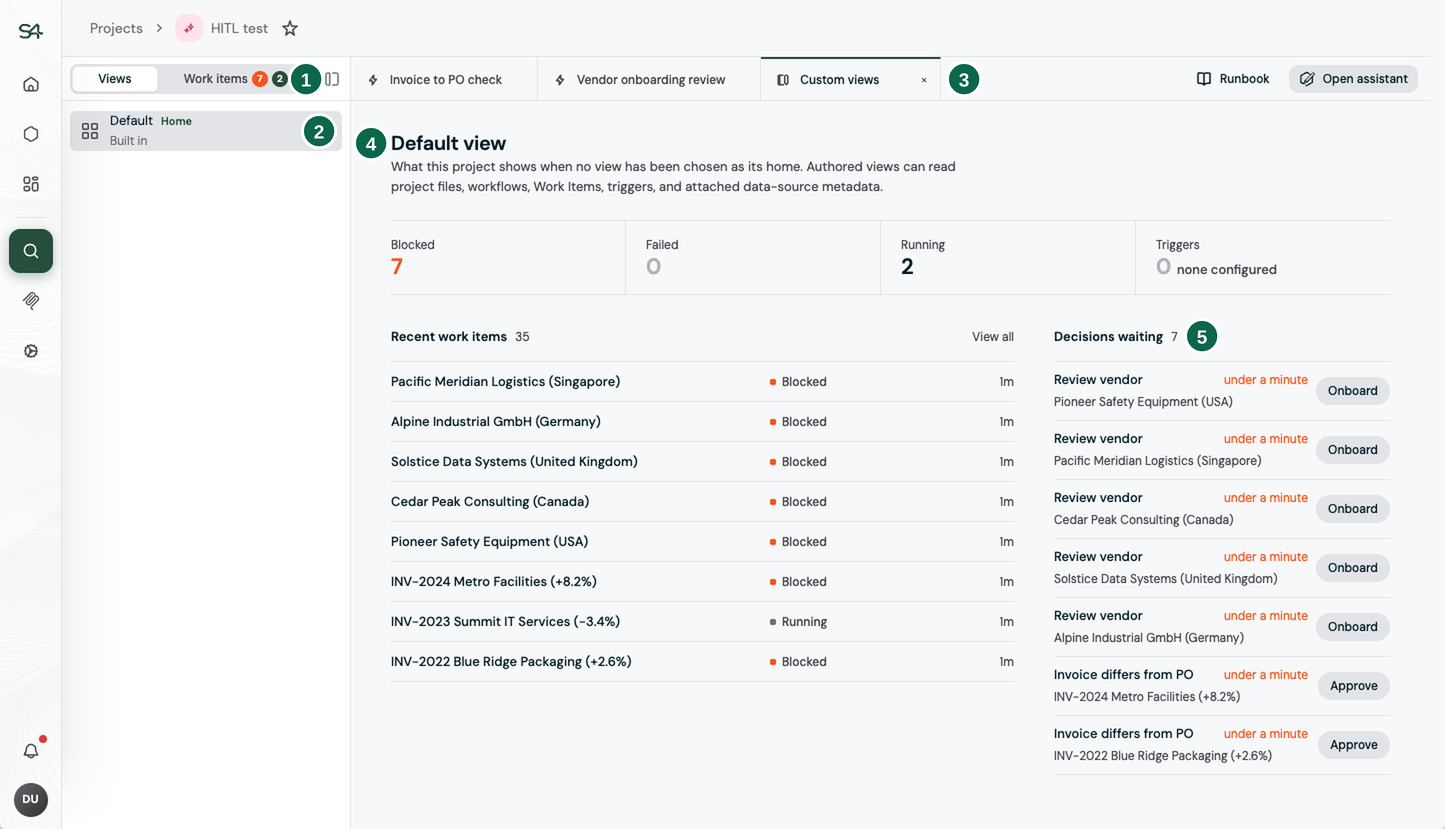
- The rail switch. It moves the sidebar between Views and Work items, the two rails a member has. The counts on Work items show how many are waiting on a decision and how many are running.
- The views this Project has. One is marked Home, and that is the one that opens when you arrive. Every Project has the built-in Default view.
- Your open tabs. The Workflows and views you open stay as tabs across the top, so you can move between them.
- The view itself. The Default view counts what is blocked, failed, and running, and lists the most recent Work items. Select a count or a Work item to open it.
- Decisions waiting. The Work items where a Workflow stopped to ask a person. Select the action on a row, such as Approve, to decide.
Views: the screens built for you
A view is a page the Project draws for the people who operate it. Rather than sending you hunting through everything the Project contains, it puts the answer to your question on one screen.
Every Project has a Default view. Beyond that, a builder can author custom views shaped around your work: an inbox for a particular Workflow, a status board for the close, the exceptions that need chasing today.
Views are live, not screenshots. They read the Project as it stands right now, and they can act: open a work item, start a conversation about one, or kick off a Workflow run. A view can never do something you could not do yourself, because your permissions still apply.
A view is a lens, not a boundary. Leaving something off a view does not hide it. Views make the right things convenient; teams and permissions control access.
If the view you need does not exist, ask for it. Describing the screen you want in a conversation is usually how one gets made.
The Work items rail: your queue
The other rail is where work waits for you. Every run of a Workflow produces a work item, carrying its input, its result, and the trigger that started it.
The rail is a queue, and the thing worth understanding about it is why something is in it. A run that finished is not automatically waiting for you. A work item waits for you because the Workflow stopped it for a person's decision: an amount that did not match, a vendor it could not find, a duplicate it suspected. That is a decision the Workflow was designed to hand over, not a failure. See How a run ends.
Items still moving show a count on the rail, so an in-progress run is visible without opening anything.
One work item: read, correct, send
Opening a work item splits the page: the queue stays on the left, and what the run produced opens on the right.
That detail pane is where the actual work happens. You read what the AI did and the outputs it declared, you change the decision if it is wrong, and you send it on. Corrections you make here do not stop at this one item: they feed back into the Project, so the next batch needs less correcting than this one.
Asking directly
Not all work arrives in a queue. When you need something one-off, ask the Project.