Work with agents
Agents are your team's tireless digital coworkers. Ask one a question in plain language, hand it a document, or point it at your data — and it does the work: looking things up, drafting, reconciling, analyzing, and reporting back in seconds. No prompts to engineer, no setup. If you can describe it, you can delegate it.
It all happens in one familiar place — a chat. Open an agent and start talking.
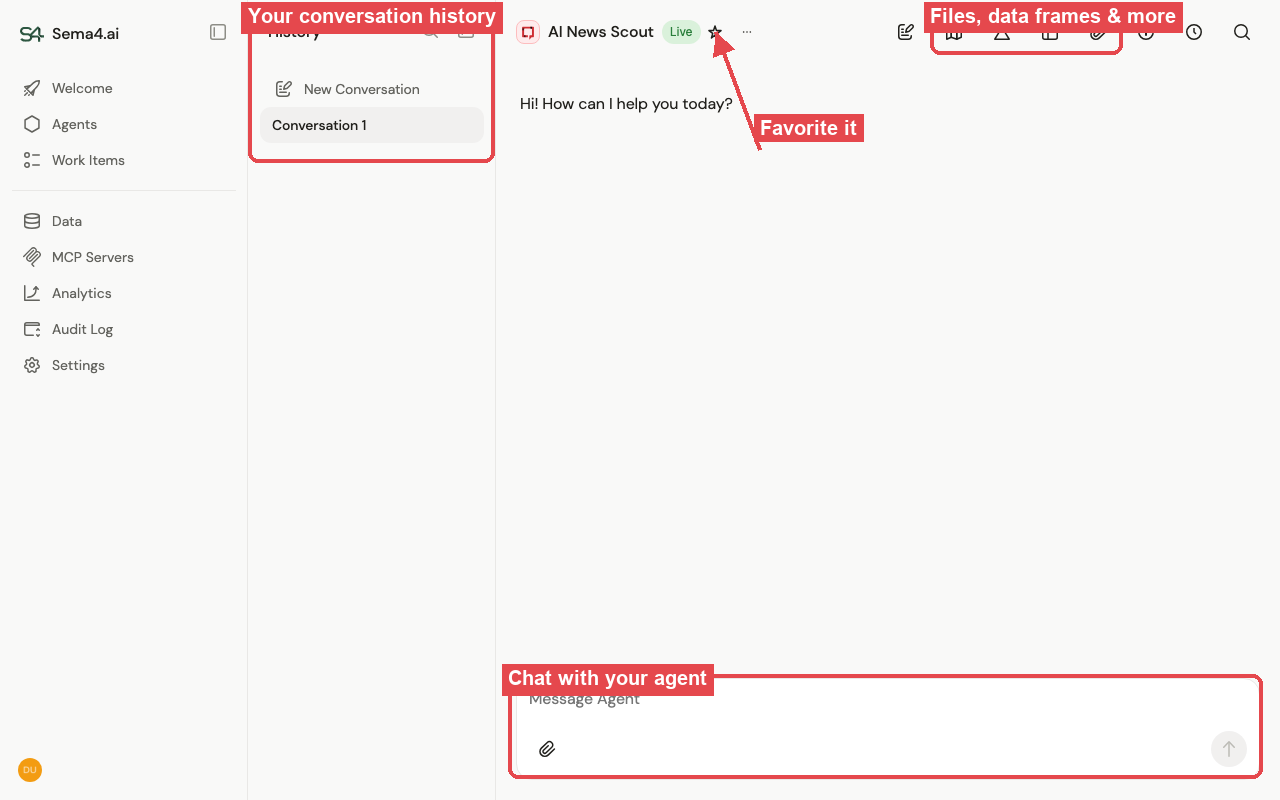
A quick tour of the view:
- Chat — the heart of it. Type what you need; the agent responds, asks for anything it's missing, and shows its work.
- History — every conversation is saved on the left, so you can pick up where you left off or revisit what an agent did.
- Favorites — star the agents you use most so they're always one click away.
- Side panels — open the agent's files and data frames to see the documents it's working with and the exact data behind every answer.
Good to know
- Chat vs. work items — talk to an agent live, or let a worker agent process tasks for you in the background.
- Tools that need authentication — connect your accounts so an agent can act on your behalf.
- Sharing threads — share a conversation with your team.
- Versioning — agents improve over time; here's why an agent's behavior can change.