Setup Model Providers
Configure your model provider credentials in Studio or Control Room. Select your provider below for specific setup instructions.
To use Azure AI Foundry models in Sema4.AI:
-
Create an Azure AI Foundry resource in the Azure Portal (opens in a new tab)
-
Deploy a model (e.g. GPT-5, Claude Opus 4.5) in your Azure AI Foundry workspace
-
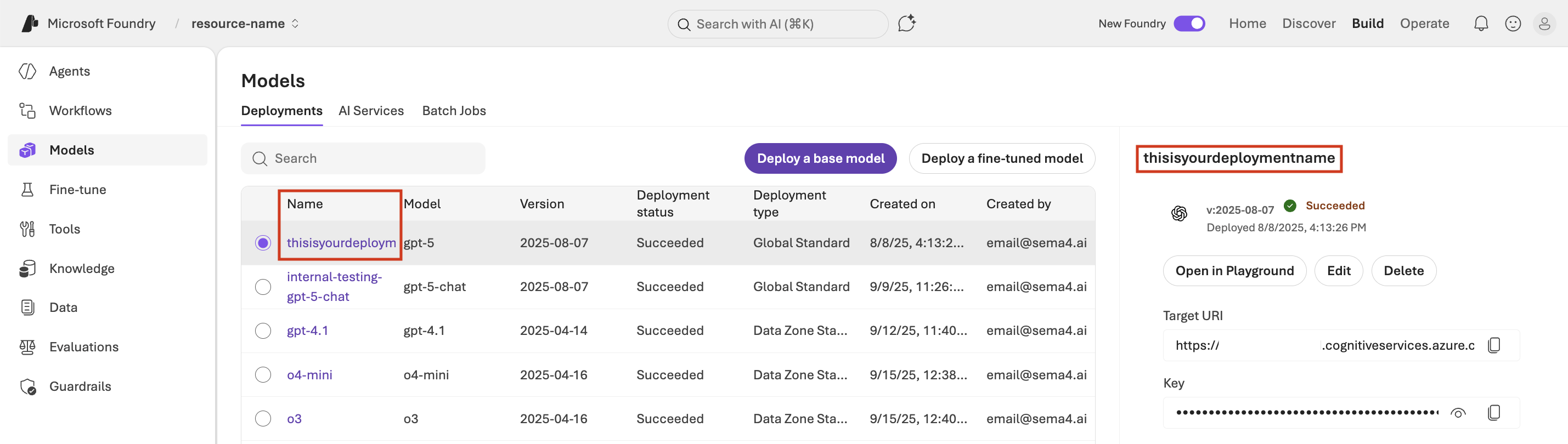
Get your credentials:
- Deployment Endpoint URL
- Deployment name
- API Key
-
Add credentials in Sema4.AI:
- Control Room: Configuration → LLMs → + LLM
- Studio: Settings → Models → + Add New
Ensure your Azure subscription has access to the reasoning models you want to use. Some models may require requesting access through the Azure Portal. If Azure OpenAI verification for GPT-5 series models is taking time, you can use OpenAI directly as a workaround.
If you must use Azure, ensure you're on invoice-based billing and complete the verification process—expect about a week of lead time. See Troubleshooting for more details.
If you paste in your endpoint URL and the deployment name does not automatically populate, you can find it on the model deployments page in Azure Foundry: