Public API
Follow these four steps to use the Team Edition public API.
Grant the application role
Grant an account role the application role SEMA4_APP_PUBLIC_API.
Create a PAT
Configure a Snowflake programmatic access token (PAT) for a user who can use that role. See Snowflake programmatic access tokens documentation (opens in a new tab).
Find the endpoint URL
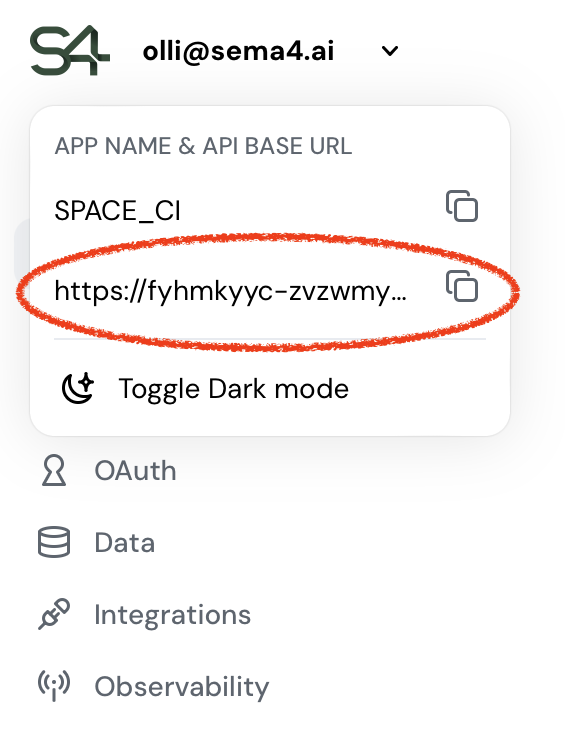
Locate the API base URL directly in the app UI.
- Open the Control Room application.
- In the top-left navigation bar, open the app menu.
- Copy the API base URL shown under App name & API base URL.
Test with curl
Use the API base URL and your PAT to make a request (example below).
Example Request
#!/bin/bash

API_BASE_URL="<the API base URL value obtained above>"
PAT="<the value of the PAT>"

# This will fetch the OpenAPI spec of the API
curl -X GET -H "Authorization: Snowflake Token=\"${PAT}\"" "${API_BASE_URL}"

# This will fetch the list of deployed agents
curl -X GET -H "Authorization: Snowflake Token=\"${PAT}\"" "${API_BASE_URL}/agents"

# This will post a work item to the agent specified by the AGENT_ID
AGENT_ID="<id of the worker agent>"
curl -X POST -H "Authorization: Snowflake Token=\"${PAT}\"" -H 'Content-Type: application/json' \
  -d "{\"agent_id\":\"${AGENT_ID}\",\"messages\":[{\"role\":\"user\",\"content\":[{\"kind\":\"text\",\"text\":\"do the work now\"}]}]}" \
  "${API_BASE_URL}/work-items/"
The PAT value must be wrapped in double quotes in the Authorization header, as shown: Snowflake Token="${PAT}".