Agent Evaluations
Your agents have to work every time, not most of the time. Sema4.AI evaluations verify that your agent calls the right actions, in the right order, to produce the right outcomes.
Record the behavior you want by chatting with your agent, and Sema4.AI's platform tests against it - up to 4 trials in a row to catch inconsistencies. No code required.
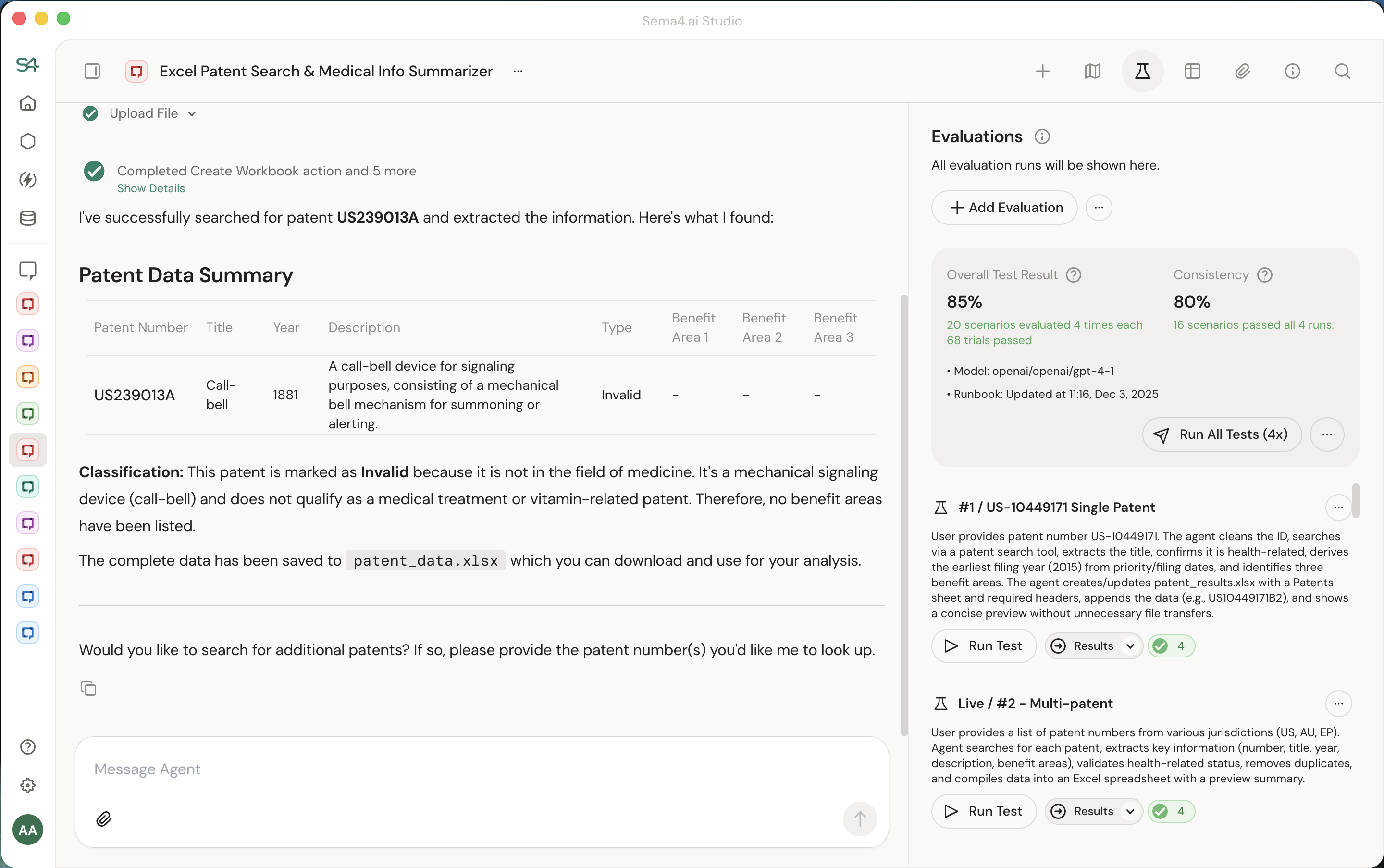
- Sema4.AI Studio version 1.6.2 or above is required.
- Evaluations are not enabled by default. To use this feature, you first need to enable Studio > Settings > Advanced > Experiments.
- Then, you can check "Evaluations sidebar" to see the feature.
Why Evaluations Matter
Most agent evaluation frameworks only test the final output: did the agent produce the right answer? This misses critical failure modes. An agent might reach the correct answer through a flawed or inefficient path, or get lucky with bad reasoning.
Sema4.AI's evaluations, however, check for accuracy and completeness of the intermediary steps, catching issues that output-only testing would miss. And unlike frameworks that require developers to hand-craft test suites and write evaluation code, Sema4 lets you record real conversations and use them directly as benchmarks.
When to Use Evaluations
- While building: Iterate on runbooks and prompts. Test whether a change improves accuracy or consistency, and pinpoint failures so you know what to fix your runbook, an action package, or the model.
- When deploying: Test your agent end to end: from data retrieval to LLM tool calling to action packages. Verify that all the pieces work together consistently before going live.
- When upgrading models: Run your evaluation scenarios against current and candidate models to compare accuracy, cost, and speed. Upgrade with confidence when the data says it's worth it.
How It Works
- Evaluations use a "Golden Run" approach: you begin with a conversation with your agent that represents the correct behavior and outcome for a specific input. This golden run captures the tools called, their sequence, and the expected outcomes.
- When creating an evaluation, Sema4.AI Studio proposes outcomes and their sequence that it will evaluate for. You can either reduce specificity or increase specificity in the test contract.
- When you run an evaluation, Sema4.AI studio replays the same input and compares the agent's behavior against that reference.
Each evaluation can be executed 1 time, or 4 times to ensure consistent behaviour and outcomes across different runs. This catches flaky behavior—if your agent succeeds 3 out of 4 times, you'll see it. Consistent agents pass all 4.
Evaluation Modes
| Mode | Best For | Trajectory Matching |
|---|---|---|
| Dry Run | Model upgrades, offline regression testing | Strict—must match exactly |
| Live Run | Production validation, end-to-end testing | Flexible—extra steps allowed |
Dry Run expects a strict trajectory match—ideal for testing model upgrades before deployment. The agent must follow the exact same tool sequence as the golden run. Live Run tests your full production system and allows slight deviations. The agent must call the reference tools in order, but extra tool calls are permitted. This accounts for production variability: real APIs and databases may require additional lookups, validation steps, or error handling that wasn't present in your reference recording.
What evaluations do:
- Validate that your agent calls the correct tools in the expected order
- Catch regressions when you update runbooks, action packages, or models
- Enable side-by-side comparison of different model versions
- Provide pass/fail results for business-critical workflows
What evaluations don't do:
- Generate synthetic test data automatically (coming in future phases)
- Evaluate subjective qualities like tone or style (these aren't useful for business correctness)
- Require you to write code or maintain test scripts
FAQ
Are results binary (pass/fail)?
Yes. In business processes, a partial failure (wrong row count, misclassification) is usually considered a total failure of the work.
If the agent takes 6 steps instead of 5, does it fail?
- In Live Run mode, it depends. An extra search step that still leads to the correct result? Passes. An extra database write that duplicates data? Fails. The fuzzy evaluation cares about outcomes and side effects, not exact step counts.
- In Dry Run mode, yes - exact trajectory matching is required.
What do I do if the evaluation fails?
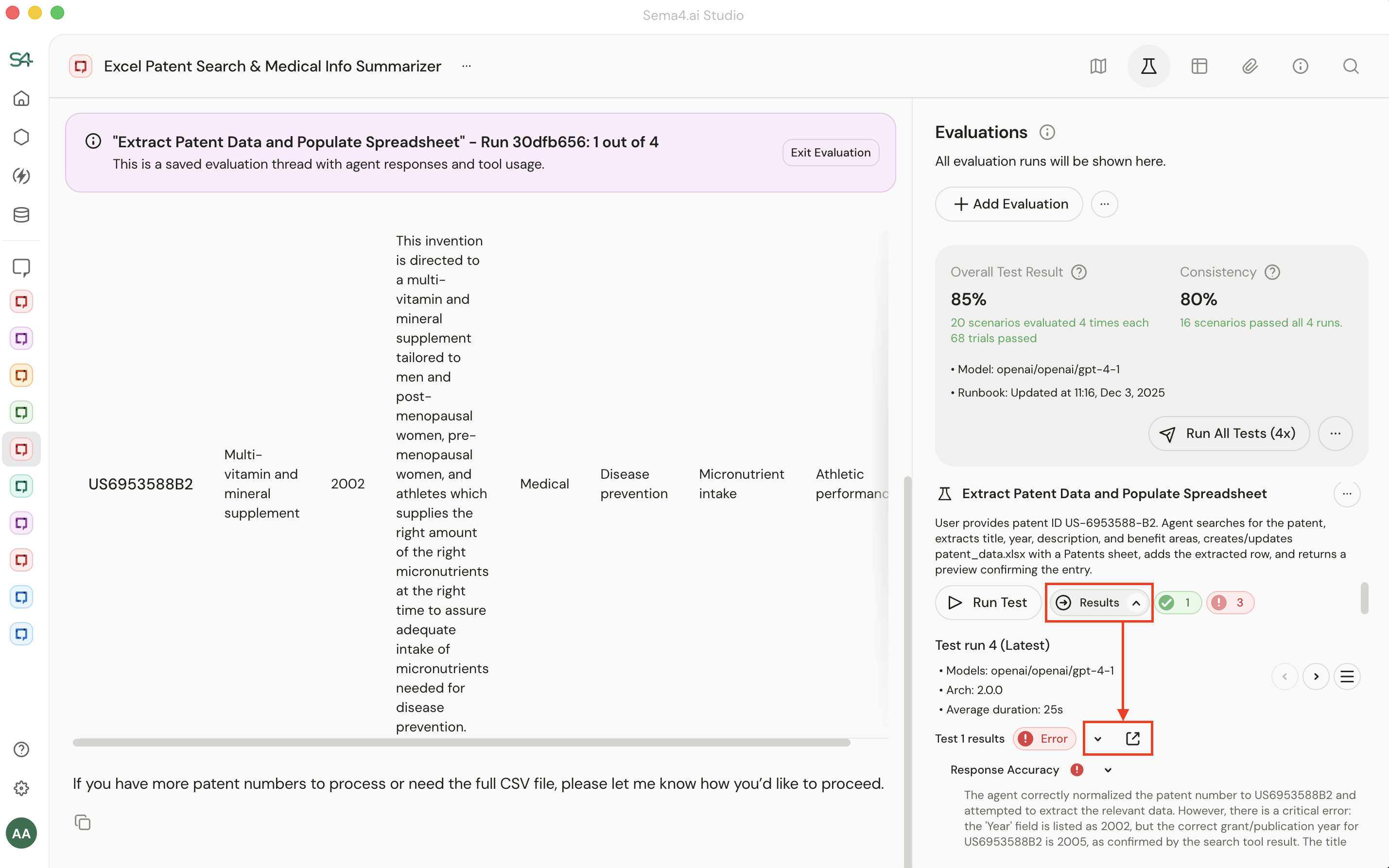
Click "Results" to find the failed test. You will be presented a summary of why a test failed in the sidebar and the option to see what happened in the test itself.
Comparing this to what you expected usually reveals the problem:
- The Action Package or MCP server has a bug. The agent tried to do the right thing, but the underlying tool didn't work correctly.
- The Runbook instructions are unclear. The agent misunderstood what to do or took an unexpected path.
- The test criteria are too strict (or too loose). The agent did something reasonable, but the test didn't account for it. Most of the time, it's #1 or #2. Adjusting the test itself is less common.
How do I investigate why an action failed?
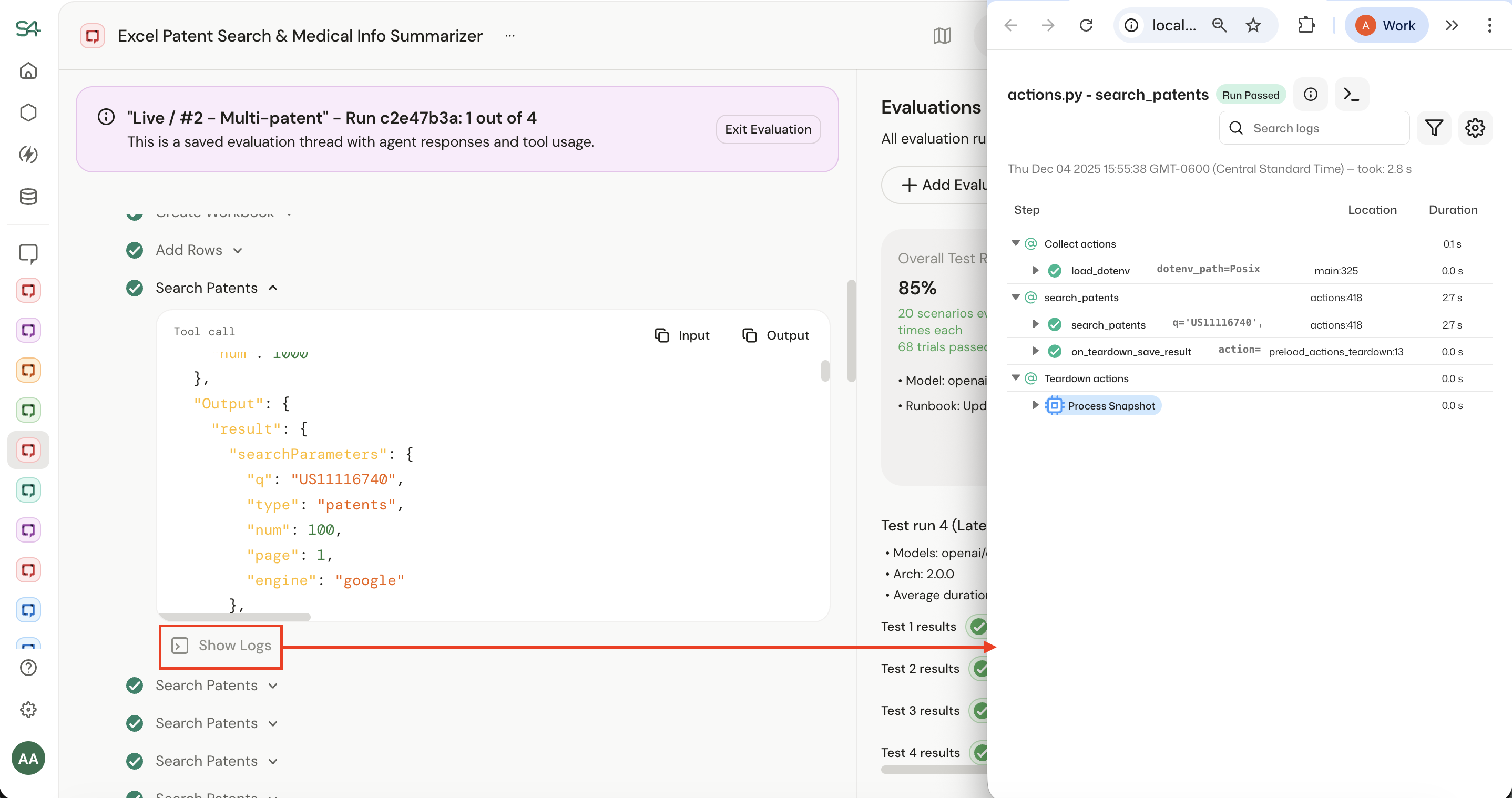
Sema4.AI platform captures a detailed trace for every action. You'll see inputs, outputs, and errors—everything you need to debug.
You can access this by..
- Clicking the Evaluation sidebar for your agent.
- Clicking "Results" for the failed test run.
- Clicking the icon to view the run.
- Clicking Show Details, locating the failed action, then clicking Show Logs.
Am I ever too early to use evaluations?
Start using evaluations as soon as you have a working agent flow. Even during early development, evaluations help you understand whether changes improve or degrade performance.
Can I use synthetic data instead of recording golden runs?
Currently, evaluations use a manual Golden Scenario approach.
Do evaluation runs show up in Agent Observability?
Yes - evaluation runs are just agent runs, so they flow through your observability pipeline like any other execution. If you have OpenTelemetry (OTEL) configured, you'll see them in your traces. Learn more about Agent Observability.
Next Steps
Ready to start creating and running evaluations? See the step-by-step guide for authoring and running evaluations to learn how to set up your first evaluation test cases.