Troubleshooting Reasoning Models
This page covers common issues and solutions when working with reasoning models in Sema4.AI.
Common Issues
Model Not Appearing in Studio
Symptom: You are trying to add a supported model to Sema4.AI Studio or Control Room but don't see the option in the provider dropdown.
Recommendation:
- Verify your Studio, Control Room, or Team Edition App meets the minimum requirements (see Model Compatibility & Benchmarks)
- For Team Edition App users, ensure your Snowflake account's model listing is up to date (see Snowflake Cortex Models Not Available below).
Slow Response Times
Symptom: Agent responses take significantly longer than expected.
Recommendation:
This is most commonly reported with GPT-5 Medium or High reasoning levels, which don't provide significant improvements over Low. We recommend using GPT-5 Low which provides similar accuracy and consistency with 50% lower latency than Medium and 75% lower latency than High.
If you're consuming OpenAI models through their API platform, we support priority processing (opens in a new tab) which guarantees 50 tokens per second or higher throughput for GPT-5/Codex.
To enable priority processing:
- Create a new project in the OpenAI API dashboard
- In Project Settings, set Default Service Tier to priority
- Create an API key for the new project
- Create an LLM instance in Sema4.AI Studio/ACE/SPCS using the new API key
AWS Bedrock Permission Errors
Symptom: Error messages when configuring or using Bedrock models.
Solutions: Ensure your IAM role or user has these required permissions:
bedrock:ListFoundationModelsbedrock:ListInferenceProfilesbedrock:InvokeModelWithResponseStream
Contact your AWS administrator if you're unsure about your API key permissions.
Azure Endpoint URL Format Issues
Symptom: You've entered your Azure AI Foundry endpoint URL but the model isn't working, or you're seeing connection errors.
Explanation: Some versions of Azure Foundry produce an endpoint URL format that is missing necessary fields. For example:
https://{yourResourceName}.cognitiveservices.azure.com/openai/responses?api-version=2025-04-01-preview
Older versions of Sema4.AI (Studio before 1.6.6, ACE before 1.6.5, and Snowflake App before 1.4.44) expect this format:
https://{yourResourceName}.openai.azure.com/openai/deployments/{deploymentId}/chat/completions?api-version={apiVersion}
Recommendation: Update to the latest version of Sema4.AI, which will automatically parse most Azure URL formats. If you're unable to update, you can construct the URL manually:
- Get the resource name from the URL Azure provides
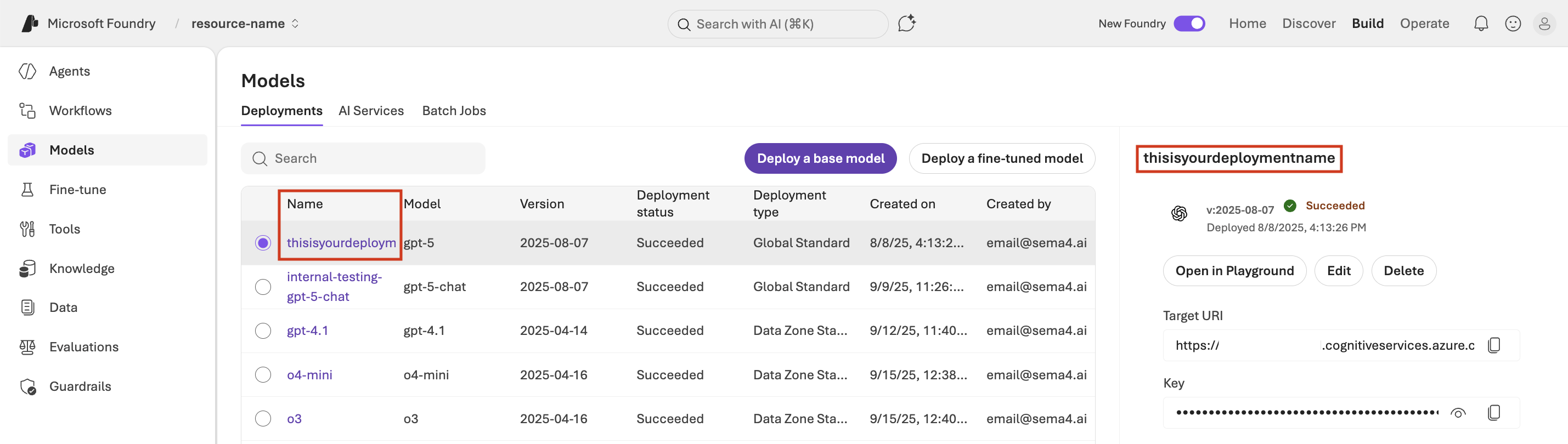
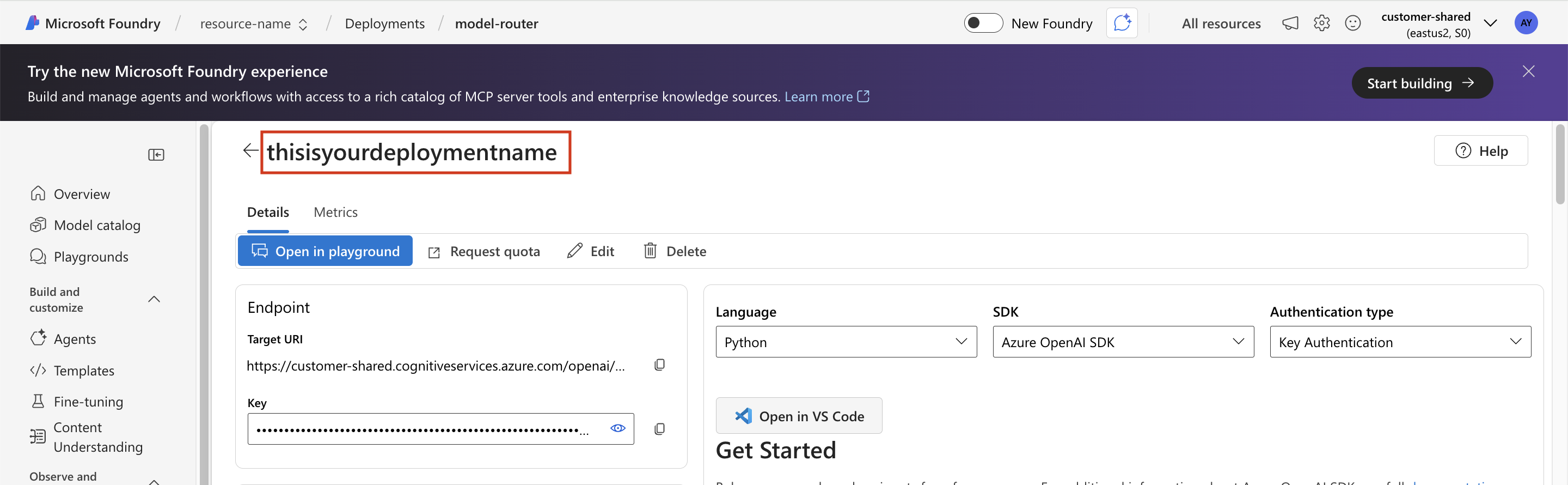
- Use the deployment name (the name given to the instance of your model) from the model page in the Azure Portal
- Use API version
2025-04-01-preview
You can find the deployment name in the Azure Foundry portal:
New Foundry experience:
Classic Foundry experience:
Note: Although the URL format shows the chat completions endpoint, OpenAI reasoning models will use the responses endpoint.
Azure Rate Limits
Symptom: Hitting rate limits or throttling when using OpenAI models (e.g. GPT-5) through Azure AI Foundry.
Recommendation: If you're deploying your agent to Azure, switch to invoice-based billing (opens in a new tab) to unlock 1M–10M token per minute (TPM) limit. See Azure's quotas and limits (opens in a new tab) documentation for details by model and offer type.
Explanation: On pay-as-you-go billing, OpenAI reasoning models like GPT-5 are rate limited to 20K tokens per minute (TPM), or up to 100K TPM after a month+ wait for a rate limit increase. These limits only apply to pay-as-you-go are insufficient for sustaining testing and production workloads, where customers typically need 500k TPM.
Checking Your Azure Agreement Type
While low model rate limits in the Azure Foundry portal the more obvious tell that you're on pay-as-you-go billing, the following commands are the definitive way to check your agreement type.
Install the Azure CLI (opens in a new tab) and run the following commands.
Check your current/default subscription's quota type:
az rest --method get --uri "https://management.azure.com/subscriptions/$(az account show --query id -o tsv)?api-version=2021-04-01" --query "subscriptionPolicies.quotaId" -o tsvList all your subscriptions with their billing type:
for sub in $(az account list --query "[].id" -o tsv); do
  name=$(az account show --subscription $sub --query name -o tsv)
  quota=$(az rest --method get --uri "https://management.azure.com/subscriptions/${sub}?api-version=2021-04-01" --query "subscriptionPolicies.quotaId" -o tsv)
  echo "$name: $quota"
done
Look for EnterpriseAgreement_2014-09-01 or similar enterprise/MCA-E quota IDs to confirm invoice-based billing. PayAsYouGo indicates pay-as-you-go billing with lower rate limits.
Azure Verification Required for OpenAI Reasoning Model Deployment
Symptom: You're unable to deploy OpenAI reasoning models (e.g. GPT-5, GPT-5.1 Codex Max) on Azure AI Foundry and are prompted to complete verification.
Recommendation:
- If onboarding and development is time sensitive:
- If using OpenAI models directly is an option, consider using the OpenAI API platform instead of Azure.
- If you must stay on Azure, consider using an Anthropic model (e.g. Claude Sonnet or Opus), which come with a 2–5M token per minute rate limit by default — even without invoice-based billing.
- If you must stay within a specific region on Azure and only want to use OpenAI models, contact the Sema4 support team for guidance on the best available non-verified model.
- Long term, if agent deployment is planned for Azure, complete the verification process in Azure Foundry. In addition, ensure your Azure subscription is on invoice-based billing (opens in a new tab) — models that require verification also require invoice-based billing to obtain a usable rate limit.
Why this matters: Getting access to verified models is critical for successful Sema4.AI agent deployments because they excel at following processes and logic consistently. Without access to verified models, the best available options achieve a pass rate of roughly 40% on the τ²-telecom benchmark compared to 85%+.
Agent Behavior Changes After Enabling Reasoning
Symptom: Agent responses are different from what you expected after migrating from a non-reasoning to a reasoning model.
Explanation: When migrating from non-reasoning to reasoning models, you may notice behavioral differences. In general, reasoning models should improve agent behavior with more structured responses and better handling of complex tasks. However, if you see unexpected behavior:
In our experience, this most commonly happens with the OpenAI o3 and o4 models. For most use cases, we recommend switching to GPT-5 Low, or GPT-5.1 Codex Max Medium for others.
Solutions:
- Review the reasoning trace - Examine the chain of thought to understand how the model is processing your request. This helps identify where the reasoning path diverges from expectations.
- Review and adjust your agent's runbook instructions if the reasoning trace reveals issues with how instructions are being interpreted
- Test thoroughly with your actual workflows before deploying to production
- If you need to revert, go to Advanced Options → select v2.0 Architecture → then reselect your original model
Snowflake Cortex Models Not Available
Symptom: When using a Snowflake Cortex AI model (e.g. Claude 4.5 Haiku, Claude 4.6 Opus) through Team Edition, you see an error like:
Failed to resolve the generic model ID cortex/anthropic/claude-4-6-opus-thinking-low to a platform-specific model ID, the platform-specific model ID claude-opus-4-6 is not available on the platform as configured.
Explanation: Snowflake maintains a cached listing of available Cortex models per account via SNOWFLAKE.MODELS. When Snowflake releases new models, this listing is not automatically updated. The agent server discovers available models by running SHOW MODELS IN SCHEMA SNOWFLAKE.MODELS at startup — if a model is missing from that listing, it will be rejected even though the model is available on the platform.
Solution:
Run the following SQL statements as ACCOUNTADMIN on the Snowflake account where your Team Edition app is installed. Replace <APP_NAME> with your Team Edition application name (e.g. SPACE_PRODUCTION).
Step 1: Refresh the Cortex model listing to include newly released models:
USE ROLE ACCOUNTADMIN;
CALL SNOWFLAKE.MODELS.CORTEX_BASE_MODELS_REFRESH();
Step 2: Verify the model you need is now visible:
SHOW MODELS IN SCHEMA SNOWFLAKE.MODELS;You should see the model in the results (e.g. CLAUDE-OPUS-4-6, CLAUDE-HAIKU-4-5).
Step 3: Ensure the application has the required Cortex database roles:
GRANT DATABASE ROLE SNOWFLAKE.CORTEX_USER TO APPLICATION <APP_NAME>;
GRANT DATABASE ROLE SNOWFLAKE.CORTEX_REST_API_USER TO APPLICATION <APP_NAME>;
Step 4: Redeploy or restart the Team Edition app so the agent server re-queries the model listing with the updated data.
The CORTEX_BASE_MODELS_REFRESH() call only needs to be run once per account when new models are released. It does not need to be run per-application.
Snowflake models in Studio: Failed to List Cortex Models
Symptom: When testing the model configuration in Studio, you see an error like:
Testing Model configuration failed: Failed to list Cortex models via SHOW MODELS. Verify the configured Snowflake role has permission to list models.
Explanation: The Snowflake role configured in Studio does not have permission to run SHOW MODELS IN SCHEMA SNOWFLAKE.MODELS, or the model listing is out of date.
Solution:
These steps must be completed before upgrading to Standard edition 1.4.52 or Multi-install edition 1.4.14.
Run the following SQL statements as ACCOUNTADMIN:
USE ROLE ACCOUNTADMIN;
CALL SNOWFLAKE.MODELS.CORTEX_BASE_MODELS_REFRESH();
GRANT APPLICATION ROLE SNOWFLAKE."CORTEX-MODEL-ROLE-ALL" TO ROLE <YOUR_ROLE>;
Replace <YOUR_ROLE> with the Snowflake role that will connect to Snowflake from Sema4.AI Studio. Repeat the GRANT statement for every role that will be used to connect to Snowflake from Studio.
Getting Help
If you're still experiencing issues after trying these solutions:
- Check the FAQ for additional guidance
- Review the Model Compatibility & Benchmarks page to ensure version compatibility
- Contact Sema4.AI support with details about your issue, including:
- Studio and Agent Compute versions
- Model and provider being used
- Error messages (if any)
- Steps to reproduce the issue