Workflows
A Workflow is a repeatable process that lives inside a Project. You define the inputs, the steps, the tools, and the triggers once, and every run produces a Work item your team can inspect, discuss, and correct without leaving the Project.
Audience: builders
When to make one
A Workflow is not where you start. You start by doing the work in the Project: asking, correcting, and letting the Project accumulate the context the work needs.
The moment to write a Workflow is when you notice you are walking the agent through the same routine again. An invoice exception to triage. A remittance to match. A vendor inquiry to answer. You describe the routine once, and from then on it runs itself and comes back to you as something to review.
Because the Workflow lives inside the Project, it inherits everything the Project already has: the same context, the same tools, the same attached data. A Workflow built on a Project that already knows your vocabulary is a short description. The same Workflow with nothing behind it is a specification you have to write from scratch, which is the main reason to do the work by hand first.
Every run becomes a Work item. A Work item keeps its input, its result, and the trigger that started it. That is where your team picks the work up: see Work items.
Where Workflows live
Workflows belong to a Project, not to the workspace. Open a Project as a builder, and find Workflows under Automations in the Context tree.
On disk they are files under .blockparty/workflows/ in the Project. They are versioned with the Project and travel with it.
Selecting a Workflow opens it as one page, reading top to bottom as the stages of the pipeline:
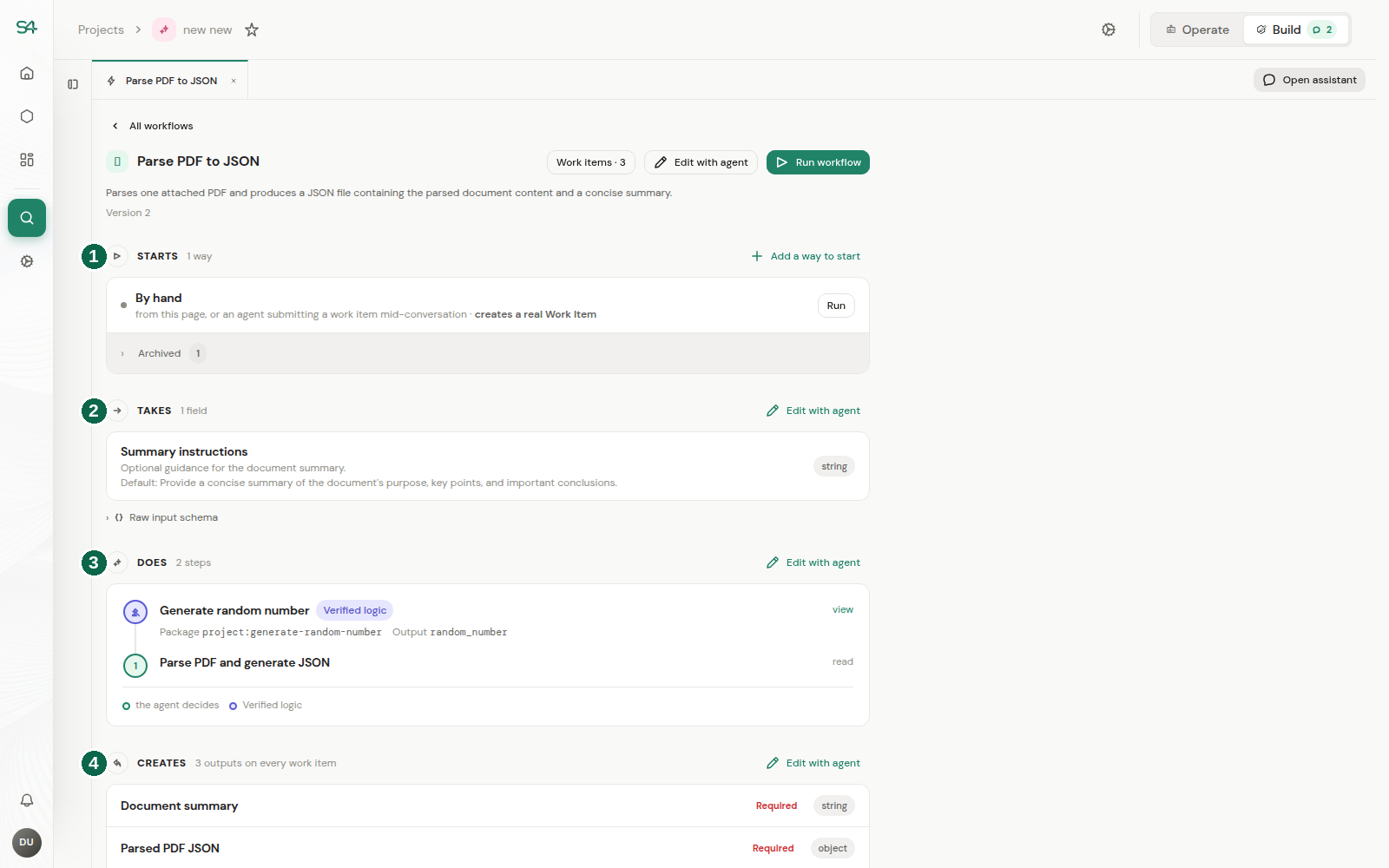
- Starts. The triggers that bring work in. Every Workflow can also be run by hand from this page.
- Takes. What a person fills in to start a run by hand.
- Does. The steps the run executes, in order.
- Creates. The outputs carried on every work item.
A fifth section, Ends as, sits between Does and Creates on Workflows that declare a disposition. The Workflow above does not, so it is not shown. To route work to a person, add a human.request step, or have an agent step call sdk.human.ask().
Nothing there is a form. A Workflow is a file the server validates, so each section's edit action seeds a conversation with the agent rather than writing a field directly.
Takes: what a run starts with
If the Workflow declares structured inputs, Takes lists each one with its label, its key, its type, and whether it is required. Fields with a fixed set of choices list them.
If it declares none, the section says so: a run starts with an optional title, an optional external key, and whatever files are attached.
Inputs are what a person fills in to start a run by hand. Work arriving from a trigger carries the trigger's payload instead.