Conversation guide
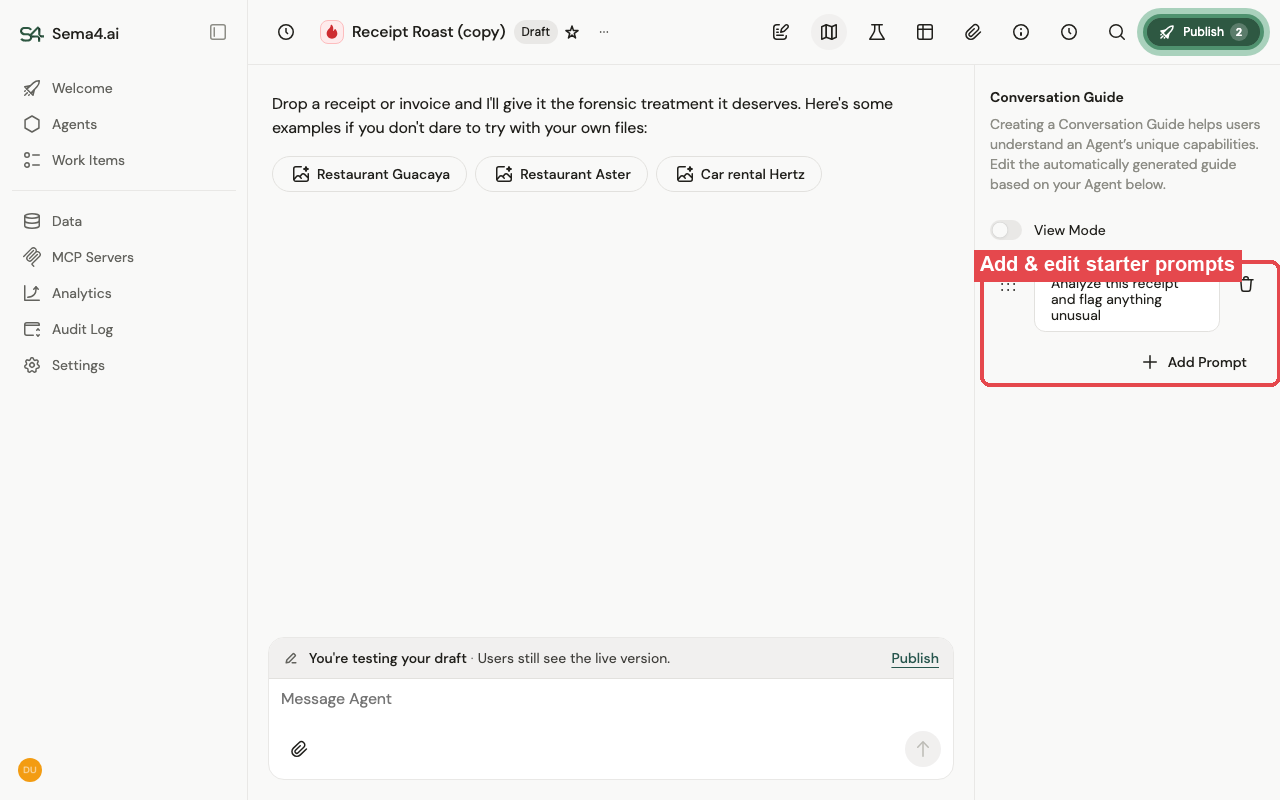
A conversation guide is a set of clickable starter prompts shown to users when they open an agent, so they immediately know what to ask and what the agent can do.
Why use one
New users often don't know where to start. A guide turns "what do I type?" into a curated list of examples that showcase the agent's key workflows — speeding adoption, cutting support questions, and making sure users discover what the agent can do.
How you edit it
Open the Conversation Guide panel on the agent. The guide is generated automatically from the agent's runbook, and you refine it from there:
- Turn off View Mode to edit.
- Add Prompt to create a starter prompt, and type the example users should see.
- Drag the handle to reorder prompts, or delete the ones you don't want.
- Changes go to the agent's draft and reach users when you publish — see Versioning & lifecycle.
Keep the examples short and representative of what the agent is actually good at.
How users use them
When someone opens the agent (or starts a new conversation), the guide's prompts appear as clickable chips above the message box. Clicking one runs that prompt as the first message — no typing required — and the conversation continues normally from there.