Self-host Sema4.ai
These guides cover standing up a self-hosted Sema4.ai deployment in your own cloud. Pick the target that matches your infrastructure, deploy, connect an identity provider, then move on to Configure Sema4.ai to make it ready for your team.
What you provide
A Sema4.ai deployment sits on top of infrastructure you own. There are three things you provide:
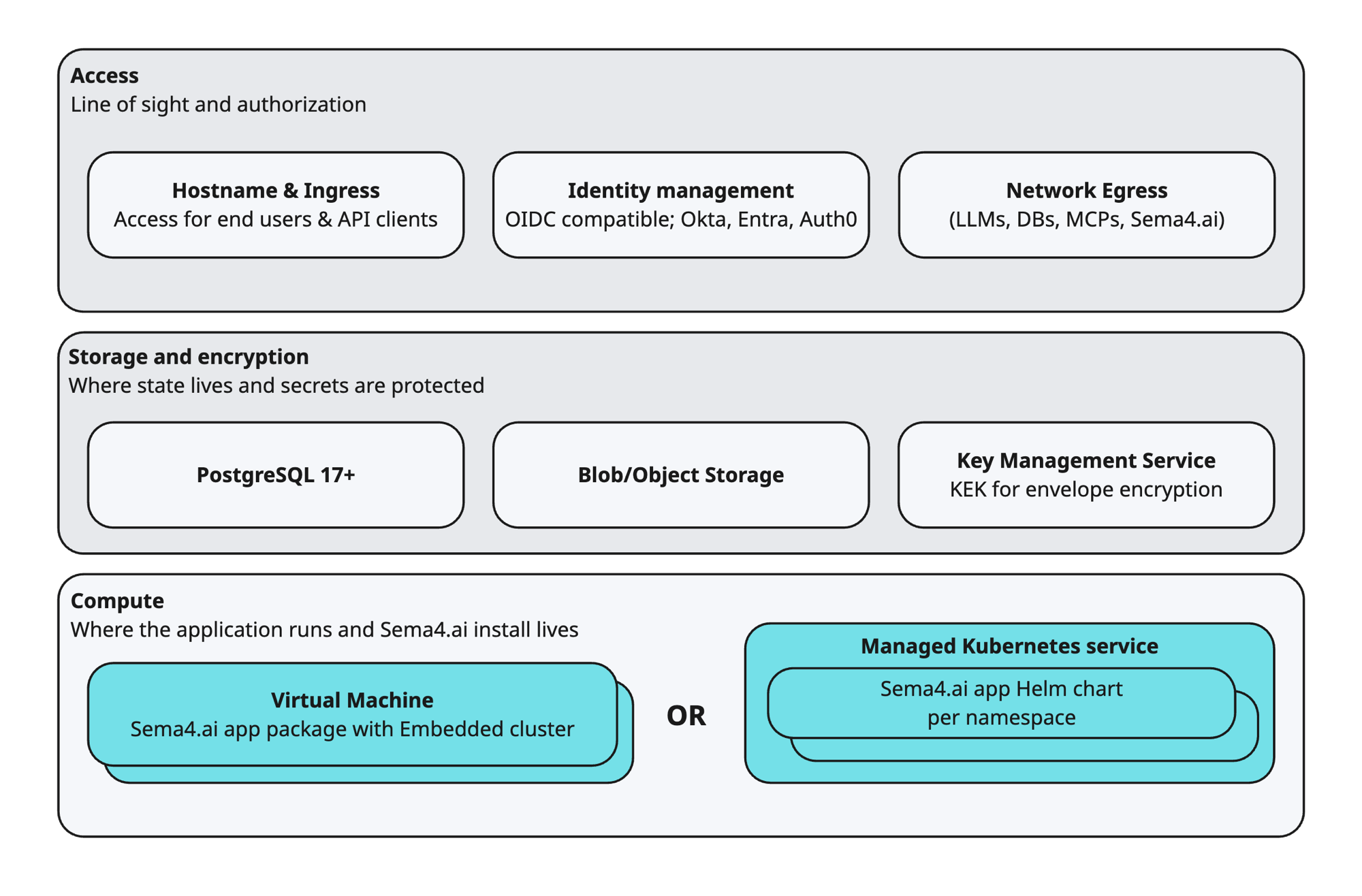
- Access — line of sight and authorization. A hostname and ingress so end users and API clients can reach the application; an OIDC identity provider (Okta, Entra ID, or Auth0) for sign-in; and network egress for the application to reach LLMs, databases, MCP servers, and Sema4.ai services.
- Prerequisites — where state lives and secrets are protected. A PostgreSQL 17+ database, blob/object storage, and a KMS key (a KEK used for envelope encryption of secrets at rest).
- Compute — where the application runs. The Sema4.ai install lives either on a single virtual machine (the app package with an embedded Kubernetes cluster) or in a Kubernetes cluster (the app Helm chart, per namespace — EKS or AKS). This is the main choice that distinguishes the deployment guides below.
The application is stateless. All application state lives in the prerequisites you provide — PostgreSQL and object storage — so the compute holds no application data that needs backing up. On the Kubernetes (Helm) path you can destroy and recreate the deployment at will and it comes back up against the same data, as long as it points at the same dependencies and you keep your values file. On a VM (embedded cluster), the application data is still external, but the VM also holds the admin console and the configuration you enter there — so preserve your configuration and admin-console credentials to rebuild.
The deployment flow
- Prepare prerequisites — a cloud account, the required CLI tools, your Sema4.ai license ID, DNS and TLS for the application's URL, and an identity provider.
- Deploy to your target — follow the guide for your platform.
- Set up your identity provider — Sema4.ai signs users in over OIDC. Configure your IdP and wire its details into the deployment.
- Configure the application — connect LLMs, the MCP Gallery, and the rest in Configure Sema4.ai.
Choose a deployment target
| Target | Best for |
|---|---|
| AWS EKS | AWS, managed Kubernetes (Helm). |
| AWS VM | AWS, single-node embedded cluster on a VM. |
| Azure AKS | Azure, managed Kubernetes (Helm). |
| Azure VM | Azure, single-node embedded cluster on a VM. |
For AWS, a reference Terraform module (opens in a new tab) provisions the supporting infrastructure.
Set up an identity provider
All deployments authenticate users over OIDC. Set up one of the supported providers and reference it from your deployment — see Identity providers (OIDC).
Once your deployment is up and your identity provider is connected, continue to Configure Sema4.ai.