Advanced settings
Beyond the runbook, tools, and data, an agent has a set of advanced options. The defaults are sensible — reach for these when you need to tune behavior.
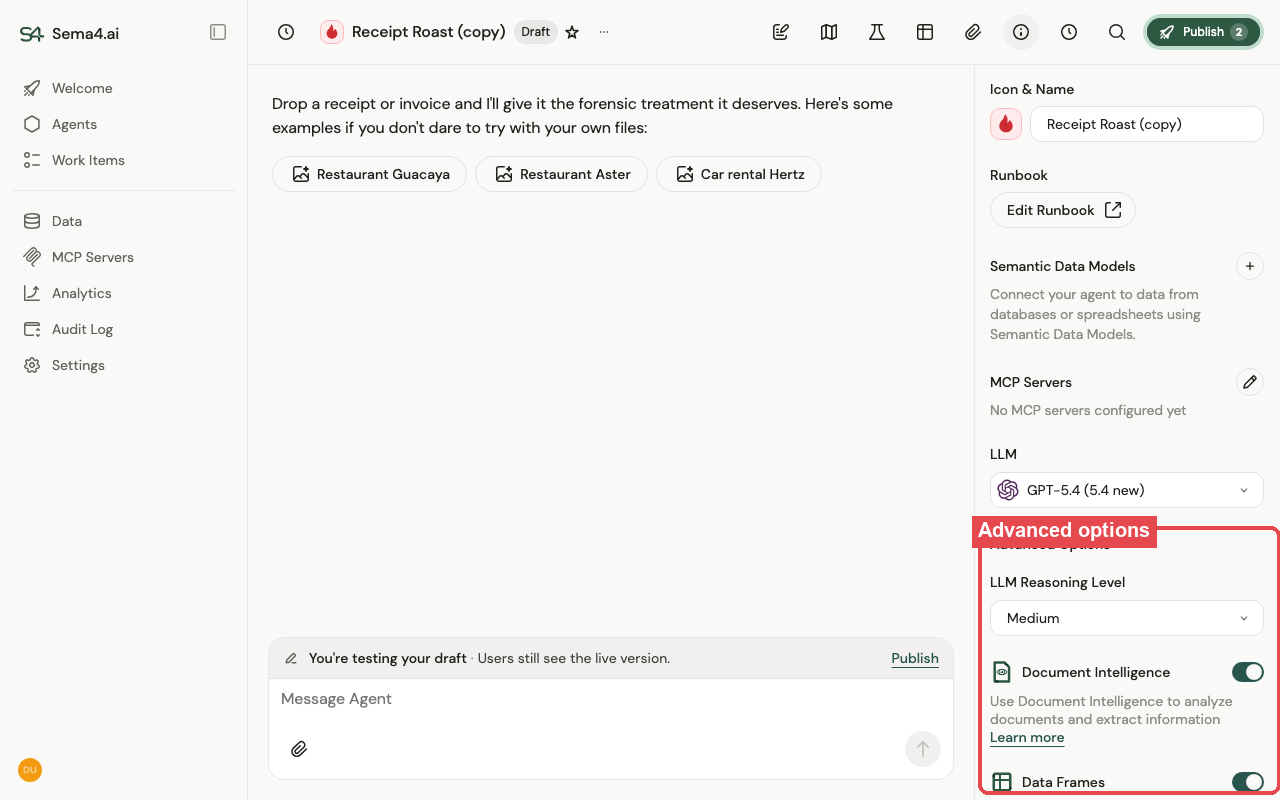
- LLM & reasoning level — which model the agent runs on, and how much reasoning effort it spends. Higher reasoning is more capable but slower; lower is faster for simple work.
- Document Intelligence — gives the agent the document-extraction tools. Turn it off for agents that never process documents — the tools aren't offered, keeping the agent's toolset focused, prompts leaner, and runs slightly cheaper and faster.
- Data Frames — gives the agent the data-frame tools. Turn it off when the agent never works with tabular data, for the same reason — fewer unused tools means a tighter, more reliable agent.
- Max steps — the cap on how many steps the agent may take in a single turn. Raise it for complex tasks, lower it to bound cost and latency.
- Conversation history turns kept in context — how much of the prior conversation the agent sees. More context helps continuity; less keeps prompts lean.
- New thread behaviour — what happens automatically when someone opens a new thread. This is not the conversation guide (those are clickable starter prompts the user can choose). The options are:
- Standard — nothing happens; the user types the first message.
- Custom agent greeting — the agent opens with a greeting message you write, before the user says anything.
- Automatic user message — a message you define is sent as the user's first turn automatically, so the agent starts working the moment the thread opens.