Project context
A Project's context is everything it is made of and everything it can reach. Open a Project as a builder and it is the tree in the sidebar's Context rail.
Audience: builders
The Build view
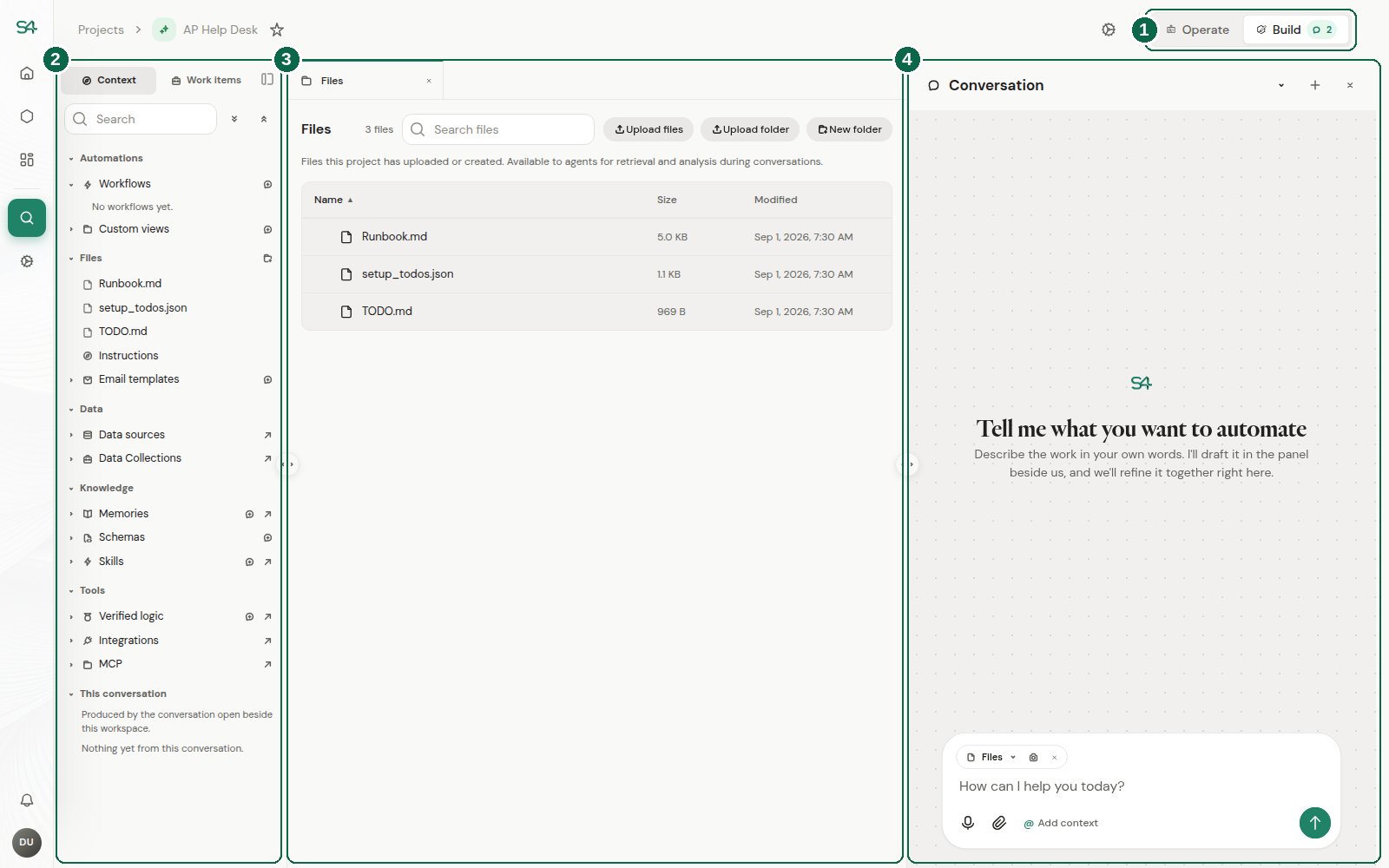
- The rail switch. The Context rail shows what the Project is made of, and only people who can build the Project see it. See Who sees what.
- The sidebar, on the Context rail. The tree below, grouped by what each thing is for. Its other rails are Views and Work items.
- The workspace. Whatever you open from the tree lands here as a tab: a file, a Workflow, a data source, a work item.
- The conversation. The fastest way to change anything in the tree. Describe what you want and review what it proposes.
How the tree is organized
The Context tree groups sections by what they are for, rather than listing them flat. Knowing the groups is most of knowing where to look.
| Group | Holds | The question it answers |
|---|---|---|
| Automations | Workflows | What this Project runs |
| Files | The file tree, Instructions, Email templates | What it works with, and what it has been told |
| Data | Data sources, Semantic models, Verified queries | What it can query |
| Knowledge | Memories, Schemas, Skills | What it knows and how it is shaped |
| Tools | Verified logic, Integrations, MCP | What it can act with |
| This conversation | Whatever the open conversation has produced | What just changed, and by whom |
Automations opens first, because what a Project runs is usually what you came to check on. Instructions and Email templates sit inside Files rather than beside it: they are documents in the Project like any other, and they are edited the same way.
Most of this can be created from chat. Nearly every section offers a "Create in chat" action that opens the composer seeded for that kind of thing. Describing what you want and reviewing what the agent proposes is usually faster than filling in a form.
Automations
What the Project works with
Knowledge
Tools
Project scope and shared scope
Some of these exist at more than one level. A Memory, a Skill, or a piece of verified logic can belong to this Project, or to your team or organization, where every Project gets it.
The tree shows both, grouped by scope, and the sections that have a shared counterpart offer a link across to it. Which scope to author into is a real decision: see Shared versus project scope.