Data
Give a Project access to your databases and warehouses, tell the agent what the data means, and pin the answers that must never drift.
Audience: builders
Three building blocks
Data in a Project is made of three things, each optional except the first.
| What it is | What it adds | |
|---|---|---|
| Data sources | A database or warehouse attached to the Project, with the tables it may read or change | The data itself, queried live where it lives |
| Semantic models | A versioned definition of what the data means: datasets, fields, metrics, and relationships, mapped to your tables | Your business vocabulary, so questions and logic use names like orders and amount instead of physical table names |
| Verified queries | Reviewed code that reads or changes data, approved by a person | The same answer every time, and changes that run only as reviewed |
All three live in the Data group of the Project's Context tree, which builders see.
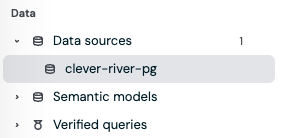
Start with a data source. Add a semantic model when your tables do not use your team's words, or when the same logic should work across Projects whose tables differ. Add verified queries for the questions that matter most and for every change the agent makes to your data.
How the agent uses your data
This is the part to understand before you attach anything. The agent never connects to your database itself. It reaches your data only through the platform, which checks the Project's access on every call. This holds even when the Project's network access settings let the sandbox reach outside hosts.
What the agent knows when a conversation starts
Every attached data source is described to the agent at the start of each conversation and each Workflow run:
- The source's name and type, such as Postgres or Snowflake.
- What this Project may do with it: which tables it can read, and which it can add, update, or delete rows in.
- A first look at its structure: up to five schemas and ten tables in each.
For anything beyond that first look, the agent asks for the source's full catalog of permitted tables and columns before it writes a query. It sees only the tables the Project has access to, so a table you did not include does not exist as far as the agent is concerned.
Semantic models are different: the agent uses one only when it is named. Name the model in your request, in a Workflow step, or in the Project's Instructions, for example "Use the revenue semantic model for any question about revenue."
Answering a question
When you ask something like "What were our ten largest open invoices last month?", the agent:
- Picks the source, or the semantic model you named.
- Checks the catalog for the exact tables and columns it needs.
- Writes one SQL query in the source's own dialect, with values passed as parameters rather than pasted into the SQL.
- Runs it and reads the result.
Each query returns at most 10,000 rows, so the agent filters and aggregates in SQL rather than pulling raw tables. When a result is cut off at the limit, the agent knows, and it should say so rather than treat the rows as complete. If it gets a join or a column wrong, tell it, and save the correction as a memory so it holds next time.
Answering through a semantic model
With a semantic model named, the agent writes its SQL against the model's names, such as invoices and amount, instead of the schema, table, and column names in your database.
The platform translates those names to your tables through the model's mapping and runs the query on the source.
Two things follow from that. The same question, or the same verified query, works unchanged in another Project that maps the model to different tables. And every query records the model version and the mapping it ran with, so you can tell later exactly what an answer was based on.
Metrics are definitions, not calculations. A semantic model's metrics tell the agent how a number is defined, and the agent writes that calculation into its SQL. Nothing computes a metric automatically. For a number that must always be computed the same way, use a verified query.
Running a verified query
A verified query is code someone on your team reviewed and approved. The agent can list the approved verified queries the Project can use and run one by name with its inputs, instead of writing new SQL. A Workflow can run one as a step, which is how a Workflow gets the same answer on every run.
The agent does not pick a verified query for you automatically. When a question has an approved answer, ask for it by name, or say so in the Instructions: "For days payable outstanding, always run the DPO verified query."
Changing data
The agent changes data only when you ask it to, and only where the Project allows changes on that table. Each table's access says how a change runs:
- Through approved logic. The default. The agent can change rows only by running approved Verified Logic or an approved verified query that contains that exact change. SQL it writes itself is refused, however the request is phrased.
- Directly. The agent can write and run the change itself, within the operations and columns you allowed.
Adding, updating, and deleting rows are separate permissions. No access setting lets the agent create, alter, or drop tables, and the source's own credentials are always the upper limit.
When access changes
Access is checked on every call, not when the conversation started. If you narrow a Project's access or detach a source, the next query is refused even if an earlier message in the conversation used that table.
Every query is on the record. Each query the agent runs is recorded with the source, the tables, the model version where one was used, and the conversation or Work item that asked for it. A workspace admin can follow the trail in Audit.
In this section
Connecting a database or warehouse to the workspace is an admin task: see Data sources.