
Release Notes
Process run termination updates
We are excited to announce a few updates to the process run termination in the Control Room, which will give you more control over how process runs are stopped and what happens to the work items in them.
Previously, when "Terminate ongoing step runs instantly" was selected, it also marked all work items as "Done", which prevented retrying the items after the underlying issue was solved. This was inconvenient in many use cases, so we are now introducing new toggles which you can use to define the logic in a more granular level. Also, many users were not aware of the different ways we provide to end ongoing runs, so we have clarified the options in the UI.
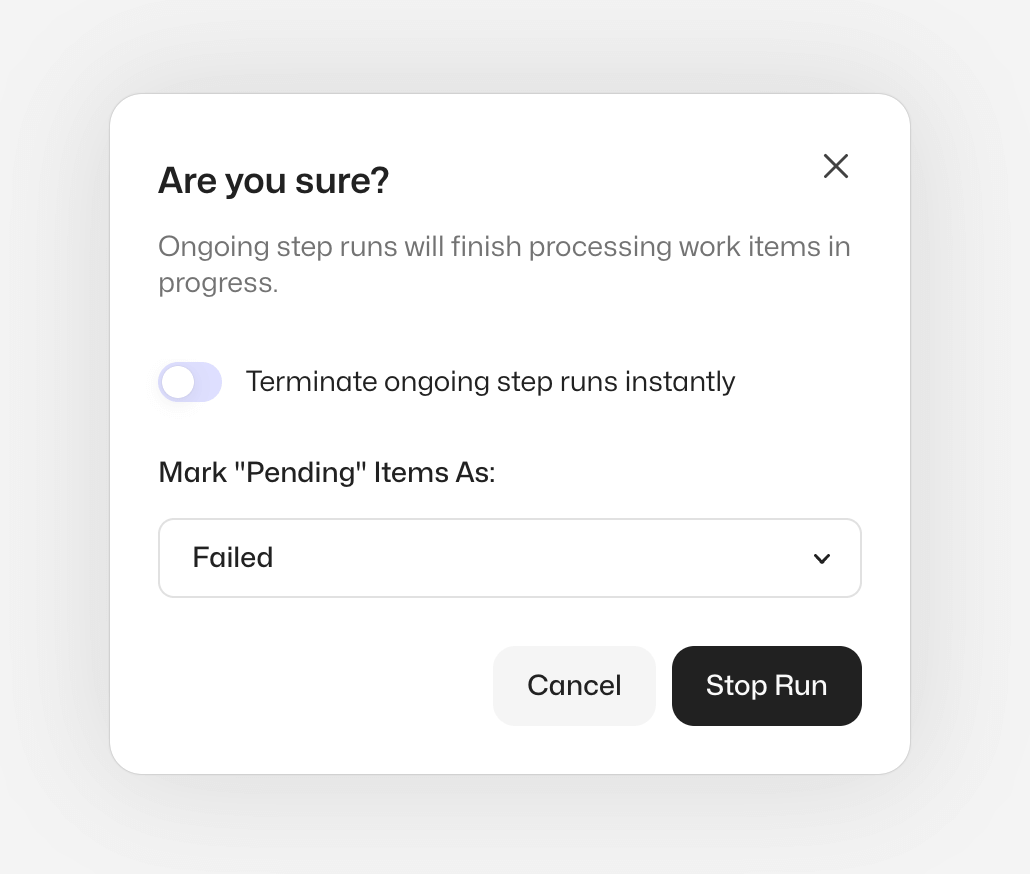
When you click "Stop Run" button in the process run table or inside the process run view, you will get a confirmation dialog with two options.
The first one lets you control the way the step runs are stopped:
- By selecting "Terminate ongoing step runs instantly," all the step runs are given a terminate signal which will instantly end all processing
- By not selecting, all the step runs will finish the work item they are processing and shut down gracefully afterward
The second one controls the behavior of the "Pending" work items which are still to be processed:
- By selecting "Failed" the work items are marked as "Failed" with an exception and can be retried, and the process run will be marked as "Unresolved"
- By selecting "Done" the work items are marked as "Done", and the process run will be marked as "Complete"
For more information about the feature, please see the updated documentation page.
As always, we are excited to hear what you think about the update, so please feel free to contact us in Slack if you have any feedback!
Worker v6.31.1
Workforce Agent Core v6.31.1
Changes to the Workforce Agent Core:
-
Cleanup temporary video files once they have been processed to save diskspace
-
Fixed video streaming issues
-
Fix an issue where on terminate command failure the desktop video streamer would keep running when worker is in error state
-
Fix logging issue with video streamer when delete file event is handled
-
Added a status files for agent-core instances to common location for Robocorp Setup Utility tool
-
Status file for agent containing all relevant information from device and Control Room
-
Added the
statuscommand that reads from the Status file and prints information to the user -
Added new handlers for exit situations
-
A new way to handle a graceful shutdown with listeners for standard I/O
-
Update dependencies
You can find the detailed changelog for Workforce Agent Core here.
Process webhooks and conditional step start
We're thrilled to add two new features to the unattended automation, helping you to integrate and control the execution flow of processes in new ways:
-
Process scoped webhooks
-
Conditional process step start
Process Scoped Webhooks
Previously all webhooks were on the Workspace level, leading to unwanted events and a need to filter them at the integration in some use cases. Solution: Process Scoped Webhooks! You can now receive webhook invocations for chosen process runs instead of polling the APIs for status updates and work item data. This feature is designed to be simple, efficient, and scalable to meet the integration needs with various systems like dashboards, other workflow automation tools and BPM tools.
API Key and Webhook management user interfaces got an overhaul in the process. These now have filtering and sorting and let you send test events to ensure the integrations are working properly.
Last but not least, we have added an event log for Webhooks, where you can see the invocations and results, including errors and error codes, to help troubleshoot any problems that might arise during use.
Please see our updated Webhooks documentation to learn more about the feature.
Conditional step start
This new feature lets you control the execution condition of process steps - a much-wanted functionality! Look at the Mark in the below picture; that's where the magic happens. He is like a gatekeeper between the steps, exactly what this feature introduces.
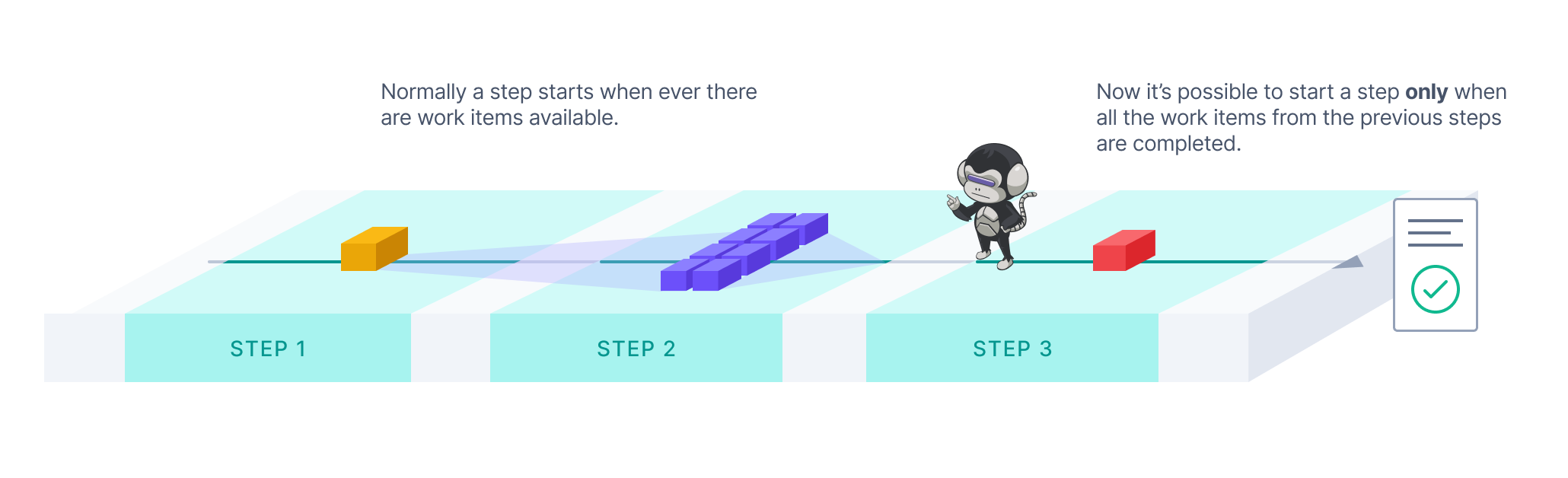
With the "Start Only After" feature switched on, you can choose a step execution to start only after all work items from the previous steps have been processed. This will allow you to synchronise workloads in the process steps. A typical case is when you are concurrently processing high volumes of work items in the early parts of the process but need a consolidated step at the end to, for example, generate a report of all the results of a process run. Take a look at our new Producer-Consumer-Reporter template for an example.
You can switch on the "Start Only After" in the Configuration under each step (except the first of any process). For more information about the feature, please see our updated documentation.
As always, we would love to hear your feedback about the new features, so please don't hesitate to contact us if you have anything in mind!
Pre-build robot environments 🏗️
👉 Need to control or scan every file your automations use in production?
👉 Want to save time / protect developers from environment building?
We now have a solution for setting up environment pre-building inside your company network so that all robot runs and developer tools can get environments much faster.
The setup enables you to build the environments on dedicated machines and, if needed, scan the results before passing them on to your users.
The client machines only download missing files to get the environment which means drastic speed improvements over time as the environments share many of the same files.

🚀 The documentation covers the feature and setup, but if there are any questions, do not hesitate to ping us.
Robocorp Assistant 2.0.11
Robocorp Assistant 2.0.11
This update contains:
- Now all the Error pages will show a "Submit issue" button; this will specially be helpful for users to submit an issue in case of linking errors
- RCC updated to version 14.6.0
Kind reminder that Assistant v1 will be deprecated end of June 2023, we will push the automatic update, at which point the end-users still using version 1 will get a prompt to upgrade.
Worker v6.28.1
Workforce Agent Core v6.28.1 / Workforce Agent UI v1.2.88.
Changes to the Workforce Agent Core:
- Upgrade RCC to v13.12.0
- Add support for streaming the desktop video to local path
- Improved desktop streamer logging and error handling
- Fix an issue where worker was not sending the run IDs in the state update message to Control Room
- Send worker configuration to Control Room when connection is established
- Update dependencies
A good thing to understand about Workforce Agent is that no matter which execution option you are using; you are always running the Workforce Agent Core behind the scenes, and you can find the detailed changelog for Workforce Agent Core here.
Introducing: Robocorp Setup Utility 🎉
Robocorp Setup Utility is a new application we have developed to simplify the setup process inside companies that are using SSO, have stricter network access, or want to avoid command-line setups 😉
What is the tool for?
-
Quickly create and test a profile configuration for your SSO organization
-
The tool also helps you through complex setups with network proxies etc.
-
Import and switch between profiles
-
Note: Our VS Code extension also supports profile imports and switching.
-
Setup and run the Local Worker for testing purposes
-
Setup Utility will replace the Workforce Agent UI application for the local testing use case
…and on the coming soon list are the Windows Desktop Worker Setups
Download the tool from: https://robocorp.com/download.
You can find guides and documentation on our docs site
Mandatory database update
We need to perform a mandatory database update on all of our production instances which can have minor impact on the system usage. This can show up as e.g. errors on UI or some API calls failing. This should not however impact any ongoing process runs which should automatically retry any failed orchestration operations etc. Runtime environments for robots runs are not directly impacted at all. Some robot operations like accessing the Vault can be interrupted.
We will be performing these operations on 3rd of May at 10:00-12:00 EEST. The actual update will be performed as a database failover which should be near instantaneous and we expect the impact of the operation to be extremely limited.
Robocorp Assistant 2.0.8
Robocorp Assistant 2.0.8
This update contains:
- RCC updated to version 13.12.0 now supports the ROBOCORP_HOME env variable to be a path that contains special characters like diacritics
- Security updates for multiple 3rd party dependencies
- Fixes that should support better the complex network proxy setups
We also released Robocorp Assistant 1.9.3 that contains important security updates as part of the maintenance for v1. This is a kind reminder that Assistant v1 is marked for deprecation.
We will publish security updates to Assistant v1 until the end of April 2023. End of June 2023, we will push the automatic update, at which point the end-users still using version 1 will get a prompt to upgrade.
New UX & Process Outputs
We are excited to announce our new user experience for the Control Room, which is designed to provide users with a more natural, consistent, and efficient experience. In addition to looking modern, it will help users to stay on top of what is happening in their automated processes, simplifying common usage patterns and speeding up the troubleshooting of exceptions.
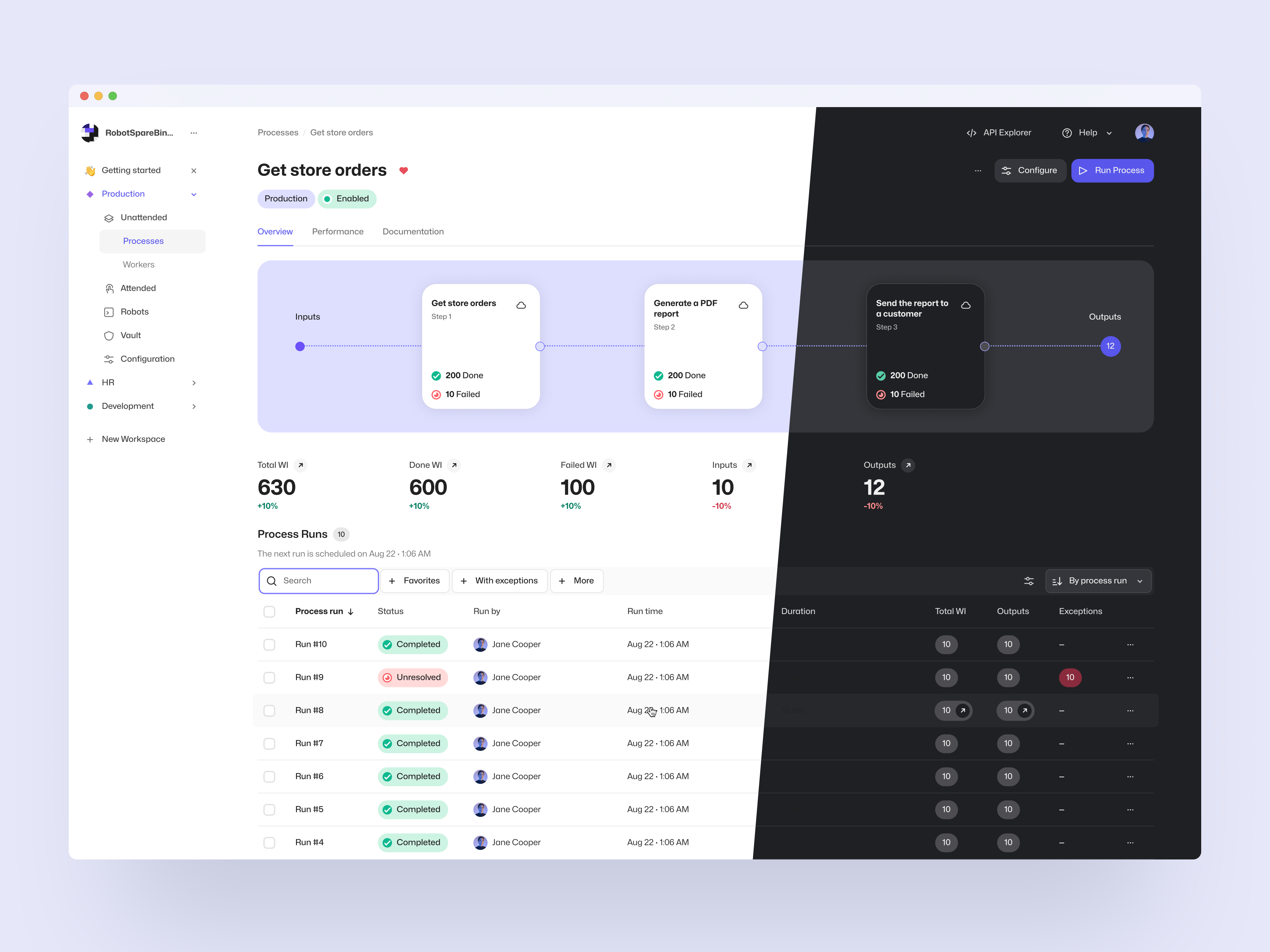
One of the main focus points of the redesign was the unattended automation views, which now visualize the processes giving users better visibility of the process structure and work items, including their processing status. With a few clicks, users are now able to get into the data they need and conveniently perform common actions like looking into the task log, terminating a process run, or retrying multiple failed work items.
Process Output Work Items
As a new feature, we have also introduced Process Outputs. These Output-state work items can be used to store data that is conceptually considered the output of the business process. To utilize them, all you need to do is to create work items from the robot in the last step of the process. They can be accessed via the UI and API in the same way as all other work items, and we will be adding more output-specific functionality in the future to help with e.g. integration use cases.
To go with the new user experience and added features, we have also updated our unattended automation documentation along with examples of how to conveniently use the system, which can be found on the documentation site.
As always, we at Robocorp would be excited to hear what you think of these changes, so feel free to contact us if you have anything in your mind!
Worker 6.26.12
Workforce Agent Core v6.26.12 / Workforce Agent UI v1.2.85.
Worker API call error handling was improved to validate all responses from Control Room to provide better error messages.
A good thing to understand about Workforce Agent is that no matter which execution option you are using; you are always running the Workforce Agent Core behind the scenes, and you can find the detailed changelog for Workforce Agent Core here.
Worker 6.26.10
Workforce Agent Core v6.26.10 / Workforce Agent UI v1.2.83
This version added a fix for an issue where artifact upload failure raised an incorrect error message and updated worker dependencies.
A good thing to understand about Workforce Agent is that no matter which execution option you are using; you are always running the Workforce Agent Core behind the scenes, and you can find the detailed changelog for Workforce Agent Core here.
Video streaming for unattended processes
We have now added the capability to the Control Room to view a video feed for unattended process runs. This gives visibility to what is happening during the execution and will help troubleshoot or demonstrate what the robot is doing.
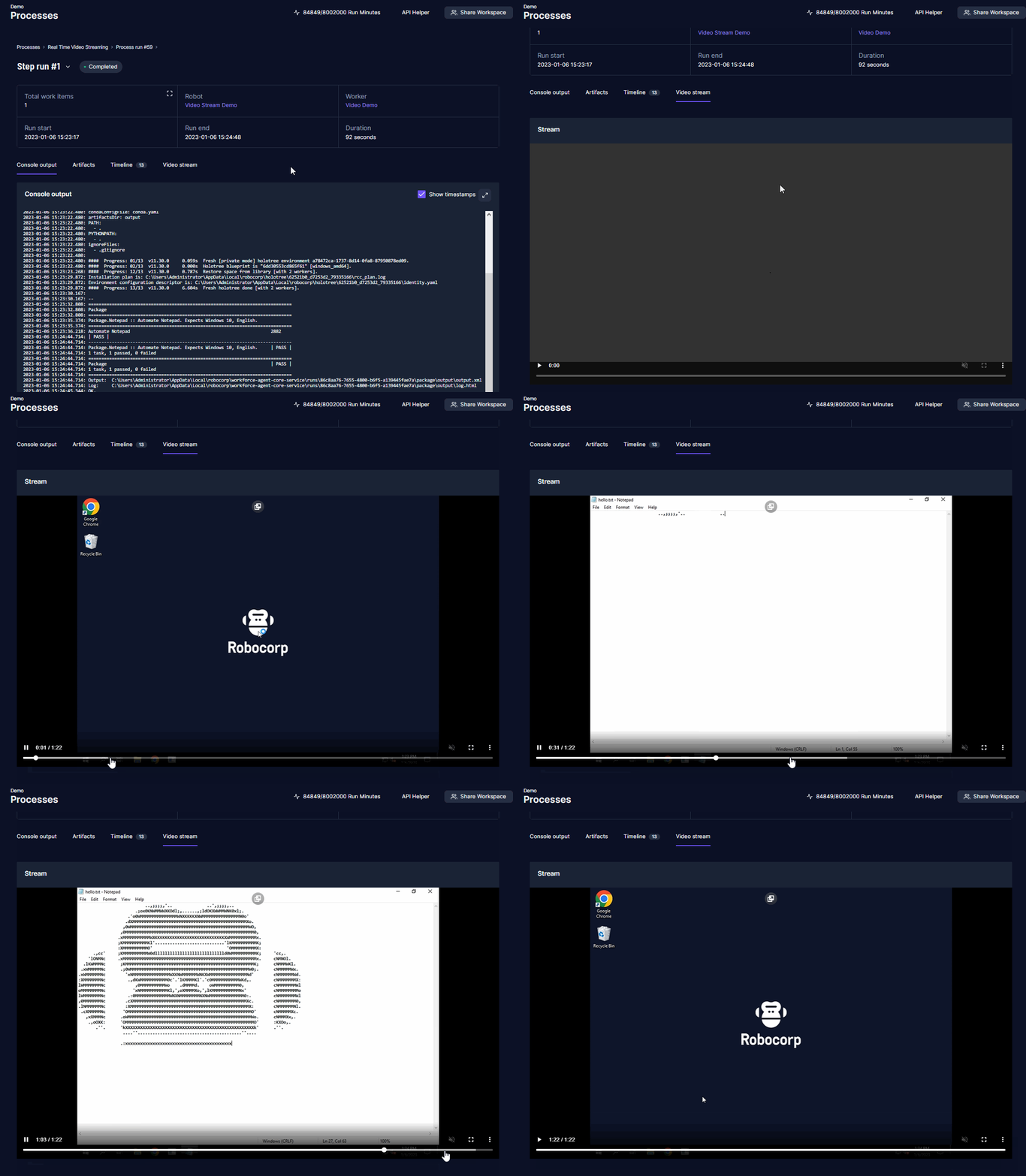
For security, video streaming has a few opt-in steps. Video streaming needs to be enabled per organization, and the feature must be enabled per worker on the local machines.
Once enabled, you can see the video stream under your process step run page. You can view the robot run as it happens or after it has finished. Depending on the network delay, there can be a delay in the streaming.
Video streaming is now available for the new Flex and Enterprise tiers, don't hesitate to get in touch with your Robocorp Customer Success contact to enable the feature.
Check out the documentation: Video stream for unattended runs
Worker 6.26.6
Workforce Agent Core v6.26.6 / Workforce Agent UI v1.2.80
Changes for the Workforce Agent Core:
- Fixes for http(s) calls when proxy is setup via the RCC profile
- Make sure the stream file upload is using RCC profile network options
- Upgrade RCC to v13.9.2
- Update dependencies
A good thing to understand about Workforce Agent is that no matter which execution option you are using; you are always running the Workforce Agent Core behind the scenes, and you can find the detailed changelog for Workforce Agent Core here.
Service Helper 1.8.1
New version of Robocorp Service Helper v1.8.1 available from here.
This version adds RCC profile network support for all downloads and fixes an issue where executable could fail on dependency issue.
Robocorp Workforce Agent Update v6.26.1
Robocorp Workforce Agent UI v1.2.76 / Workforce Agent Core v6.26.1.
The Workforce Agent Core version was updated to fix an issue introduced in the v6.26.0 release. Large artifacts were not uploaded correctly to the Control Room at the end of the run.
A good thing to understand about Workforce Agent is that no matter which execution option you are using; you are always running the Workforce Agent Core behind the scenes, and you can find the detailed changelog for Workforce Agent Core here.
Robocorp Worker Update v6.26.0
Robocorp Workforce Agent UI v1.2.75 / Workforce Agent Core v6.26.0
The Workforce Agent Core received bug fixes and updates:
- Artifact uploader to use RCC profile network settings
- Catch package download failure correctly and recover
- Set proxy authentication credentials correctly from embedded proxy URL
- Upgrade RCC to v13.6.3
Major upgrade was also added to the Control Room Robocontainer which will now include, by default, document handling packages:
- libreoffice
- wkhtmltopdf
- unoconv
A good thing to understand about Worker is that no matter which execution option you are using; you are always running the Workforce Agent Core behind the scenes, and you can find the detailed changelog for Workforce Agent Core here.
Robocorp Assistant 2.0.4
Robocorp Assistant 2.0.4
-
Fix for supporting proxies with passwords that contain special characters
-
Updates to internal dependencies for security updates
-
Fix for the documentation URL
Reminder: Assistant v2 update had some behavior changes that we do not want to force the automatically update to version 2. Update to v2 by downloading the application from the downloads page and installing it. The update will not break the link to Control Room. We will publish security updates to Assistant v1 until the end of April 2023. End of June 2023, we will push the automatic update, at which point the end-users still using version 1 will get a prompt to upgrade. Please contact us via Slack or Forum if you have any questions.
Robocorp Assistant 2.0.1
Robocorp Assistant 2.0.1
The new version of Robocorp Assistant simplifies the end-user experience.

The end-user no longer sees technical / developer options like 'Open Logs', 'Unlink', etc. as the technical features are now behind a Maintenance mode, which you can activate via user settings.
The bigger change in behavior is that the robot run output handling is now in complete control of the robot developer.
If your robot needs to store, for example, report files to the user's local folder, this needs to be done in the robot code, where Robot developers can choose the location or ask the user. Assistant application no longer copies robot outputs automatically to users local folders.
Files placed in the artifactsDir defined in robot.yaml work just like before and will be sent to the Control Room at the end of the run, so use these for debugging as you see fit.
Note: Due to the behavior change described above, the Assistant application will not automatically update to version 2.
Update to v2 by downloading the application from the downloads page and installing it. The update will not break the link to Control Room.
We will publish security updates to Assistant v1 until the end of April 2023. End of June 2023, we will push the automatic update, at which point the end-users still using version 1 will get a prompt to upgrade.
Please contact us via Slack or Forum if you have any questions.
Feature update: Scheduler, custom SMTP server, RBAC
Greetings everyone!
In this feature update, we are bringing additional utility to work items, and improving other areas around operations, especially in Enterprise setups. In the upcoming releases, expect to see more utility added to work items, process operation, and APIs. We are also working on rehauling the look & feel (see our new Portal) and UX of the core views in the Control Room, so stay tuned for interesting updates during the spring and summer!
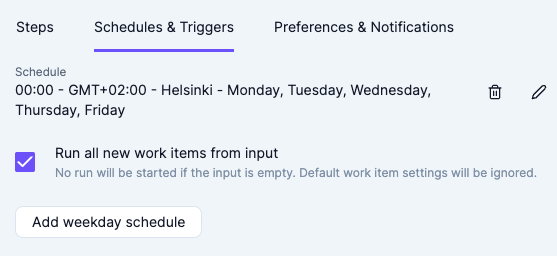
Scheduler - automatically run all new work items from the process input:
-
We have added a new option to run all work items in "New" state from the process input.
-
One powerful use-case for this option is to accumulate work to be processed by creating new work items using the API (or manually via Control Room UI) and defer the processing of said work items to a later time, on a schedule.
-
In case there are no new items in the input, no runs will be started, and hence no run minutes will be used.
-
Combined with a cron scheduler, the feature can be used to create e.g. queue pollers.
-
For further information, see the documentation.
Custom SMTP server configuration for notification e-mails:
-
By default, Control Room uses its own server to send outgoing e-mails, which may cause issues with some filters, e.g. in high-security Enterprise setups.
-
We have added an option (currently available for Enterprise customers) to configure a custom SMTP server, which will then be used instead of the default Robocorp e-mail service.
-
This will also enable sending of notification e-mails to non-workspace member addresses, which can be useful for e.g. integrating with e-mail-based systems.
-
In the future, we are also planning to include support for sending e-mails from the Robots via the custom SMTP server.
-
For further information, see the documentation.
Operator role UI update:
- We have removed the ability for the workspace role "Operator" to see the "Robots" page in the UI.
- The change was made to reflect the use case that "Operator" role is usually given to business persons to operate their automations, and the Robots page is usually obsolete for them.
- No back-end permissions have been changed, so "Operator" still has access to robots for e.g. running Assistants.
- With SSO RBAC, custom permission configurations are available for Enterprise customers.
- The permission matrix has been updated to reflect the UI change.