
Release Notes
Portal got new looks and much more ✨
Our Portal has been growing fast in terms of content, now home to thousands of lines of robot code that jumpstarts your development. It was time to take it to the next level!
Design
Okay, let's get the most important updates out of the way: it now has a dark mode! 😎🕺 Joking aside, we've redesigned it from scratch with the users in mind. Hope you like it!
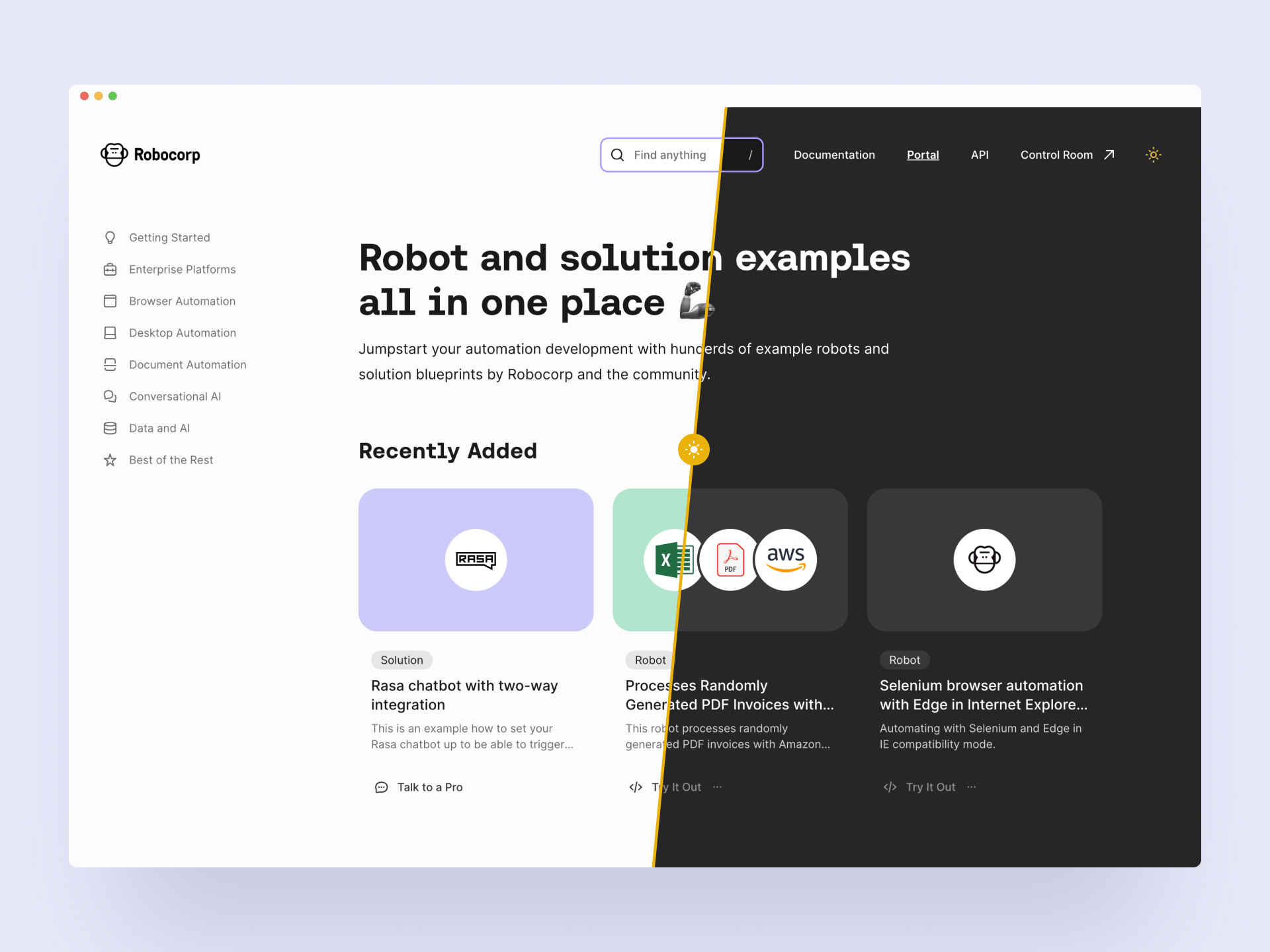
New content type: Solution
Portal still houses the robot code examples, but we've added a second content category called Solutions. These bigger pieces guide you through building your entire digital stack with Robocorp. Integrating third-party systems, reference architectures, extending the capabilities, using Control Room API and more. Robocorp + Rasa chatbots is an excellent example of a solution.
Content findability: Collections and library links
Another big update is the Collections you can see on the navigation (on the left in the big screens). This answers your call to have fast access to the content relevant to your style of automation. "Show me all you got on desktop automation now". Btw, the search is quite good, too. 🧙♀️
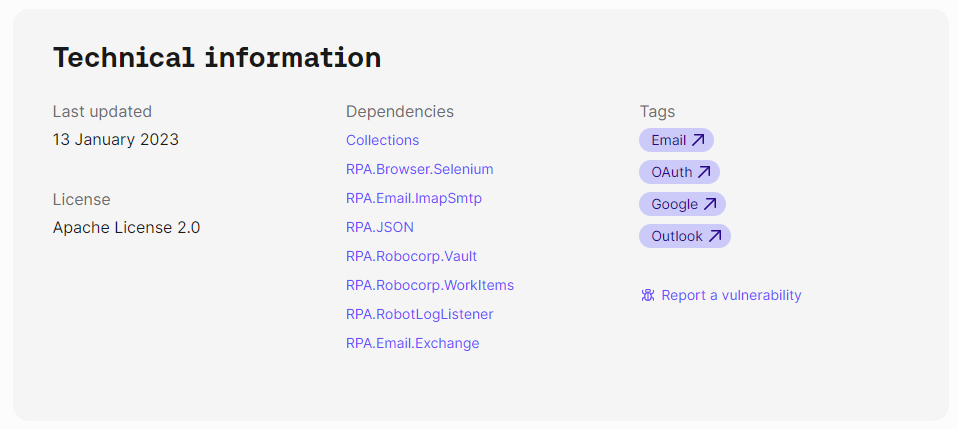
Each robot has a footer containing technical information that houses a new helpful feature: It shows the libraries that the robot uses. They are now linked to a page that contains all the other robots using the same library.
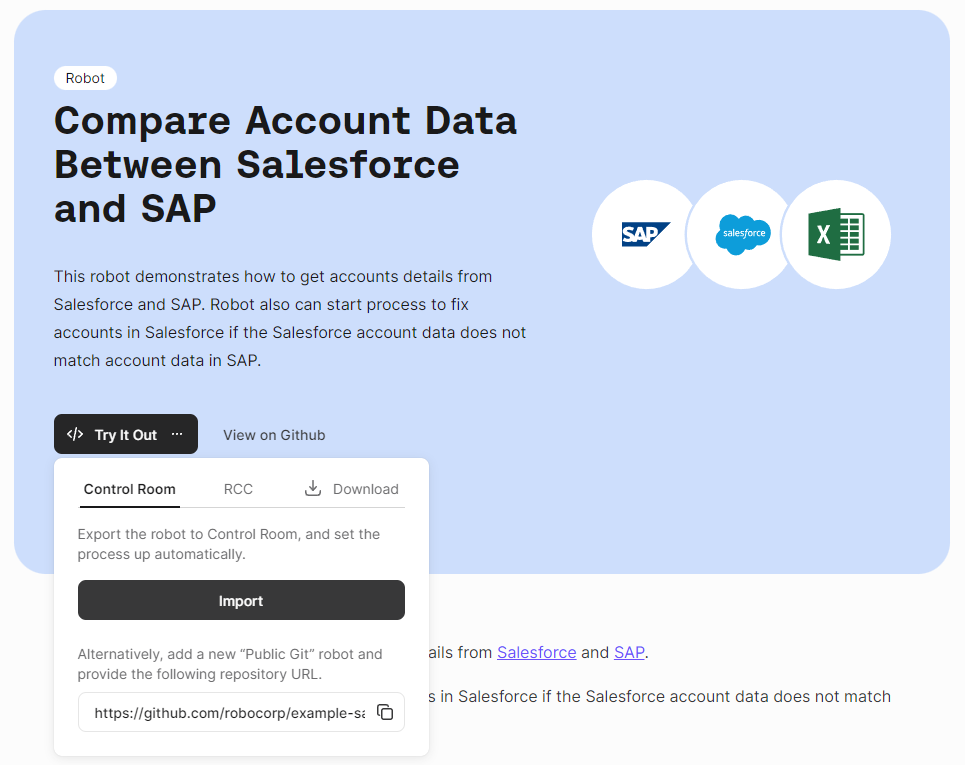
Add to Control Room
You can now add the robot directly to Control Room from the Portal. The Try It Out button's first option is "Import to Control Room", which takes you through the steps to add the robot and create a process. Handy!
We hope you enjoy the new Portal, and be sure to let us know what you think!
As a reminder, community submissions to the Portal are more than welcome, it's a great way to promote your work. We are planning to add a section to the front page that highlights the best of your bots soon! Submit your bot here.
Robocorp Workforce Agent v1.2.66
Robocorp Workforce Agent UI v1.2.66 / Workforce Agent Core v6.25.7
New in the Workforce Agent Core:
- Upgraded RCC to v13.0.0
- Use RCC to unwrap the downloaded bundle from Control Room
- File downloads use network settings from RCC profile
A good thing to understand about Workforce Agent is that no matter which execution option you are using; you are always running the Workforce Agent Core behind the scenes, and you can find the detailed changelog for Workforce Agent Core here.
Robocorp Workforce Agent Update
Robocorp Workforce Agent UI v1.2.62 / Workforce Agent Core v6.25.0
New in the Workforce Agent Core:
- Upgraded RCC to v11.33.2
- Send runtime log events to Control Room
- Drop the Microsoft RDP client as a backup, use the FreeRDP client only when connecting to a desktop session
A good thing to understand about Workforce Agent is that no matter which execution option you are using; you are always running the Workforce Agent Core behind the scenes, and you can find the detailed changelog for Workforce Agent Core here.
Terminology, Assistant and Process updates
To better align with the widely used RPA terminology, we have made some changes to the naming in our product. The goal was to make the stack easier to understand especially when migrating from Gen1 products, and to avoid overloading the term "Environment".
Unattended automation naming has been simplified as follows:
-
The term "Workforce" has been dropped in favor of "Unattended"
-
The term "Environment" has been replaced with the term "Worker" and applied in all contexts such as Worker Groups and Cloud Worker
-
"Workforce Agent" application will be renamed as "Worker" application

To help with managing Assistants in especially large-scale deployments, two features have been added:
-
Assistant-only users
-
Added "Assistant-only" users who only need to run assistants, without Control Room registration
-
Workspace Admins are able to mass-create "Assistant-only" users via a CSV import
-
The feature is enabled upon request, get in touch with us if interested
-
-
Assistant failure notifications
-
Users are now able to set failure notifications for Assistant runs, in the same way as with Process runs
-
E-mail and Slack are supported as notification channels
-
The feature is available for all tiers
-
Process updates:
-
Cron scheduler now supports scheduling a process on the last day of the month via the L-notation
-
Step runs now have numbering in a Process run scope
-
Step run UI has been updated
Robocorp Workforce Agent Update
Robocorp Workforce Agent UI v1.2.58 / Workforce Agent Core v6.23.3
The Workforce Agent Core received few minor bug fixes.
A good thing to understand about Workforce Agent is that no matter which execution option you are using; you are always running the Workforce Agent Core behind the scenes, and you can find the detailed changelog for Workforce Agent Core here.
Robocorp Workforce Agent Update
Robocorp Workforce Agent UI v1.2.57 / Workforce Agent Core v6.23.0
The Workforce Agent Core version also has multiple improvements and features around the Windows Desktop executions. As well as major performance improvements.
A good thing to understand about Workforce Agent is that no matter which execution option you are using; you are always running the Workforce Agent Core behind the scenes, and you can find the detailed changelog for Workforce Agent Core here.
Improved UX: Work Item handling flows
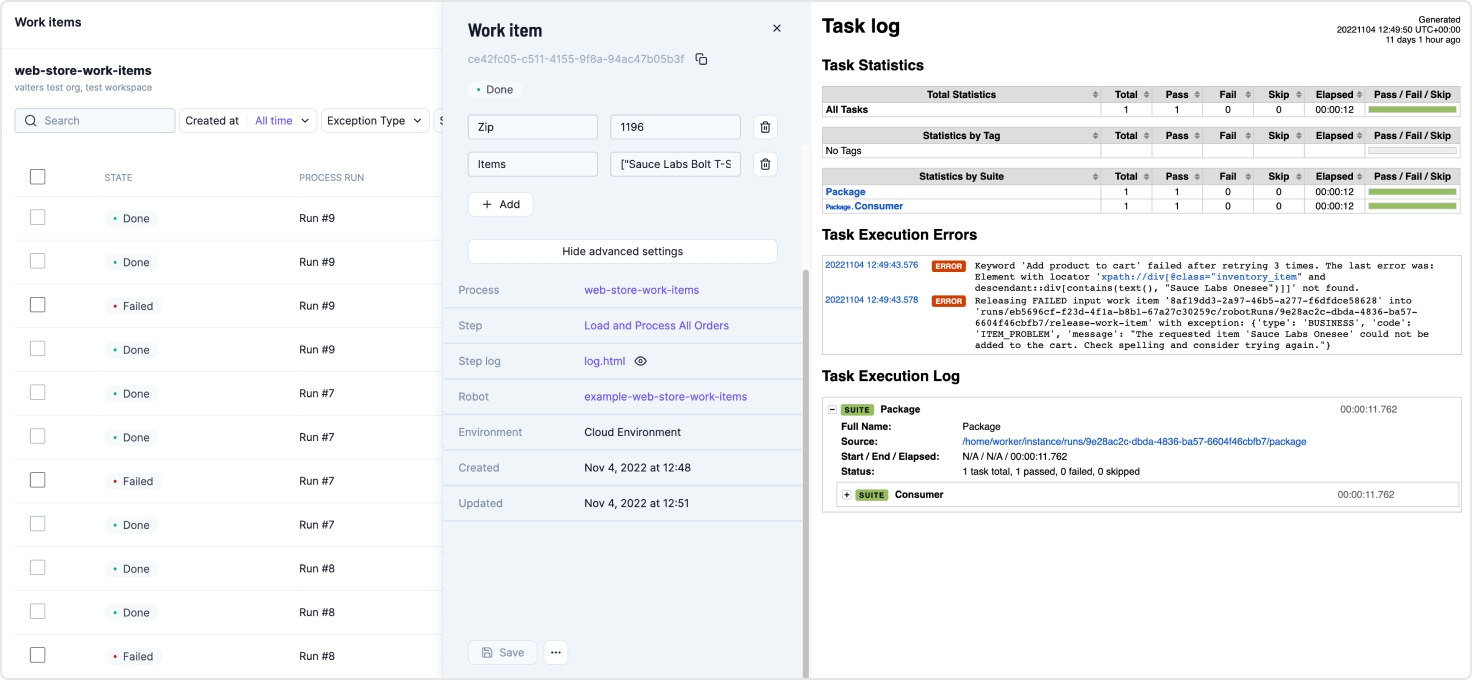
In our continuous effort to make the Control Room UX as good as possible, this round of UX improvements was aimed at the work item handling flows. The core view regarding these is the Work Data Explorer, where we implemented multiple improvements which reduce a lot of clicks and make work item handling flows and technical troubleshooting more streamlined.
-
New search, sort, and filtering
- Stay on top of what is happening with the improved search, sorting and filtering
-
The work item side panel now stays open while browsing through work items
- Reduced amount of clicks and streamlined the flow when browsing through multiple work items
-
Work item actions added to the work item side panel
- Retry, Mark as Done, etc. are now available in the work item panel
-
Toggleable advanced settings for technical troubleshooting
-
You can toggle advanced settings to see more data about the work item at a glance
-
Quick access links to the Step, Step log file, Robot and Environment
-
You can click the eye icon next to the log file to automatically render it to the same view, making troubleshooting more straightforward
-
-
Improved single work item view and direct linking
- Get direct links to single work items, which will open in their own view
- Pass work items to your teammates to handle in a straightforward way
Robocorp Assistant 1.8.5
Robocorp Assistant 1.8.5 released
Fixed the community Assistant install view as the UI elements there were broken
Get started with Assistant quick guide
Robocorp Assistant 1.8.4
Robocorp Assistant 1.8.4 released
Fixed the Assistant installation step to speed up the 1st run
Get started with Assistant quick guide
Robocorp Workforce Agent update
Robocorp Workforce Agent UI v1.2.54 / Workforce Agent Core v6.20.9
Workforce Agent updated to using RCC v11.30.0 that provides warning around the OpenSSL vulnerability, so that execution logs show if the environment contains vulnerable versions. We will keep updating the guidance page as we get more details and actions.
The Workforce Agent Core version also has multiple improvements and features around the Windows Desktop executions.
A good thing to understand about Workforce Agent is that no matter which execution option you are using; you are always running the Workforce Agent Core behind the scenes, and you can find the detailed changelog for Workforce Agent Core here
Robocorp Assistant 1.8.3
Robocorp Assistant 1.8.3 released
Update RCC to v11.30.0. This update will print a warning in case a insecure openssl version is detected in the environment
UI changes in the results view to clear out some of the more developer focused things like logs.
October feature update
We have released an update today with improvements to many features, including Workforce, Assistant, and the new Audit Log. The new additions should help with managing operations involving a number of self-hosted environments, and addressing needs around compliance and governance.
Environment management updates
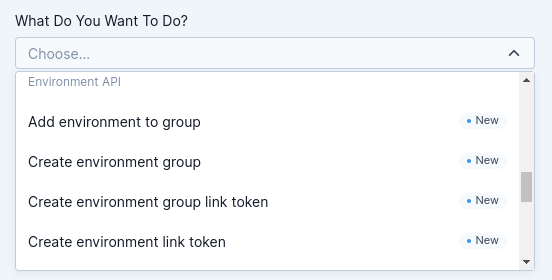
- Environment API is now available and can be accessed through the API helper in the Control Room
- Many new endpoints to manage environments and environment groups
- Opens up use cases around custom infrastructure configurations and monitoring
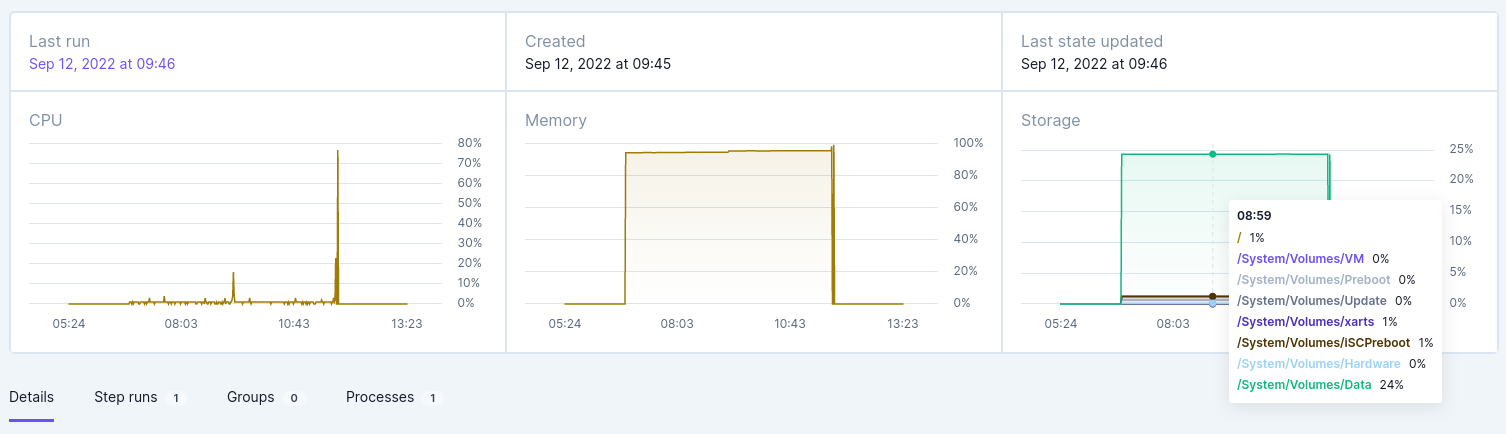
- Environment pages have been redesigned
- Environment listing and environment views now include a lot more data
- Added CPU, Memory, and Storage usage statistics and graphs
- Added tabs about Step runs, Groups and Processes to give more visibility around where the environments are used
Assistant updates
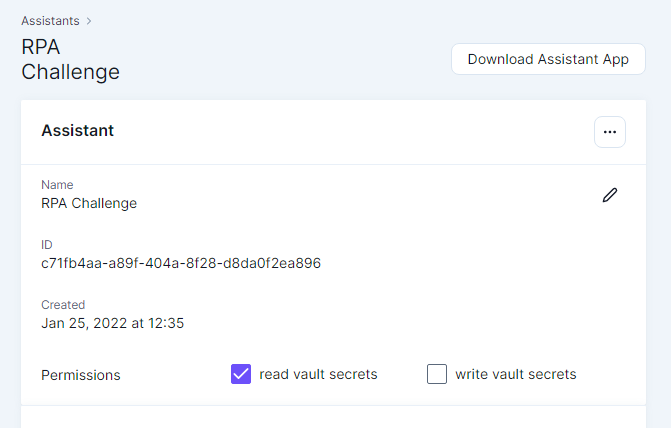
- Assistants now support configuring Vault access permissions
- The ability to control Assistant's access to read and/or write vault secrets has been added to the UI
Audit Log updates
- Export as CSV feature has been added to the Audit Log
- Administrators can now download Audit Log data as .CSV based on the selected filters
- The file will be generated in the background, and will be available for download afterward
New and improved Audit Log
The new and improved Audit Log is now live in the Control Room! We at Robocorp want to make it as straightforward as possible for you to set up secure RPA operations and to address all kinds of traceability, compliance, and governance requirements, so we have improved the audit log to cover many types of events in more detail. You can find the audit log under organization and workspace settings.
Robocorp Workforce Agent updates released
Robocorp Workforce Agent UI v1.2.48 / Workforce Agent Core v6.17.2. Improvements around connection creation and detecting potential error cases on target machines. RCC updated to v11.26.3.
Robocorp Assistant 1.7.1
Robocorp Assistant v1.7.1 released. Assistant release notes also moving to updates.robocorp.com. Updates dependencies and design system of Assistant as well as RCC v11.26.3.
Automation Studio 2.5.3 released
Push Robot updates from Automation Studio direct to Control Room. Linking to Control Room. Support for multiple .robot files within the same project. Allow navigating back when jumping to user keywords. Stop an in-progress run from the UI. Plus various UX and bugfixes.
New example robots in the Portal: Base64.ai and ADA
Two new reference architectures: intelligent document processing using Base64.ai, and conversational AI integration with Ada chatbots triggering digital workers with work items.
Reference architecture for Rasa chatbots triggering processes
New Portal example integrating Rasa chatbots with Digital Workers using Custom Action Server to trigger processes over Control Room API based on intent.
New navigation & UX improvements
New and improved navigation now enabled as default for all users in Control Room. Sign-up flows streamlined. Upcoming UX improvements to work data management, runs, robots, and environments planned for H2.
New navigation available in the Control Room
New and improved navigation for Control Room, streamlining flows and making navigation more intuitive. New user profile. Changelog moved in-product. Old navigation could be switched back to from user profile settings.