
Release Notes
Cloud Worker (Debian 12 bookworm) 2026-10-01
Debian package updates
Cloud Worker (Debian 12 bookworm) 2026-10-01 is now available in Control Room. This release
contains only package updates in the Debian base image.
Which steps receive the update
Cloud Worker (Debian 12 bookworm) auto-update now points to the 2026-10-01 image, replacing
2026-09-07. Steps using this option receive the new container on their next run.
Steps using a dated image keep that image. To update them, select
Cloud Worker (Debian 12 bookworm) 2026-10-01 in the process step configuration.
See Robocorp-Hosted Cloud Worker for details on dated and auto-update images.
More reliable GitLab integrations and task package links
What changed
Several longstanding bugs in GitLab integrations and task package linking surfaced recently. Affected packages could stop updating after repository pushes or fail to show their GitLab deployment details.
We improved the robustness of GitLab linking and reconnection to address these problems. Existing links can resume updating after their GitLab connection is restored, and new links use the correct integration.
What you need to do
If your GitLab-linked packages are updating normally, no action is needed. If Control Room shows your GitLab integration as inactive, select Reconnect in your organization settings. If a task package missed updates or still does not update after reconnecting, re-link that package to its GitLab repository. Re-linking fetches the current revision; future pushes can then update the package again.
Cloud Worker versions are now named by distribution and build date
How it used to work
A step configuration offered four Cloud Worker options:
Cloud Worker— the default.Cloud Worker (early access)— the next version, for testing before it became the default.Cloud Worker (previous)— the version that was the default before.Cloud Worker (Ubuntu 18.04 legacy)— the old Ubuntu container.
Cloud Worker was updated to a newer container from time to time. (previous) kept the container
it replaced.
None of the four options let you select an exact container. We controlled what each name pointed to, and we could change it. If a customer needed a fixed container, we configured it manually for that workspace. These manual workarounds show that the model did not work, so we are replacing it.
The names also gave you no information. They did not show the Linux distribution or the build date,
and (early access) and (previous) pointed to different containers at different times.
What changes
Each step now uses one of two kinds of option.
- A specific version. The name gives the distribution and the build date, for example
Cloud Worker (Debian 12 bookworm) 2026-09-08. This container never changes. - The automatically updating version. The name ends in
auto-updateinstead of a date, for exampleCloud Worker (Debian 12 bookworm) auto-update. When we release a new Cloud Worker for that distribution, we point this option to it. Your steps use the new container on their next run.
Each distribution has one auto-update option, and it only moves within that distribution. A new distribution is added as a new option. We never apply it to an existing selection.
We normally set the auto-update option to the latest available image. This is a guideline, not a fixed rule.
We plan to release a new Cloud Worker about once a month. This is a target, not a commitment.
What this means for your steps
Nothing changes. Your steps use the same container as before. Only the name is different.
There is one exception. Cloud Worker (early access) becomes the auto-update option, so it moves
to the latest container. This is the update that option was designed to receive.
The Extended variant is removed. The standard Cloud Worker now contains everything the variant
added, including LibreOffice.
No action is required. When you next work on your process configurations, check which Cloud Worker each step uses. The name shows the build date, so you can see if it is old.
See Robocorp-Hosted Cloud Worker for details.
EU1 Database update completed
EU1 instance (cloud.robocorp.com) database has now been updated and the maintenance window is over. Update was started at 10:28 EET and completed 10:52 EET. Everything should now be operating normally.
EU1 Database update
Reminder related to the comms we sent out 2 weeks ago: we're performing a mandatory database update on EU1 instance (cloud.robocorp.com) which will have an impact on the system usage. This can show up as e.g. errors on UI or some API calls failing, and even some runs failing altogether. Runtime environments for robots runs are not directly impacted at all. Some robot operations like accessing the Vault can be interrupted.
We’re working to minimise the impact on customer operations. The actual update should not take more than 15mins.
The update will be performed between 10:00 and 13:00 EET on 21.02.2024
Embracing Python for Automation-as-Code
TL;DR: We are transitioning from Robot Framework and moving all our focus to Python. Existing bots developed in Robot Framework will continue to operate as usual. We'll provide critical updates related to Robot Framework-specific issues until Feb 15th 2025, according to our one-year LTS plan for Enterprise customers. All our new developments will be directed towards Python's dynamic and expansive ecosystem. We recommend our users develop all new automations on Python.
Robocorp platform will be Python-only
Advancements in Generative AI and LLMs have revolutionised how we approach problem-solving and automation. We realized the potential of Python as a language for automation and AI early. Last year, we announced that we invested heavily in Python on our platform, ensuring that, at minimum, everything that was possible using Robot Framework would be available for Python developers. We have reached that date now.
👉 Today marks a significant milestone in our platform's evolution. As part of this transition, we're announcing discontinuing support for Robot Framework on the Robocorp platform. While we will continue to offer bug fixes and security updates for Robot Framework related features until February 15th, 2025, official support will cease thereafter. It's crucial to understand that automations developed with Robot Framework will remain fully functional within the Robocorp ecosystem. 👈
Robot Framework has served us well, providing a solid foundation for automation - all based on Python. However, by focusing on Python only, we allow our customers to enjoy scale and speed that only comes with an ecosystem as vibrant as Python.
What will happen in detail?
There is no immediate impact on existing bots: Automations built on Robot Framework will continue functioning as usual, ensuring your ongoing operations are not disrupted.
We announce a deprecation of Robot Framework on the Robocorp platform on Feb 15th 2024, with one-year long term support guaranteed for Enterprise customers (until Feb 15th 2025). The old Robot Framework bots will continue working even after this; we simply do not issue fixes to Robot Framework-related tooling anymore.
Our developer tooling going forward only supports Python. However, we will issue CVE fixes for the following year.
-
Language Server Protocol (LSP) for Robot Framework extension for VS Code remains open-source and available, but we cease to support new features or new versions of Robot Framework.
-
Robocorp Code Extension will support only Python code generation in the inspectors/recorders and its other features. The same will apply to the ReMark developer AI assistant.
-
Our documentation site will be focused on Python tutorials and examples. However, we will keep a snapshot of current Robot Framework examples and docs until 2025.
We will restructure our automation libraries over time to focus on Python and to remove the dependency on Robot Framework that exists today in RPA Framework. This work was already started mid 2023 with the introduction of robocorp libraries. See details of all automation libraries here.
-
RPA Framework (our open-source project with the automation keywords many of our users have gotten familiar with) remains available and supports RPA use-cases (like Java apps, Excel, Outlook, PDFs and much more). However, examples and documentation are added only in Python going forward.
-
Some RPA Framework libraries will be deprecated as there are better ways to accomplish the same functionality directly with well-maintained Python libraries. This will be communicated later.
Our recommendation for action
While there are no immediate consequences to currently running Robot Framework bots, we recommend our customers take the following action:
-
Start developing new automation workflows in Python. All three certification courses are available now in Python and are a great starting point for developers.
-
Review the “Switch to Python” page for detailed instructions on what is new, and decide if your organisation will implement any existing Robot Framework automations in Python. We do not require this, but in some cases, it will help with maintenance.
Relevant links
Control Room: Disable Processes and API for Git References
Enable/Disable Processes
You can now disable (and enable) any Process in the Control Room: useful if the process targets a system that needs maintenance and you don't want to run automations needlessly. Disabling the process will prevent the start of new runs via the UI, API, schedules or triggers. Any ongoing runs will progress as usual until completed.
Here's how it works:
Git Task Package Update via API
For the Task Packages connected to Github or Gitlab, you can now programmatically update the Git reference (tag, commit or branch) via the API. This makes it much easier to roll out task package updates as part of your CI / CD pipeline. Read more from the API docs.
Control Room: Enable / Disable Workers, new MFA option
In this release, we are introducing Enable / Disable for Workers to make maintenance operations more convenient, a new self-service option for MFA, along with some UX updates.
Enable / Disable Workers
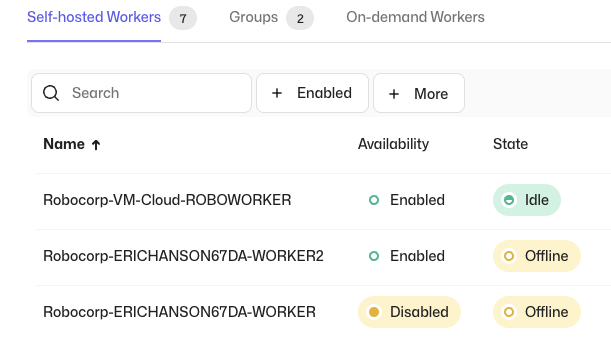
Due to popular demand, we have added a functionality that lets you temporarily disable Workers. Any ongoing work at the time of disabling the worker will be completed, but new work will not be allocated to this Worker while the status persists. This enables you to conveniently do maintenance operations, e.g., updating Workers or target systems, without having to change the related process configurations. When the Worker is re-enabled, it will continue processing the pending work.
When disabling a Worker, you can optionally enter a reason, which will be visible in the Worker Event Log. Also the related events are generated in the Workspace Audit Log, along with the information of the actor.
Self-service option for MFA

We have added a new self-service option for MFA, which lets you to require entering an authenticator code to be able to access the Control Room to enable an additional layer of security. The MFA can be enabled from the user settings, after which you will be guided through the setup. Organization and Workspace administrators are able to see which users have the MFA enabled from the member list.
Features
- Enable / Disable Workers
- Self-service option for MFA
Updates
- UX Improvements:
- Settings pages have been updated to match the rest of the Control Room
- You can now select a role when inviting users to an Organization
AI Actions and the Action Server Community Release
We're thrilled to introduce a new addition to the Robocorp platform: AI Actions and the Action Server. You can think of AI actions as the connective tissue between AI agents and your applications and data.
These new features are available as a developer preview for the community and are fully open-source under the Apache 2.0 license.
Developers can now create AI Actions that interact with any data or application, along with our low latency Action Server connecting them with any AI App and Agent framework such as GPTs and LangChain.
Given the recent release of the OpenAI GPT Store, and the success of AI app frameworks like LangChain, developers are looking for ways to integrate these with various data sources and platforms. Robocorp provides the easiest way to enable AI agents, assistants, and copilots to use custom actions, all written in Python. It’s easier than building Flask apps, or figuring out how to deploy to Vercel.
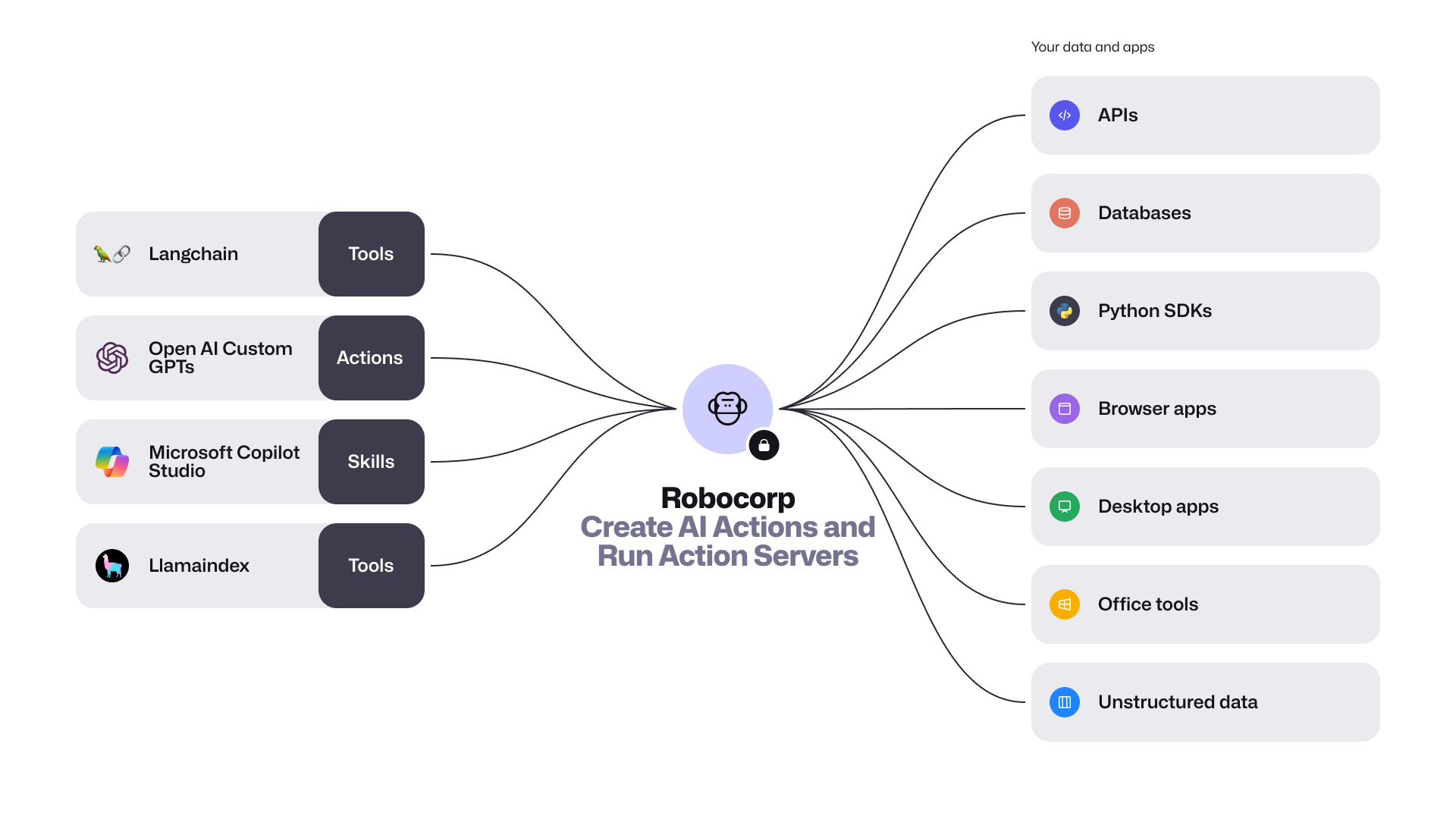
The community preview release includes the following:
-
Introducing the new package
robocorp.actionswith@actiondecorator. AI Actions are Python scripts, workflows, or automations that are securely exposed to AI apps. They are defined by their inputs and outputs, and are described in natural language. This makes it easy for AI apps to comprehend and use them. You can conveniently build and debug these actions with the Robocorp Code extension for VS Code. -
Action Server is a stand-alone executable that connects Actions with AI apps. This server automatically generates an OpenAPI specification for your Python code, allowing various AI/LLM Agents to understand and invoke your
@action. It also offers a straightforward local UI for testing and monitoring, handling the full Action lifecycle, and provides comprehensive event traceability during runs. -
LangChain Robocorp Toolkit and a template for quick startup. Extending the AI apps built with LangChain is as simple as one, two, three. The new
langchain-robocorppackage lets you import all your actions into your project effortlessly. -
Revamped Robocorp Github Repository - This is your gateway to AI Actions and open-source Python automation. We've consolidated all the key features into one repository, which includes the Python framework with automated logging, libraries for automating tasks such as browser and desktop applications, and the new Action Server.
It's time to get started! Visit the GitHub repository for more details, and don't forget to leave a ⭐ while you're there.
Control Room: Activity View and Vault API endpoints
We at Robocorp wish you a happy new year 2024! In this year's first release, we are introducing the new Activity View and Vault endpoints to the Control Room API.
Activity View
With the new Activity View, you are conveniently able to track what is going on in all of your Workspace from a single view.
You can see the status of the recent Process Runs, Step Runs and Assistant Runs, and also see what's going to be run next from the Scheduled Runs tab. With filters and search, you are able to filter e.g. all Failed runs, which will streamline the exception handling and troubleshooting flows.
API endpoints for Vault
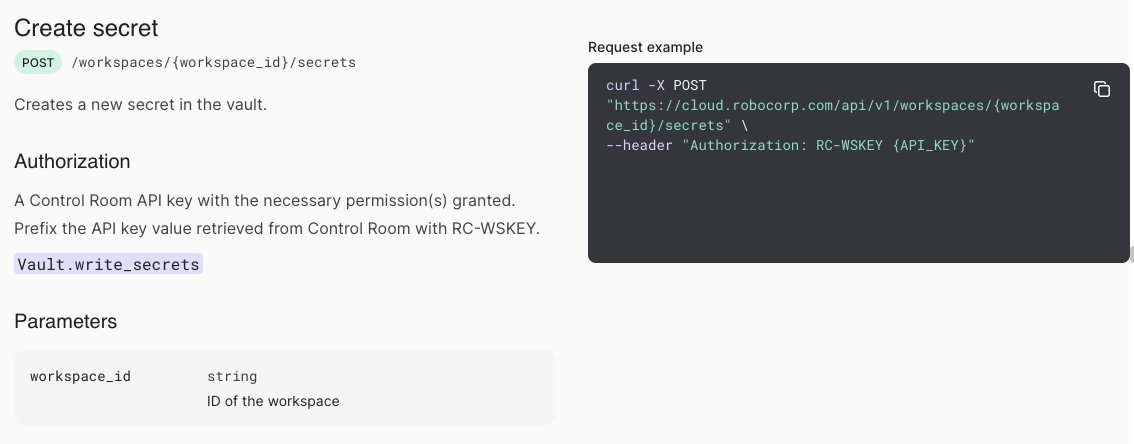
To cover more use cases with the Control Room API, we have added new endpoints that you can use to create and update Vault secrets. This will enable you to programmatically manage your secrets, e.g. by automating credential updates.
For more information about the new Vault API, see the API documentation.
Features
- Activity View
- New API endpoints for Vault
- Account Member Management for Partners
Control Room: Work Item Log, Process Documentation and more
In this release, we are introducing Work Item Log, Documentation for Processes, new possibilities to integrate with AWS, and new Audit Log events.
Work Item Log
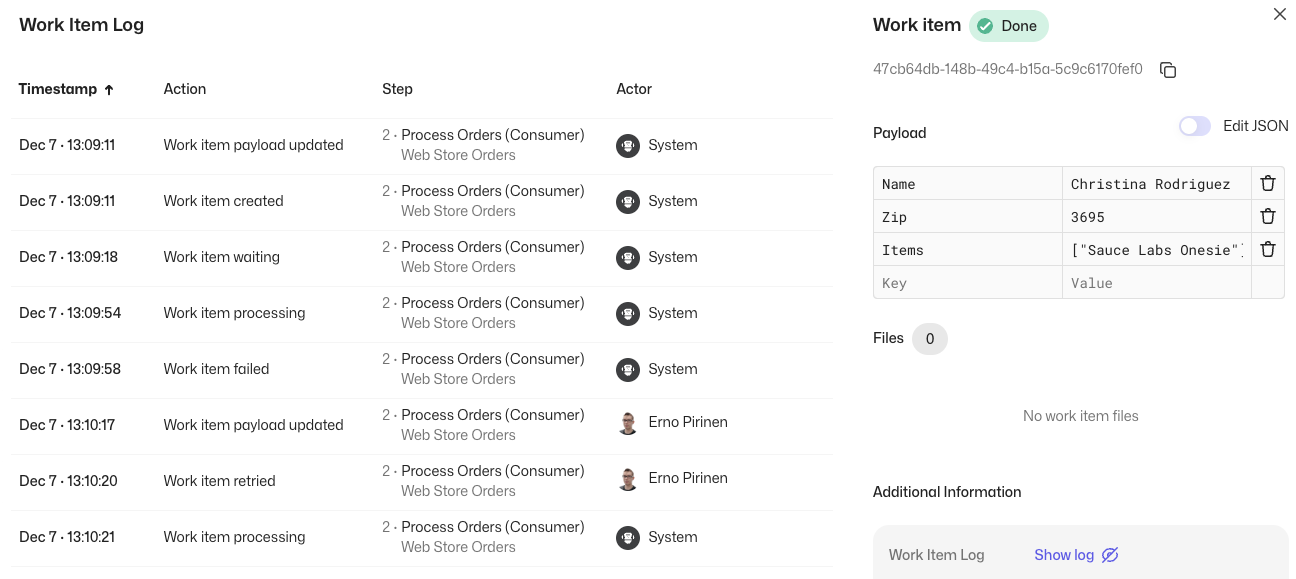
Want to know more about how your Work Items have been processed for troubleshooting or auditing purposes? The new Work Item Log feature enables you to do exactly that!
When you open the Work Item Log from the Work Item details, it will show you what has interacted with the Work Item, how, and when. This enables you to see the lifecycle of the item, giving broader visibility to the processing flow.
Process Documentation

Say hello to the new Process Documentation feature! You are now able to add a description for Processes, where you can include descriptive information about the Process itself, e.g., what the Process is about, how the Process works, and who are the responsible contact persons.
The Documentation supports Markdown syntax, so you are able to add images, links, or whatever you see as valuable to convey the information. And, of course, we also have an API available so you can programmatically fetch the process information, including the description!
AWS integrations
Robocorp Control Room runs on AWS, and so do many of our customers. AWS-native integrations can enable convenient and secure integrations utilizing the AWS backbone. Today we are announcing the first two:
-
Production release: Accessing AWS resources from Robocorp-hosted Cloud Workers
-
Early Access: EventBridge
Audit Log improvements
We have increased the retention time of Audit Log events to 365 days for new events recorded after the 16th of November. Also, three new events have been added to the Audit Log:
-
Process Schedule Created
-
Process Schedule Updated
-
Process Schedule Deleted
Features
- Work Item Log
- Process Documentation
- New AWS integrations
- Audit Log improvements
Control Room: Improved API Helper, Version Control features
In this release, we are bringing new features to help utilize the new Control Room API, to improve Task Package version management, and to get familiar with the available Control Room features by examples.
New API helper features
Say hello to the new and improved API Helper! With the API Helper, you are able to conveniently select what you want to do, and the API Helper will select the right parameters, helps you to create keys with right permissions, and gives an example call in curl, python, and javascript code. In addition, you are able to directly test the calls from your browser to see that they work exactly the way you want.
Version control improvements
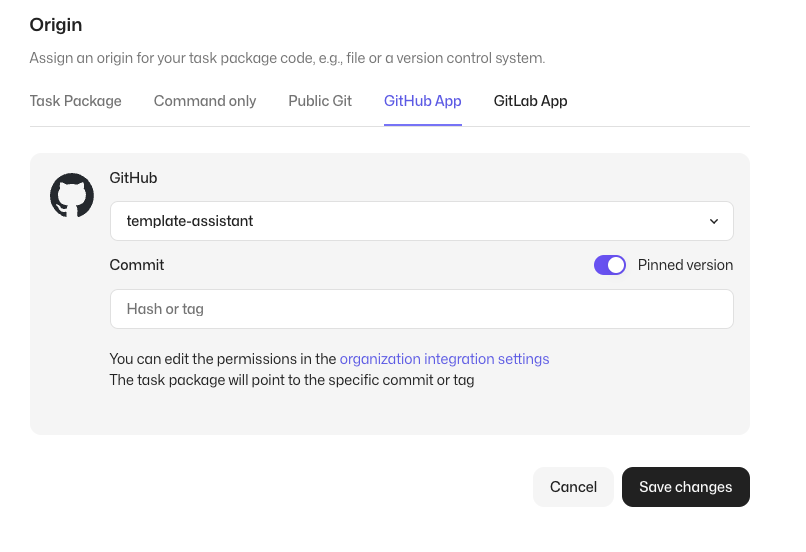
We have enhanced the Control Room version control integrations and introduced a new pinned version capability. With the new feature, you are able to select the exact commit or tag you want your tasks to use, which is useful when e.g., integrating with external CI/CD systems or when you need total control over your release cadence.
Example processes in the Control Room
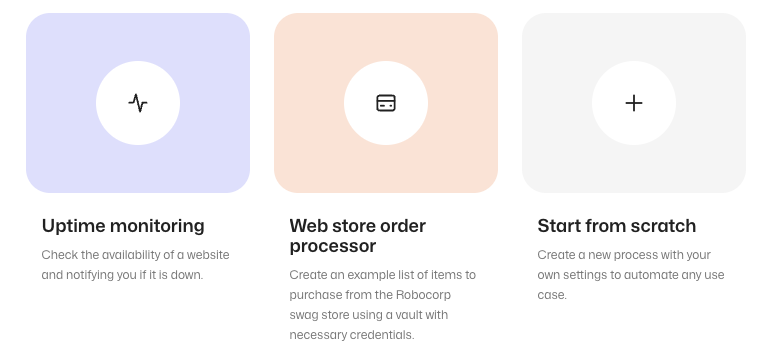
Getting started with Control Room or want to have a quick walkthrough of the most important features? Try out the brand new example processes! When creating an example process, you will get a fully setup process with an example configuration, that you are able to explore at your own pace. In addition, you are of course, able to change the parameters to modify the example to suit your needs.
Features
- New & Improved API Helper
- Link to Commit / Tag with Version Control
- Improved Control Room New User Experience
Introducing the new Control Room API and Worker Events
We are excited to announce two new major features that will help you to better integrate with Robocorp Control Room and to give better visibility to self-hosted Workers.
New API based on the OpenAPI v3 specification
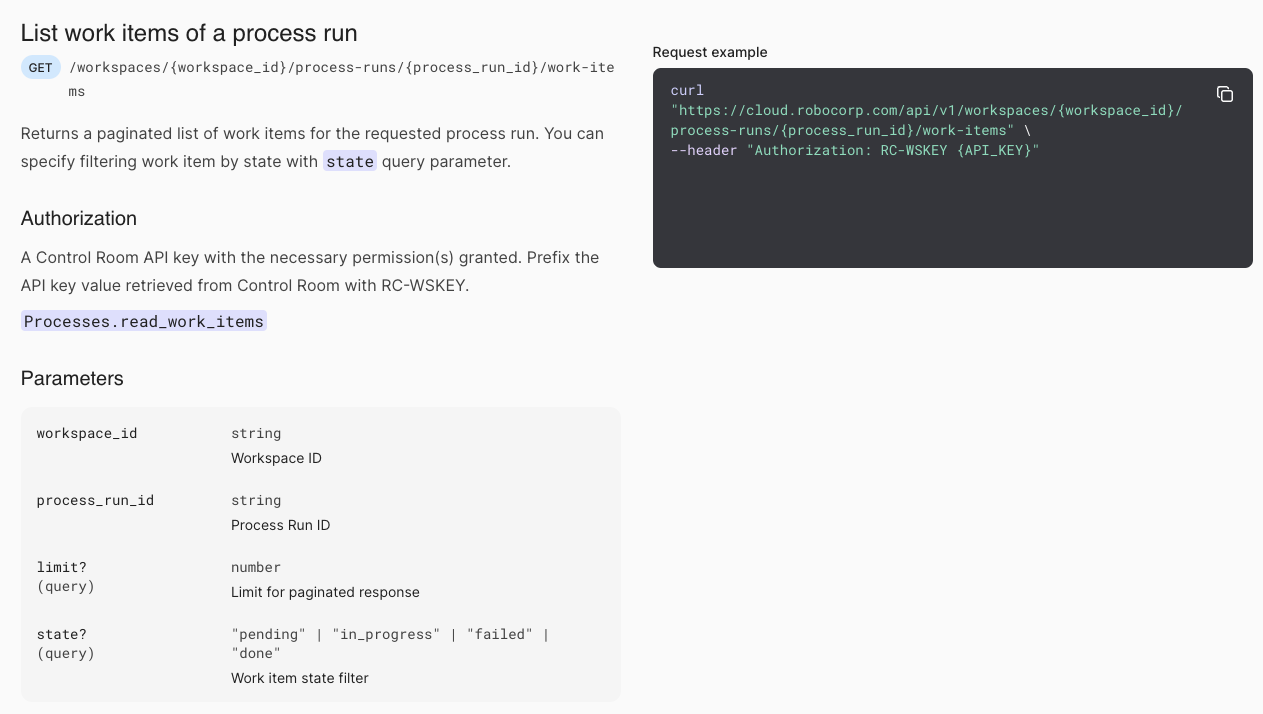
The new unified Control Room API consolidates the old Process, Robot, Assistant and Worker APIs under one consistent set of endpoints. Naming conventions now also reflect the current terminology used across Robocorp. The API is specified using OpenAPI v3, which makes building integrations a breeze. For example, it enables you to take advantage of all the tooling built on the top of the OpenAPI ecosystem, e.g., generating custom SDKs directly from the specification file.
The old APIs are now deprecated but will be available until the 15th of January 2025. No immediate action is required. We will be sending reminders to users of the old APIs until the discontinuation.
Authentication and authorization mechanisms will stay the same, and any existing API keys will work with the new API. We highly recommend building all new implementations on the top of the new API, and to start converting old implementations to the new specification. No new features will be added to the old API endpoints. If you need any guidance with migrating to the new API, please contact your technical account manager.
Finally, the new API is hosted under the same domain name used to access Control Room. The API helper guides you to use the appropriate domain name. This reduces the number of domains to be allow-listed and thus simplifies the network configuration requirements.
For more details about the new API please see the updated API documentation.
Worker Event Log and Notifications

The new Worker event log shows events happening in the self-hosted Workers, giving visibility to the status. It helps with troubleshooting any issues related to the configuration or the host machine.
We have also added a new notification feature, which enables you to receive e-mail notifications about the selected events you want. This enables you to stay on top of operations and take action if required.
Features
- New Control Room API
- Worker Event Log
- Worker Notifications

🐛 Issue with 'RPA.Email.ImapSmtp' and 'RPA.Robocorp.WorkItems' libraries
We have discovered an issue with the current python-docx==1.0.0 package that is publicly available and utilized in our rpaframework as well.
This has direct impact to our RPA.Email.ImapSmtp and the RPA.Robocorp.WorkItems libraries.
The error looks like:
To resolve the issue you can either:
👉 Upgrade rpaframework==27.4.1 OR pin python-docx==0.8.11

Robocorp templates have already been updated, so you can also follow those.
If you have any questions or issues please submit a support ticket to support@robocorp.com
Control Room: New Tasks View
We are streamlining the terminology across our product stack and have renamed Robots to Task Packages. More in-depth story about the change can be found in the blog post. The change will be at first visible at the Control Room UI and will be rolled to other parts of the Robocorp stack soon. Along with the naming change, we are introducing an updated Tasks view, which will make managing your executable code a breeze.
Renaming Robots to Task Packages
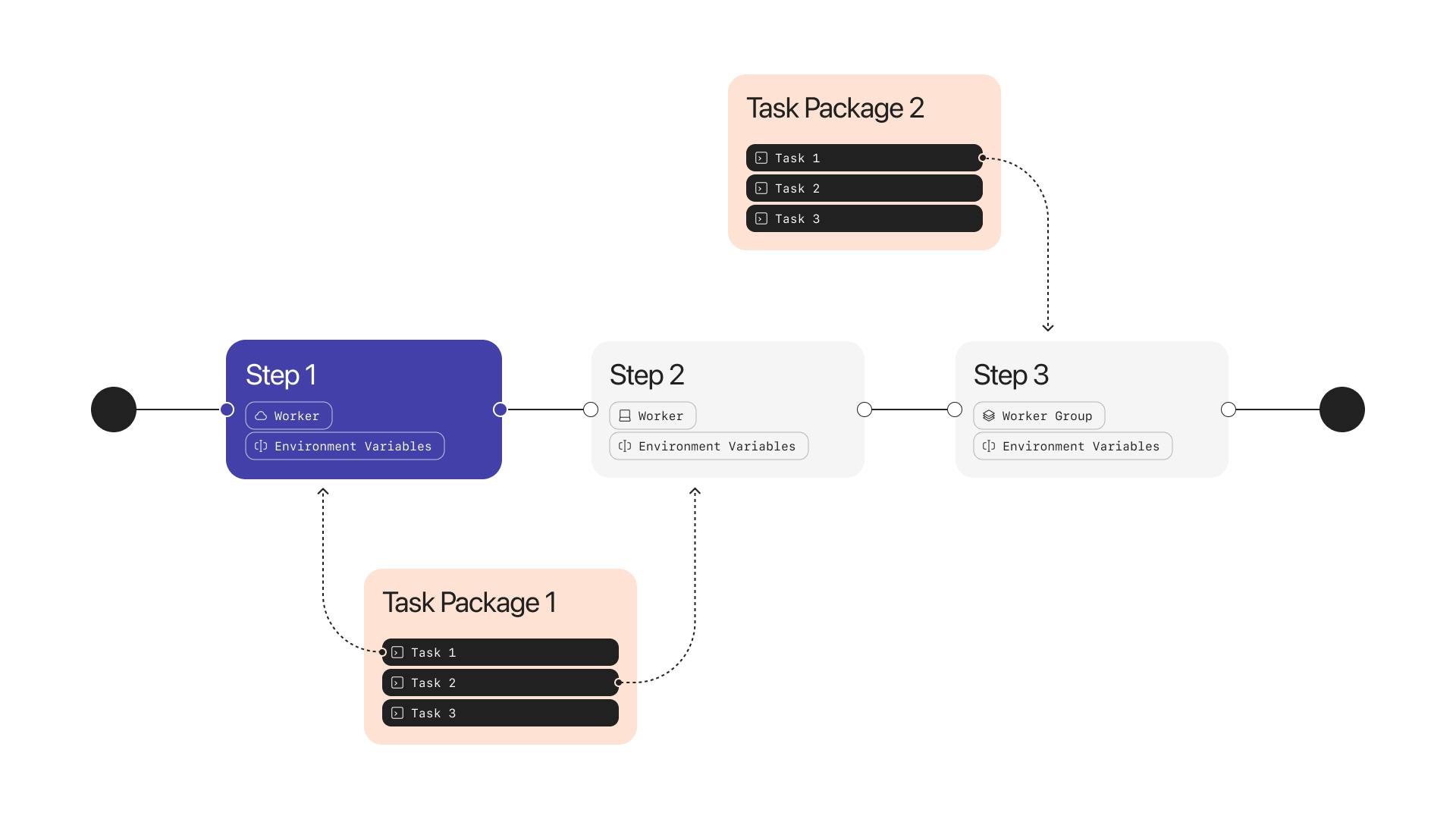
The Robot is now renamed to Task Package, and the UI has been updated to reflect the change.
The functionality of the Task Package is exactly the same as the Robot was but it is now more intuitive in the user experience. E.g. you develop Tasks with the developer tools, package them as a Task Package, add the Task Package to the Control Room, and assign the Tasks to be executed with Workers or Assistants.
New Tasks View
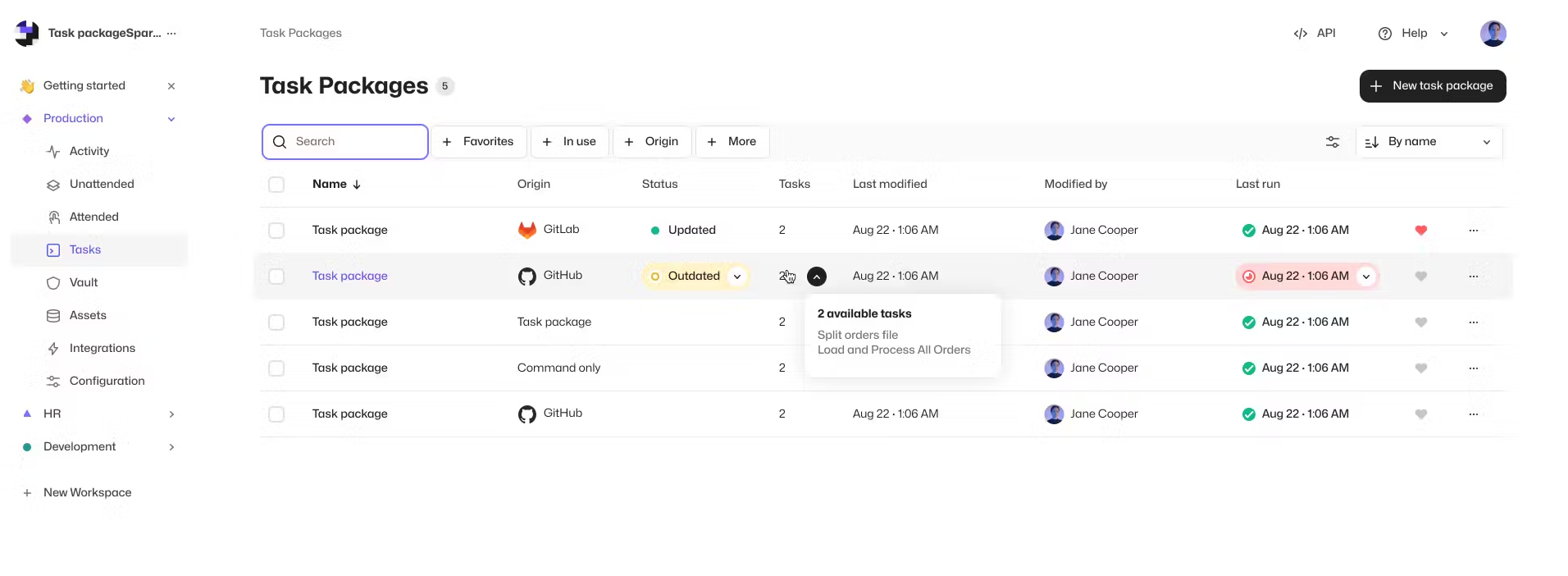
We have redesigned the Tasks view (previously called Robots). The new view is more intuitive to use and provides a broader visibility to your Tasks, where they are used, and how they have been used in Processes and Assistants. This will improve the management of Tasks, especially in scenarios where you have multiple Tasks and Task Packages that are used in different ways along your operations.
Features
- Renaming Robots to Task Packages
- New Tasks View
Updates
- Tables now remember state when exiting and returning to views
- Most of the clickable elements in the Control Room can now be opened in a new tabs
- Owner and Admin users in Organizations with SSO are now able to create Workspaces as a self-service
🎉 Robocorp Setup Utility v1.1.3
-
Multiple fixes for small issues that bring consistency in functionality and UI/UX
-
New Diagnostic Details Info & Design
-
New version of
RCCwhich brings in TLS & trust chain information to Setup Utility -
This is activated only by a Network Configuration file that contains a
tls-verifyfield -
You can learn more about this from here
-
RCCEmbedded at version16.1.2 -
Service HelperEmbedded at version1.14.2
Download from here and check our documentation here.
Have a splendid day! 🚀
Robocorp Assistant 2.2.1
This update contains:
- Adding a way to disable the auto-updater by adding - as the autoupdater URL
- Update to use RCC v16.1.1
- Bug fix for RCC not injecting environment variables like HTTP_PROXY properly for micromamba process, supporting complex firewall setups with self-signed certificates
🎉 Robocorp Setup Utility v1.1.1
-
Main Page has been redesigned for a more clean look & for new things to come
-
System Statuspage now includes everything about the environment -
Gathering Service Helper logs in the
Generate Report + Submit Issue -
Remote Desktop Protocol detection is implemented now & a warning will show when adding a new Windows Worker if RDP is not enabled
-
Shared Pre-built Environments (Holotree) integration
-
Enabling at global level only with Admin permissions
-
Enabling/Revoking from Worker Details if state is reachable & enabled at global level
-
Fixed issues with worker update available scenarios
-
UI/UX improvements all across the board
-
OS Detection & presentation in human friendly way
-
Show warning for Long Paths in case of
Windows Server 2016 -
RCCEmbedded at version15.2.0 -
Service HelperEmbedded at version1.14.2
Download from here and check our documentation here (updates will come soon).
Have a splendid day! 🚀
Robocorp Assistant 2.1.0
Robocorp Assistant 2.1.0
This update contains:
-
Support for SSO Assistant-only Users
-
Security updates
-
Update to use RCC v14.15.4
Worker v6.34.7
Worker release v6.34.7.
Fixes an issue where extracted RCC executable was sometimes locked for the first API call.
You can find the detailed changelog for Workforce Agent Core here.