
Control Room: Enable / Disable Workers, new MFA option
In this release, we are introducing Enable / Disable for Workers to make maintenance operations more convenient, a new self-service option for MFA, along with some UX updates.
Enable / Disable Workers
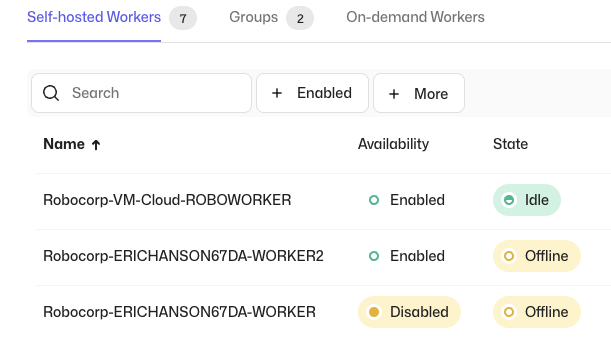
Due to popular demand, we have added a functionality that lets you temporarily disable Workers. Any ongoing work at the time of disabling the worker will be completed, but new work will not be allocated to this Worker while the status persists. This enables you to conveniently do maintenance operations, e.g., updating Workers or target systems, without having to change the related process configurations. When the Worker is re-enabled, it will continue processing the pending work.
When disabling a Worker, you can optionally enter a reason, which will be visible in the Worker Event Log. Also the related events are generated in the Workspace Audit Log, along with the information of the actor.
Self-service option for MFA

We have added a new self-service option for MFA, which lets you to require entering an authenticator code to be able to access the Control Room to enable an additional layer of security. The MFA can be enabled from the user settings, after which you will be guided through the setup. Organization and Workspace administrators are able to see which users have the MFA enabled from the member list.
Features
- Enable / Disable Workers
- Self-service option for MFA
Updates
- UX Improvements:
- Settings pages have been updated to match the rest of the Control Room
- You can now select a role when inviting users to an Organization