
Release Notes
Robocorp 3.1.6: security updates for robocorp-log, robocorp-windows, robocorp-excel and robocorp-vault
Robocorp Log
robocorp-log 3.1.6 rebuilds the React application that renders log.html with
dompurify 3.4.17 (#497). The previous
bundle carried 3.4.1, which has since accumulated eleven advisories, among them
CVE-2026-49458, CVE-2026-49978, CVE-2026-65898 and CVE-2026-65902. DOMPurify is what
sanitises the HTML you pass to log.html() before it is shown in the viewer, so a log file
produced by this version carries the fixed sanitiser.
The build tooling for the viewer was refreshed in the same change (vite 6.4.4,
handlebars 4.7.10, js-yaml, postcss, browserslist and others). Those are build-time
only and do not end up in the generated log.
Nothing changes in how you write logs:
Robocorp Windows and Robocorp Excel
robocorp-windows 1.1.3 and robocorp-excel 0.5.1 raise their pillow requirement
to 12.3.0 or newer (#496). Pillow
12.3.0 fixes a run of image-decoding advisories, including CVE-2026-59205 (heap
out-of-bounds write in ImageCmsTransform.apply()), CVE-2026-54058 (out-of-bounds read
through a controlled row stride) and several missing decompression-bomb checks in the font
and GD loaders (CVE-2026-54059, CVE-2026-54060, CVE-2026-55379, CVE-2026-55380).
Both packages already required Python 3.10, which is also Pillow 12.3's minimum, so the
new floor does not change which Python versions are supported. If something else in your
environment pins an older Pillow, pip will tell you when you upgrade.
Robocorp Vault
robocorp-vault 1.4.2 raises its cryptography requirement to 50.0.0 or newer
(#496). That version ships wheels with a
patched OpenSSL (GHSA-537c-gmf6-5ccf) and fixes CVE-2026-69247, CVE-2026-69248 and
CVE-2026-69249 in certificate verification and PKCS#7 handling.
Upgrading
robocorp 3.1.6 pins the new robocorp-log and robocorp-vault, so upgrading the
meta package is enough for those two:
robocorp-windows and robocorp-excel are not part of the meta package; upgrade them
separately if you use them:
Released packages
- package
robocorp3.1.6 (meta package) - package
robocorp-log3.1.6 - package
robocorp-windows1.1.3 - package
robocorp-excel0.5.1 - package
robocorp-vault1.4.2
🎉 RPA Framework 33.0.2
Python 3.13 and 3.14 support
-
rpaframework can now be installed on Python 3.13 and 3.14 (#1351, fixes #1348, contributed by @mikemikimike). The package previously declared
<3.14as its supported Python range, sopip install rpaframeworkon Python 3.14 fell back to an old release and failed while building its dependencies. The supported range is now>=3.10. -
The
rpa-cryptocommand-line tool no longer usesargparse.FileType, which is deprecated in Python 3.14. Reading from standard input and writing to standard output work as before. Two details changed: the output file is now created only when the command succeeds, and a missing input file is reported as a command failure instead of an argument error.
Security fixes
-
Dependency bumps (#1355):
PyJWT≥2.14.0 — CRITICAL,decode()options-dict mutation enabling a silent claim-verification bypass (CVE-2026-103001); HIGH, ReDoS inis_pem_format(CVE-2026-102270); MEDIUM, uncaughtRecursionErroron deeply nested token headers (CVE-2026-102265), in rpaframeworkpypdf≥6.19.0 — HIGH, long runtimes with a large number of embedded files (CVE-2026-102999), in rpaframework-pdfurllib3≥2.8.0 — HIGH, infinite loop in chunked deflate streaming (CVE-2026-97688), in rpaframework-awsanyio≥4.14.2 — CRITICAL, TLS certificate spoofing via IDNA 2003 host name encoding inTLSStream(CVE-2026-63374), andsoupsieve≥2.9.0 — HIGH, polynomial-time ReDoS in selector parsing (CVE-2026-86000), in the packages' development lock files
-
rpaframework now requires
rpaframework-pdf≥11.0.3, so upgrading rpaframework on an existing installation also brings in the patchedpypdf(#1359). -
Known limitation: rpaframework still installs
oauthlib3.x. The two currentoauthlibadvisories (CVE-2026-49265 and CVE-2026-49264) are fixed only inoauthlib4.0.0, whichtweepy— a dependency of RPA.Twitter — does not allow yet. Both advisories concern code that runs on an OAuth provider's side (the PKCE check at the token endpoint and the JSONP option of the revocation endpoint). The RPA Framework libraries useoauthlibonly as a client, so that code is not reached, but a tool such aspip-auditwill still report the package.
Fixes and improvements
- rpaframework-recognition: Fixed OCR text search failing with a bare
AssertionErrorwhen Tesseract reported a blank word before the end of a line of text (#1354). In RPA.Desktop this madeocr:locators fail immediately, soWait For Elementgave up on the first attempt instead of retrying until its timeout:
-
RPA.Email.ImapSmtp: Fixed
LookupError: unknown encoding: Nonewhen reading a multipart message that has a text part without a charset, which made keywords such asList Messagesfail (#1356, fixes #1086). Such parts are now decoded with the library's default encoding, and parts that are neither text nor attachments no longer end up in the message body. -
RPA.Excel.Files:
Auto Size Columnsnow sets the column width from the longest text in each column (#1356, fixes #1104). Previously it only flagged the columns as auto sized, which left the widths unchanged:
The width is estimated from the length of the text, so cells with non-default fonts or number formats can still need a manual width.
Released packages
- package
rpaframework33.0.2 - package
rpaframework-pdf11.0.3 - package
rpaframework-aws8.0.2 - package
rpaframework-recognition8.0.3
Cloud Worker (Debian 12 bookworm) 2026-10-01
Debian package updates
Cloud Worker (Debian 12 bookworm) 2026-10-01 is now available in Control Room. This release
contains only package updates in the Debian base image.
Which steps receive the update
Cloud Worker (Debian 12 bookworm) auto-update now points to the 2026-10-01 image, replacing
2026-09-07. Steps using this option receive the new container on their next run.
Steps using a dated image keep that image. To update them, select
Cloud Worker (Debian 12 bookworm) 2026-10-01 in the process step configuration.
See Robocorp-Hosted Cloud Worker for details on dated and auto-update images.
Robocorp 3.1.4 and robocorp-log 3.1.5
Memory growth in output redaction
robocorp-log redacts sensitive values from the log output. Every value registered for
hiding, whether explicitly through hide_from_output() or automatically because it was
assigned to a variable with a sensitive-looking name such as password, is added to a
single regular expression that is rebuilt each time a new value arrives.
Rebuilding that expression had a hidden cost (#489, fixed in #491). Each rebuild produced a new, slightly longer pattern, and CPython's regular expression cache kept the last several hundred of them alive. In a long-running process that registers a new sensitive value per processed record, the retained patterns grew without bound. One reported batch job reached roughly 13 GB of memory over seven hours before ending with:
Redaction itself was never at risk: every registered value was still hidden from the output. The defect only affected memory use and, before that, throughput.
The active pattern is now compiled outside the process-wide cache, so only the current version is kept. Measured with the reproduction from the issue, registering 2,400 values took about 34 MB of memory instead of roughly 800 MB, with redaction output unchanged.
Who should upgrade
You are most likely affected if all of the following apply:
- The automation runs for hours in one process, for example a batch loop over many records.
- A sensitive-looking variable name, or a pattern added with
add_sensitive_variable_name_pattern(), matches a value that changes on every iteration. - Memory use climbs steadily during the run, or the run slows down over time.
If you saw MemoryError raised from robocorp/log/_log_redacter.py, this release is the fix.
Upgrading
robocorp 3.1.4 pulls in the fixed robocorp-log automatically, so installing the meta
package is enough:
If you depend on robocorp-log directly, upgrade it to 3.1.5.
Released packages
- package
robocorp3.1.4 (meta package) - package
robocorp-log3.1.5
More reliable GitLab integrations and task package links
What changed
Several longstanding bugs in GitLab integrations and task package linking surfaced recently. Affected packages could stop updating after repository pushes or fail to show their GitLab deployment details.
We improved the robustness of GitLab linking and reconnection to address these problems. Existing links can resume updating after their GitLab connection is restored, and new links use the correct integration.
What you need to do
If your GitLab-linked packages are updating normally, no action is needed. If Control Room shows your GitLab integration as inactive, select Reconnect in your organization settings. If a task package missed updates or still does not update after reconnecting, re-link that package to its GitLab repository. Re-linking fetches the current revision; future pushes can then update the package again.
Robocorp Setup Utility v1.10.1
Manual upgrade required from v1.9.0, v1.9.1 and v1.10.0
Automatic updates are broken in those three versions, so they cannot update themselves to v1.10.1. If you are running any of them, download and install v1.10.1 by hand from the download page. You only have to do this once — automatic updates work normally again from v1.10.1 onwards.
Version v1.8.0 and older are not affected and will update automatically.
To check which version you are on, open the settings menu in the Setup Utility and choose Check for Updates.
Check your profiles after upgrading
The same fault also sent profiles to the wrong location, so profiles imported or switched through v1.9.0, v1.9.1 or v1.10.0 did not reach the workers the Setup Utility manages. Once you are on v1.10.1, check your profile list and import again any that are missing.
Robocorp Setup Utility v1.10.0
What's new
This is a security and maintenance release.
- All high and critical CVEs in the application's dependencies are cleared.
- Updated to Electron 44, which brings a newer Chromium and Node 24 runtime.
- Upgraded RCC to v21.3.0.
- Windows service helper updated to 1.24.0.
If you are on v1.9.0 or newer, read this before upgrading
Automatic updates do not work in v1.9.0, v1.9.1 or this release. You need to install v1.10.1 manually — see the v1.10.1 release note for what happened and what to do.
Service Helper v1.24.0
What's new
Service Helper v1.24.0.
- The bundled runtime has been updated to Node v24.
- Updated RCC to v21.3.0.
- Updated dependencies, clearing all high and critical CVE advisories.
You can download the latest Service Helper here.
Cloud Worker versions are now named by distribution and build date
How it used to work
A step configuration offered four Cloud Worker options:
Cloud Worker— the default.Cloud Worker (early access)— the next version, for testing before it became the default.Cloud Worker (previous)— the version that was the default before.Cloud Worker (Ubuntu 18.04 legacy)— the old Ubuntu container.
Cloud Worker was updated to a newer container from time to time. (previous) kept the container
it replaced.
None of the four options let you select an exact container. We controlled what each name pointed to, and we could change it. If a customer needed a fixed container, we configured it manually for that workspace. These manual workarounds show that the model did not work, so we are replacing it.
The names also gave you no information. They did not show the Linux distribution or the build date,
and (early access) and (previous) pointed to different containers at different times.
What changes
Each step now uses one of two kinds of option.
- A specific version. The name gives the distribution and the build date, for example
Cloud Worker (Debian 12 bookworm) 2026-09-08. This container never changes. - The automatically updating version. The name ends in
auto-updateinstead of a date, for exampleCloud Worker (Debian 12 bookworm) auto-update. When we release a new Cloud Worker for that distribution, we point this option to it. Your steps use the new container on their next run.
Each distribution has one auto-update option, and it only moves within that distribution. A new distribution is added as a new option. We never apply it to an existing selection.
We normally set the auto-update option to the latest available image. This is a guideline, not a fixed rule.
We plan to release a new Cloud Worker about once a month. This is a target, not a commitment.
What this means for your steps
Nothing changes. Your steps use the same container as before. Only the name is different.
There is one exception. Cloud Worker (early access) becomes the auto-update option, so it moves
to the latest container. This is the update that option was designed to receive.
The Extended variant is removed. The standard Cloud Worker now contains everything the variant
added, including LibreOffice.
No action is required. When you next work on your process configurations, check which Cloud Worker each step uses. The name shows the build date, so you can see if it is old.
See Robocorp-Hosted Cloud Worker for details.
Workforce Agent Core v8.1.0
What's new
Workforce Agent Core v8.1.0.
- The bundled runtime has been updated to Node v24 LTS.
- Updated RCC to v21.3.0.
- Updated dependencies, including security fixes.
Minimum macOS version is now 13.5 (Ventura)
Node 24 raises the minimum macOS version it supports, so Workforce Agent Core v8.1.0 requires macOS 13.5 (Ventura) or newer. If you run workers on an older macOS version, stay on v8.0.2 until those machines can be updated.
Linux and Windows requirements are unchanged.
You can find the detailed changelog for Workforce Agent Core here.
RCC v21.3.0 released
RCC v21.3.0 is a security release. It updates two Go dependencies for CVEs reported to us, and moves the toolchain to Go 1.25.14 to pick up the current standard library fixes. Scanning v21.2.0 with govulncheck reported 22 known vulnerabilities; this build reports none.
There are no functional changes and no breaking changes in this release. Upgrading is a straight swap.
Dependency updates
Two CVEs were reported against RCC's dependencies:
- CVE-2026-56852 —
golang.org/x/text:norm.Itercan enter an infinite loop when processing input containing invalid UTF-8 bytes. Updated 0.23.0 → 0.41.0. - CVE-2026-39824 —
golang.org/x/sys:NewNTUnicodeStringdoes not check for string length overflow on Windows NT Unicode strings. Updated 0.32.0 → 0.47.0.
golang.org/x/term was updated 0.31.0 → 0.45.0 alongside these to stay in step with golang.org/x/sys.
Go standard library updates
The Go toolchain moved from 1.25.9 to 1.25.14, which resolves 20 standard library CVEs:
crypto/tls— CVE-2026-42505 (Encrypted Client Hello privacy leak), CVE-2026-56862 (post-handshake message limit)crypto/x509— CVE-2026-27145 (inefficient candidate hostname parsing)html/template— CVE-2026-39826 and CVE-2026-39823 (escaper and meta content URL bypasses), CVE-2026-56858 (JavaScript regexp context tracking)net— CVE-2026-39836 (panic on NUL byte inDial/LookupPorton Windows), CVE-2026-33811 (crash on long CNAME response)net/http— CVE-2026-33814 (HTTP/2 infinite loop on a badSETTINGS_MAX_FRAME_SIZE), CVE-2026-56853 (ReadHeaderTimeouton the unencrypted HTTP/2 check), CVE-2026-39825 (ReverseProxyquery parameter limit)net/mail— CVE-2026-42499 and CVE-2026-39820 (quadratic string concatenation)net/textproto— CVE-2026-42507 (arbitrary input included in errors without escaping)net/url— CVE-2026-56860 (quadratic complexity inresolvePath)mime— CVE-2026-42504 (quadratic complexity inWordDecoder.DecodeHeader)os— CVE-2026-39822 (root escape via symlink plus trailing slash)encoding/asn1— CVE-2026-33818 (maximum recursion depth)encoding/xml— CVE-2026-56859 (recursion depth guard during decode)golang.org/x/net/idna— CVE-2026-39821 (ASCII-only Punycode-encoded labels not rejected)
Getting v21.3.0
Signed and pre-built executables are available directly:
macOS and Windows builds are code-signed, and the macOS build is notarized. Note that RCC supports macOS on Apple Silicon only; Intel builds were discontinued in v21.0.0.
The complete changelog ships inside the executable itself — run rcc docs changelog to read the full list of changes for the version you have installed.
Robocorp 3.1.3 and robocorp-log 3.1.4
Python 3.14 support
robocorp-log crashed on Python 3.14 before any task code executed (#485, fixed in #486):
ast.Str was deprecated in Python 3.8, began emitting a DeprecationWarning in 3.12, and was removed entirely in 3.14. robocorp-log still used it in the AST rewriter that adds the automatic logging callbacks, so the crash happened while the import hook was rewriting an ordinary standard-library import during logger setup — before your tasks were even collected. There was no way to work around it from automation code; the only option was to stay on Python 3.13 or earlier.
The rewriter now uses ast.Constant, which has been the correct representation for a literal since Python 3.8. This also clears the related deprecation warnings on Python 3.12 and 3.13.
If you pinned your environment to an older Python because of this, you can now move to 3.14:
Upgrading
robocorp 3.1.3 pulls in the fixed robocorp-log automatically, so installing the meta package is enough:
If you depend on robocorp-log directly, upgrade it to 3.1.4.
Released packages
- package
robocorp3.1.3 (meta package) - package
robocorp-log3.1.4
🎉 RPA Framework 33.0.1
Breaking changes
RPA.Desktop.Windowshas been removed (#1343). The pywinauto-based library has emitted a deprecation warning pointing at RPA.Windows for a long time and is no longer maintained. Use RPA.Windows for all Windows UI automation going forward.
This is not a drop-in rename. RPA.Windows is built on UIAutomation rather than pywinauto, so keyword names, arguments and locator syntax differ — expect to rewrite the affected steps rather than just change the import:
The two examples/windows-* scripts that depended exclusively on the removed pywinauto API were removed along with the library.
Security fixes
-
RPA.Archive: Fixed a Zip Slip path traversal vulnerability (CWE-22) inExtract Archive(#1341, fixes #1339, #1340). Archive members containing path traversal sequences such as../../evil.pycould previously be written outside the requested destination directory. Extraction now validates that every member resolves inside the destination first and raisesValueErrorotherwise. Both the ZIP and TAR code paths are covered, for whole-archive and selected-membersextraction alike. -
Dependency bumps across the affected packages:
soupsieve≥2.8.4 — HIGH, memory exhaustion via large comma-separated selector lists (CVE-2026-49476) (#1342)pillow≥12.3.0 — HIGH, heap out-of-bounds write inImageCmsTransform.apply()(CVE-2026-59205) and a decompression-bomb DoS inPdfParser.PdfStream.decode()(CVE-2026-59200)cryptography≥50.0.0 — HIGH, Bleichenbacher oracle in PKCS#7EnvelopedDatadecryption (CVE-2026-69247)pypdf≥6.15.0 — MEDIUM, excessive memory use for large/ToUnicodestreams (CVE-2026-71870), in rpaframework-pdfpyasn1≥0.6.4 — HIGH, BER/CER/DER decoder DoS via unbounded long-form tag IDs (CVE-2026-59884), andhttplib2≥0.32.0 — HIGH, decompression-bomb DoS via unbounded gzip/deflate handling (CVE-2026-59939), both in rpaframework-googlesetuptools≥83.0.0 — MEDIUM,MANIFEST.inexclusion bypass via Unicode normalization collision (CVE-2026-59890), in rpaframework-sema4ai
The
pillowandcryptographyfloors were raised across all packages (#1350, #1338).
Fixes and improvements
-
rpaframework-core: Fixed the Windows locator parser silently mis-tokenizing a strategy when the locator value carried a stray
locator=prefix or an unmatched quote character — for example producing a boguslocator='executablestrategy instead of recognizingexecutable:. A clearer warning is now surfaced when this happens (#1343, fixes #1323). -
rpaframework-core:
executable:locators are now matched case-insensitively. Windows file names are case-insensitive but the comparison was not, soexecutable:notepad.execould not find a process that Windows lists asNotepad.exe— as it does on Windows 11.handle:matching is numeric and is unchanged. -
RPA.Desktop:
Highlight Elementsnow returns the list of matched element regions instead ofNone, exposing the coordinates that were already being computed internally (#1343, fixes #1324):
- rpaframework now requires
rpaframework-core≥13.0.2, so a fresh install cannot resolve a core version that predates the Windows locator fixes RPA.Windows relies on.
Released packages
- package
rpaframework33.0.1 - package
rpaframework-core13.0.3 - package
rpaframework-pdf11.0.2 - package
rpaframework-recognition8.0.2 - package
rpaframework-google12.0.1 - package
rpaframework-sema4ai1.1.1
Robocorp 3.1.2 and robocorp-log 3.1.3
Control Room API request timeout
robocorp-vault, robocorp-workitems and robocorp-storage now apply a default 60-second request timeout to Control Room API calls (#484).
Previously these calls were made without an explicit timeout, so requests would wait indefinitely for a response. A stalled connection — one dropped by a proxy or load balancer, for instance — hung the run forever instead of raising and letting the existing retry logic take over. With a timeout in place the request fails, retries, and the task can make progress.
The value is configurable through the RC_API_REQUEST_TIMEOUT environment variable. Set it in your run environment (the env section of robot.yaml, or a Control Room environment variable) — that is the normal place for it.
It is read once when the module is imported, so if you do set it from Python it has to happen before the import:
Robocorp Log
robocorp-log 3.1.3 fixes 13 npm security vulnerabilities in the React application that renders the log output (#473), affecting dompurify, vite, lodash, flatted, picomatch, postcss, brace-expansion and tmp.
dompurifybumped to ^3.4.0 andviteto ^6.4.2- npm overrides added to pull in fixed versions of transitive dependencies
- The embedded React output view was rebuilt, so
log.htmlfiles produced by this version carry the fixed bundle
Robocorp Windows
robocorp-windows 1.1.2 fixes wait_for_condition() ignoring the caller-supplied timeout and always waiting 8 seconds (#480). This release shipped slightly ahead of the rest of the batch, on 24 July 2026.
Released packages
- package
robocorp3.1.2 (meta package) - package
robocorp-log3.1.3 - package
robocorp-workitems1.5.1 - package
robocorp-vault1.4.1 - package
robocorp-storage1.1.1 - package
robocorp-windows1.1.2
Robocorp Setup Utility v1.9.1
What's new
This release focuses on security improvements, dependency updates, and a runtime upgrade.
- Update to Electron 40 and Node 24
- Upgrade RCC to v21.2.0
- Windows service helper updated to 1.23.0
- Security and dependency updates
Download from here and check our documentation here.
Have a splendid day! 🚀
Workforce Agent Core v8.0 & Service Helper v1.23
What's new
Workforce Agent Core v8.0.2 / Service Helper v1.23.0.
Changes to Workforce Agent Core
- Security improvement: the password used for desktop connections is now handled more securely.
- Updated dependencies.
Changes to Service Helper
- Updated FreeRDP to the latest version for improved desktop connection stability.
- Updated dependencies.
🎉 RPA Framework Security releases
Security releases regarding dependency package cryptography. Other security updates have been included as well and because of that multiple package releases have been done.
-
package
rpaframework28.6.3 -
package
rpaframework-google9.0.2 -
package
rpaframework-hubspot1.0.2 -
package
rpaframework-openai1.3.3 -
package
rpaframework-pdf7.3.3 -
package
rpaframework-recognition5.2.5 -
package
rpaframework-windows7.5.2
Also as mentioned on 03 Apr 2024, the dialogs package has been now removed from repository.
Robocorp VS Code Extension and Action Server rebranding to Sema4.ai
Since Robocorp was acquired by Sema4.ai in January 2024, we have been busy building the vital components of AI Agents to become generally available. You can read more about our vision for building, running, and managing enterprise AI Agents on our website.
As we gear up for our first Sema4.ai product launches, we have restructured some of the components we previously offered, without removing any features from the current Robocorp Automation platform users.
The Robocorp Code extension for VS Code has become the Sema4.ai extension for VS Code
The new Sema4.ai extension for VS Code retains all the functionality of Robocorp Code. In addition, it will get a lot of new AI agent-related features moving forward.
🔔 Your action is needed! 🔔
-
Remove the Robocorp Code extension from the VS Code. This is done by navigating to Extensions from the left sidebar, locating Robocorp Code, and clicking “Uninstall”.
-
Install the new Sema4.ai Extension from the Marketplace, or by searching for it through the VS Code Extensions panel.
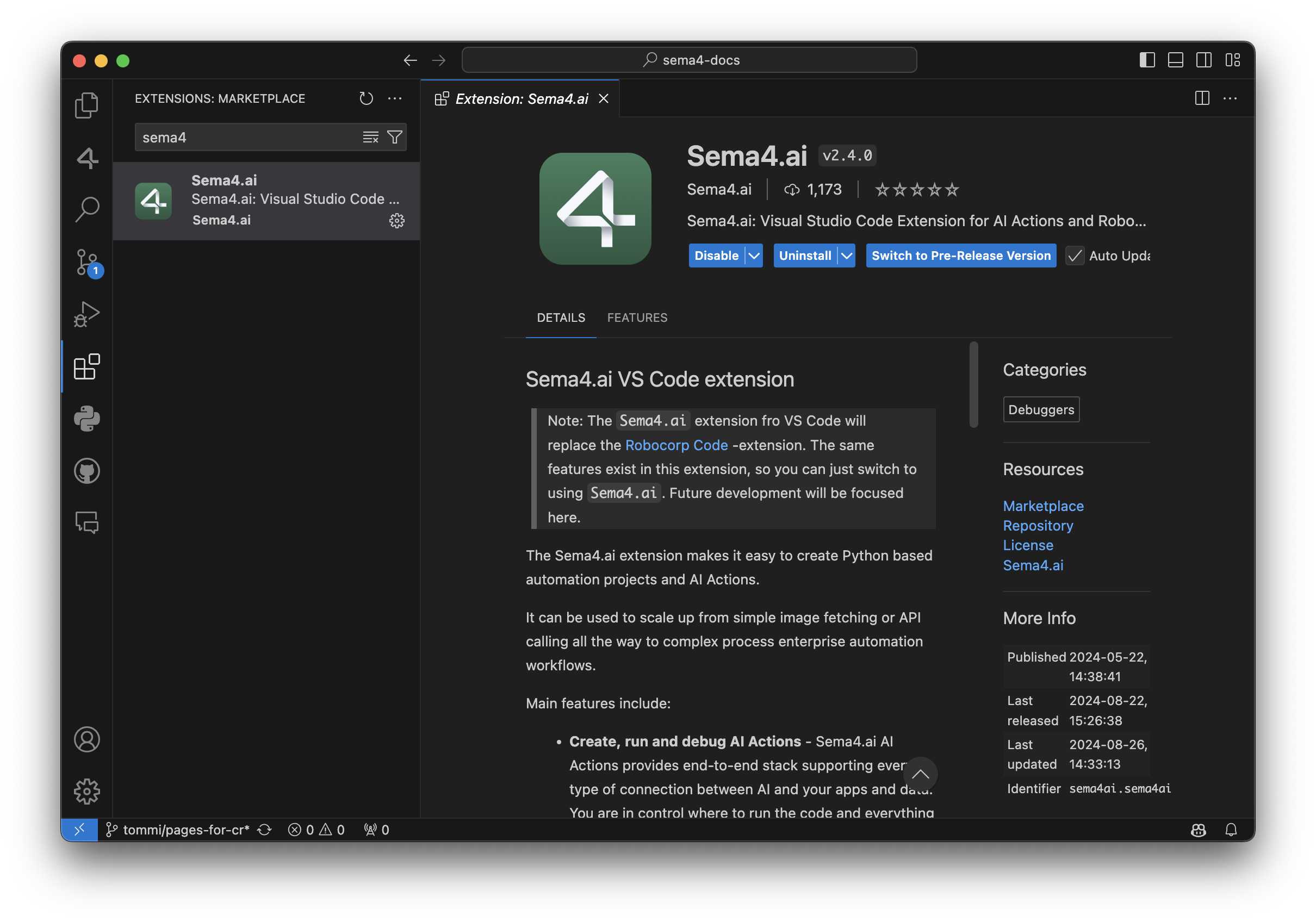
Robocorp Code is deprecated and will not receive any updates after September 30, 2024. Please make sure to install the new Sema4.ai extension by this date. This change has no impact on your current automations deployed to the Control Room - they continue to operate normally.
Apart from supporting everything the automation developer needs for building the Tasks, here are some recent additions:
-
AI Actions complete workflow: from bootstrapping from the provided templates to debugging to publishing them to Sema4.ai Studio.
-
Completely renewed inspectors and recorders for web, Windows, Java and image-based automations. Have a look at the recording of our recent Product Hour Live for all the details.
-
Better environment management when working on Python - when you change any dependencies, it’ll ask if you want to update the environment.
For a detailed list of features, visit the change log.
Rebranding AI Actions and Action Server
Thank you to the community members for the great feedback during the developer preview period. You all helped us shape the Actions and Action Server to be a top-notch method for connecting new capabilities to AI agents.
To prepare for general availability, we have made the following naming changes:
-
AI Actions and Action Server moved from robocorp/robocorp GitHub repository to sema4ai/actions.
-
Renamed Robocorp Action Server to Sema4.ai Action Server.
-
PyPi package changed from robocorp-actions to sema4ai-actions.
This brings slight changes to using the packages, while features remain the same or more.
Working on a Mac, you should remove the old versions and install a new:
In your Action code, the import changes like this:
We have added loads of new features in the Actions and Action Server, and here are some of the most important ones.
-
Hot reload of actions when the package directory changes
-
Support for parsing Custom Types in Action Server UI action run view
-
Console output added to Action Server UI action run view
-
Support OAuth2 secrets as Action arguments, and in the Action Server UI
-
Stable public URL link to Action Server UI if started with
--expose -
Support for action-server package build, extract, metadata, and update (for publishing to future Sema4.ai products)
-
Automatic version handling by the Sema4.ai platform
-
Customizable action display names in openapi.json using
@action(display_name="<Action name>") -
An environment built only once, no longer checked/made pristine on server start to save time
For full details, have a look at the change log in the repository.
Early Access to AI Agents
We are excited to bring you the best of automation and unlock your journey towards AI Agents. To stay updated on the new releases from Sema4.ai, sign up for early access to Sema4.ai Agents here.

🎉 RPA Framework 28.6.2
-
Update
rpaframework-coreto version 11.3.3 includingwebdriver-managerupgrade to version 4.0.2. This should fix the issue with downloading the latest Chrome driver version. -
(in rpaframework 28.6.1) Library RPA.Robocorp.Vault (#1199): Proper error message if caused by SSL truststore patching bug.
Couple of reminders when using Selenium browsers and handling webdrivers:
-
the matching webdriver can be always placed into robot root folder and that will be used if it is compatible with the selected browser (can be downloaded from here). BUT remember that open_available_browser method will automatically try to download and use correct webdriver
-
the Chrome's new search engine selection startup popup can be bypassed by giving argument for the Chrome (examples in Python and Robot Framework syntax)
Python
Robot Framework
🏗️ Robocorp Setup Utility v1.7.1
More and more complex enterprise setups highlighting improvement points for configuring networks and Workers.
-
Added the ability for users to delete profile from Profile Management
-
Added the ability to remove .service.json file if the user wants to
-
The Worker configuration changes are disabled in the interface
Download from here and check our documentation here.
Have a splendid day! 🚀