
Release Notes
🎉 RPA Framework 28.6.0
-
Library RPA.Browser.Selenium (#1191):
- Fix/workaround for Chromium browser all instances not closing after the run. Which affects methods
open_available_browserandopen_chrome_browser. The default behavior can be changed with new parametersandbox=True.
- Fix/workaround for Chromium browser all instances not closing after the run. Which affects methods
-
Library RPA.Excel.Application (#1191):
-
Enhance
findwith new parameterssearch_type,start_after, andexact -
Allow
open_workbookto load workbooks from URLs -
Improve all
RPA.*.Application.quit_applicationmethods to perform garbage collection before callingapp.quit()to avoid problem with unreleased COM objects -
Add
rgb_to_excel_color(red, green, blue)method to get a suitable color value forRange.Font.ColorandRange.Interior.Color
-
🚀 Java Inspector added to VS Code extension
👉 Our next Product Hour Live session on April 24th will dive deeper into Inspectors so join us there.
The complete Inspector set is now available in the VS Code Extension, as we've added the Java Inspector and Image-based locator support.
The creation of Java locators is quite similar to that of Windows locators. You can hover over elements to pick items and then browse the element tree in the Inspector. Create locators out of rules on the UI or write the locator directly and test. We do not yet have the code generation available in the Inspector, but that is simple enough in the VS Code code editor.
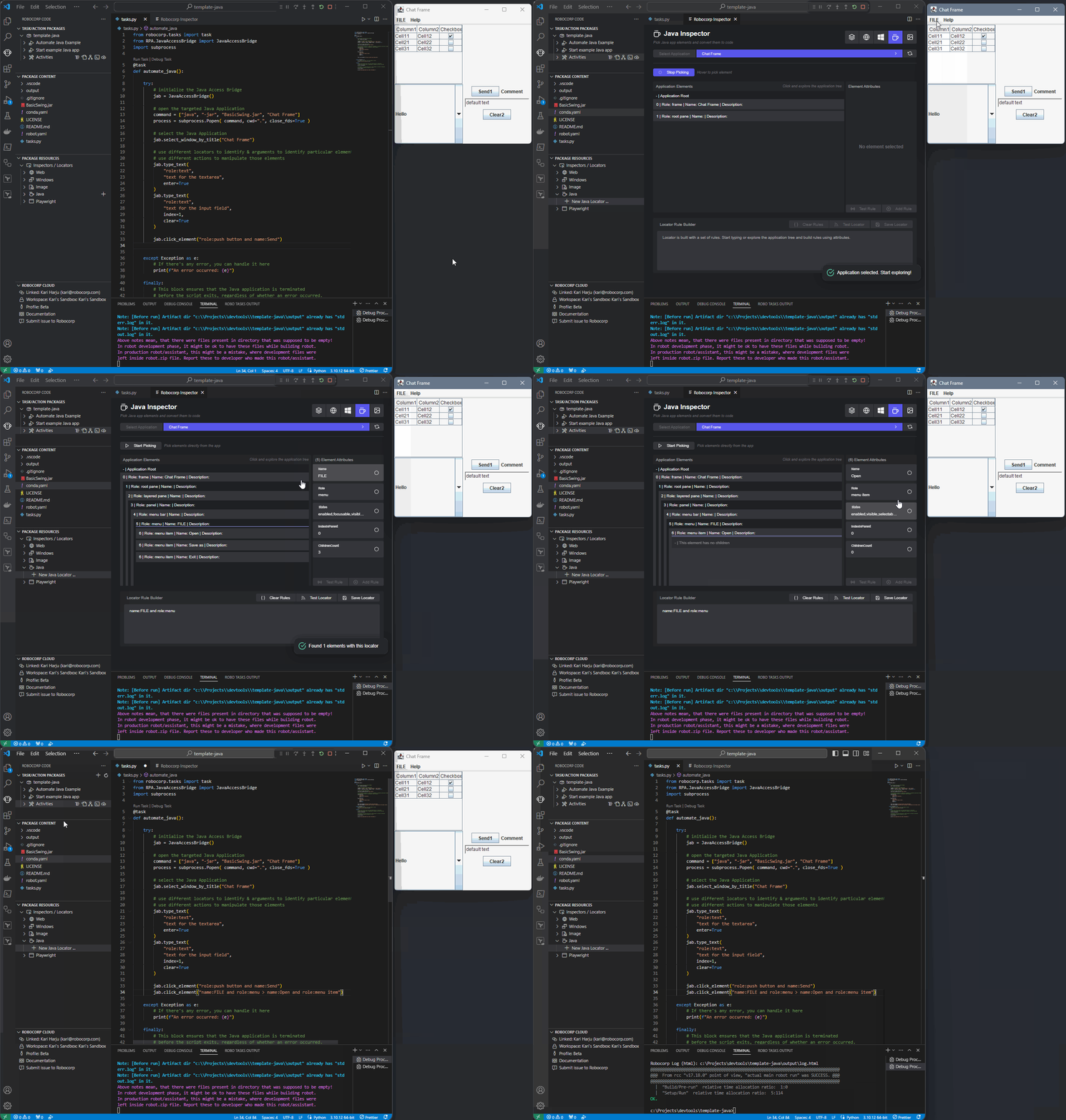
👉 Checkout our documentation on the new Inspectors for details
We have also integrated the Image-based locator support in the VS Code extension. As before, we see Image-based automation as a last resort, so we heavily recommend trying out the other types of locators and even hotkey sending before returning to image-based automations.
🎉 RPA Framework 28.4.0 and rpaframework-google 9.0.0
-
Library RPA.Word.Application (#1159):
-
Add keyword
Select current paragraphfor selecting the current paragraph. -
Add keyword
Select paragraphsfor selecting previous/next paragraphs. -
Add keyword
Copy selection to clipboardfor copying the selection to the clipboard.
-
-
Library RPA.Excel.Application (#1158):
-
Add keyword
Remove hidden columns and rowsfrom given range. -
Add keyword
Merge rangefor merging cells in a range. -
Add keyword
Unmerge rangefor unmerging cells in a range.
-
-
Library RPA.Cloud.Google (#1157, rpaframework-google 9.0.0):
-
Fix problem with method intellisense in Python development environments.
-
Add keyword
Detect Tablesfor detecting table-like structures in spreadsheet’s sheets. -
Add keyword
Get Sheet Formulasfor getting formulas from a sheet. -
Add keyword
To A1 notationfor converting column number to A1 notation.
-
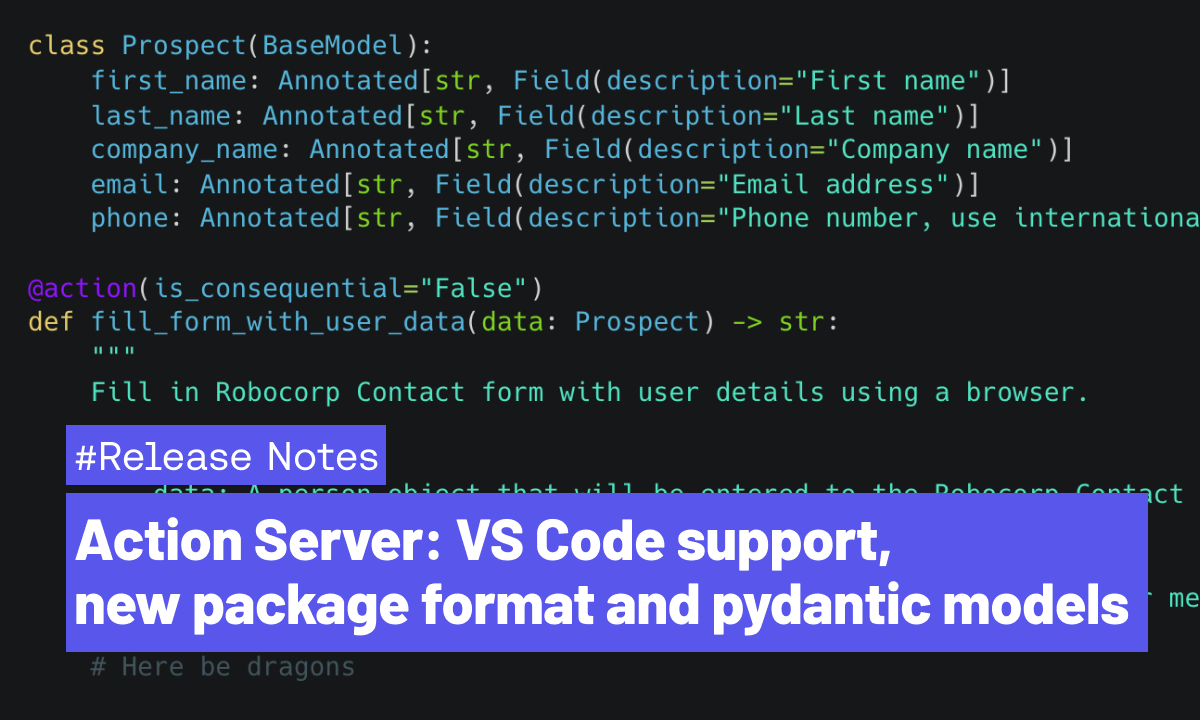
Action Server: VS Code support, new package format and pydantic models
Action Server is developing fast towards general availability, with 10 releases in the past 7 weeks! It's time for a recap of the biggest new features and updates. To follow the plans and progress in detail, head to the GitHub Project, and check out the changelog.
New Action Package format
We've introduced a new configuration file and format: package.yaml. It replaces the previous conda.yaml (and other) files, and simplifies the configuration of Action Packages along with their Python environments to a single file.
Run command action-server package --update in your project folder to automatically upgrade to a new format.
Robocorp Code for VS Code supports Actions
We've added proper support for developing Actions (and Packages) to our VS Code extension. You can now access commands like Create Action Package, Run and Debug Action from the Command Palette.

In addition, you can now start the Action Server locally from VS Code. When running Actions, VS Code helps you create test inputs in devdata folder so that you don't need to repeat giving the inputs separately every time.
Custom data models as Action inputs and outputs
You can now use custom pydantic models as inputs/outputs of an @action. This opens many possibilities besides previously supported simple str, int, float and bool. Most commonly used LLMs create solid JSON inputs for function/tool/action calls; supporting those now in the Actions is a breeze.
For example you could define a class for "Prospect" like this
Then you can use it as an input argument in one or more actions just like this:
When using the Annotated types shown above, you only need to describe the fields once in your custom model, and they will be automatically included in the OpenAPI spec that gets exposed to AI Assistants like Custom GPT. Check out this cookbook example on how to use custom models, or head over to our Youtube channel for a video on how to use the Actions with OpenAI Custom GPTs!
ReMark Widget now available inside the documentation
Robocorp ReMark - Generative AI assistant is now available as a widget inside Robocorp Documentation and Portal 🎉
The new widget streamlines your workflow while browsing the documentation. You can get help from ReMark for multiple topics for your automation projects. ReMark can help you generate and debug Python code, tailored for automation use cases. It recognizes the page you are browsing and automatically suggests questions you might be interested in.
Benefits of the ReMark widget
-
Smooth operation while browsing the documentation without the need to jump to a separate page
-
Recognition of the content you are browsing - automatically suggests topics you might be interested in
-
Available instantly when you need it and can be minimized when not needed
-
Easy to continue the conversation at the full page site, your conversations from the widget all land to ReMark.
Check it out e.g. here, the bottom right corner: https://robocorp.com/docs
🎉 RPA Framework 28.3.0
-
Library RPA.Excel.Application (#1152): Add keyword
Write data to rangefor writing data to range(s) in a spreadsheet. This will be significantly faster than usingWrite to cellskeyword for large data sets. -
Library RPA.Word.Application (#1152):
-
Add keywords starting with
Move_for positioning cursor position in a document. -
Add keyword
Find textfor finding text in a document. -
Add keyword
Paste from clipboardfor pasting text from clipboard to a current cursor position. -
Add keyword
Get current lineto get text from the current line. -
Add keyword
Get number of linesto get number of lines in a current document. -
Refactor keyword
Write textto take cursor positioning into consideration.
EU1 Database update completed
EU1 instance (cloud.robocorp.com) database has now been updated and the maintenance window is over. Update was started at 10:28 EET and completed 10:52 EET. Everything should now be operating normally.
EU1 Database update
Reminder related to the comms we sent out 2 weeks ago: we're performing a mandatory database update on EU1 instance (cloud.robocorp.com) which will have an impact on the system usage. This can show up as e.g. errors on UI or some API calls failing, and even some runs failing altogether. Runtime environments for robots runs are not directly impacted at all. Some robot operations like accessing the Vault can be interrupted.
We’re working to minimise the impact on customer operations. The actual update should not take more than 15mins.
The update will be performed between 10:00 and 13:00 EET on 21.02.2024
🚀 New Inspectors for Windows and Browser automations 🚀
Robocorp Inspector includes Locator Manager, which streamlines the process, allowing you to edit, validate, and delete locators—all within a single, integrated package inside our Robocorp Code extension for VS Code, eliminating additional installation steps.
In our Inspectors, we balance recording, automatic locator generation, and giving the full power to the developer also to solve complex cases. The recording and UI are there to help and make the simple cases… well, simple, but it also allows you to directly edit and write the locator yourself and use the validation tools to see the results.
🪟 For Windows automations
✅ Parent-Child Rule Creation: Effortlessly define relationships between elements to enhance accuracy.
✅ Interactive Field Selection: Directly select fields to create rules, eliminating guesswork.
✅ Real-Time Validation: Instantly verify the effectiveness of your locators to ensure reliability.
✅ Screenshot Capture: Automatically save screenshots for reference, providing a visual confirmation of your locator.
🌐 For browser automations
✅ Recording: Seamlessly record your browser activities, and the Inspector generates accurate locators on the fly
✅ Strategy Adjustment: Switch between locator strategies and methods flexibly, ensuring the most robust solution for your needs.
✅ Locator Validation: Validate your locators within the tool quickly, ensuring optimal performance
✅ Code Generation: Copy and paste generated Python code directly into your project, saving time and reducing the potential for errors
✅ Screenshot Capture: Automatically takes screenshots to help recall the associated elements for your stored locators
...Image and Java locator supports will be following shortly.
Embracing Python for Automation-as-Code
TL;DR: We are transitioning from Robot Framework and moving all our focus to Python. Existing bots developed in Robot Framework will continue to operate as usual. We'll provide critical updates related to Robot Framework-specific issues until Feb 15th 2025, according to our one-year LTS plan for Enterprise customers. All our new developments will be directed towards Python's dynamic and expansive ecosystem. We recommend our users develop all new automations on Python.
Robocorp platform will be Python-only
Advancements in Generative AI and LLMs have revolutionised how we approach problem-solving and automation. We realized the potential of Python as a language for automation and AI early. Last year, we announced that we invested heavily in Python on our platform, ensuring that, at minimum, everything that was possible using Robot Framework would be available for Python developers. We have reached that date now.
👉 Today marks a significant milestone in our platform's evolution. As part of this transition, we're announcing discontinuing support for Robot Framework on the Robocorp platform. While we will continue to offer bug fixes and security updates for Robot Framework related features until February 15th, 2025, official support will cease thereafter. It's crucial to understand that automations developed with Robot Framework will remain fully functional within the Robocorp ecosystem. 👈
Robot Framework has served us well, providing a solid foundation for automation - all based on Python. However, by focusing on Python only, we allow our customers to enjoy scale and speed that only comes with an ecosystem as vibrant as Python.
What will happen in detail?
There is no immediate impact on existing bots: Automations built on Robot Framework will continue functioning as usual, ensuring your ongoing operations are not disrupted.
We announce a deprecation of Robot Framework on the Robocorp platform on Feb 15th 2024, with one-year long term support guaranteed for Enterprise customers (until Feb 15th 2025). The old Robot Framework bots will continue working even after this; we simply do not issue fixes to Robot Framework-related tooling anymore.
Our developer tooling going forward only supports Python. However, we will issue CVE fixes for the following year.
-
Language Server Protocol (LSP) for Robot Framework extension for VS Code remains open-source and available, but we cease to support new features or new versions of Robot Framework.
-
Robocorp Code Extension will support only Python code generation in the inspectors/recorders and its other features. The same will apply to the ReMark developer AI assistant.
-
Our documentation site will be focused on Python tutorials and examples. However, we will keep a snapshot of current Robot Framework examples and docs until 2025.
We will restructure our automation libraries over time to focus on Python and to remove the dependency on Robot Framework that exists today in RPA Framework. This work was already started mid 2023 with the introduction of robocorp libraries. See details of all automation libraries here.
-
RPA Framework (our open-source project with the automation keywords many of our users have gotten familiar with) remains available and supports RPA use-cases (like Java apps, Excel, Outlook, PDFs and much more). However, examples and documentation are added only in Python going forward.
-
Some RPA Framework libraries will be deprecated as there are better ways to accomplish the same functionality directly with well-maintained Python libraries. This will be communicated later.
Our recommendation for action
While there are no immediate consequences to currently running Robot Framework bots, we recommend our customers take the following action:
-
Start developing new automation workflows in Python. All three certification courses are available now in Python and are a great starting point for developers.
-
Review the “Switch to Python” page for detailed instructions on what is new, and decide if your organisation will implement any existing Robot Framework automations in Python. We do not require this, but in some cases, it will help with maintenance.
Relevant links
Worker v7.6.3
Updates:
-
When the "use desktop" option is enabled from Control Room, create a proxy executor only when the worker is running with "--service" CLI argument
-
By default a service created with Service Helper "setup-desktop" command will set the worker to run with this argument
-
Better error handling when fetching CA certificates from system store
You can find the detailed changelog for Workforce Agent Core here.
🎉 RPA Framework 28.2.0
-
Library RPA.Excel.Application (#1149):
-
Add new keyword
Create Pivot Fieldfor creating pivot fields for the pivot table. -
Add new keyword
Create Pivot Tablefor creating pivot tables in a spreadsheet. -
Add new keyword
Create Tablefor creating a table in a spreadsheet. -
Add new keyword
Findfor finding a value in a range. -
Add new keyword
Get Pivot Tablesfor getting pivot tables in a spreadsheet. -
Add new keyword
Get Rangefor getting a range in a spreadsheet. -
Add new keyword
List Tablesfor listing tables in a spreadsheet. -
For all RPA.*.Application libraries (#1149): Add new utility keyword for Robot Framework syntax
Set Object Property -
Security dependency fix given the bump of
cryptographypackage to version 42.0.2. (#1149)
Read pull requests linked above for more information.
Control Room: Disable Processes and API for Git References
Enable/Disable Processes
You can now disable (and enable) any Process in the Control Room: useful if the process targets a system that needs maintenance and you don't want to run automations needlessly. Disabling the process will prevent the start of new runs via the UI, API, schedules or triggers. Any ongoing runs will progress as usual until completed.
Here's how it works:
Git Task Package Update via API
For the Task Packages connected to Github or Gitlab, you can now programmatically update the Git reference (tag, commit or branch) via the API. This makes it much easier to roll out task package updates as part of your CI / CD pipeline. Read more from the API docs.
Control Room: Enable / Disable Workers, new MFA option
In this release, we are introducing Enable / Disable for Workers to make maintenance operations more convenient, a new self-service option for MFA, along with some UX updates.
Enable / Disable Workers
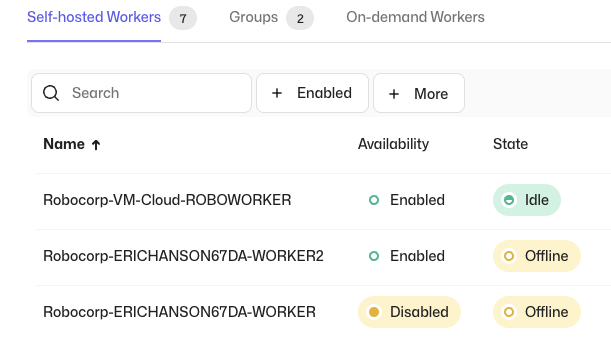
Due to popular demand, we have added a functionality that lets you temporarily disable Workers. Any ongoing work at the time of disabling the worker will be completed, but new work will not be allocated to this Worker while the status persists. This enables you to conveniently do maintenance operations, e.g., updating Workers or target systems, without having to change the related process configurations. When the Worker is re-enabled, it will continue processing the pending work.
When disabling a Worker, you can optionally enter a reason, which will be visible in the Worker Event Log. Also the related events are generated in the Workspace Audit Log, along with the information of the actor.
Self-service option for MFA

We have added a new self-service option for MFA, which lets you to require entering an authenticator code to be able to access the Control Room to enable an additional layer of security. The MFA can be enabled from the user settings, after which you will be guided through the setup. Organization and Workspace administrators are able to see which users have the MFA enabled from the member list.
Features
- Enable / Disable Workers
- Self-service option for MFA
Updates
- UX Improvements:
- Settings pages have been updated to match the rest of the Control Room
- You can now select a role when inviting users to an Organization
Connect Action Servers to ReMark
Your friendly code gen assistant ReMark is a bit better again! Apart from tweaks and minor fixes, we’ve done two bigger things, both visible in the screenshot below.
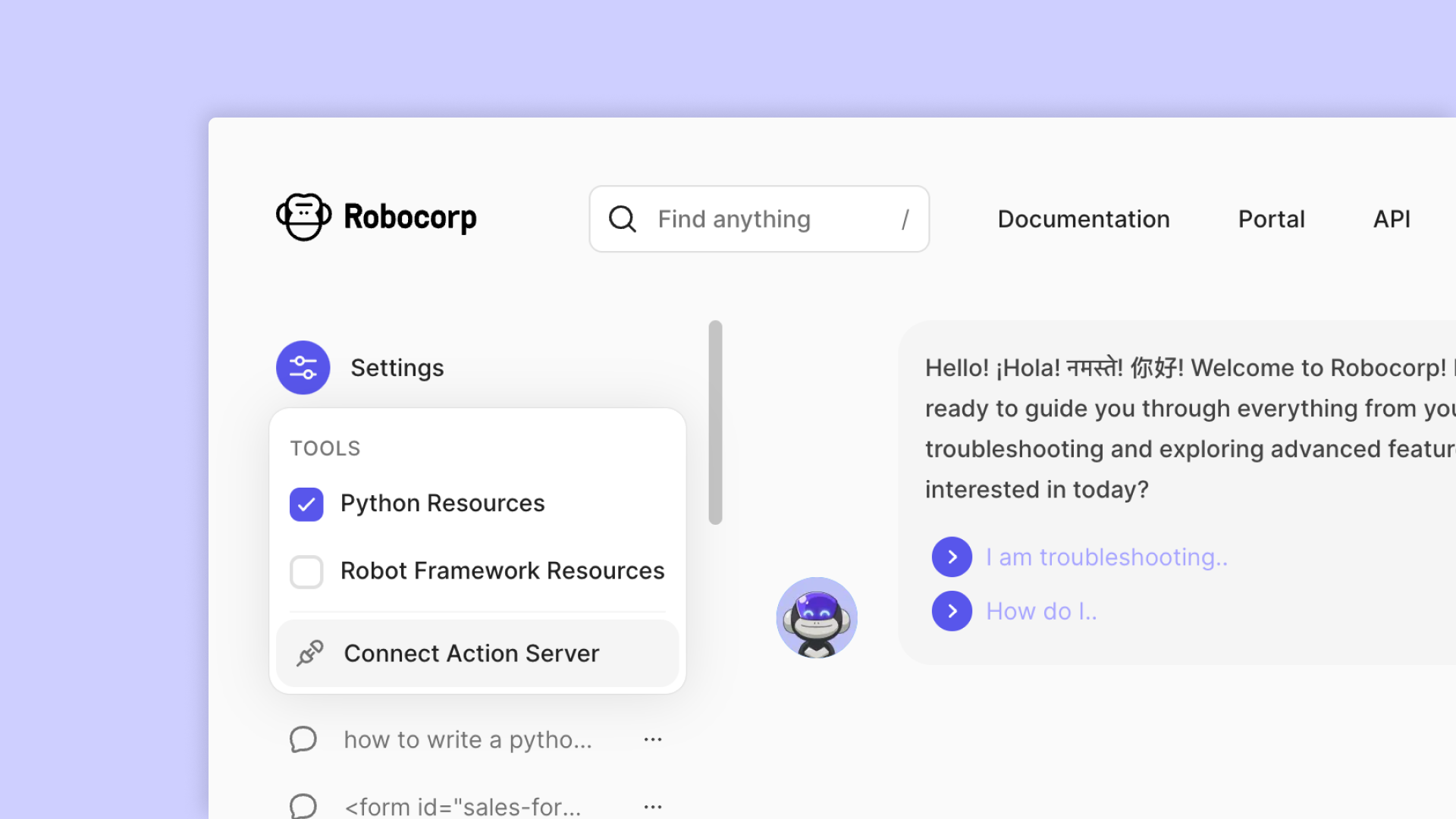
Connect Action Server
Last week, we released the developer preview of Action Server. This new feature allows you to create AI Actions that interact with any data or application and connect them with any AI App and Agent framework, such as GPTs and LangChain.
⭐ Please leave a star to Action Server project in GitHub, and help us keep building open-source!
Testing your AI Actions run with Action Server is now possible with ReMark! Just hit “Connect Action Server”, then copy-paste the exposed URL and bearer token that you’ll get when starting the Action Server with action-server start --expose , and you are good to go! This is a handy way to test things while developing new AI Actions.
Reorganised “tool” collections
Remember that we created separate tools from different source data types, like Python docs, Robot Framework docs, API specs, etc. While moving over to agent/tool architecture has been great, it wasn’t optimal. So we went halfway back. 😎
There are now just two instead of multiple tools (or source data collections). These two highlight the biggest “choice” our users make: whether to build bots on Python or Robot Framework language. The generic source data is replicated on both collections, with the only difference being that they aim to serve you better than before, prioritizing the language (and examples) of your choice.
Features
- Connect Actions Server to ReMark
Updates
- Reorganised RAG data sources to two main collections: Python and Robot Framework
🎉 rpaframework-google 8.2.0
17 Jan 2024
- Library RPA.Cloud.Google (#1145,
rpaframework-google8.2.0): - All
init_keywords will return initializedserviceinstance. - Library level documentation refactoring. Authentication related examples are now in their own markdown file.
See Github pull request for more details on the release.
AI Actions and the Action Server Community Release
We're thrilled to introduce a new addition to the Robocorp platform: AI Actions and the Action Server. You can think of AI actions as the connective tissue between AI agents and your applications and data.
These new features are available as a developer preview for the community and are fully open-source under the Apache 2.0 license.
Developers can now create AI Actions that interact with any data or application, along with our low latency Action Server connecting them with any AI App and Agent framework such as GPTs and LangChain.
Given the recent release of the OpenAI GPT Store, and the success of AI app frameworks like LangChain, developers are looking for ways to integrate these with various data sources and platforms. Robocorp provides the easiest way to enable AI agents, assistants, and copilots to use custom actions, all written in Python. It’s easier than building Flask apps, or figuring out how to deploy to Vercel.
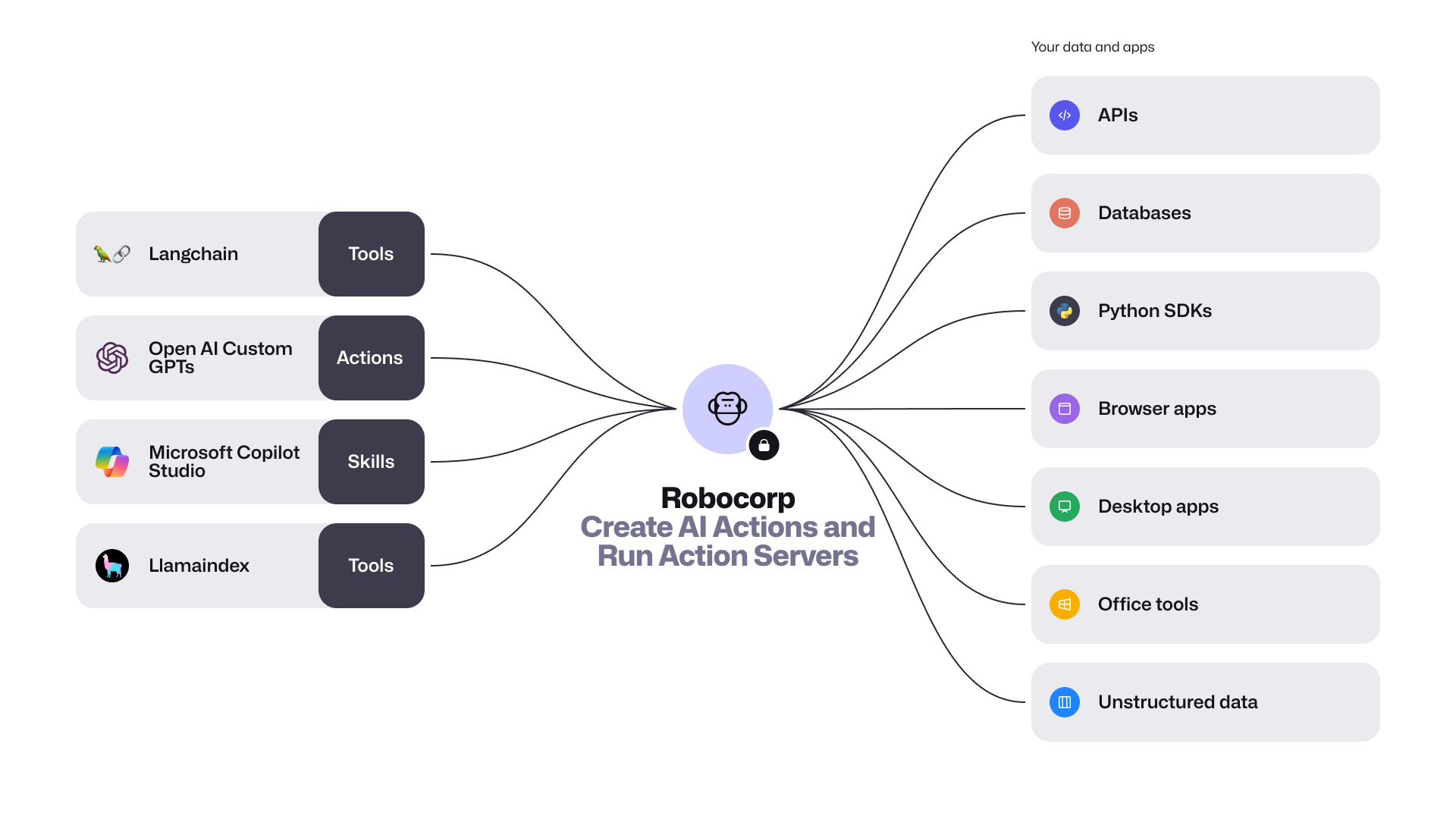
The community preview release includes the following:
-
Introducing the new package
robocorp.actionswith@actiondecorator. AI Actions are Python scripts, workflows, or automations that are securely exposed to AI apps. They are defined by their inputs and outputs, and are described in natural language. This makes it easy for AI apps to comprehend and use them. You can conveniently build and debug these actions with the Robocorp Code extension for VS Code. -
Action Server is a stand-alone executable that connects Actions with AI apps. This server automatically generates an OpenAPI specification for your Python code, allowing various AI/LLM Agents to understand and invoke your
@action. It also offers a straightforward local UI for testing and monitoring, handling the full Action lifecycle, and provides comprehensive event traceability during runs. -
LangChain Robocorp Toolkit and a template for quick startup. Extending the AI apps built with LangChain is as simple as one, two, three. The new
langchain-robocorppackage lets you import all your actions into your project effortlessly. -
Revamped Robocorp Github Repository - This is your gateway to AI Actions and open-source Python automation. We've consolidated all the key features into one repository, which includes the Python framework with automated logging, libraries for automating tasks such as browser and desktop applications, and the new Action Server.
It's time to get started! Visit the GitHub repository for more details, and don't forget to leave a ⭐ while you're there.
Control Room: Activity View and Vault API endpoints
We at Robocorp wish you a happy new year 2024! In this year's first release, we are introducing the new Activity View and Vault endpoints to the Control Room API.
Activity View
With the new Activity View, you are conveniently able to track what is going on in all of your Workspace from a single view.
You can see the status of the recent Process Runs, Step Runs and Assistant Runs, and also see what's going to be run next from the Scheduled Runs tab. With filters and search, you are able to filter e.g. all Failed runs, which will streamline the exception handling and troubleshooting flows.
API endpoints for Vault
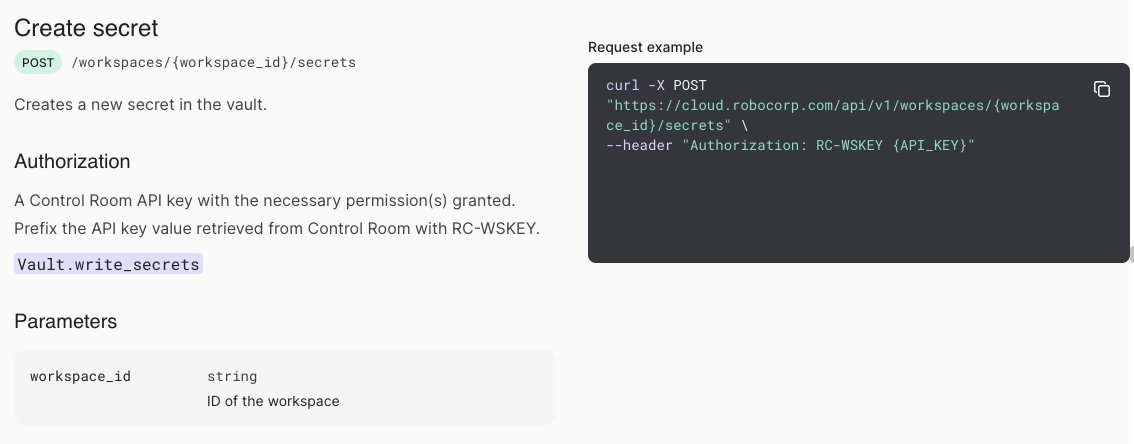
To cover more use cases with the Control Room API, we have added new endpoints that you can use to create and update Vault secrets. This will enable you to programmatically manage your secrets, e.g. by automating credential updates.
For more information about the new Vault API, see the API documentation.
Features
- Activity View
- New API endpoints for Vault
- Account Member Management for Partners
🎉 RPA Framework 28.1.0
- Library RPA.Outlook.Application (#1144): Add
reply_toandcheck_namesparameters forSend Email.
Check Github PR for more details on these parameters.
Robocorp Code extension v1.14.5
A lot of improvements based on feedback to the new Web and Windows Inspectors
-
Web inspector:
- Test locators with a push of a button on all views.
- Support iframes
- Detect page changes
- Define target webpage over inspections
- UX improvements
-
Windows Inspector:
- Always provide the main application locator code line
- UX improvements
-
SideBar renaming to the new terminology (from Robot -> Task Package/Tasks/etc.)
Full changelog here