
Release Notes
ReMark Widget now available inside the documentation
Robocorp ReMark - Generative AI assistant is now available as a widget inside Robocorp Documentation and Portal 🎉
The new widget streamlines your workflow while browsing the documentation. You can get help from ReMark for multiple topics for your automation projects. ReMark can help you generate and debug Python code, tailored for automation use cases. It recognizes the page you are browsing and automatically suggests questions you might be interested in.
Benefits of the ReMark widget
-
Smooth operation while browsing the documentation without the need to jump to a separate page
-
Recognition of the content you are browsing - automatically suggests topics you might be interested in
-
Available instantly when you need it and can be minimized when not needed
-
Easy to continue the conversation at the full page site, your conversations from the widget all land to ReMark.
Check it out e.g. here, the bottom right corner: https://robocorp.com/docs
🎉 RPA Framework 26.0.1
- Library RPA.Browser.Selenium (#1059): Fix webdriver management and automation issues related to Edge in IE mode. Updated Portal example: https://robocorp.com/portal/robot/robocorp/example-ie-mode-edge
🎉 RPA Framework 26.0.0
-
Library RPA.Browser.Selenium (#1058):
-
Fixed options passing with Firefox. (when a binary location is specified)
-
General improvements to RPA.*.Application libraries (#1055):
-
All: Better error handling (COM -> runtime), improved generic docs and troubleshooting guiding, fixed document closing (if was closed already) and app open/quit management, improved warnings and logging, file paths are tested for existence when operating on documents and raise errors in their absence.
-
Excel:
-
Removed deprecated parameter tabname from
Add New Sheet. (use sheetname) -
Save Excel Asraises when there’s no workbook open. (useOpen Workbookfirst) -
Outlook:
-
Removed deprecated keywords:
Send Message(useSend Email) andWait For Message(useWait For Email).
⚠️ Breaking changes in the Application libraries listed above.
🎉 RPA Framework 25.0.1
🎉 RPA Framework 24.1.2
- Library RPA.Robocorp.Storage (
robocorp-storage0.3.2): Fix bug when retrieving assets containing spaces in their names.
🎉 RPA Framework 24.1.1
- Library RPA.Browser.Selenium (#1035;
rpaframework-core11.0.5): Fix chromedriver download issues with Chrome 115 and over.
🎉 RPA Framework 24.1.0
-
Library RPA.Browser.Selenium (#1021;
rpaframework-core11.0.4): -
Correctly handles and downloads a valid existing webdriver version when there’s a need for one.
-
Ability to provide a default browser binary location with the RPA_SELENIUM_BINARY_LOCATION environment variable. (useful when the webdriver isn’t able to automatically detect and start your system browser)
-
Portal example taking these into use: here
-
Library RPA.Browser.Playwright: Renders documentation for
robotframework-browser==17.1.0.
🎉 RPA Framework 23.2.0
-
Library RPA.Browser.* (#974):
-
Selenium:
-
Fix bug with detecting the right web-driver version for download on systems having Chromium installed instead of Chrome. (#949)
-
Add support for operating on shadow DOMs within the
Get WebElementkeyword. (#941) -
Playwright:
-
Upgrade version and documentation to the latest robotframework-browser 16.2.0. (#942)
-
Automatic headless detection when running on systems without UI, including our Cloud Worker (Linux container). (#166)
🎉 RPA Framework 23.1.0
- Library RPA.Browser.Selenium (#943):
- New keyword
Click Element When Clickablewhich tries to overcome errors like “Other element would receive the click”. (#884) - New keyword
Set Element Attributewhich sets an attribute value to an element retrievable withGet Element Attribute. (#762) - Setting a custom download directory is now supported by all Chromium-based browsers and Firefox. Use
Set Download Directorybefore opening any browser instance in order to set such a custom path. (this should be working now in both headful and headless modes; #882) - Custom user profiles (and common configuration) can be used with all Chromium-based browsers, like Chrome, Edge. (#865)
- Improved main library documentation, accepting both WebElement and str as locator types under our keywords as well. (#940, #939)
Robot templates update 🤖
Robot Templates coming via RCC and VS Code are now "renamed" a bit, and we have a simple landing page for templates to explain a bit more and have links to their Portal pages.
The highlight item is the new template Producer-Consumer Extended, which extends the Producer-Consumer template by showcasing a third step for reporting, examples for starting your own Python library, more extensive exception handling, etc.
The template list from RCC looks like this:
👉 Reminder that Robocorp Portal is full of open-source robots that can work as a jumping off point, so check it out.
🎉 RPA Framework 22.5.0
- Library RPA.Windows (
rpaframework-windows7.3.0; #912): - Our Windows elements recorder (windows-recorder) supports path: strategy display when run with verbosity on. (
-vflag) - Keyword
Print Treenow displays the path: strategy locator alongside printed controls and flattened-by-level returned elements. - Keyword
Set Valuesupports value validation customization through the validator parameter.
Check our visually detailed Portal example in order to learn more about element paths and how to use the recorder: this Portal example
🎉 rpaframework 21.1.0
- Library RPA.DocumentAI.Base64AI (#803): Support for signature matching on image documents with the following newly added keywords:
Get Matching Signatures: Detects and returns signatures and their similarity.Filter Matching Signatures: Keeps relevant and alike signatures only.Get Signature Image: Saves signature’s image for manual inspection.- Portal example: https://github.com/robocorp/example-signature-match-assistant
- Global fix with retrieving the output directory path.
🎉 rpaframework 21.0.0
⚠️ Warning
Multiple breaking changes below!
-
Library RPA.Cloud.Azure (#635):
- robocloud_vault_name -> robocorp_vault_name
- use_robocloud_vault -> use_robocorp_vault
Set Robocloud Vault->Set Robocorp Vault
-
Library RPA.Cloud.Google (#794;
rpaframework-google7.0.0):RPA.Robocloud.Secrets->RPA.Robocorp.Vault
-
Library RPA.PDF (#785;
rpaframework-pdf7.0.1):- Keyword
Find Text: - Supports additional parameter ignore_case, which if set to True, will make the search case insensitive. (switch it on if you experience a different behaviour)
- Adds subtext: strategy in the passed locator which checks for a substring instead of the whole text to match.
- Keyword
-
New related Portal example for parsing PDF invoices: https://github.com/robocorp/example-parse-pdf-invoice
Portal got new looks and much more ✨
Our Portal has been growing fast in terms of content, now home to thousands of lines of robot code that jumpstarts your development. It was time to take it to the next level!
Design
Okay, let's get the most important updates out of the way: it now has a dark mode! 😎🕺 Joking aside, we've redesigned it from scratch with the users in mind. Hope you like it!
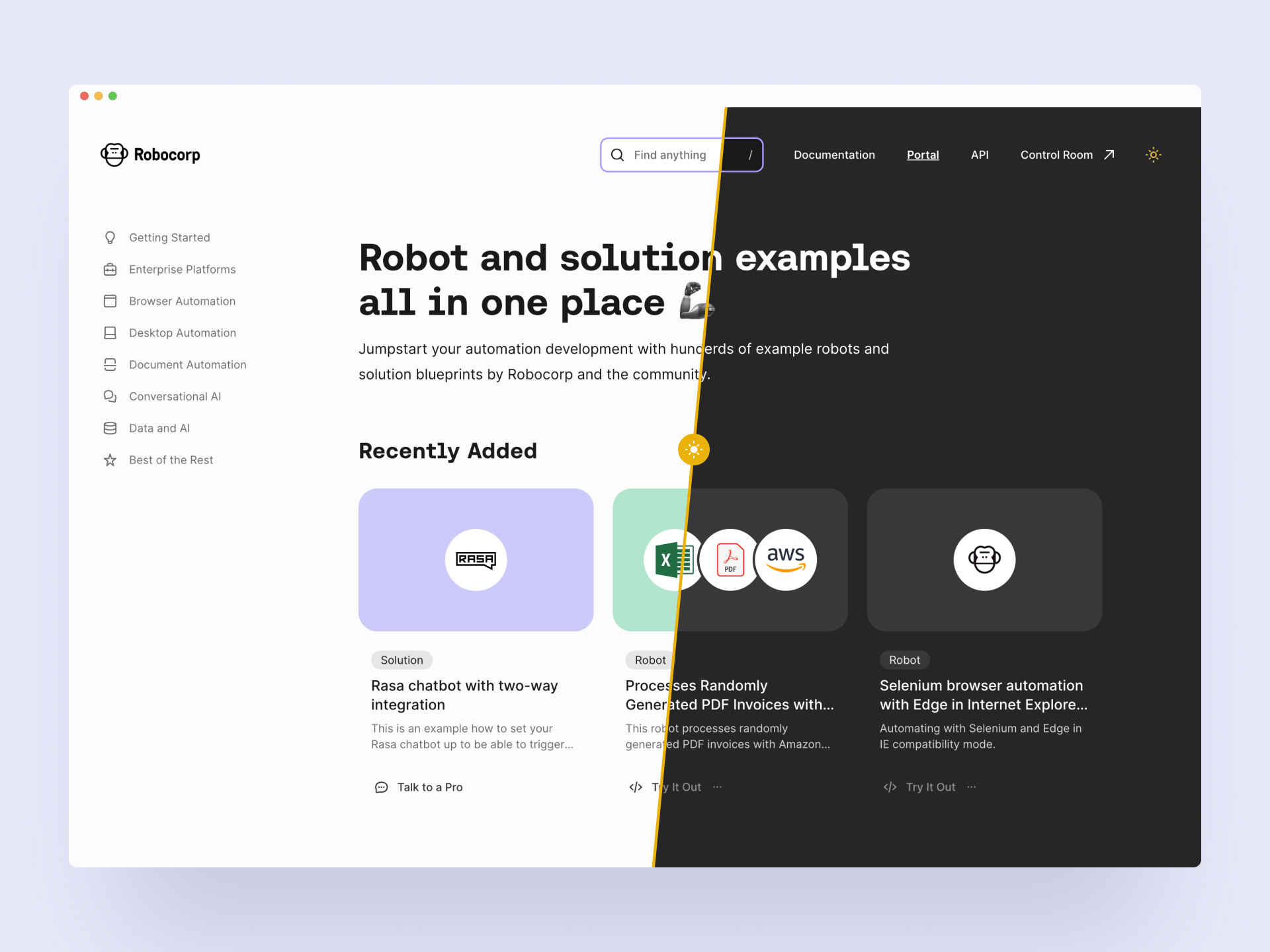
New content type: Solution
Portal still houses the robot code examples, but we've added a second content category called Solutions. These bigger pieces guide you through building your entire digital stack with Robocorp. Integrating third-party systems, reference architectures, extending the capabilities, using Control Room API and more. Robocorp + Rasa chatbots is an excellent example of a solution.
Content findability: Collections and library links
Another big update is the Collections you can see on the navigation (on the left in the big screens). This answers your call to have fast access to the content relevant to your style of automation. "Show me all you got on desktop automation now". Btw, the search is quite good, too. 🧙♀️
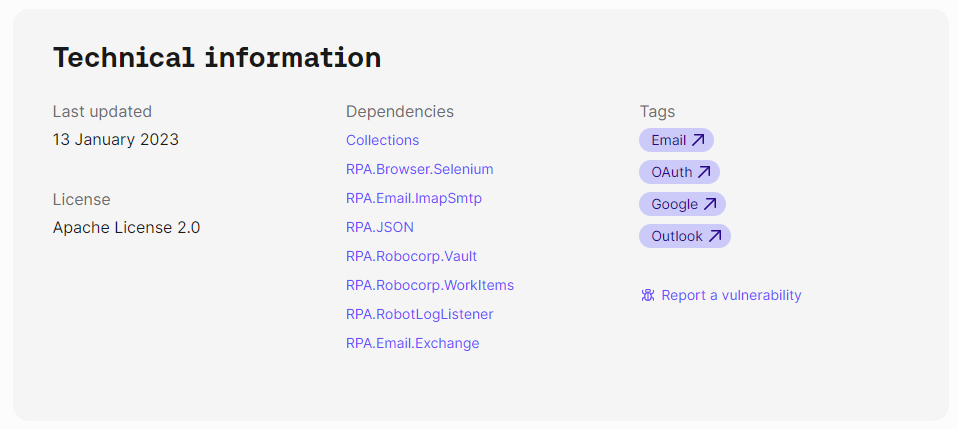
Each robot has a footer containing technical information that houses a new helpful feature: It shows the libraries that the robot uses. They are now linked to a page that contains all the other robots using the same library.
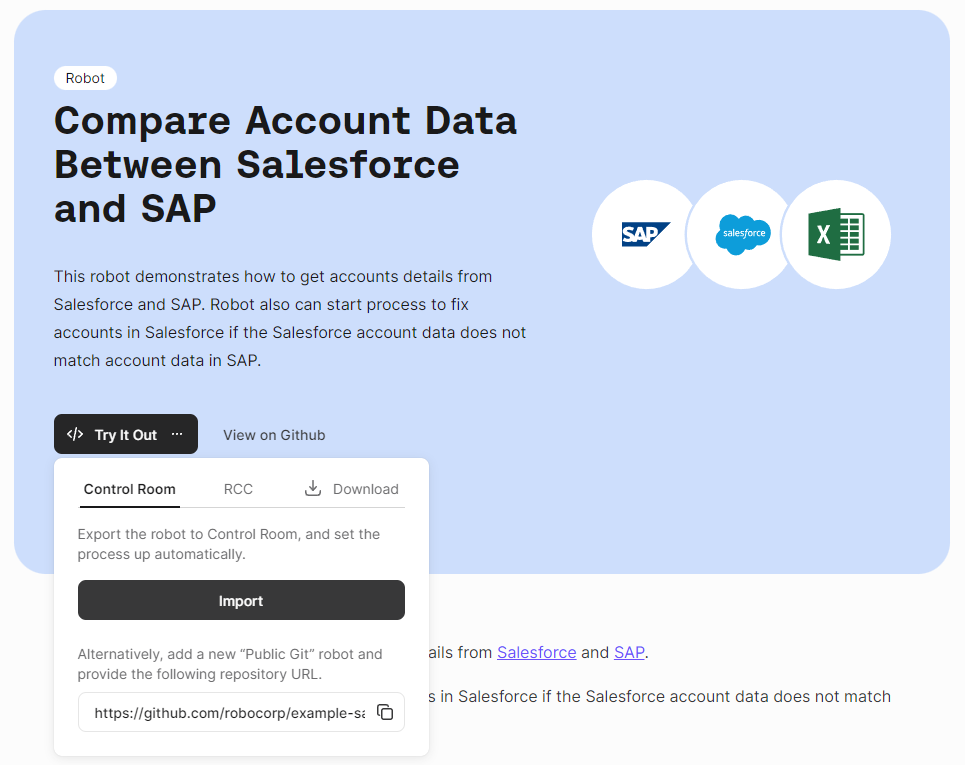
Add to Control Room
You can now add the robot directly to Control Room from the Portal. The Try It Out button's first option is "Import to Control Room", which takes you through the steps to add the robot and create a process. Handy!
We hope you enjoy the new Portal, and be sure to let us know what you think!
As a reminder, community submissions to the Portal are more than welcome, it's a great way to promote your work. We are planning to add a section to the front page that highlights the best of your bots soon! Submit your bot here.
🎉 rpaframework 20.1.0
- Library RPA.Browser.Selenium (#745): Ability to run Edge in IE compatibility mode. (robot example: https://github.com/robocorp/example-ie-mode-edge)
- Library RPA.SAP: Fix error in dependency import order in the underlying SapGuiLibrary.
🎉 rpaframework 19.4.0
- Added native OAuth2 support (#706) with the following keywords:
Generate OAuth URLGet OAuth TokenRefresh OAuth Token
Available in libraries:
- RPA.Email.Exchange (#604)
- RPA.Email.ImapSmtp (additional keyword
Generate OAuth String) - RPA.MFA (#658)
Check the updated OAuth2 E-mail sending Portal example on: https://robocorp.com/portal/robot/robocorp/example-oauth-email
New example robots in the Portal: Base64.ai and ADA
Two new reference architectures: intelligent document processing using Base64.ai, and conversational AI integration with Ada chatbots triggering digital workers with work items.
Reference architecture for Rasa chatbots triggering processes
New Portal example integrating Rasa chatbots with Digital Workers using Custom Action Server to trigger processes over Control Room API based on intent.