
Release Notes
RCC v21.3.0 released
RCC v21.3.0 is a security release. It updates two Go dependencies for CVEs reported to us, and moves the toolchain to Go 1.25.14 to pick up the current standard library fixes. Scanning v21.2.0 with govulncheck reported 22 known vulnerabilities; this build reports none.
There are no functional changes and no breaking changes in this release. Upgrading is a straight swap.
Dependency updates
Two CVEs were reported against RCC's dependencies:
- CVE-2026-56852 —
golang.org/x/text:norm.Itercan enter an infinite loop when processing input containing invalid UTF-8 bytes. Updated 0.23.0 → 0.41.0. - CVE-2026-39824 —
golang.org/x/sys:NewNTUnicodeStringdoes not check for string length overflow on Windows NT Unicode strings. Updated 0.32.0 → 0.47.0.
golang.org/x/term was updated 0.31.0 → 0.45.0 alongside these to stay in step with golang.org/x/sys.
Go standard library updates
The Go toolchain moved from 1.25.9 to 1.25.14, which resolves 20 standard library CVEs:
crypto/tls— CVE-2026-42505 (Encrypted Client Hello privacy leak), CVE-2026-56862 (post-handshake message limit)crypto/x509— CVE-2026-27145 (inefficient candidate hostname parsing)html/template— CVE-2026-39826 and CVE-2026-39823 (escaper and meta content URL bypasses), CVE-2026-56858 (JavaScript regexp context tracking)net— CVE-2026-39836 (panic on NUL byte inDial/LookupPorton Windows), CVE-2026-33811 (crash on long CNAME response)net/http— CVE-2026-33814 (HTTP/2 infinite loop on a badSETTINGS_MAX_FRAME_SIZE), CVE-2026-56853 (ReadHeaderTimeouton the unencrypted HTTP/2 check), CVE-2026-39825 (ReverseProxyquery parameter limit)net/mail— CVE-2026-42499 and CVE-2026-39820 (quadratic string concatenation)net/textproto— CVE-2026-42507 (arbitrary input included in errors without escaping)net/url— CVE-2026-56860 (quadratic complexity inresolvePath)mime— CVE-2026-42504 (quadratic complexity inWordDecoder.DecodeHeader)os— CVE-2026-39822 (root escape via symlink plus trailing slash)encoding/asn1— CVE-2026-33818 (maximum recursion depth)encoding/xml— CVE-2026-56859 (recursion depth guard during decode)golang.org/x/net/idna— CVE-2026-39821 (ASCII-only Punycode-encoded labels not rejected)
Getting v21.3.0
Signed and pre-built executables are available directly:
macOS and Windows builds are code-signed, and the macOS build is notarized. Note that RCC supports macOS on Apple Silicon only; Intel builds were discontinued in v21.0.0.
The complete changelog ships inside the executable itself — run rcc docs changelog to read the full list of changes for the version you have installed.
Robocorp VS Code Extension and Action Server rebranding to Sema4.ai
Since Robocorp was acquired by Sema4.ai in January 2024, we have been busy building the vital components of AI Agents to become generally available. You can read more about our vision for building, running, and managing enterprise AI Agents on our website.
As we gear up for our first Sema4.ai product launches, we have restructured some of the components we previously offered, without removing any features from the current Robocorp Automation platform users.
The Robocorp Code extension for VS Code has become the Sema4.ai extension for VS Code
The new Sema4.ai extension for VS Code retains all the functionality of Robocorp Code. In addition, it will get a lot of new AI agent-related features moving forward.
🔔 Your action is needed! 🔔
-
Remove the Robocorp Code extension from the VS Code. This is done by navigating to Extensions from the left sidebar, locating Robocorp Code, and clicking “Uninstall”.
-
Install the new Sema4.ai Extension from the Marketplace, or by searching for it through the VS Code Extensions panel.
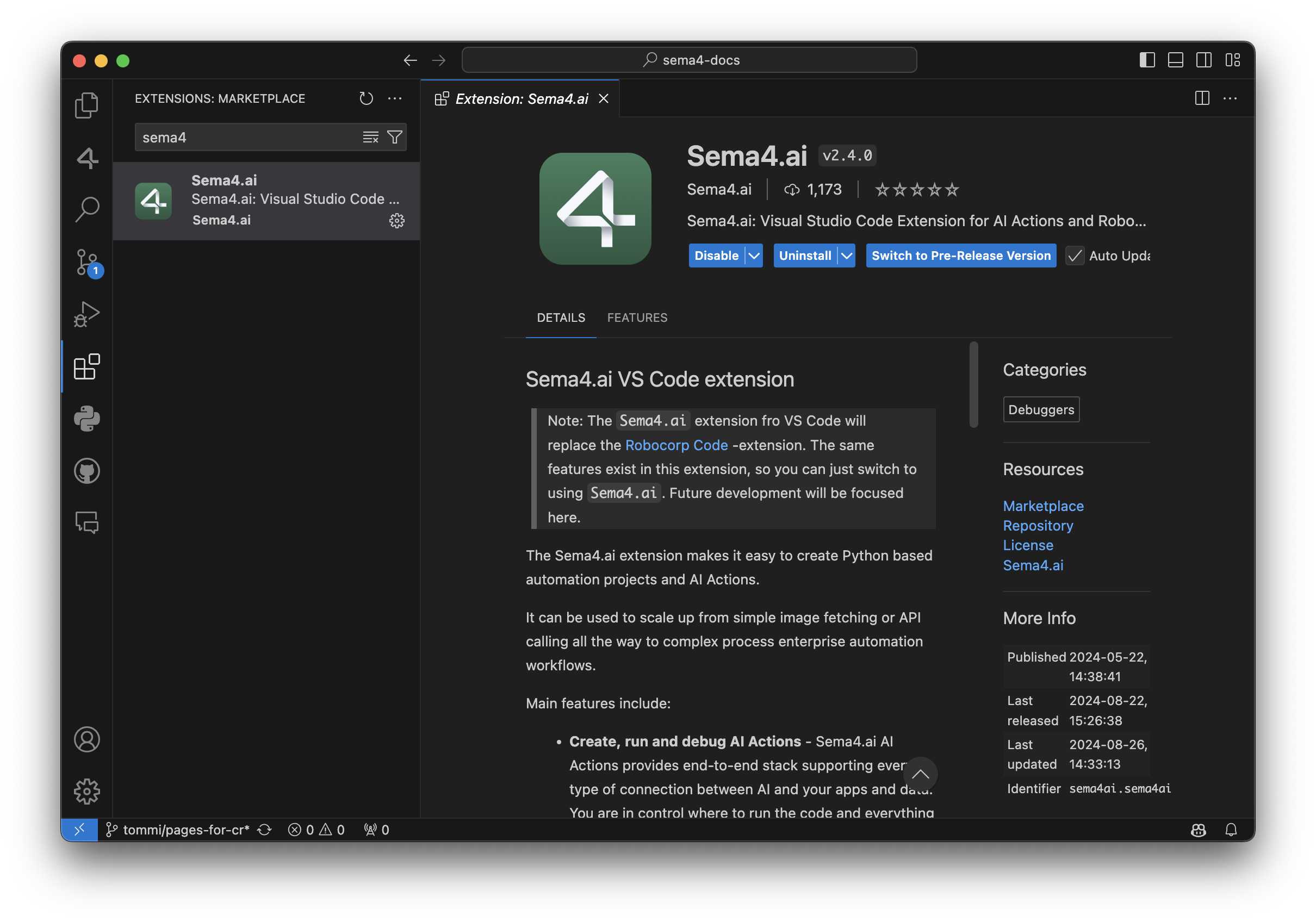
Robocorp Code is deprecated and will not receive any updates after September 30, 2024. Please make sure to install the new Sema4.ai extension by this date. This change has no impact on your current automations deployed to the Control Room - they continue to operate normally.
Apart from supporting everything the automation developer needs for building the Tasks, here are some recent additions:
-
AI Actions complete workflow: from bootstrapping from the provided templates to debugging to publishing them to Sema4.ai Studio.
-
Completely renewed inspectors and recorders for web, Windows, Java and image-based automations. Have a look at the recording of our recent Product Hour Live for all the details.
-
Better environment management when working on Python - when you change any dependencies, it’ll ask if you want to update the environment.
For a detailed list of features, visit the change log.
Rebranding AI Actions and Action Server
Thank you to the community members for the great feedback during the developer preview period. You all helped us shape the Actions and Action Server to be a top-notch method for connecting new capabilities to AI agents.
To prepare for general availability, we have made the following naming changes:
-
AI Actions and Action Server moved from robocorp/robocorp GitHub repository to sema4ai/actions.
-
Renamed Robocorp Action Server to Sema4.ai Action Server.
-
PyPi package changed from robocorp-actions to sema4ai-actions.
This brings slight changes to using the packages, while features remain the same or more.
Working on a Mac, you should remove the old versions and install a new:
In your Action code, the import changes like this:
We have added loads of new features in the Actions and Action Server, and here are some of the most important ones.
-
Hot reload of actions when the package directory changes
-
Support for parsing Custom Types in Action Server UI action run view
-
Console output added to Action Server UI action run view
-
Support OAuth2 secrets as Action arguments, and in the Action Server UI
-
Stable public URL link to Action Server UI if started with
--expose -
Support for action-server package build, extract, metadata, and update (for publishing to future Sema4.ai products)
-
Automatic version handling by the Sema4.ai platform
-
Customizable action display names in openapi.json using
@action(display_name="<Action name>") -
An environment built only once, no longer checked/made pristine on server start to save time
For full details, have a look at the change log in the repository.
Early Access to AI Agents
We are excited to bring you the best of automation and unlock your journey towards AI Agents. To stay updated on the new releases from Sema4.ai, sign up for early access to Sema4.ai Agents here.

🚀 Java Inspector added to VS Code extension
👉 Our next Product Hour Live session on April 24th will dive deeper into Inspectors so join us there.
The complete Inspector set is now available in the VS Code Extension, as we've added the Java Inspector and Image-based locator support.
The creation of Java locators is quite similar to that of Windows locators. You can hover over elements to pick items and then browse the element tree in the Inspector. Create locators out of rules on the UI or write the locator directly and test. We do not yet have the code generation available in the Inspector, but that is simple enough in the VS Code code editor.
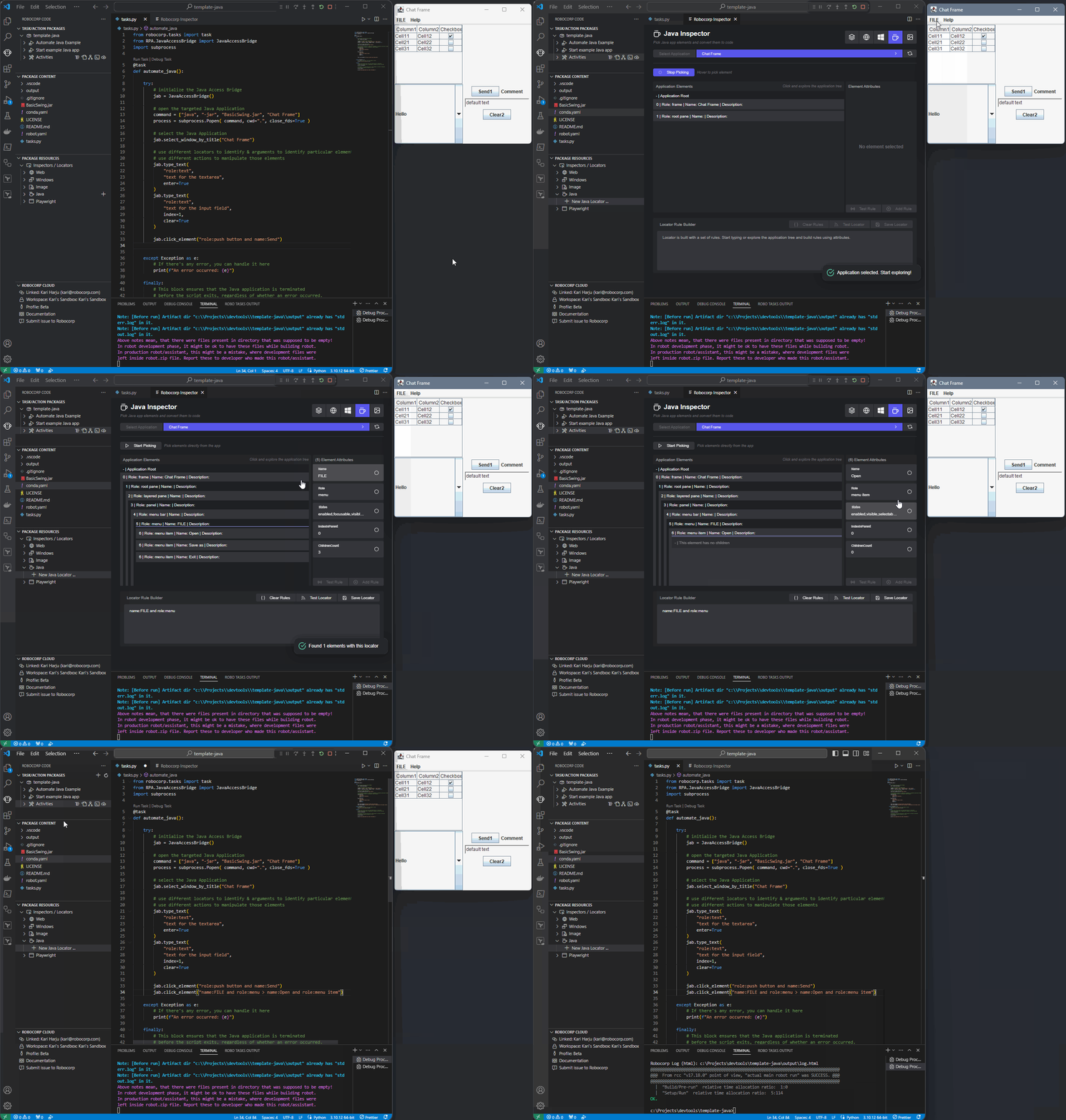
👉 Checkout our documentation on the new Inspectors for details
We have also integrated the Image-based locator support in the VS Code extension. As before, we see Image-based automation as a last resort, so we heavily recommend trying out the other types of locators and even hotkey sending before returning to image-based automations.
Action Server: VS Code support, new package format and pydantic models
Action Server is developing fast towards general availability, with 10 releases in the past 7 weeks! It's time for a recap of the biggest new features and updates. To follow the plans and progress in detail, head to the GitHub Project, and check out the changelog.
New Action Package format
We've introduced a new configuration file and format: package.yaml. It replaces the previous conda.yaml (and other) files, and simplifies the configuration of Action Packages along with their Python environments to a single file.
Run command action-server package --update in your project folder to automatically upgrade to a new format.
Robocorp Code for VS Code supports Actions
We've added proper support for developing Actions (and Packages) to our VS Code extension. You can now access commands like Create Action Package, Run and Debug Action from the Command Palette.

In addition, you can now start the Action Server locally from VS Code. When running Actions, VS Code helps you create test inputs in devdata folder so that you don't need to repeat giving the inputs separately every time.
Custom data models as Action inputs and outputs
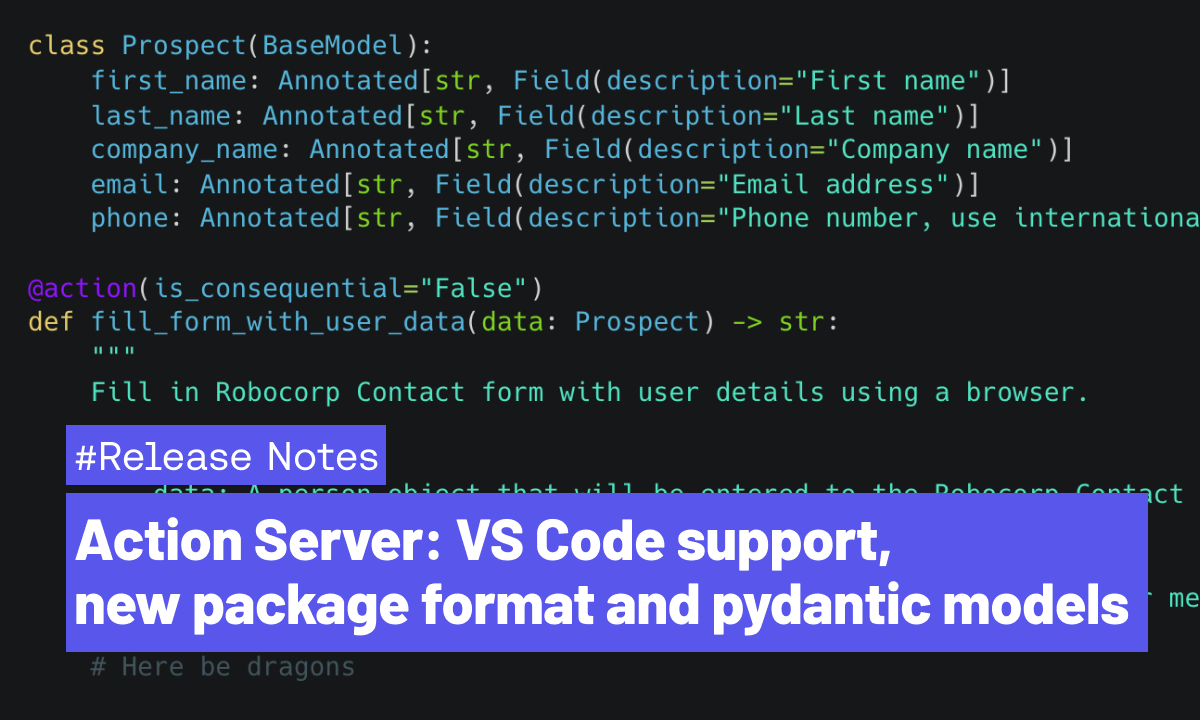
You can now use custom pydantic models as inputs/outputs of an @action. This opens many possibilities besides previously supported simple str, int, float and bool. Most commonly used LLMs create solid JSON inputs for function/tool/action calls; supporting those now in the Actions is a breeze.
For example you could define a class for "Prospect" like this
Then you can use it as an input argument in one or more actions just like this:
When using the Annotated types shown above, you only need to describe the fields once in your custom model, and they will be automatically included in the OpenAPI spec that gets exposed to AI Assistants like Custom GPT. Check out this cookbook example on how to use custom models, or head over to our Youtube channel for a video on how to use the Actions with OpenAI Custom GPTs!
🚀 New Inspectors for Windows and Browser automations 🚀
Robocorp Inspector includes Locator Manager, which streamlines the process, allowing you to edit, validate, and delete locators—all within a single, integrated package inside our Robocorp Code extension for VS Code, eliminating additional installation steps.
In our Inspectors, we balance recording, automatic locator generation, and giving the full power to the developer also to solve complex cases. The recording and UI are there to help and make the simple cases… well, simple, but it also allows you to directly edit and write the locator yourself and use the validation tools to see the results.
🪟 For Windows automations
✅ Parent-Child Rule Creation: Effortlessly define relationships between elements to enhance accuracy.
✅ Interactive Field Selection: Directly select fields to create rules, eliminating guesswork.
✅ Real-Time Validation: Instantly verify the effectiveness of your locators to ensure reliability.
✅ Screenshot Capture: Automatically save screenshots for reference, providing a visual confirmation of your locator.
🌐 For browser automations
✅ Recording: Seamlessly record your browser activities, and the Inspector generates accurate locators on the fly
✅ Strategy Adjustment: Switch between locator strategies and methods flexibly, ensuring the most robust solution for your needs.
✅ Locator Validation: Validate your locators within the tool quickly, ensuring optimal performance
✅ Code Generation: Copy and paste generated Python code directly into your project, saving time and reducing the potential for errors
✅ Screenshot Capture: Automatically takes screenshots to help recall the associated elements for your stored locators
...Image and Java locator supports will be following shortly.
Embracing Python for Automation-as-Code
TL;DR: We are transitioning from Robot Framework and moving all our focus to Python. Existing bots developed in Robot Framework will continue to operate as usual. We'll provide critical updates related to Robot Framework-specific issues until Feb 15th 2025, according to our one-year LTS plan for Enterprise customers. All our new developments will be directed towards Python's dynamic and expansive ecosystem. We recommend our users develop all new automations on Python.
Robocorp platform will be Python-only
Advancements in Generative AI and LLMs have revolutionised how we approach problem-solving and automation. We realized the potential of Python as a language for automation and AI early. Last year, we announced that we invested heavily in Python on our platform, ensuring that, at minimum, everything that was possible using Robot Framework would be available for Python developers. We have reached that date now.
👉 Today marks a significant milestone in our platform's evolution. As part of this transition, we're announcing discontinuing support for Robot Framework on the Robocorp platform. While we will continue to offer bug fixes and security updates for Robot Framework related features until February 15th, 2025, official support will cease thereafter. It's crucial to understand that automations developed with Robot Framework will remain fully functional within the Robocorp ecosystem. 👈
Robot Framework has served us well, providing a solid foundation for automation - all based on Python. However, by focusing on Python only, we allow our customers to enjoy scale and speed that only comes with an ecosystem as vibrant as Python.
What will happen in detail?
There is no immediate impact on existing bots: Automations built on Robot Framework will continue functioning as usual, ensuring your ongoing operations are not disrupted.
We announce a deprecation of Robot Framework on the Robocorp platform on Feb 15th 2024, with one-year long term support guaranteed for Enterprise customers (until Feb 15th 2025). The old Robot Framework bots will continue working even after this; we simply do not issue fixes to Robot Framework-related tooling anymore.
Our developer tooling going forward only supports Python. However, we will issue CVE fixes for the following year.
-
Language Server Protocol (LSP) for Robot Framework extension for VS Code remains open-source and available, but we cease to support new features or new versions of Robot Framework.
-
Robocorp Code Extension will support only Python code generation in the inspectors/recorders and its other features. The same will apply to the ReMark developer AI assistant.
-
Our documentation site will be focused on Python tutorials and examples. However, we will keep a snapshot of current Robot Framework examples and docs until 2025.
We will restructure our automation libraries over time to focus on Python and to remove the dependency on Robot Framework that exists today in RPA Framework. This work was already started mid 2023 with the introduction of robocorp libraries. See details of all automation libraries here.
-
RPA Framework (our open-source project with the automation keywords many of our users have gotten familiar with) remains available and supports RPA use-cases (like Java apps, Excel, Outlook, PDFs and much more). However, examples and documentation are added only in Python going forward.
-
Some RPA Framework libraries will be deprecated as there are better ways to accomplish the same functionality directly with well-maintained Python libraries. This will be communicated later.
Our recommendation for action
While there are no immediate consequences to currently running Robot Framework bots, we recommend our customers take the following action:
-
Start developing new automation workflows in Python. All three certification courses are available now in Python and are a great starting point for developers.
-
Review the “Switch to Python” page for detailed instructions on what is new, and decide if your organisation will implement any existing Robot Framework automations in Python. We do not require this, but in some cases, it will help with maintenance.
Relevant links
AI Actions and the Action Server Community Release
We're thrilled to introduce a new addition to the Robocorp platform: AI Actions and the Action Server. You can think of AI actions as the connective tissue between AI agents and your applications and data.
These new features are available as a developer preview for the community and are fully open-source under the Apache 2.0 license.
Developers can now create AI Actions that interact with any data or application, along with our low latency Action Server connecting them with any AI App and Agent framework such as GPTs and LangChain.
Given the recent release of the OpenAI GPT Store, and the success of AI app frameworks like LangChain, developers are looking for ways to integrate these with various data sources and platforms. Robocorp provides the easiest way to enable AI agents, assistants, and copilots to use custom actions, all written in Python. It’s easier than building Flask apps, or figuring out how to deploy to Vercel.
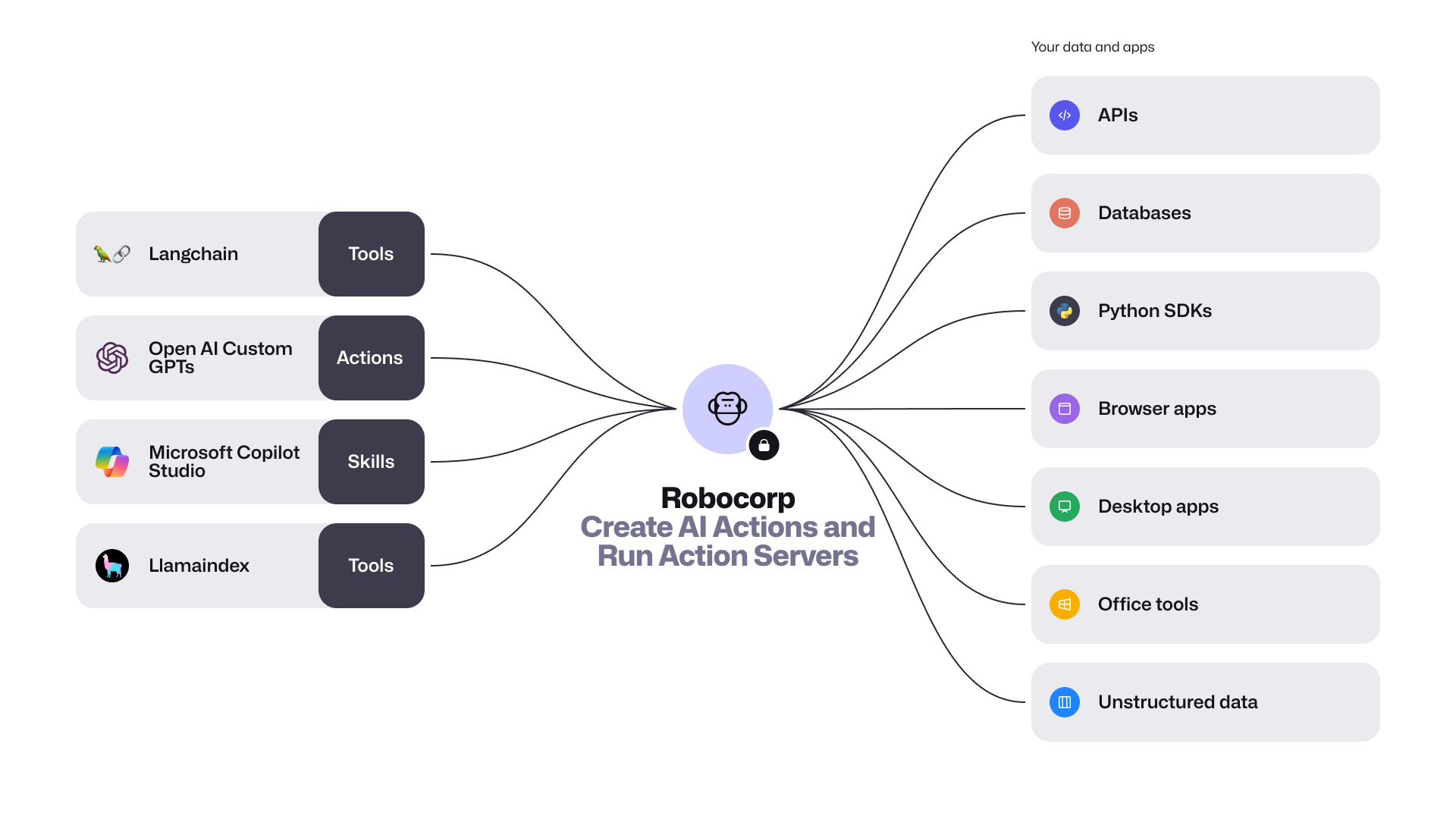
The community preview release includes the following:
-
Introducing the new package
robocorp.actionswith@actiondecorator. AI Actions are Python scripts, workflows, or automations that are securely exposed to AI apps. They are defined by their inputs and outputs, and are described in natural language. This makes it easy for AI apps to comprehend and use them. You can conveniently build and debug these actions with the Robocorp Code extension for VS Code. -
Action Server is a stand-alone executable that connects Actions with AI apps. This server automatically generates an OpenAPI specification for your Python code, allowing various AI/LLM Agents to understand and invoke your
@action. It also offers a straightforward local UI for testing and monitoring, handling the full Action lifecycle, and provides comprehensive event traceability during runs. -
LangChain Robocorp Toolkit and a template for quick startup. Extending the AI apps built with LangChain is as simple as one, two, three. The new
langchain-robocorppackage lets you import all your actions into your project effortlessly. -
Revamped Robocorp Github Repository - This is your gateway to AI Actions and open-source Python automation. We've consolidated all the key features into one repository, which includes the Python framework with automated logging, libraries for automating tasks such as browser and desktop applications, and the new Action Server.
It's time to get started! Visit the GitHub repository for more details, and don't forget to leave a ⭐ while you're there.
Robocorp Code extension v1.14.5
A lot of improvements based on feedback to the new Web and Windows Inspectors
-
Web inspector:
- Test locators with a push of a button on all views.
- Support iframes
- Detect page changes
- Define target webpage over inspections
- UX improvements
-
Windows Inspector:
- Always provide the main application locator code line
- UX improvements
-
SideBar renaming to the new terminology (from Robot -> Task Package/Tasks/etc.)
Full changelog here
RCC v17.12.0 released 🚀
We've had a 4-month gap in updating the latest RCC, which ends now 🚀
For the last four months, we've been working hard on the new enterprise Firewall setups coming online and finding solutions to work with those. RCC is the keystone in solving and distributing these solutions.
The breaking change between v16 and v17 is that we dropped the interactive commands for profile creation. These were only used to help bootstrap new network profiles, so the change is quite limited. The task of profile creation is now handled by Setup Utility, which has all the testing and diagnostics tools right next to profile creation with a nice UI.
The new features and improvements list is a long one, but I am raising a few here:
- A lot of TLS-related testing and diagnostic solutions were added
- A lot of tooling around certificates needed and used by the MITM firewalls
- Improvements in environment build speeds
- Space usage tracking to enable simpler cleanups
- Less load subprocess monitoring
- Detecting multiple users sharing ROBOCORP_HOME
That's not all; please check the full changelog for all the details.
(This version of RCC is already available in the latest Worker and is coming out to VS Code and other tools as well).
New way of making locators for Web and Windows automations 🚀
New Robocorp Inspector is now available and directly integrated in VS Code.
The new Inspector is integrated into VS Code, so no extra pieces are needed; this comes with the Robocorp Code extension v1.14.0
👉 Get going via: Command-palette → Robocorp: Open Inspector
Web recorder in action:
Windows Locators in action:
🚀 Use Web Recorder to get started seamlessly, then fine-tune the recorded actions into locators you can store and manage later.
-
Change strategies after picking/recording, the browser stays on while you develop, etc.
-
Complete freedom to create more advanced locators
-
Code generation for Python, get single lines or complete scripts
-
Built on Playwright, but the locators work with Selenium and RFW
🚀 Much improved Windows capabilities
-
Pick from an application or browse from the UI tree.
-
Complete freedom to the developers to use the way they need to:
-
Create and combine rules into parent-child locators, use the UI, or type the advanced locator you know.
-
The test-button for each step is right there to enable you to create solid locators no matter what.
-
-
Store as locators or just get the generated Python code, just like for the Web recorder.
ReMark goes Turbo
The new OpenAI announcements on their Dev Day blew air into the already blazing AI fire (not to mention their recent leadership musical chairs). Overall, the AI app frameworks develop at an insane rate these days, so we keep re-iterating ReMark💬 to have all the latest bells and whistles. Improvements are not always visible other than “it answers better than before”. This time, we’ve done more - worth a release note.
ReMark uses the new GPT-4 Turbo
We are happy to report that ReMark now uses the new GPT-4 Turbo! To the end users, it shows up immediately as increased speed and fewer situations where the maximum prompt length would be reached.
Now, this is just the beginning, as there is much more we can do with the new model. For example, we expect the new large context window to open up possibilities like “find me all the form elements and their locators from this page”, which previously was tricky due to the limited size of prompts. We are already exploring the new use cases, so stay tuned!
The initial response time is much faster
Apart from the new underlying language model, the architecture also got a complete overhaul. We have felt the first reaction from ReMark took too long. What used to be a simple “RAG” is now a sophisticated tools-based architecture (we are using Langchain, by the way), allowing ReMark to answer much faster than before. It really feels better!
When asking questions from ReMark, you can see which tools ReMark uses and the source data these tools find relevant to your question. Like this:
Putting you in control of the source data
We’ve added a new “Settings” dropdown to the user interface, allowing you to control what data sources ReMark has available to answer your question. By default, they are all on. It looks like this:
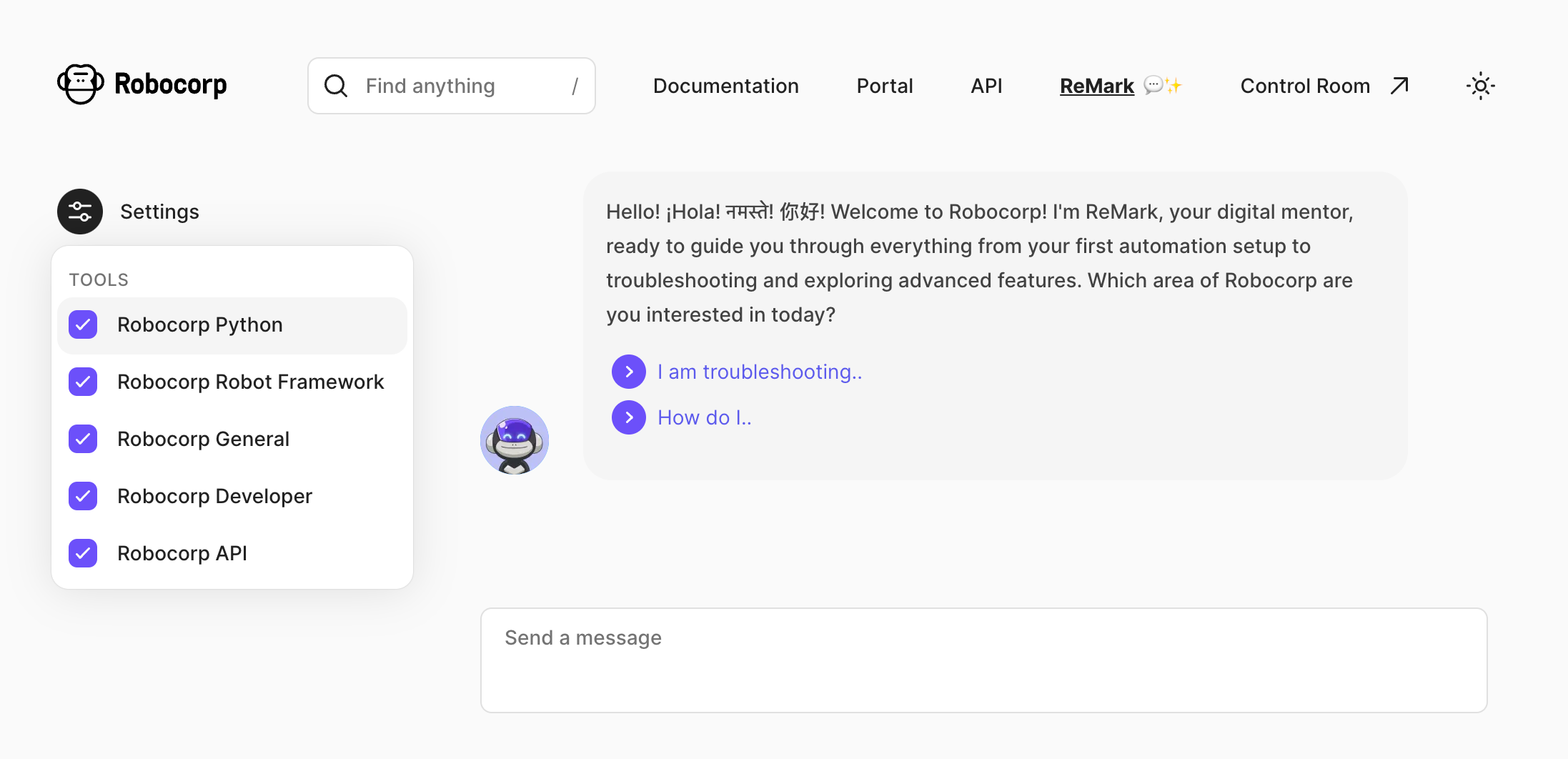
But why? The reason is that the source data ReMark “knows” has already become quite broad, and it’s easy to get mistaken in the nuances. For example, for someone working 100% on Python, it’s useless to feed in Robot Framework built-in keyword documentation.
A user who, for example, only works with Control Room and is not interested in building the bots can drop the irrelevant source “tools” out. Here’s what each tool contains as of writing this:
-
Robocorp Python - Robocorp framework and library docs, Python examples in the Portal, Playwright documentation
-
Robocorp Robot Framework - Robot Framework built-in library docs, RPA Framework library docs, Robot Framework examples in the Portal
-
Robocorp General - Stuff from our website, like blog posts, case studies and the pricing page
-
Robocorp Developer - All the rest of the documentation and developer guides: topics such as operating bots with Control Room and setting up workers.
-
Robocorp API - recently updated Control Room API docs.
In case you are wondering why they all have “Robocorp” in the name, we plan to add 3rd party sources such as docs from the most commonly used Python packages, and why not even let you add your documents?
The new API documentation in the source data
As you already saw in the previous chapter, API documentation is now covered as a separate source. They are unique from the “build bots” use cases that ReMark has been excelling in already for a while, as you might be working on any platform and language. The skills of large-language models shine here.
Try, for example, something like this, and you’ll get working code out:
How do I add a new work item with control room API but not start a process? Want to call it from JavaScript.
Your feedback is vital. Please help us by hitting the 👍 / 👎 emojis in ReMark’s responses to help us know when things are great, especially when things go south. Thank you.
Developer Tools September Updates 🏗️
As you may have noticed, we have been pushing out many updates to our tools and libraries lately, so a summary of the key things you can gain by updating is in place.
Support for newer type firewalls (MITM)
New firewall setups are coming to many companies, so we had to be the bridge to get the open-source frameworks to work inside these protected networks. Tools and libraries have been updated, and we have documentation here and here.
VS Code extensions
Support for our new Python logging is now built into VS Code, and several smaller improvements and supports for Python developers have been added.
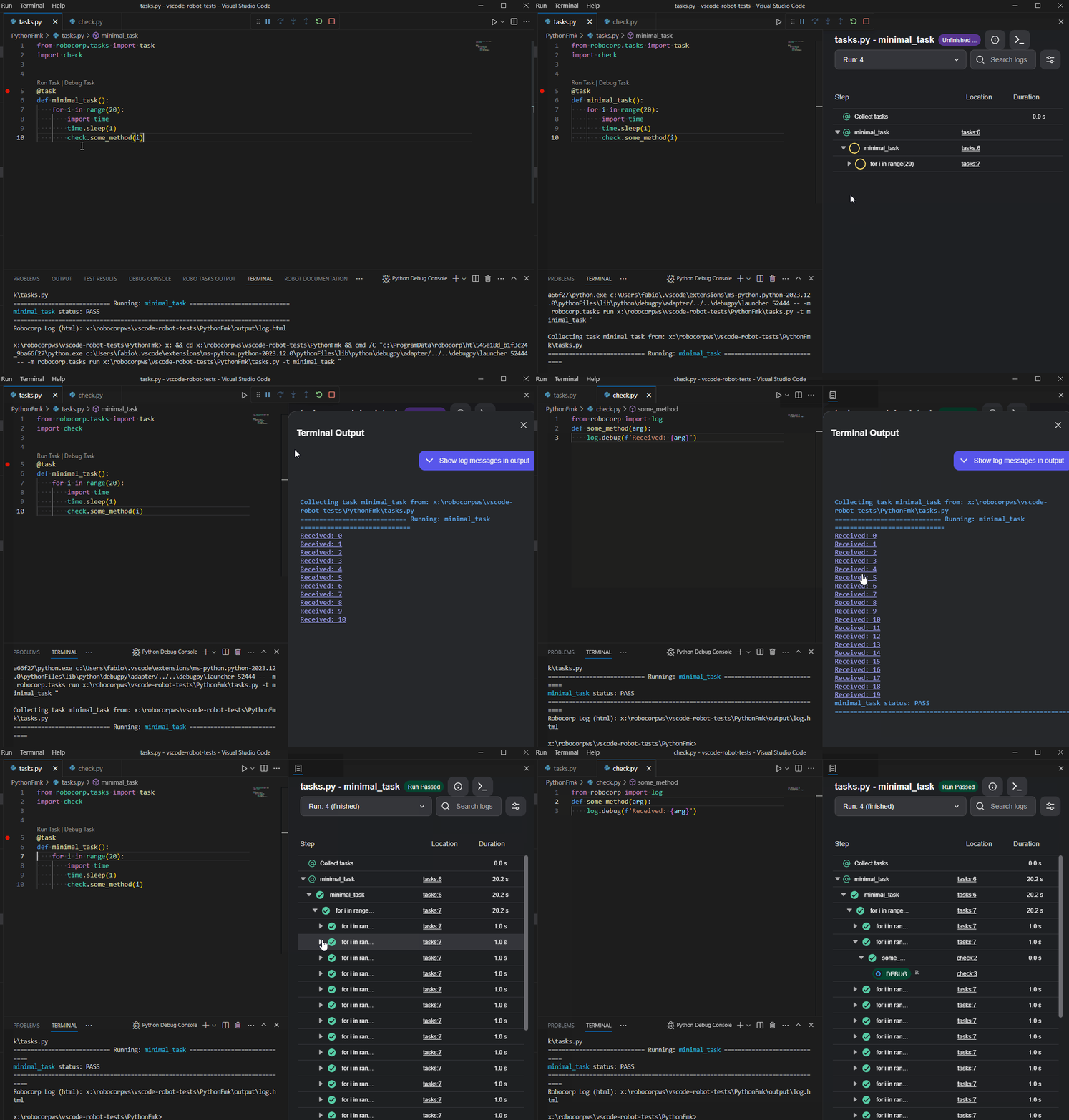
There is a dependency helper that highlights and helps you update your dependencies to new versions. Just hover over the dependencies, and you will see the versions available.
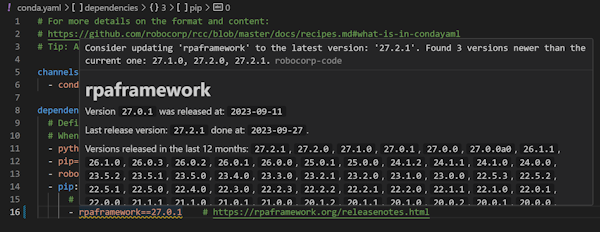
The full changelog is worth following if you want to keep up with the updates.
Setup Utility, Worker, and RCC
The latest version of Setup Utility adds new checks to identify potential blockers for Windows RDP setups. It adds a lot of new information coming from RCC diagnostics for the firewall setups and testing.
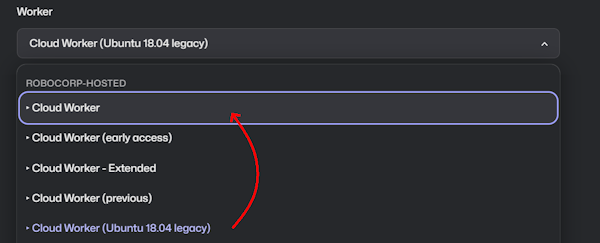
For the Worker, we would like to draw your attention to Cloud Workers specifically. Many are still running their processes on the older Ubuntu containers, so a kind reminder to update to the new Cloud Workers.
We have not seen any problems arising from this change, but switching to the new one has fixed a few cases. We also have the latest Worker (v7.1.3) in the Cloud Worker (early access), so you can always test the next upcoming Cloud Worker by using that one.
Robocorp Assistant 2.2.2
This update solves an issue where RCC locks would be reported as long paths check failed and would block the application. Now those are no longer reported and the application starts normally.
Solving company firewalls and SSL troubles 🚀
For the past three weeks, we have been working hard on finding a solution to easily use Python and open-source tools inside corporate networks that follow the pattern of man-in-the-middle or Transparent HTTPS firewalls.
Without going into the details, this is what has been causing the different SSL error cases. We've seen many companies switching or updating to this model as providers like PaloAlto, Sophos, Zscaler, etc. are all marketing this functionality.
The first version of a guiding document can be found in our docs-site. All of our templates are now also updated to the required levels.
👉 The call to action is: Update your dependencies This requires Python 3.10 and the specific version of pip that you can find in the docs and templates.

These updates enable Python implementations to use the OS-specific certificate store to validate HTTPS traffic. This should mean that the certificates provided by the firewall are valid, as it is standard practice to have IT update the certificate stores.
We've also worked hard to reduce the number of web domains you need to whitelist in your firewalls. For those using Selenium, the web drivers for the browsers now come via the robocorp.com domain, which cuts some six domains off the list.
In Setup Utility and RCC related to this we have added TLS checks to the diagnostics to help out in finding these cases.
We are not yet done, as there are still open-source tools and cases that do not enable us to fix all cases, but this is a big step forward.
Robocorp Assistant 2.2.1
This update contains:
- Adding a way to disable the auto-updater by adding - as the autoupdater URL
- Update to use RCC v16.1.1
- Bug fix for RCC not injecting environment variables like HTTP_PROXY properly for micromamba process, supporting complex firewall setups with self-signed certificates
ReMark💬 AI code assistant is coming to Slack
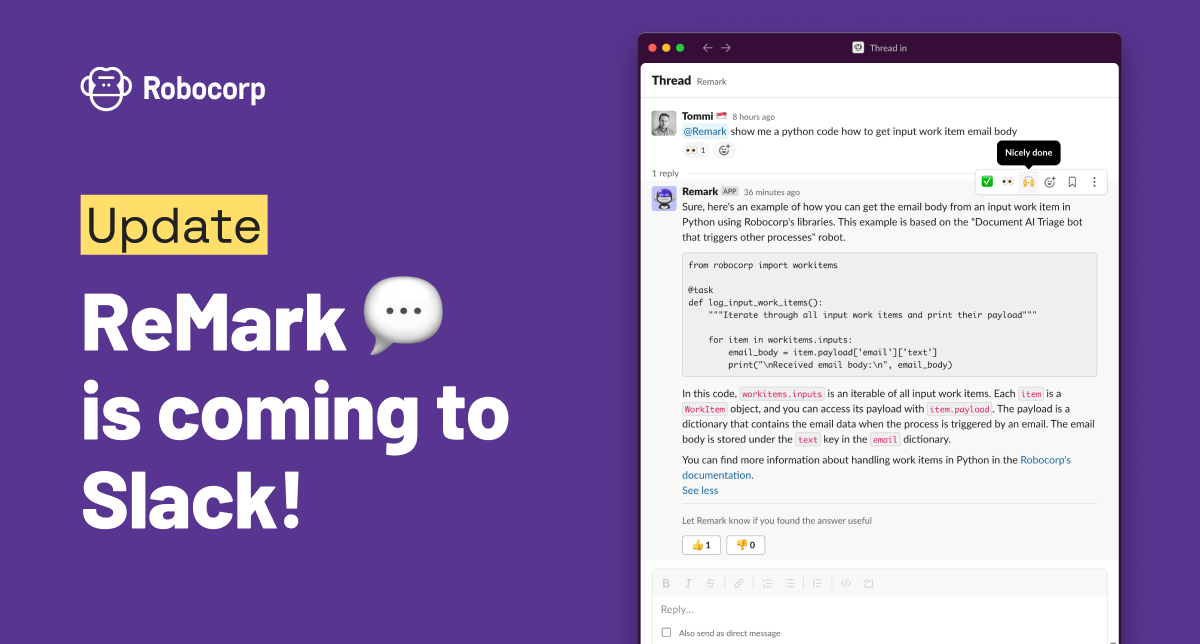
To unify our generative AI-based code assistant experience, we have brought ReMark💬 to the developer Slack community. Join the #ask-remark channel and ask for tips on building bots and operating automations on Robocorp. It knows both Python and Robot Framework.
We are committed to frequently updating ReMark's knowledge and will continue to push the integration deeper into our developer experience. ReMark has only been available through a standalone website. That site will remain as-is, and the Slack ReMark will be an additional way to interact with ReMark.
ReMark will replace the current Kapa app, offering the same user experience. Kapa has been a grand experiment and quickly initiated our journey to the world of generative AI, and we want to thank everyone who has been part of the trial. 🙏
-
#ask-kapa channel has been renamed #ask-remark, and Kapa app has been replaced by ReMark app. No actions are needed from users.
-
Remember to tag @ReMark in your messages and replies so that it knows to react to them.
-
NEW: You can also chat with @ReMark in private. Just find the app from Slack sidebar and start conversing.
-
NEW: There is no five message limit in the conversation length with Remark, as there was with Kapa.
Keep on chatting, and give us feedback! The best way to tell us if ReMark's answers are helpful is to use 👍 and 👎 buttons after replies.
P.S. You'll find the invite to join our developer community in Slack from the top right corner of Robocorp Control Room, under Help. :)
Robocorp Assistant 2.1.0
Robocorp Assistant 2.1.0
This update contains:
-
Support for SSO Assistant-only Users
-
Security updates
-
Update to use RCC v14.15.4
ReMark💬 knowledge update
We've done major updates on ReMark💬 to serve the growing user base better now and in the future.
First and foremost, ReMark💬 now has a personality! We wanted it to be something familiar based on our much-loved Mark the Monkey. ReMark💬 is an alter ego of Mark, equipped with more tech and tapped into all data sources devs need when working on their Robocorp bots. Meet ReMark💬!

The main updates are in the data ingestion and in the responses ReMark💬 gives:
-
We added new data sources to be ingested into ReMark💬 database. The documentation now contains all the contents from Robocorp Docs, including new Python library documents. In addition, we've added the Portal examples.
-
The data ingestion is now implemented as a Robocorp bot (!) and runs daily. So, the knowledge will refresh continuously as we improve our documentation and examples.
-
We reduced the next-best questions to three in the answers, as the previous five took up too much space in the UI.
-
Also, in the answers, ReMark💬 might now point you to the most relevant Portal bots to learn more, not just docs articles.

Under the hood, we've done a complete rehaul of the architecture, gearing up towards integrating ReMark💬 into our other tools and services. For example, we switched the vector database for embeddings from Chroma to pgvector.
You might have noticed a few moments of "Something went wrong" in the past few days, but updates are now done, and things should run much smoother from now on!
Robocorp Code 1.10.0 released
-
RCC upgraded from
v14.6.0tov14.15.4. -
Information from pypi is shown on hover for pypi packages in
conda.yaml. -
Warning if the versions for pypi in
conda.yamlhave updates. -
Warning if
pythonversion is not>= 3.8inconda.yaml -
Warning if
pipversion is not>= 22.0inconda.yaml -
ROBO TASKS OUTPUTupdated to latest version (now supportsrobocorp-log 2.7.0).
ReMark💬 got conversational
Have you tried ReMark💬, our generative AI assistant that helps developers deliver value (bots!) faster? One of the early users said, "Something that used to take me 1 hour to do now takes me 10-15 minutes". Don't miss out on this significant shift in developer productivity. ReMark💬 is available for free here.
The most recent update makes the use of ReMark💬 easier, especially when working on multiple things at the same time. We added conversations. The new left sidebar will keep your conversations in order. As ReMark💬 uses previous messages and responses to answer your questions, remember to hit the "New Chat" button to start fresh when you are changing topics.
Features
- Organise chats with ReMark💬 in conversations
- Rename and delete conversations
- Stop text generation button when ReMark💬 is answering
- Thumbs up and down buttons to give feedback on the quality of answers
Updates
- Better error messages in cases when OpenAI API returns an error