
ReMark goes Turbo
The new OpenAI announcements on their Dev Day blew air into the already blazing AI fire (not to mention their recent leadership musical chairs). Overall, the AI app frameworks develop at an insane rate these days, so we keep re-iterating ReMark💬 to have all the latest bells and whistles. Improvements are not always visible other than “it answers better than before”. This time, we’ve done more - worth a release note.
ReMark uses the new GPT-4 Turbo
We are happy to report that ReMark now uses the new GPT-4 Turbo! To the end users, it shows up immediately as increased speed and fewer situations where the maximum prompt length would be reached.
Now, this is just the beginning, as there is much more we can do with the new model. For example, we expect the new large context window to open up possibilities like “find me all the form elements and their locators from this page”, which previously was tricky due to the limited size of prompts. We are already exploring the new use cases, so stay tuned!
The initial response time is much faster
Apart from the new underlying language model, the architecture also got a complete overhaul. We have felt the first reaction from ReMark took too long. What used to be a simple “RAG” is now a sophisticated tools-based architecture (we are using Langchain, by the way), allowing ReMark to answer much faster than before. It really feels better!
When asking questions from ReMark, you can see which tools ReMark uses and the source data these tools find relevant to your question. Like this:
Putting you in control of the source data
We’ve added a new “Settings” dropdown to the user interface, allowing you to control what data sources ReMark has available to answer your question. By default, they are all on. It looks like this:
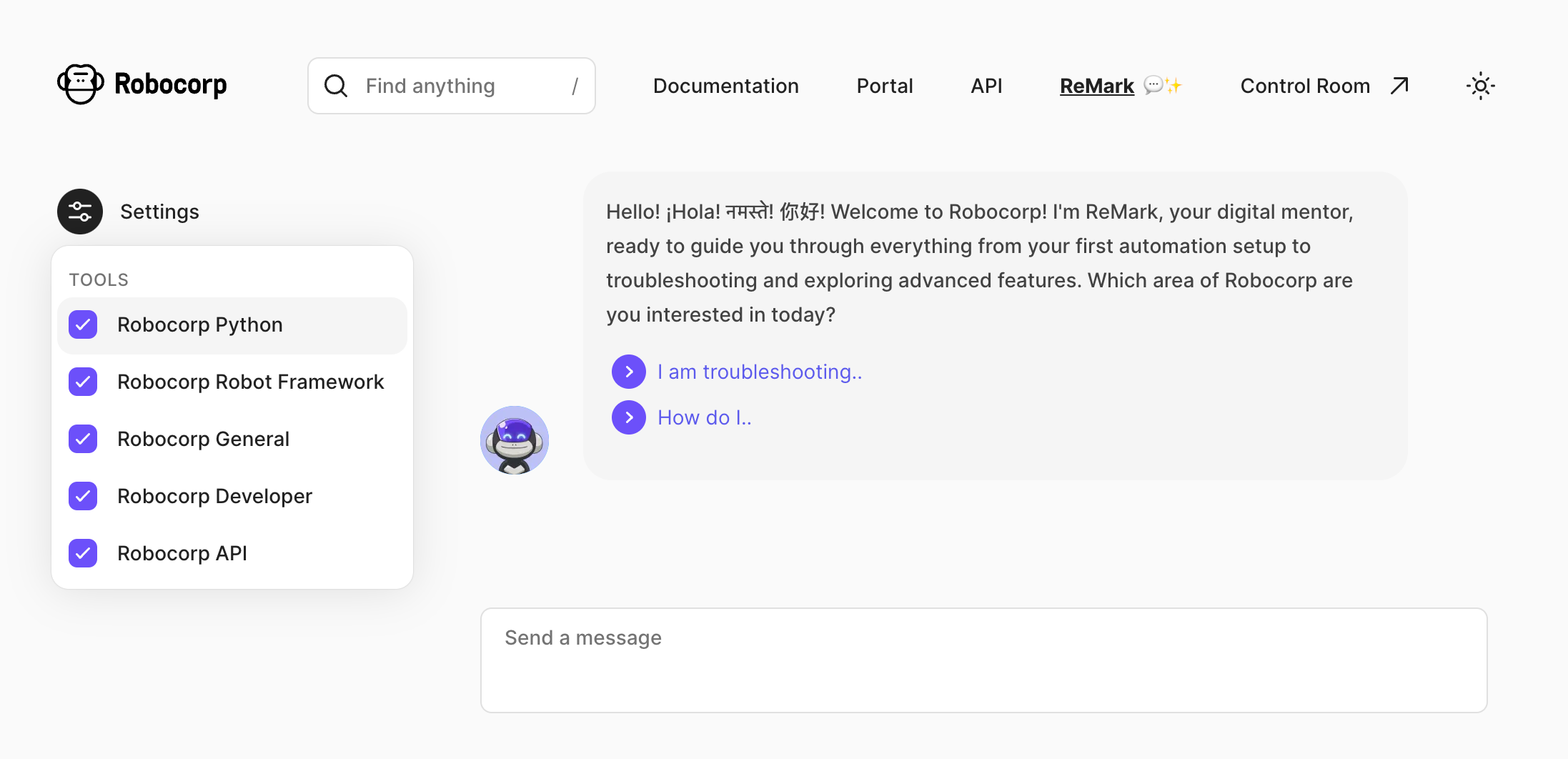
But why? The reason is that the source data ReMark “knows” has already become quite broad, and it’s easy to get mistaken in the nuances. For example, for someone working 100% on Python, it’s useless to feed in Robot Framework built-in keyword documentation.
A user who, for example, only works with Control Room and is not interested in building the bots can drop the irrelevant source “tools” out. Here’s what each tool contains as of writing this:
-
Robocorp Python - Robocorp framework and library docs, Python examples in the Portal, Playwright documentation
-
Robocorp Robot Framework - Robot Framework built-in library docs, RPA Framework library docs, Robot Framework examples in the Portal
-
Robocorp General - Stuff from our website, like blog posts, case studies and the pricing page
-
Robocorp Developer - All the rest of the documentation and developer guides: topics such as operating bots with Control Room and setting up workers.
-
Robocorp API - recently updated Control Room API docs.
In case you are wondering why they all have “Robocorp” in the name, we plan to add 3rd party sources such as docs from the most commonly used Python packages, and why not even let you add your documents?
The new API documentation in the source data
As you already saw in the previous chapter, API documentation is now covered as a separate source. They are unique from the “build bots” use cases that ReMark has been excelling in already for a while, as you might be working on any platform and language. The skills of large-language models shine here.
Try, for example, something like this, and you’ll get working code out:
How do I add a new work item with control room API but not start a process? Want to call it from JavaScript.
Your feedback is vital. Please help us by hitting the 👍 / 👎 emojis in ReMark’s responses to help us know when things are great, especially when things go south. Thank you.