
Release Notes
Robocorp VS Code Extension and Action Server rebranding to Sema4.ai
Since Robocorp was acquired by Sema4.ai in January 2024, we have been busy building the vital components of AI Agents to become generally available. You can read more about our vision for building, running, and managing enterprise AI Agents on our website.
As we gear up for our first Sema4.ai product launches, we have restructured some of the components we previously offered, without removing any features from the current Robocorp Automation platform users.
The Robocorp Code extension for VS Code has become the Sema4.ai extension for VS Code
The new Sema4.ai extension for VS Code retains all the functionality of Robocorp Code. In addition, it will get a lot of new AI agent-related features moving forward.
🔔 Your action is needed! 🔔
-
Remove the Robocorp Code extension from the VS Code. This is done by navigating to Extensions from the left sidebar, locating Robocorp Code, and clicking “Uninstall”.
-
Install the new Sema4.ai Extension from the Marketplace, or by searching for it through the VS Code Extensions panel.
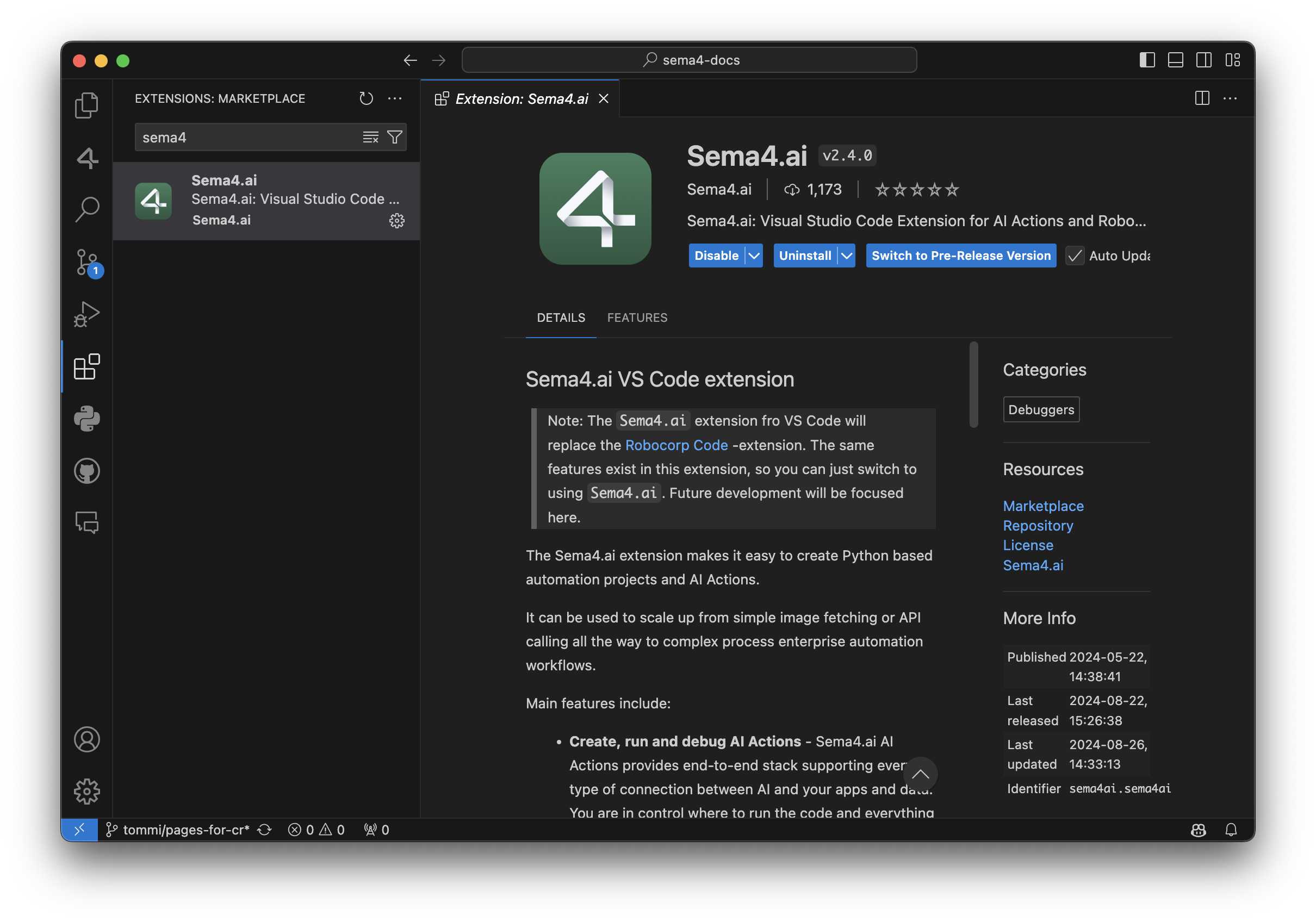
Robocorp Code is deprecated and will not receive any updates after September 30, 2024. Please make sure to install the new Sema4.ai extension by this date. This change has no impact on your current automations deployed to the Control Room - they continue to operate normally.
Apart from supporting everything the automation developer needs for building the Tasks, here are some recent additions:
-
AI Actions complete workflow: from bootstrapping from the provided templates to debugging to publishing them to Sema4.ai Studio.
-
Completely renewed inspectors and recorders for web, Windows, Java and image-based automations. Have a look at the recording of our recent Product Hour Live for all the details.
-
Better environment management when working on Python - when you change any dependencies, it’ll ask if you want to update the environment.
For a detailed list of features, visit the change log.
Rebranding AI Actions and Action Server
Thank you to the community members for the great feedback during the developer preview period. You all helped us shape the Actions and Action Server to be a top-notch method for connecting new capabilities to AI agents.
To prepare for general availability, we have made the following naming changes:
-
AI Actions and Action Server moved from robocorp/robocorp GitHub repository to sema4ai/actions.
-
Renamed Robocorp Action Server to Sema4.ai Action Server.
-
PyPi package changed from robocorp-actions to sema4ai-actions.
This brings slight changes to using the packages, while features remain the same or more.
Working on a Mac, you should remove the old versions and install a new:
In your Action code, the import changes like this:
We have added loads of new features in the Actions and Action Server, and here are some of the most important ones.
-
Hot reload of actions when the package directory changes
-
Support for parsing Custom Types in Action Server UI action run view
-
Console output added to Action Server UI action run view
-
Support OAuth2 secrets as Action arguments, and in the Action Server UI
-
Stable public URL link to Action Server UI if started with
--expose -
Support for action-server package build, extract, metadata, and update (for publishing to future Sema4.ai products)
-
Automatic version handling by the Sema4.ai platform
-
Customizable action display names in openapi.json using
@action(display_name="<Action name>") -
An environment built only once, no longer checked/made pristine on server start to save time
For full details, have a look at the change log in the repository.
Early Access to AI Agents
We are excited to bring you the best of automation and unlock your journey towards AI Agents. To stay updated on the new releases from Sema4.ai, sign up for early access to Sema4.ai Agents here.

🚀 Java Inspector added to VS Code extension
👉 Our next Product Hour Live session on April 24th will dive deeper into Inspectors so join us there.
The complete Inspector set is now available in the VS Code Extension, as we've added the Java Inspector and Image-based locator support.
The creation of Java locators is quite similar to that of Windows locators. You can hover over elements to pick items and then browse the element tree in the Inspector. Create locators out of rules on the UI or write the locator directly and test. We do not yet have the code generation available in the Inspector, but that is simple enough in the VS Code code editor.
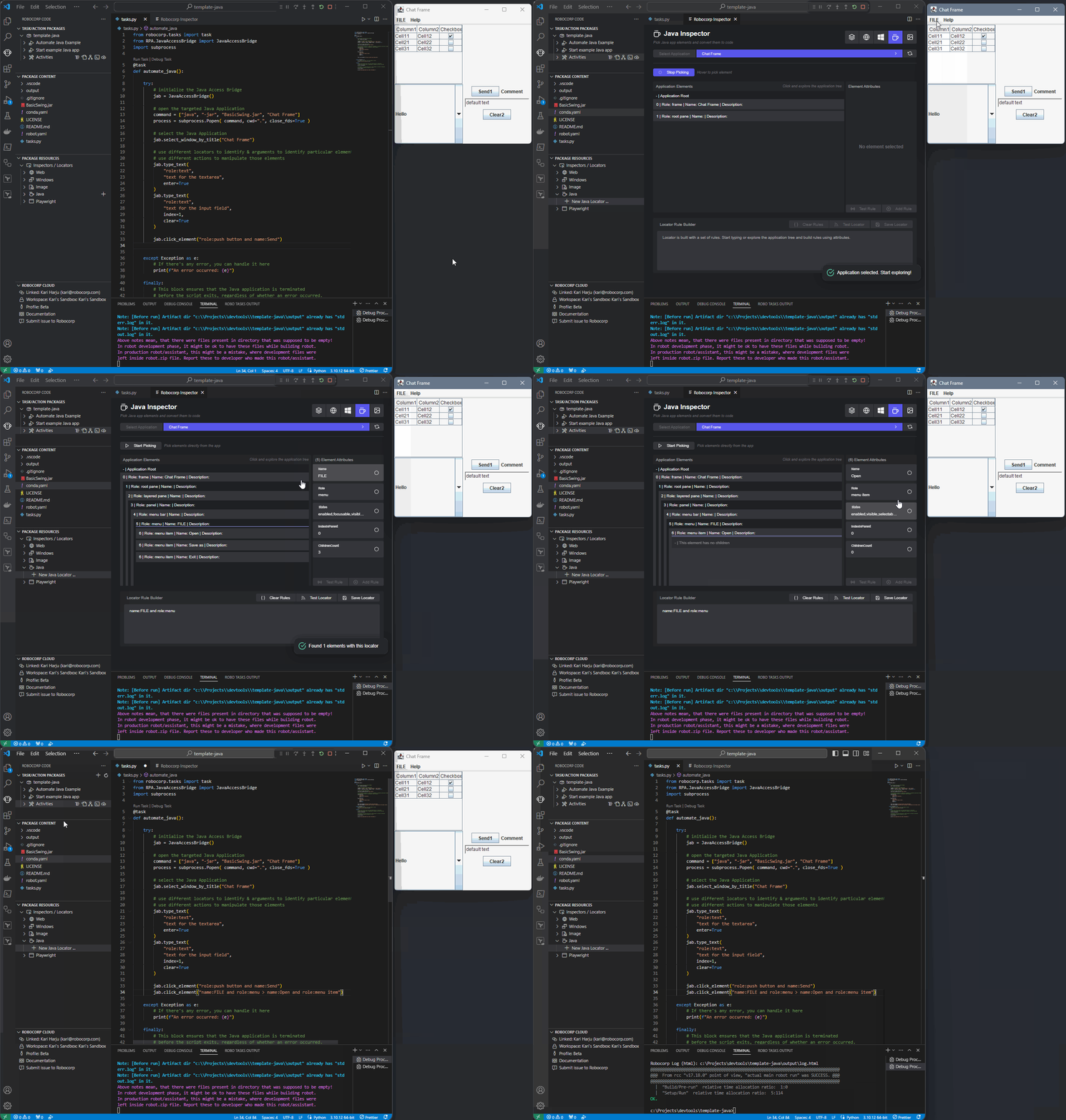
👉 Checkout our documentation on the new Inspectors for details
We have also integrated the Image-based locator support in the VS Code extension. As before, we see Image-based automation as a last resort, so we heavily recommend trying out the other types of locators and even hotkey sending before returning to image-based automations.
🚀 New Inspectors for Windows and Browser automations 🚀
Robocorp Inspector includes Locator Manager, which streamlines the process, allowing you to edit, validate, and delete locators—all within a single, integrated package inside our Robocorp Code extension for VS Code, eliminating additional installation steps.
In our Inspectors, we balance recording, automatic locator generation, and giving the full power to the developer also to solve complex cases. The recording and UI are there to help and make the simple cases… well, simple, but it also allows you to directly edit and write the locator yourself and use the validation tools to see the results.
🪟 For Windows automations
✅ Parent-Child Rule Creation: Effortlessly define relationships between elements to enhance accuracy.
✅ Interactive Field Selection: Directly select fields to create rules, eliminating guesswork.
✅ Real-Time Validation: Instantly verify the effectiveness of your locators to ensure reliability.
✅ Screenshot Capture: Automatically save screenshots for reference, providing a visual confirmation of your locator.
🌐 For browser automations
✅ Recording: Seamlessly record your browser activities, and the Inspector generates accurate locators on the fly
✅ Strategy Adjustment: Switch between locator strategies and methods flexibly, ensuring the most robust solution for your needs.
✅ Locator Validation: Validate your locators within the tool quickly, ensuring optimal performance
✅ Code Generation: Copy and paste generated Python code directly into your project, saving time and reducing the potential for errors
✅ Screenshot Capture: Automatically takes screenshots to help recall the associated elements for your stored locators
...Image and Java locator supports will be following shortly.
Robocorp Code extension v1.14.5
A lot of improvements based on feedback to the new Web and Windows Inspectors
-
Web inspector:
- Test locators with a push of a button on all views.
- Support iframes
- Detect page changes
- Define target webpage over inspections
- UX improvements
-
Windows Inspector:
- Always provide the main application locator code line
- UX improvements
-
SideBar renaming to the new terminology (from Robot -> Task Package/Tasks/etc.)
Full changelog here
New way of making locators for Web and Windows automations 🚀
New Robocorp Inspector is now available and directly integrated in VS Code.
The new Inspector is integrated into VS Code, so no extra pieces are needed; this comes with the Robocorp Code extension v1.14.0
👉 Get going via: Command-palette → Robocorp: Open Inspector
Web recorder in action:
Windows Locators in action:
🚀 Use Web Recorder to get started seamlessly, then fine-tune the recorded actions into locators you can store and manage later.
-
Change strategies after picking/recording, the browser stays on while you develop, etc.
-
Complete freedom to create more advanced locators
-
Code generation for Python, get single lines or complete scripts
-
Built on Playwright, but the locators work with Selenium and RFW
🚀 Much improved Windows capabilities
-
Pick from an application or browse from the UI tree.
-
Complete freedom to the developers to use the way they need to:
-
Create and combine rules into parent-child locators, use the UI, or type the advanced locator you know.
-
The test-button for each step is right there to enable you to create solid locators no matter what.
-
-
Store as locators or just get the generated Python code, just like for the Web recorder.
Developer Tools September Updates 🏗️
As you may have noticed, we have been pushing out many updates to our tools and libraries lately, so a summary of the key things you can gain by updating is in place.
Support for newer type firewalls (MITM)
New firewall setups are coming to many companies, so we had to be the bridge to get the open-source frameworks to work inside these protected networks. Tools and libraries have been updated, and we have documentation here and here.
VS Code extensions
Support for our new Python logging is now built into VS Code, and several smaller improvements and supports for Python developers have been added.
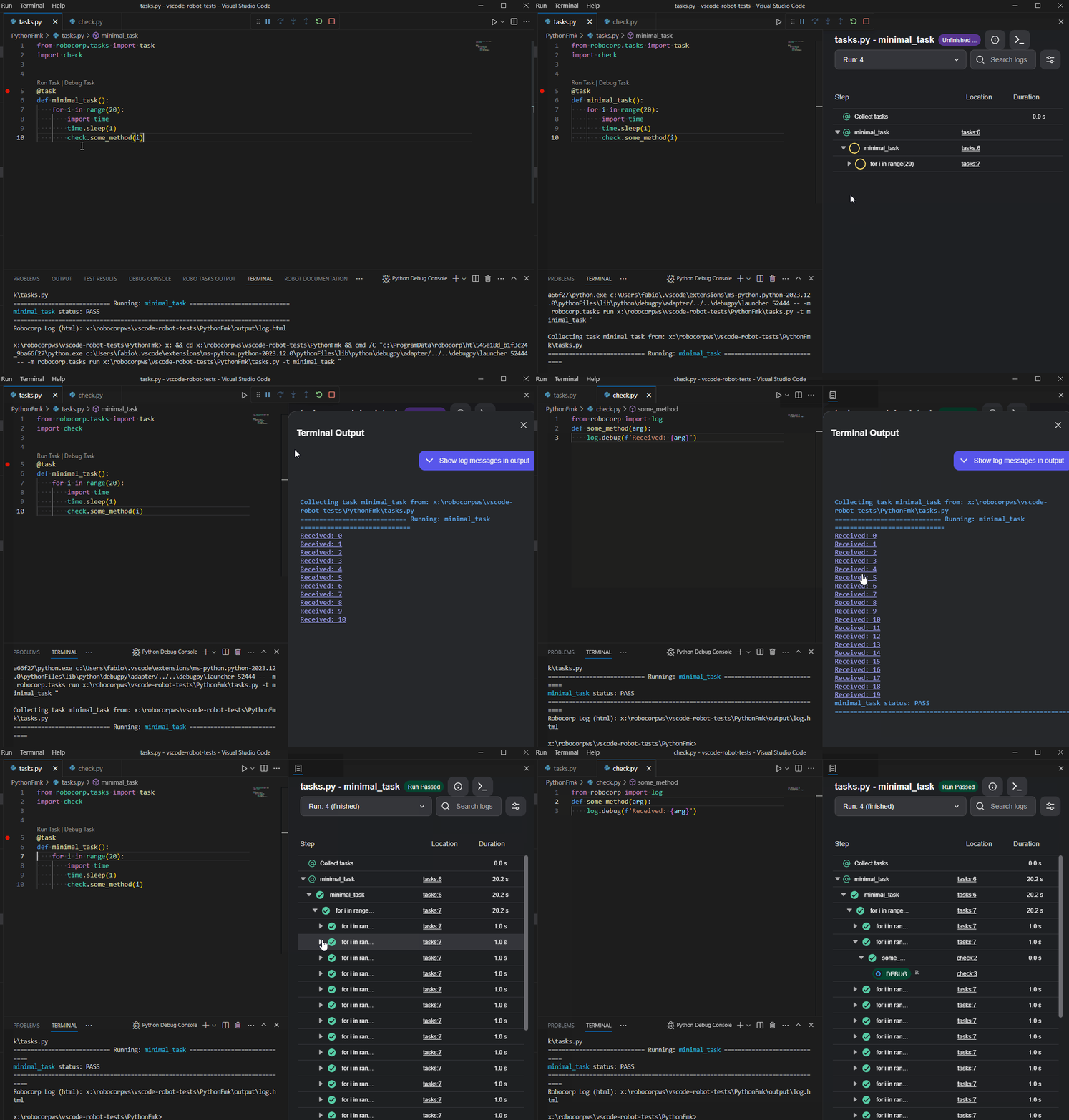
There is a dependency helper that highlights and helps you update your dependencies to new versions. Just hover over the dependencies, and you will see the versions available.
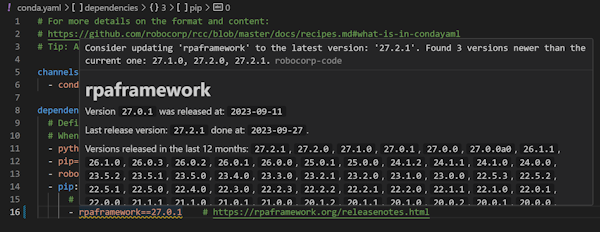
The full changelog is worth following if you want to keep up with the updates.
Setup Utility, Worker, and RCC
The latest version of Setup Utility adds new checks to identify potential blockers for Windows RDP setups. It adds a lot of new information coming from RCC diagnostics for the firewall setups and testing.
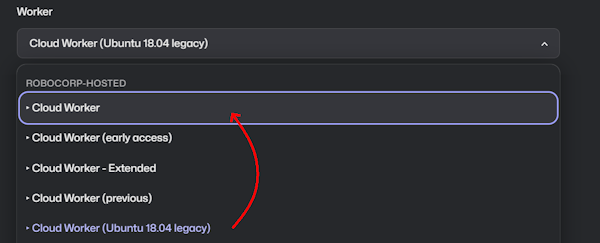
For the Worker, we would like to draw your attention to Cloud Workers specifically. Many are still running their processes on the older Ubuntu containers, so a kind reminder to update to the new Cloud Workers.
We have not seen any problems arising from this change, but switching to the new one has fixed a few cases. We also have the latest Worker (v7.1.3) in the Cloud Worker (early access), so you can always test the next upcoming Cloud Worker by using that one.
Robocorp Code 1.10.0 released
-
RCC upgraded from
v14.6.0tov14.15.4. -
Information from pypi is shown on hover for pypi packages in
conda.yaml. -
Warning if the versions for pypi in
conda.yamlhave updates. -
Warning if
pythonversion is not>= 3.8inconda.yaml -
Warning if
pipversion is not>= 22.0inconda.yaml -
ROBO TASKS OUTPUTupdated to latest version (now supportsrobocorp-log 2.7.0).
Updates on Robocorp Code and robocorp-log
Updates on Robocorp Code
- The logging from
robocorp.tasks/robocorp.logis now integrated directly into VSCode (ROBO TASKS OUTPUTview). - Note: Requires
robocorp.tasks 2.1.2,robocorp.log 2.3.0andRobocorp Code 1.7.0. - Elements which have a location can now be clicked to open the related file directly inside of VSCode.
- The terminal view can now also show entries logged from
robocorp.log debug|warn|info|criticaland not just stdout/stderr.
Other noteworthy changes in Robocorp Code:
-
Fixed issues in
Run Task/Debug Taskcode lenses (launchingrobocorp.tasks): -
Robot environment properly used when robot is available.
-
The input work item is properly selected when available.
-
If multiple entry points in the same file were available the selected one will be run.
-
If a
robot.yamlhaspreRunScriptsthey'll be run prior to launching.
Noteworthy changes in robocorp.log:
-
Added
robocorp.log.debug(so, there's one more level available to log messages). -
It's possible to filter log levels by using
setup_log(log_level='debug|info|warn|critical')(so that log levels filtered out won't even be added to thelog.html). -
It's possible to also redirect to
sys.stdoutorsys.stderrthe messages added with log.debug, log.info, log.warn and log.critical by usingsetup_log(output_log_level='debug|info|warn|critical')along withsetup_log(output_stream={'debug': 'stderr'})(note that the current default is just redirectingcriticalcalls tostderr).
Introducing the new era of Python automations
We're excited to announce our new automation framework for Python automations – simply called robocorp. The release brings the experience of developing Python automations on par with Robot Framework on our platform.
The project templates in our VS Code extension have been updated to use the new framework and leverage its capabilities.
Check out our blog post for in-depth story about the new features, or view and read the summary below.
Features
- New
@taskDecorator: Any method decorated with@taskbecomes runnable, and can thus be scheduled or otherwise managed as a part of a Process or Assistant in Control Room. - Visual and Autogenerated Logs: We've brought the loved logging features from Robot Framework to Python, all without you having to write a single line of code. Furthermore, you can now control the logging with ease, suspending logs for sections dealing with sensitive data in several different ways.
- New Robocorp Automation Libraries: While our rpaframework libraries are based on Python, we wanted to enhance the developer experience for those choosing to work on Python exclusively. The new robocorp automation libraries roll out focusing on common automation tasks (Excel, browser, APIs) and interacting with Robocorp Control Room (such as Vault, Asset Storage, Work Items).
- New Python Templates in VS Code and Portal: Easiest way to start using these new capabilities is through the new Python templates in VS Code. They are already available, for example have a look at Playwright Browser automation template.
Pre-build robot environments 🏗️
👉 Need to control or scan every file your automations use in production?
👉 Want to save time / protect developers from environment building?
We now have a solution for setting up environment pre-building inside your company network so that all robot runs and developer tools can get environments much faster.
The setup enables you to build the environments on dedicated machines and, if needed, scan the results before passing them on to your users.
The client machines only download missing files to get the environment which means drastic speed improvements over time as the environments share many of the same files.

🚀 The documentation covers the feature and setup, but if there are any questions, do not hesitate to ping us.
Robot templates update 🤖
Robot Templates coming via RCC and VS Code are now "renamed" a bit, and we have a simple landing page for templates to explain a bit more and have links to their Portal pages.
The highlight item is the new template Producer-Consumer Extended, which extends the Producer-Consumer template by showcasing a third step for reporting, examples for starting your own Python library, more extensive exception handling, etc.
The template list from RCC looks like this:
👉 Reminder that Robocorp Portal is full of open-source robots that can work as a jumping off point, so check it out.
VS Code extensions: LSP 1.9.0 / Robocorp Code 1.1.0 / Warning regarding VSCode 1.75.0
Note: VSCode 1.75.0 has a major issue related to handling keybindings. Please keep to VSCode 1.74.3 until VSCode 1.75.1 is available.
Robot Framework Language Server
New features
-
Code action: Surround with try..except.
-
Code action: Surround with try..except..finally.
-
Interactive Console: (Robot Framework 4 onwards): When a single keyword call is executed and it has a non-None return, its return value is printed.
-
Interactive Console: Typing a variable in the
Interactive Consoleshows that variable. #871 -
Improve
IF/WHILE/Run Keyword Ifsnippet completions to make it a bit clearer that python expressions are expected. -
Building the model of the flow explorer no longer times out and a progress dialog is shown while building it.
-
robot.libraries.blacklistcan be used to blacklist libraries which should never appear in code-completion. -
Deprecated libraries:
robot.libraries.deprecatedcan be used to mark libraries as deprecated.- Keywords from deprecated libraries will not appear in the auto-import code-completion (so, they'll only be available if the
Libraryis added to theSettings). - Libraries which start with
*DEPRECATED*in its doc are also considered deprecated. - Keywords from libraries marked as deprecated will be shown as deprecated.
-
Requesting completions right after
Librarieswithout any additional name will show completions for all known (pre-loaded) libraries. -
Completions for variables are shown without having to enter
$nor${.
Bugfixes
-
Properly report about undefined variable in
RETURN. #865 -
References to variables used in
Evaluatearguments are now properly collected. -
Don't show completion for the variable being currently defined in variable assign.
Robocorp Code
-
If the
TEMPfolder being used in the environment is removed the extension properly deals with it. -
Inspector upgrades:
- Browser Actions Recorder: Improvements in performance and other bug fixes.
- Browser Actions Recorder: Auto-scroll for the keyword list.
- Browser Actions Recorder: Code Editor no longer readonly (note: still indifferent to user changes as it will always update).
- Browser Locator: Fixed buttons not displaying if no matches available.
- Improved approach to close the browser and app window.
VS Code extensions: LSP 1.8.0 / Code 1.0.2
A big bunch of updates and new features have been released in the VS Code extensions at a rate that even the release notes have been lagging behind.
The biggest features released since November 2022:
-
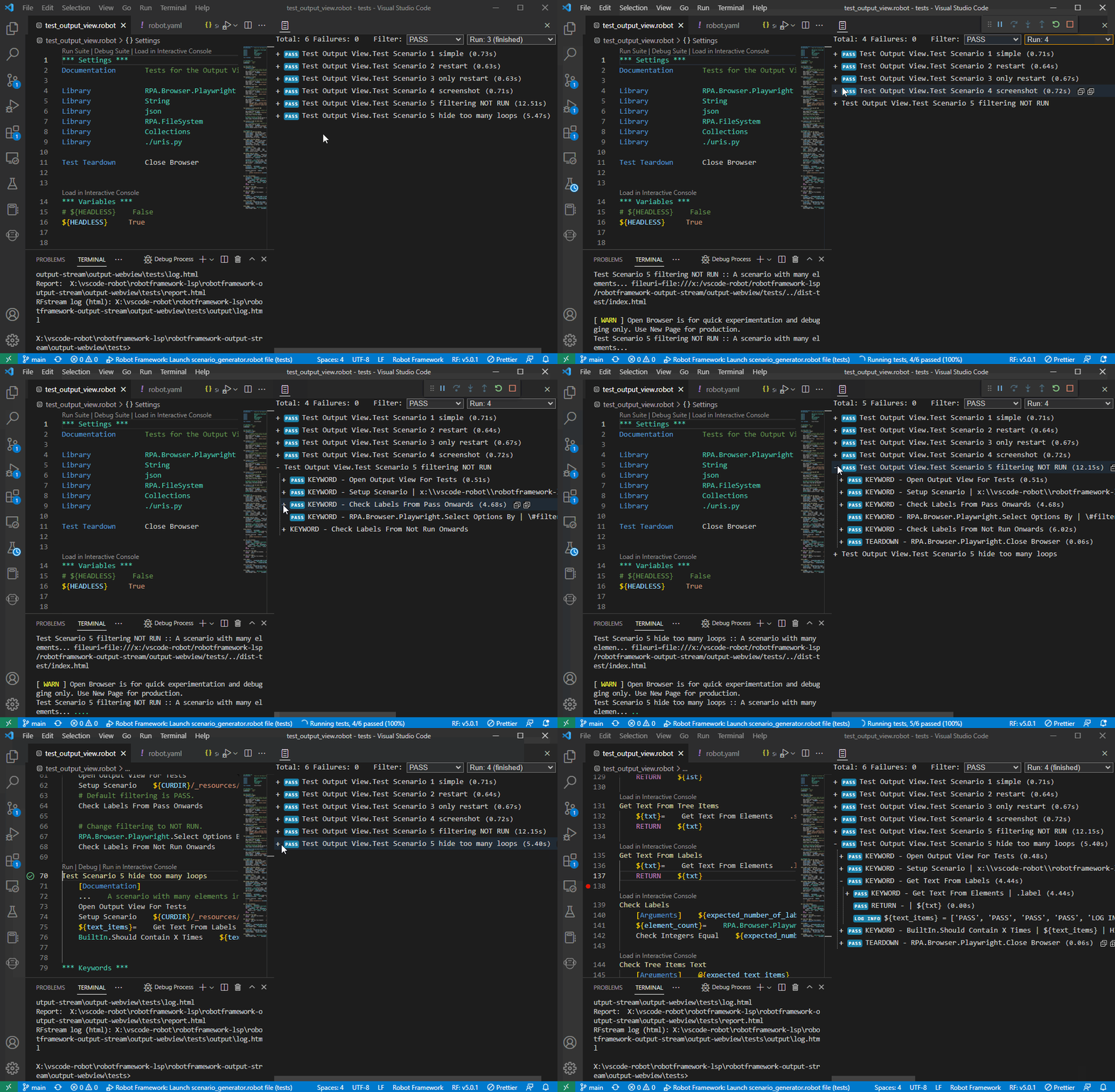
New robot output
-
See the Robot Framework output while running the robot.
-
Command palette > View: Toggle Robot Output
-
-
Flow Explorer now also in VS Code
- Select a .robot file > Command Palette > Robot Framework: Open Robot Flow Explorer
-
Documentation panel
-
See the keyword documentation in a static panel
-
Command palette > View: Toggle Robot Documentation
-
-
Inspector / locators features
-
UX from Studio now in VS Code
-
Windows Locator improvements
-
Web Recorder Beta
-
-
Conversion Accelerator
-
Improved UX to take in multiple robots at a time to enable analysis over source robots
-
Improvements to all conversions and support for AAv11
-
Still looking for more input robots to develop the tool further. Contact us.
-
-
Quick fixes and code refactoring

Install the extensions from VS Code extensions panel by typing Robocorp or from marketplace links available here.
VS Code extensions: LSP 1.2.0 / Code 0.38.0
Robot Framework Language Server v1.2.0 & Robocorp Code v0.38.0. Improved log messages, ability to open documentation to a separate panel, Setup & Teardown shown in the Flow Explorer. Gen1 conversion tooling (Blue Prism, UiPath, A360) now available via command palette.
Visual Studio Code extensions updated
Robot Framework Language Server v1.1.3 & Robocorp Code v0.37.0. Robot Flow Explorer now also in VS Code. Updated UX for the Robocorp Code sidebar.