
Release Notes
Robocorp Setup Utility v1.10.1
Manual upgrade required from v1.9.0, v1.9.1 and v1.10.0
Automatic updates are broken in those three versions, so they cannot update themselves to v1.10.1. If you are running any of them, download and install v1.10.1 by hand from the download page. You only have to do this once — automatic updates work normally again from v1.10.1 onwards.
Version v1.8.0 and older are not affected and will update automatically.
To check which version you are on, open the settings menu in the Setup Utility and choose Check for Updates.
Check your profiles after upgrading
The same fault also sent profiles to the wrong location, so profiles imported or switched through v1.9.0, v1.9.1 or v1.10.0 did not reach the workers the Setup Utility manages. Once you are on v1.10.1, check your profile list and import again any that are missing.
Robocorp Setup Utility v1.10.0
What's new
This is a security and maintenance release.
- All high and critical CVEs in the application's dependencies are cleared.
- Updated to Electron 44, which brings a newer Chromium and Node 24 runtime.
- Upgraded RCC to v21.3.0.
- Windows service helper updated to 1.24.0.
If you are on v1.9.0 or newer, read this before upgrading
Automatic updates do not work in v1.9.0, v1.9.1 or this release. You need to install v1.10.1 manually — see the v1.10.1 release note for what happened and what to do.
Robocorp Setup Utility v1.9.1
What's new
This release focuses on security improvements, dependency updates, and a runtime upgrade.
- Update to Electron 40 and Node 24
- Upgrade RCC to v21.2.0
- Windows service helper updated to 1.23.0
- Security and dependency updates
Download from here and check our documentation here.
Have a splendid day! 🚀
🏗️ Robocorp Setup Utility v1.7.1
More and more complex enterprise setups highlighting improvement points for configuring networks and Workers.
-
Added the ability for users to delete profile from Profile Management
-
Added the ability to remove .service.json file if the user wants to
-
The Worker configuration changes are disabled in the interface
Download from here and check our documentation here.
Have a splendid day! 🚀
🏗️ Robocorp Setup Utility v1.3.2
Getting deeper into complex enterprise setups has raised a bunch of tripping points that our tooling has not been able to detect and foresee, which have been causing some headaches in the initial setups lately. The release contains a bunch of improvements and fixes related to these cases.
- Fixed issue with Setup Utility downloads missing profile settings.
- Upgrade RCC to v17.3.0:
- Supports layered environment building, unique conda-forge section build once, and cached
- Embedded micromamba and version update to v1.5.1
- Improvements to the process list after execution on Windows
- Profile support to allow Legacy SSL Renegotiation
- v17 major change: 'rcc interactive configuration' removed as Robocorp Setup Utility has the UI for creating profiles
- Improved service-helper to fix a bunch of issues related to admin permission pop-ups etc.
Download from here and check our documentation here.
Have a splendid day! 🚀
Developer Tools September Updates 🏗️
As you may have noticed, we have been pushing out many updates to our tools and libraries lately, so a summary of the key things you can gain by updating is in place.
Support for newer type firewalls (MITM)
New firewall setups are coming to many companies, so we had to be the bridge to get the open-source frameworks to work inside these protected networks. Tools and libraries have been updated, and we have documentation here and here.
VS Code extensions
Support for our new Python logging is now built into VS Code, and several smaller improvements and supports for Python developers have been added.
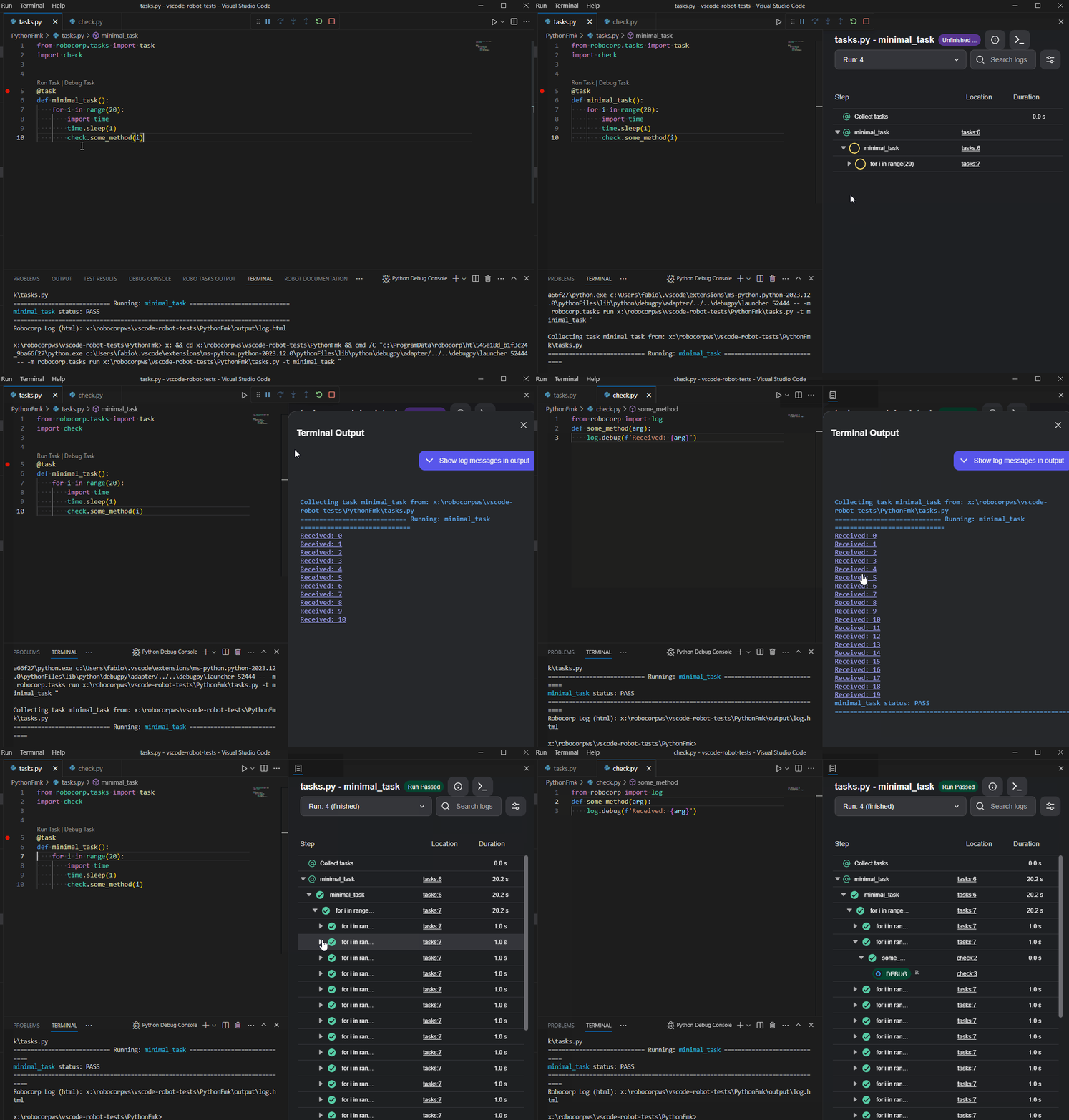
There is a dependency helper that highlights and helps you update your dependencies to new versions. Just hover over the dependencies, and you will see the versions available.
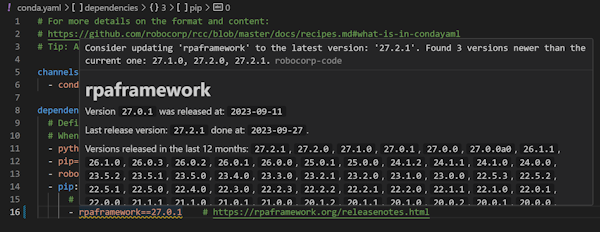
The full changelog is worth following if you want to keep up with the updates.
Setup Utility, Worker, and RCC
The latest version of Setup Utility adds new checks to identify potential blockers for Windows RDP setups. It adds a lot of new information coming from RCC diagnostics for the firewall setups and testing.
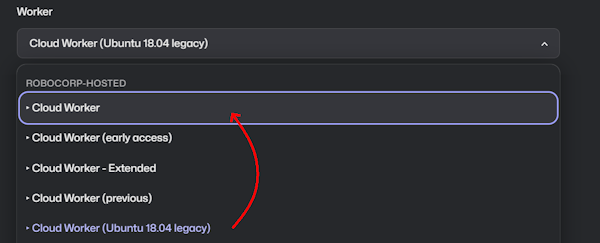
For the Worker, we would like to draw your attention to Cloud Workers specifically. Many are still running their processes on the older Ubuntu containers, so a kind reminder to update to the new Cloud Workers.
We have not seen any problems arising from this change, but switching to the new one has fixed a few cases. We also have the latest Worker (v7.1.3) in the Cloud Worker (early access), so you can always test the next upcoming Cloud Worker by using that one.
🎉 Robocorp Setup Utility v1.2.0
-
RCCEmbedded at version16.5.0Service HelperEmbedded at version1.17.1
-
The new
RCCversion has included alegacy-renegotiation-allowedflag that will permit users to enable the legacy renegotiation if needed -
Fixed notification when upgrading the worker to the latest version for the user to restart the worker
-
New Profileability inProfile Management- start a profile from scratch -
Worker Details - reshuffling of the inner menu + ability to
Lock Workerat user's will -
System Status now contains
RDP (Remote Desktop Protocol)related checks -
RDP Enabled support
-
RDP Logon Screen warning support
-
Optimisation done for the diagnostics phase
-
Ability to switch between
RCC profile settings&System settingswhile downloading the company profile -
UI/UX improvements and refactoring
Download from here and check our documentation here.
Have a splendid day! 🚀
🎉 Robocorp Setup Utility v1.1.3
-
Multiple fixes for small issues that bring consistency in functionality and UI/UX
-
New Diagnostic Details Info & Design
-
New version of
RCCwhich brings in TLS & trust chain information to Setup Utility -
This is activated only by a Network Configuration file that contains a
tls-verifyfield -
You can learn more about this from here
-
RCCEmbedded at version16.1.2 -
Service HelperEmbedded at version1.14.2
Download from here and check our documentation here.
Have a splendid day! 🚀
🎉 Robocorp Setup Utility v1.1.1
-
Main Page has been redesigned for a more clean look & for new things to come
-
System Statuspage now includes everything about the environment -
Gathering Service Helper logs in the
Generate Report + Submit Issue -
Remote Desktop Protocol detection is implemented now & a warning will show when adding a new Windows Worker if RDP is not enabled
-
Shared Pre-built Environments (Holotree) integration
-
Enabling at global level only with Admin permissions
-
Enabling/Revoking from Worker Details if state is reachable & enabled at global level
-
Fixed issues with worker update available scenarios
-
UI/UX improvements all across the board
-
OS Detection & presentation in human friendly way
-
Show warning for Long Paths in case of
Windows Server 2016 -
RCCEmbedded at version15.2.0 -
Service HelperEmbedded at version1.14.2
Download from here and check our documentation here (updates will come soon).
Have a splendid day! 🚀
🎉 Robocorp Setup Utility v1.0.1
- Setup Utility force creates necessary folders in order to operate properly
- Running diagnostics after network config add/remove
- RDP connection available only if worker is running
- Ensuring profile in common path - controlled by Admin account
- Forcefully removing unknown workers
- UI/UX improvements all across the board
- Main Page has now specific guidance for users
- RCC Speed Test implementation & integration
- All dependency vulnerabilities are fixed
- New version of embedded RCC at version
14.15.4 - Service Helper Embedded at version
1.13.2 - Internal Status page updated
Download from here and check our updated documentation here
Have a splendid day! 🎉
Worker v6.32.3
- Adds the ability to the Worker to check for the
rccexecutable in the Workers Common Path - If
rccexecutable isn't found in either path (the instance path & the Workers Common Path), it will download it as it did before - This will provide a more reliable determination in use cases involving
Setup Utility
Have a good day!
Robocorp Setup Utility v0.15.1
- Issues with launching
Setup Utilityare now fixed - missing required entities caused the app to freeze in certain situations - Everything should now be ensured in the bootstrap sequence
- Upgrading to the former version
(v0.15.0), shouldn't cause any problems - Upgrading to the latest version is always recommended
Have a good day!
🎉 Robocorp Setup Utility v0.15.0
-
Service Helper v1.11.2is recommended -
Go to
Internal Statuspage and upgradeService Helper -
Latest
Service Helpersets the correct permissions for log on service, you don't need the last steps inSetup Utilityanymore when adding a new Windows Worker-
Checking if the user already has a worker designated to it - one worker per user; if the user has already a worker, a new worker is rejected
-
Enable/Disable video stream/data transfer is now possible directly from
Setup Utility -
Test the RDP Connection by opening one directly from
Setup Utility -
Adding a new Windows Worker is prefaced by an automatic profile deployment to the user - the current profile from the Admin account is used for the deployment - as such, the proper
rccenvironment is propagated to all users -
Manually deploy the current profile to a desired user account from
Profile Management -
Reinforced clean up after Worker is removed - deleting known files from known locations
-
-
Fixed the
Submit Issueproblems -
You can now reliably Submit Issues to us and we thank you for them :)
-
Improvements in the UI/UX in certain areas of the app
Have a splendid day! 🎉
Robocorp Setup Utility v0.13.3
Added System Toolbox to fix the most common system-level settings
Detection if the user is an administrator and hides features that cannot be used.
Submit Issue is now available:
-
Submit Issue creates the report as Generate Report & sends that as attachment
-
The report package will still be available for the user locally
Fixes to the Windows Desktop Worker setup:
-
Fixed issues with User & Domain
-
Added ability to test user credentials
Download Robocorp Setup Utility from our download site.
Setup Utility: Managing your Desktop Workers just got easier 🎉
👉 You can now manage your Windows Workers just by logging in as the server's admin and using Setup Utility.
Setup Utility lets you see which ones are busy, CPU loads, versions, jump to the correct Worker in Control Room, etc. Setup Utility also now handles the permission setting so that you can directly create Workers on user accounts without admin permissions.

The service-helper CLI tool is still there, and Setup Utility is using it, so the CLI support needed by IT departments using fleet management systems is going nowhere.
👉 The update path is to update your existing Workers to v6.31.1 using the service-helper so that Setup Utility can see them. After that, you can do everything in Setup Utility.
You can find the documentation on Setup Utility in our docs
There is also support for Demo Worker, which is designed to replace the Robocorp Workforce Agent UI application. So if you need to demonstrate robot runs on your machine, this is the place for you.
This was one of the “this should be simple” features that turned out to be a bit bigger thing 😉, so big props to Kosmo & Matti from my team!
I'd also want to thank a few enterprise customers and their IT departments, but I do not know if I can ping their names, so I'll just give an anonymous thank you here. 🙏
Introducing: Robocorp Setup Utility 🎉
Robocorp Setup Utility is a new application we have developed to simplify the setup process inside companies that are using SSO, have stricter network access, or want to avoid command-line setups 😉
What is the tool for?
-
Quickly create and test a profile configuration for your SSO organization
-
The tool also helps you through complex setups with network proxies etc.
-
Import and switch between profiles
-
Note: Our VS Code extension also supports profile imports and switching.
-
Setup and run the Local Worker for testing purposes
-
Setup Utility will replace the Workforce Agent UI application for the local testing use case
…and on the coming soon list are the Windows Desktop Worker Setups
Download the tool from: https://robocorp.com/download.
You can find guides and documentation on our docs site