
Release Notes
Worker 7.6.1
Updates:
- Upgrade RCC to v17.12.0
- Improve RDP connection error messages
- Close the FreeRDP client gracefully to make sure the full logs are received
- Ignore native-certs module load failure in Windows evaluation versions
- If the module is not loaded the support for loading CA certificates from system store is disabled
New experimental feature to use Windows Remote Desktop Connection Manager tool as the RDP connector with desktop setup. RDCMan is used automatically if config file is found from path: %LOCALAPPDATA%\robocorp\workforce-agent-core-service\rdcman-config.rdg. It can also be configured via the environment variable "RC_WORKER_RDCMAN_CONFIG_PATH", pointing to the RDCMan config file path.
You can find the detailed changelog for Workforce Agent Core here.
RCC v17.12.0 released 🚀
We've had a 4-month gap in updating the latest RCC, which ends now 🚀
For the last four months, we've been working hard on the new enterprise Firewall setups coming online and finding solutions to work with those. RCC is the keystone in solving and distributing these solutions.
The breaking change between v16 and v17 is that we dropped the interactive commands for profile creation. These were only used to help bootstrap new network profiles, so the change is quite limited. The task of profile creation is now handled by Setup Utility, which has all the testing and diagnostics tools right next to profile creation with a nice UI.
The new features and improvements list is a long one, but I am raising a few here:
- A lot of TLS-related testing and diagnostic solutions were added
- A lot of tooling around certificates needed and used by the MITM firewalls
- Improvements in environment build speeds
- Space usage tracking to enable simpler cleanups
- Less load subprocess monitoring
- Detecting multiple users sharing ROBOCORP_HOME
That's not all; please check the full changelog for all the details.
(This version of RCC is already available in the latest Worker and is coming out to VS Code and other tools as well).
New way of making locators for Web and Windows automations 🚀
New Robocorp Inspector is now available and directly integrated in VS Code.
The new Inspector is integrated into VS Code, so no extra pieces are needed; this comes with the Robocorp Code extension v1.14.0
👉 Get going via: Command-palette → Robocorp: Open Inspector
Web recorder in action:
Windows Locators in action:
🚀 Use Web Recorder to get started seamlessly, then fine-tune the recorded actions into locators you can store and manage later.
-
Change strategies after picking/recording, the browser stays on while you develop, etc.
-
Complete freedom to create more advanced locators
-
Code generation for Python, get single lines or complete scripts
-
Built on Playwright, but the locators work with Selenium and RFW
🚀 Much improved Windows capabilities
-
Pick from an application or browse from the UI tree.
-
Complete freedom to the developers to use the way they need to:
-
Create and combine rules into parent-child locators, use the UI, or type the advanced locator you know.
-
The test-button for each step is right there to enable you to create solid locators no matter what.
-
-
Store as locators or just get the generated Python code, just like for the Web recorder.
🎉 RPA Framework 28.0.0
- Library RPA.Browser.Selenium (#1139): Keyword
Open Available Browserwon’t anymore try to initialize webdrivers for browsers that are not installed in the system. - Library RPA.Crypto (#1140): Fix AES256 return types for keywords
Generate KeyandDecrypt String. - Library RPA.Hubspot (#1106): Extract the
RPA.Hubspotlibrary out of the main package and into its own packagerpaframework-hubspot. This is a breaking change, please update yourconda.yamlaccordingly.
⚠️ Warning
This is a breaking change if you are using the RPA.Hubspot library within your task packages, please add the rpaframework-hubspot package into your conda.yaml to continue using the library.
Control Room: Work Item Log, Process Documentation and more
In this release, we are introducing Work Item Log, Documentation for Processes, new possibilities to integrate with AWS, and new Audit Log events.
Work Item Log
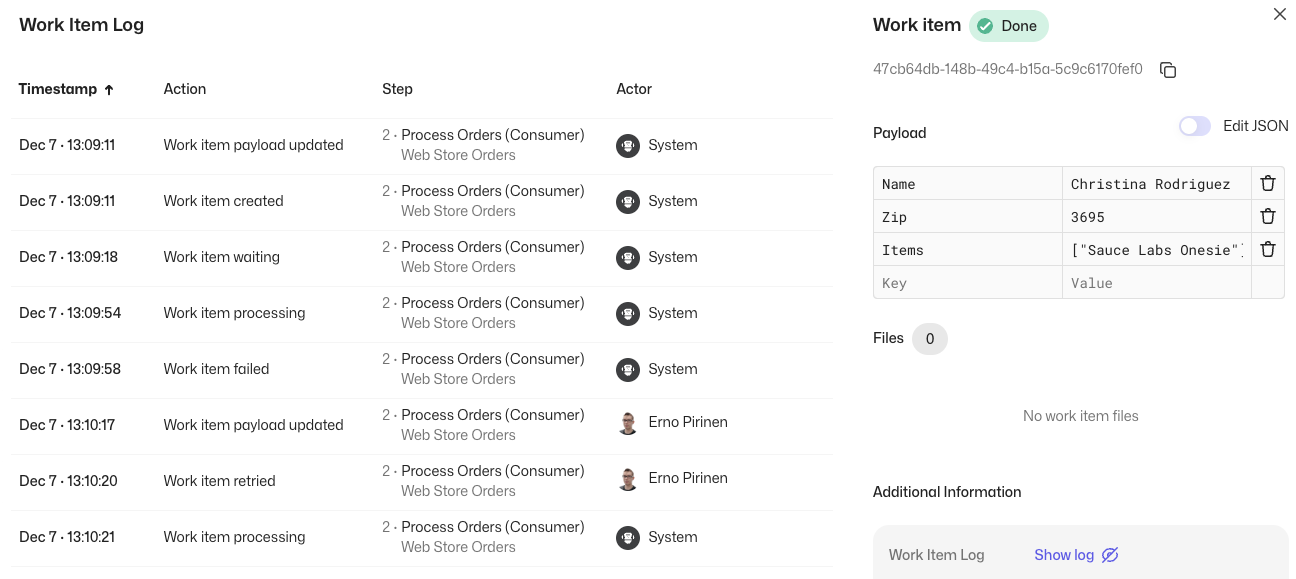
Want to know more about how your Work Items have been processed for troubleshooting or auditing purposes? The new Work Item Log feature enables you to do exactly that!
When you open the Work Item Log from the Work Item details, it will show you what has interacted with the Work Item, how, and when. This enables you to see the lifecycle of the item, giving broader visibility to the processing flow.
Process Documentation

Say hello to the new Process Documentation feature! You are now able to add a description for Processes, where you can include descriptive information about the Process itself, e.g., what the Process is about, how the Process works, and who are the responsible contact persons.
The Documentation supports Markdown syntax, so you are able to add images, links, or whatever you see as valuable to convey the information. And, of course, we also have an API available so you can programmatically fetch the process information, including the description!
AWS integrations
Robocorp Control Room runs on AWS, and so do many of our customers. AWS-native integrations can enable convenient and secure integrations utilizing the AWS backbone. Today we are announcing the first two:
-
Production release: Accessing AWS resources from Robocorp-hosted Cloud Workers
-
Early Access: EventBridge
Audit Log improvements
We have increased the retention time of Audit Log events to 365 days for new events recorded after the 16th of November. Also, three new events have been added to the Audit Log:
-
Process Schedule Created
-
Process Schedule Updated
-
Process Schedule Deleted
Features
- Work Item Log
- Process Documentation
- New AWS integrations
- Audit Log improvements
Worker v7.3.1
Updates:
- Worker network actions now use CA certificates automatically from the system certificate store (NodeJS support for firewall / proxy certificates)
- Upgrade RCC to v17.10.0
- Fix an issue where a slow environment resulted to a backlog of desktop stream files to be sent long after execution had finished
You can find the detailed changelog for Workforce Agent Core here.
Control Room: Improved API Helper, Version Control features
In this release, we are bringing new features to help utilize the new Control Room API, to improve Task Package version management, and to get familiar with the available Control Room features by examples.
New API helper features
Say hello to the new and improved API Helper! With the API Helper, you are able to conveniently select what you want to do, and the API Helper will select the right parameters, helps you to create keys with right permissions, and gives an example call in curl, python, and javascript code. In addition, you are able to directly test the calls from your browser to see that they work exactly the way you want.
Version control improvements
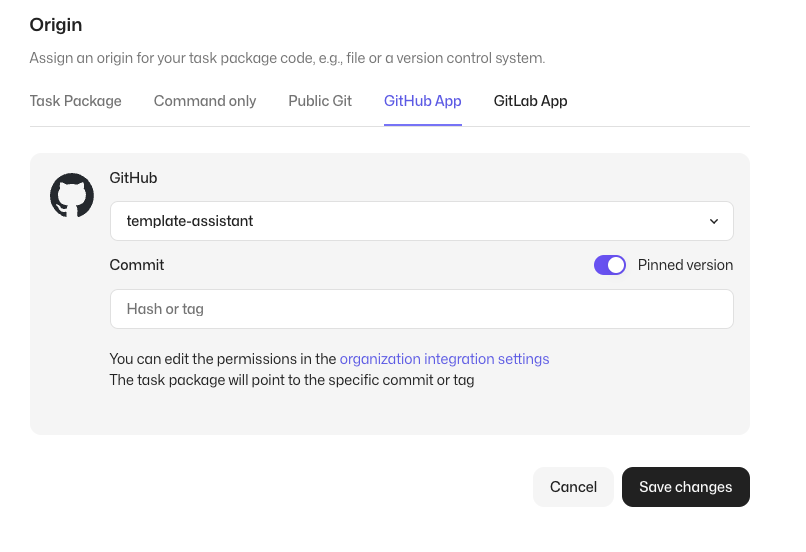
We have enhanced the Control Room version control integrations and introduced a new pinned version capability. With the new feature, you are able to select the exact commit or tag you want your tasks to use, which is useful when e.g., integrating with external CI/CD systems or when you need total control over your release cadence.
Example processes in the Control Room
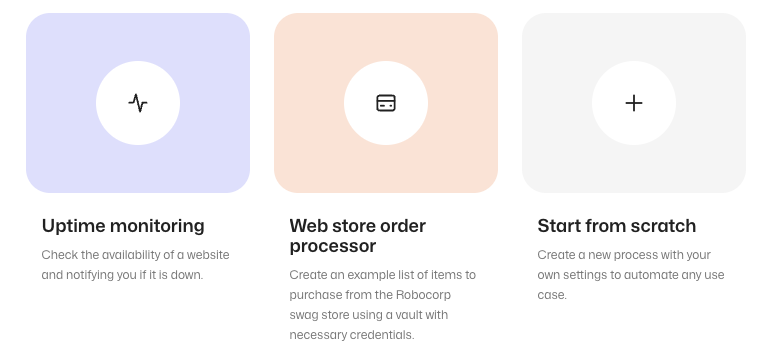
Getting started with Control Room or want to have a quick walkthrough of the most important features? Try out the brand new example processes! When creating an example process, you will get a fully setup process with an example configuration, that you are able to explore at your own pace. In addition, you are of course, able to change the parameters to modify the example to suit your needs.
Features
- New & Improved API Helper
- Link to Commit / Tag with Version Control
- Improved Control Room New User Experience
🎉 RPA Framework 27.7.0
- Update
seleniumpackage to the version 4.15.2. - Library RPA.Crypto (#1128): Add AES256 encryption method support.
- Library RPA.Windows (#1134;
rpaframework-windows7.5.0): Add keywordsEnable Process ListingandDisable Process Listingto enable/disable the listing of processes in theList Windowskeyword.
🎉 RPA Framework 27.6.0
- Library RPA.Robocorp.Vault (#1129): Improve error message when trying to connect to Control Room Vault without valid connection details.
- Library RPA.SAP (#1130): Add keywords for pressing F1 or F4 on textfield and gridview elements. Thanks to Enrico Franzelli for the contribution!
- Relax importlib-metadata version requirement to allow 4.13.0 and above.
ReMark goes Turbo
The new OpenAI announcements on their Dev Day blew air into the already blazing AI fire (not to mention their recent leadership musical chairs). Overall, the AI app frameworks develop at an insane rate these days, so we keep re-iterating ReMark💬 to have all the latest bells and whistles. Improvements are not always visible other than “it answers better than before”. This time, we’ve done more - worth a release note.
ReMark uses the new GPT-4 Turbo
We are happy to report that ReMark now uses the new GPT-4 Turbo! To the end users, it shows up immediately as increased speed and fewer situations where the maximum prompt length would be reached.
Now, this is just the beginning, as there is much more we can do with the new model. For example, we expect the new large context window to open up possibilities like “find me all the form elements and their locators from this page”, which previously was tricky due to the limited size of prompts. We are already exploring the new use cases, so stay tuned!
The initial response time is much faster
Apart from the new underlying language model, the architecture also got a complete overhaul. We have felt the first reaction from ReMark took too long. What used to be a simple “RAG” is now a sophisticated tools-based architecture (we are using Langchain, by the way), allowing ReMark to answer much faster than before. It really feels better!
When asking questions from ReMark, you can see which tools ReMark uses and the source data these tools find relevant to your question. Like this:
Putting you in control of the source data
We’ve added a new “Settings” dropdown to the user interface, allowing you to control what data sources ReMark has available to answer your question. By default, they are all on. It looks like this:
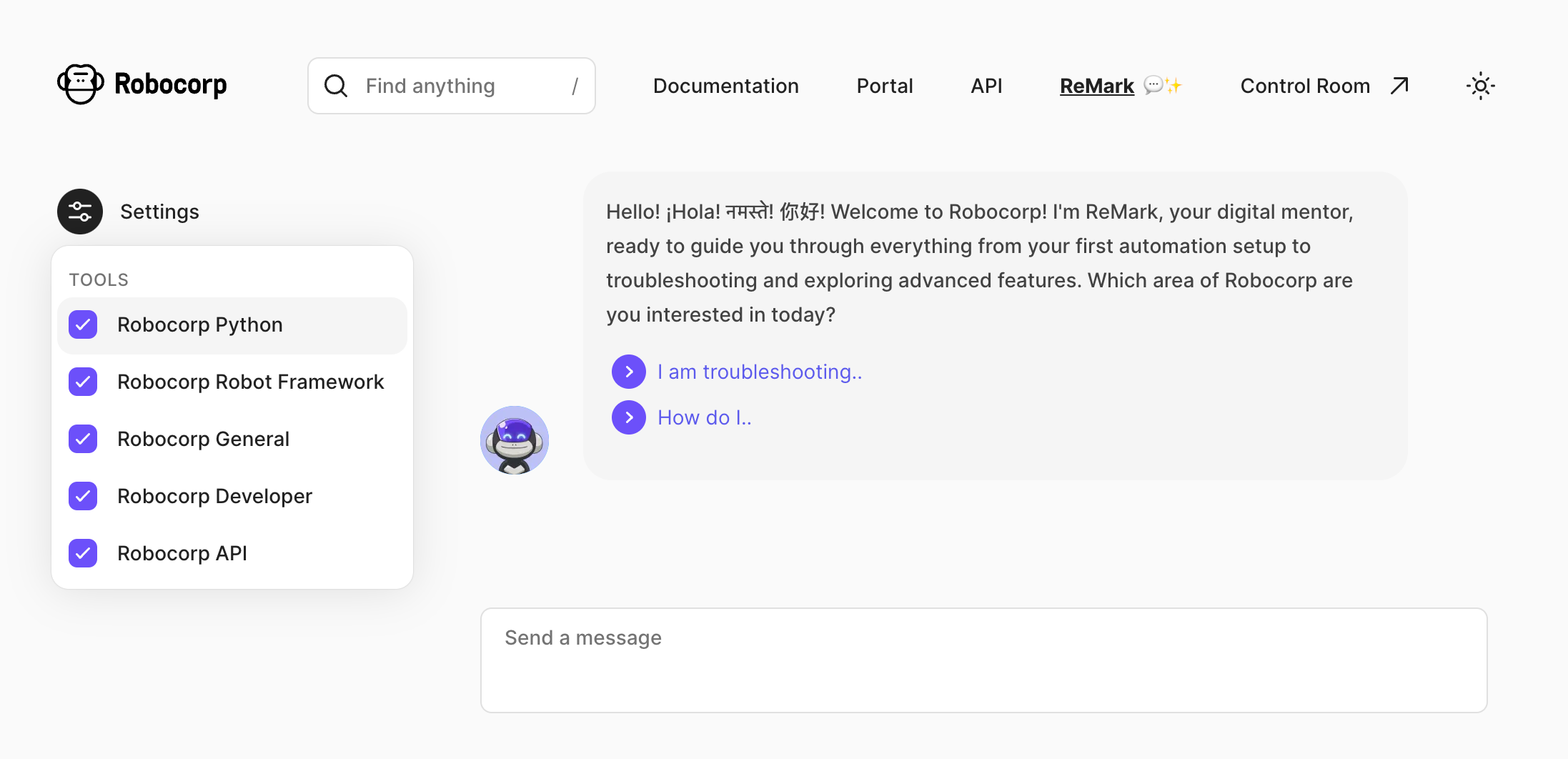
But why? The reason is that the source data ReMark “knows” has already become quite broad, and it’s easy to get mistaken in the nuances. For example, for someone working 100% on Python, it’s useless to feed in Robot Framework built-in keyword documentation.
A user who, for example, only works with Control Room and is not interested in building the bots can drop the irrelevant source “tools” out. Here’s what each tool contains as of writing this:
-
Robocorp Python - Robocorp framework and library docs, Python examples in the Portal, Playwright documentation
-
Robocorp Robot Framework - Robot Framework built-in library docs, RPA Framework library docs, Robot Framework examples in the Portal
-
Robocorp General - Stuff from our website, like blog posts, case studies and the pricing page
-
Robocorp Developer - All the rest of the documentation and developer guides: topics such as operating bots with Control Room and setting up workers.
-
Robocorp API - recently updated Control Room API docs.
In case you are wondering why they all have “Robocorp” in the name, we plan to add 3rd party sources such as docs from the most commonly used Python packages, and why not even let you add your documents?
The new API documentation in the source data
As you already saw in the previous chapter, API documentation is now covered as a separate source. They are unique from the “build bots” use cases that ReMark has been excelling in already for a while, as you might be working on any platform and language. The skills of large-language models shine here.
Try, for example, something like this, and you’ll get working code out:
How do I add a new work item with control room API but not start a process? Want to call it from JavaScript.
Your feedback is vital. Please help us by hitting the 👍 / 👎 emojis in ReMark’s responses to help us know when things are great, especially when things go south. Thank you.
🎉 RPA Framework 27.5.3
- Library RPA.Outlook.Application (#1127): Fix how keyword
Move Emailsworks. Read more from the pull request.
🎉 RPA Framework 27.5.2
- Library RPA.Robocorp.Storage (
robocorp-storage1.0.2): Fix keywordList Assetsfor listing and returning correctly all the assets available in the cloud. - Library RPA.Assistant (#1122;
rpaframework-assistant3.0.2): Show files selected withAdd File Inputto make it easier for users to know it has been used. Also shows a warning if the image path forAdd Imageis not valid or if the file does not exist.
🗒️ Note
This version is compatible with robocorp 1.2.1.
🎉 RPA Framework 27.5.1
- Library RPA.Browser.Selenium (#1123;
rpaframework-core11.2.3): Fix “There is no such driver by url” error with Chrome/Chromium versions above 114 attempting a chromedriver version resolution. - Library RPA.Robocorp.WorkItems: Fix dirty items logging and documentation nits.
🎉 RPA Framework 27.5.0
- Add reply_to parameter for
Send Messagekeyword for RPA.Email.Exchange and RPA.Email.ImapSmtp libraries.
🏗️ Robocorp Setup Utility v1.3.2
Getting deeper into complex enterprise setups has raised a bunch of tripping points that our tooling has not been able to detect and foresee, which have been causing some headaches in the initial setups lately. The release contains a bunch of improvements and fixes related to these cases.
- Fixed issue with Setup Utility downloads missing profile settings.
- Upgrade RCC to v17.3.0:
- Supports layered environment building, unique conda-forge section build once, and cached
- Embedded micromamba and version update to v1.5.1
- Improvements to the process list after execution on Windows
- Profile support to allow Legacy SSL Renegotiation
- v17 major change: 'rcc interactive configuration' removed as Robocorp Setup Utility has the UI for creating profiles
- Improved service-helper to fix a bunch of issues related to admin permission pop-ups etc.
Download from here and check our documentation here.
Have a splendid day! 🚀
Introducing the new Control Room API and Worker Events
We are excited to announce two new major features that will help you to better integrate with Robocorp Control Room and to give better visibility to self-hosted Workers.
New API based on the OpenAPI v3 specification
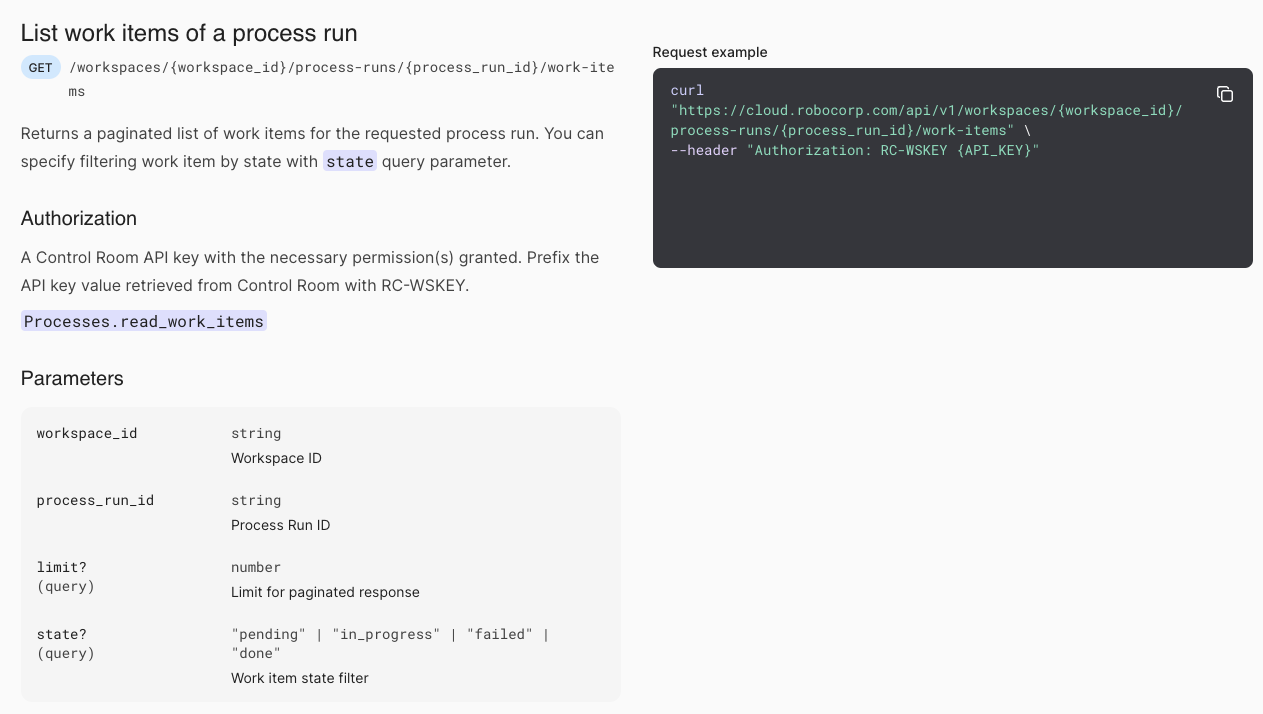
The new unified Control Room API consolidates the old Process, Robot, Assistant and Worker APIs under one consistent set of endpoints. Naming conventions now also reflect the current terminology used across Robocorp. The API is specified using OpenAPI v3, which makes building integrations a breeze. For example, it enables you to take advantage of all the tooling built on the top of the OpenAPI ecosystem, e.g., generating custom SDKs directly from the specification file.
The old APIs are now deprecated but will be available until the 15th of January 2025. No immediate action is required. We will be sending reminders to users of the old APIs until the discontinuation.
Authentication and authorization mechanisms will stay the same, and any existing API keys will work with the new API. We highly recommend building all new implementations on the top of the new API, and to start converting old implementations to the new specification. No new features will be added to the old API endpoints. If you need any guidance with migrating to the new API, please contact your technical account manager.
Finally, the new API is hosted under the same domain name used to access Control Room. The API helper guides you to use the appropriate domain name. This reduces the number of domains to be allow-listed and thus simplifies the network configuration requirements.
For more details about the new API please see the updated API documentation.
Worker Event Log and Notifications

The new Worker event log shows events happening in the self-hosted Workers, giving visibility to the status. It helps with troubleshooting any issues related to the configuration or the host machine.
We have also added a new notification feature, which enables you to receive e-mail notifications about the selected events you want. This enables you to stay on top of operations and take action if required.
Features
- New Control Room API
- Worker Event Log
- Worker Notifications

Workforce Agent Core v7.1.6
- Upgrade RCC to v17.3.0:
- Supports layered environment building, unique conda-forge section build once, and cached
- Embedded micromamba and version update to v1.5.1
- Improvements to the process list after execution on Windows
- Profile support to allow Legacy SSL Renegotiation
- v17 major change: 'rcc interactive configuration' removed as Robocorp Setup Utility has the UI for creating profiles
🎉 RPA Framework 27.4.2
- Application classes from RPA.*.Application libraries can be further inherited and extended without the need of adding a mandatory class-level docstring.
- Library RPA.Robocorp.WorkItems won’t get easily affected anymore by any issue within the RPA.Email.ImapSmtp library.
- Keyword
Email To Documentraises appropriately when the input value is of an unexpected type. - Takes into use the latest
robocorp-storage1.0.1, adding various fixes into the RPA.Robocorp.Storage library.
🎉 RPA Framework 27.4.1
- Fix keyword
Email To Documentin library RPA.Email.ImapSmtp by restricting thepython-docxpackage version to the maximum working one.
⚠️ Warning
This affected both this library and RPA.Robocorp.WorkItems due to a slipped sub-dependency breaking change. We strongly suggest to upgrade to the latest rpaframework in order to benefit from the fix, and if you’re not ready for it yet, pin in your conda.yaml python-docx==0.8.11 for the time being.
🎉 RPA Framework 27.4.0
- Library RPA.JavaAccessBridge (#1060;
java-access-bridge-wrapper1.1.0): - New library import parameter max_depth which limits the maximum level the search will go when selecting a window and building the element tree. With disable_refresh one can disable any implicit global refresh when this is set to False.
- Add new keyword
Refresh Elementfor explicitly refreshing elements. (useful when callbacks are disabled and new data appears in the app) - Enhance
Read Tablewith visible_only parameter which controls what kind of children (inner cells of the table) to return. The number of columns is correctly detected and the table automatically refreshes when callbacks are disabled and the global refresh is enabled. - Bugfixes in the following keywords:
Click Element,Set Display Scale Factor,Get Element Actions.