
Release Notes
Worker v6.34.6
Worker release v6.34.6.
Minor update that improves logging and updates the RCC to latest version (14.15.4).
You can find the detailed changelog for Workforce Agent Core here.
Updated Pricing Plans, Mass Work Item Actions
We are excited to announce some updates to the pricing plans and to the Work Item UX. The 3-minute step run time limit on the Developer plan has been removed, and the Consumption plan has 1500 free run minutes in addition. The plan updates have been rolled retroactively, so you can enjoy the benefits immediately. On the Work Items, mass actions have been updated for you to be able to process more items at once.
Pricing Plan Changes
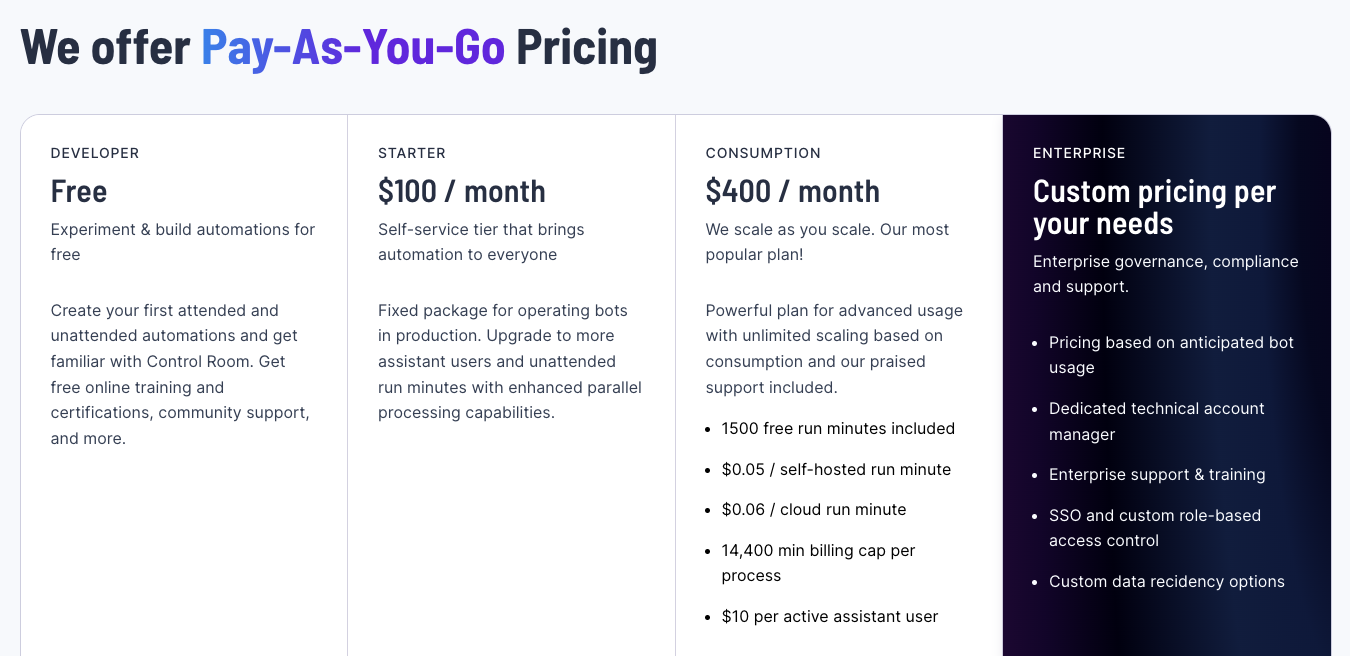
We felt that some limitations in the Developer plan were too inconvenient to properly try out the platform and that the Flex plan had some discrepancies in the upgrade path, so we decided to tune them a bit in a way that lets you get more bang for your buck.
On the free Developer plan, we have decided to remove the 3-minute time limit for step runs. The forced timeout caused many problems for users, in some cases even terminating the run before the environment was set up in the Worker. This change should allow you to run longer running automations, up to the fixed 240 minutes included in the plan.
The Flex plan has been renamed to Consumption plan to better reflect that it allows you to fully take advantage of the consumption-based pricing and scaling that our platform offers. It is the first plan that does not limit you to a fixed amount of run minutes per month (as in Developer and Starter plans).
In addition, we have decided to add 1500 free run minutes to the Consumption plan to be in line with the upgrade path, so you will also have a base capacity you can use without extra cost.
Work Item UX Improvements
The Work Item mass actions have been previously limited to the page size. Now you can select all filtered Work Items, and perform actions on them. This will reduce the amount of clicks needed in e.g. cases where you have had a lot of application exceptions and want to retry all Work Items at once.
🎉 Robocorp Setup Utility v1.0.1
- Setup Utility force creates necessary folders in order to operate properly
- Running diagnostics after network config add/remove
- RDP connection available only if worker is running
- Ensuring profile in common path - controlled by Admin account
- Forcefully removing unknown workers
- UI/UX improvements all across the board
- Main Page has now specific guidance for users
- RCC Speed Test implementation & integration
- All dependency vulnerabilities are fixed
- New version of embedded RCC at version
14.15.4 - Service Helper Embedded at version
1.13.2 - Internal Status page updated
Download from here and check our updated documentation here
Have a splendid day! 🎉
Worker v6.34.4
Workforce Agent Core v6.34.4
- Add more information to the artifact upload end event
- Bundle RCC into the Worker executable and extract it during runtime
- Upgrade RCC to v14.15.3
You can find the detailed changelog for Workforce Agent Core here.
Updated Worker Views and More
In this Control Room update, we are introducing brand new and improved Worker views for you to conveniently manage a large number of Workers, along with a few smaller UX improvements and bug fixes.
Improved Worker Views
.png)
The Worker views have been updated to enable more convenient management of Workers and troubleshooting of potential issues in your unattended automations, especially in cases where there are multiple self-hosted Workers or groups involved.
The new views have been structured to provide more information about how the Worker is used in different Processes, Steps, and Groups, in addition to sorting and filtering of data, which helps you to stay on top of operations. Also, the user experience of linking new Workers and managing groups has been improved.
Other improvements and bugfixes
- The parallel execution limit in steps is no more limited by the Worker group size
- Autoremove option has been added to the group link tokens, enabling better management of temporary execution environments
- The rare case of scheduler double triggering process runs has been fixed
- UX improvements to the Vault UI
- The bug where VSCode was unable to get secrets when "Prevent viewing Vault secret values" was enabled has been fixed
As always, we in Robocorp would be most interested to hear what you think about the update, so don't hesitate to contact us in the community Slack!
ReMark💬 got conversational
Have you tried ReMark💬, our generative AI assistant that helps developers deliver value (bots!) faster? One of the early users said, "Something that used to take me 1 hour to do now takes me 10-15 minutes". Don't miss out on this significant shift in developer productivity. ReMark💬 is available for free here.
The most recent update makes the use of ReMark💬 easier, especially when working on multiple things at the same time. We added conversations. The new left sidebar will keep your conversations in order. As ReMark💬 uses previous messages and responses to answer your questions, remember to hit the "New Chat" button to start fresh when you are changing topics.
Features
- Organise chats with ReMark💬 in conversations
- Rename and delete conversations
- Stop text generation button when ReMark💬 is answering
- Thumbs up and down buttons to give feedback on the quality of answers
Updates
- Better error messages in cases when OpenAI API returns an error
New features to address organizational policy needs
To address common security and compliance policy needs encountered often in different organizations, in this update, we are introducing a control to Vault secret visibility on the UI, the possibility to provide a reason for stopping Process Runs for auditing purposes, and new audit log events.
Organization Privacy & Compliance settings
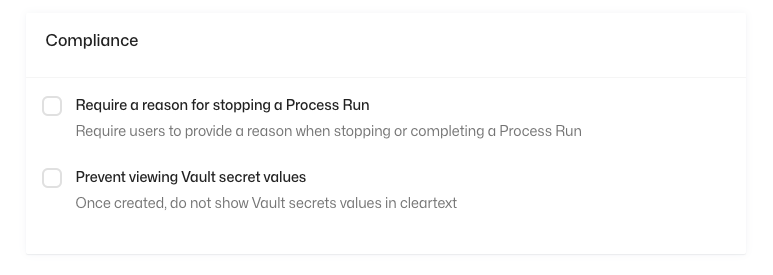
To enable the new features, we have added two new options under the "Privacy & Compliance" tab in the Organization settings. These settings can be accessed by the Organization Owners and Admins.
Vault Secret Visibility
By toggling the "Prevent viewing Vault secret values", vault secrets won't be visible to users after creation from the UI. This can prevent leaking of secure credentials by accident (by e.g. in a screen share) and can be a requirement in IT security policies.
Process Run Stop Reason
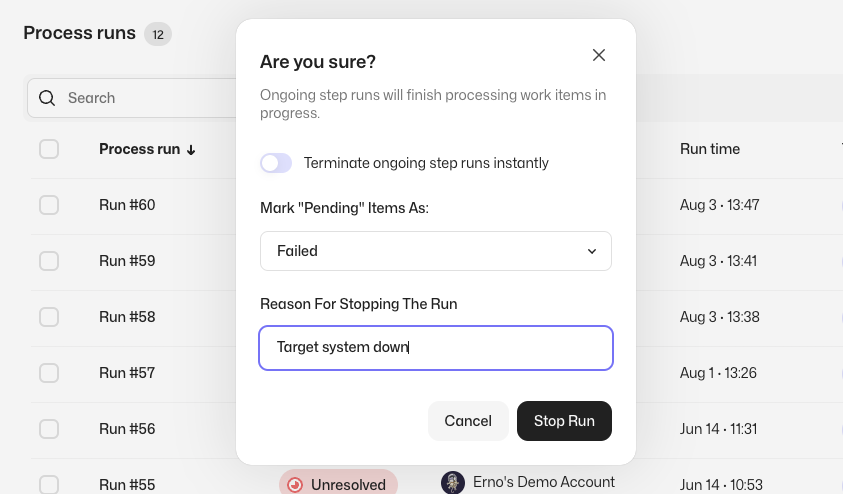
By toggling the "Require a reason for stopping a Process Run", users need to provide a reason when stopping process runs manually. This will add the reason to the audit log event regarding stopping the run and is useful for e.g. SOX compliance.
New Audit Log Events
We have added User login (with IP address) and SSO mapping change events to the audit log to cover common security policy and auditing needs.
As always, we at Robocorp would be most excited to hear your thoughts about the features! Feel free to contact us in Slack or other channels if you have any feedback in mind.
🎉 RPA Framework 24.1.2
- Library RPA.Robocorp.Storage (
robocorp-storage0.3.2): Fix bug when retrieving assets containing spaces in their names.
Worker v6.32.3
- Adds the ability to the Worker to check for the
rccexecutable in the Workers Common Path - If
rccexecutable isn't found in either path (the instance path & the Workers Common Path), it will download it as it did before - This will provide a more reliable determination in use cases involving
Setup Utility
Have a good day!
Robocorp Setup Utility v0.15.1
- Issues with launching
Setup Utilityare now fixed - missing required entities caused the app to freeze in certain situations - Everything should now be ensured in the bootstrap sequence
- Upgrading to the former version
(v0.15.0), shouldn't cause any problems - Upgrading to the latest version is always recommended
Have a good day!
🎉 Robocorp Setup Utility v0.15.0
-
Service Helper v1.11.2is recommended -
Go to
Internal Statuspage and upgradeService Helper -
Latest
Service Helpersets the correct permissions for log on service, you don't need the last steps inSetup Utilityanymore when adding a new Windows Worker-
Checking if the user already has a worker designated to it - one worker per user; if the user has already a worker, a new worker is rejected
-
Enable/Disable video stream/data transfer is now possible directly from
Setup Utility -
Test the RDP Connection by opening one directly from
Setup Utility -
Adding a new Windows Worker is prefaced by an automatic profile deployment to the user - the current profile from the Admin account is used for the deployment - as such, the proper
rccenvironment is propagated to all users -
Manually deploy the current profile to a desired user account from
Profile Management -
Reinforced clean up after Worker is removed - deleting known files from known locations
-
-
Fixed the
Submit Issueproblems -
You can now reliably Submit Issues to us and we thank you for them :)
-
Improvements in the UI/UX in certain areas of the app
Have a splendid day! 🎉
🎉 RPA Framework 24.0.0
- Library RPA.Robocorp.Storage: Takes into use
robocorp-storage0.3.1 and replaces the limited generic keywords with the ones below. (#1016) Set Bytes Asset&Get Bytes AssetSet Text Asset&Get Text AssetSet JSON Asset&Get JSON AssetSet File Asset&Get File Asset
⚠️ Breaking changes: Old Set Asset & Get Asset keywords are gone, please replace them with one of the pairs above.
24.0.0 - 18 Jul 2023
Other noticeable past releases
23.5.2 - 29 Jun 2023
- Library RPA.Robocorp.Storage: Add support for using Assets in VSCode
23.5.1 - 28 Jun 2023
- Library RPA.JavaAccessBridge:
- Update and pin
java-access-bridge-wrapperto version0.14.1
23.5.0 - 27 Jun 2023
- Library RPA.JavaAccessBridge:
- Update
java-access-bridge-wrapperto version0.13.0 - Add keyword
Print Locator Tree
23.4.0 - 22 Jun 2023
- Add new library RPA.Robocorp.Storage for managing assets within Asset Storage in Control Room. (#957)
🎉 RPA Framework 23.4.0
- Add new library RPA.Robocorp.Storage for managing assets within Asset Storage in Control Room. (#957)
Worker v6.32.2
Workforce Agent Core v6.32.2
- Fixes an issue where worker executor was left running after the connection to Control Room was already lost
- Fixes an issue where keyboard interrupt or SIGINT would exit the application with exit code zero
You can find the detailed changelog for Workforce Agent Core here.
Worker v6.32.0
Workforce Agent Core v6.32.0
Fixes an issue with desktop setup when "Do not signout after run" option was used. The agent core was left running even after the execution.
You can find the detailed changelog for Workforce Agent Core here.
Robocorp Setup Utility v0.13.3
Added System Toolbox to fix the most common system-level settings
Detection if the user is an administrator and hides features that cannot be used.
Submit Issue is now available:
-
Submit Issue creates the report as Generate Report & sends that as attachment
-
The report package will still be available for the user locally
Fixes to the Windows Desktop Worker setup:
-
Fixed issues with User & Domain
-
Added ability to test user credentials
Download Robocorp Setup Utility from our download site.
Introducing Workspace Assets
Today we are releasing Asset Storage for your bots! It’s a highly convenient way to persistently store data and configurations you might need when setting up or operating your attended or unattended automations.
The Asset Storage stores data on a workspace scope and can be used either via UI, API, or with Keywords directly from the Robots, and supports different data types, e.g., Text, JSON, and Files.
There are endless use cases in which the feature can be helpful; your imagination is the limit! Here are some examples we have heard from our users:
-
Managing configuration data across automations in a centralized way instead of multiple environment variables in process steps (e.g. e-mail lists used by the robots)
-
Sharing common input data across multiple processes (e.g. Excel sheet that multiple robots process different parts from)
-
Storing user-facing reports that are updated by multiple processes (e.g. Excel sheet that is updated by multiple different processes)
-
Storing process operational data that the work items are not suitable for due to their transactional nature
-
Storing non-process items, like development guides, documentation, and company practices
-
Storing LLM prompt templates to be used by the robots with large language models, allowing the iteration of prompts without deploying the bot
The Asset Storage is designed for non-sensitive data that needs to persist beyond a single process or assistant run, and the Vault should be used to store sensitive data like credentials instead.
How to use
Control Room UI: Asset Storage is enabled by default, and you can access it from the navigation by selecting "Assets" in the menu. In the Assets view, you can create new assets or modify the content of old assets.
API: Assets can be used with the workspace API; please see the available actions from the API documentation under "Asset Storage".
Keywords: To utilize Assets from robots, we have created simple-to-use keywords for convenient workflows. Please see the library documentation.
For the full description of the feature, please see the documentation page. As always, we at Robocorp would be most excited to hear your thoughts and feedback about the features, and if you have interesting use cases in mind, please share them with us!
Introducing the new era of Python automations
We're excited to announce our new automation framework for Python automations – simply called robocorp. The release brings the experience of developing Python automations on par with Robot Framework on our platform.
The project templates in our VS Code extension have been updated to use the new framework and leverage its capabilities.
Check out our blog post for in-depth story about the new features, or view and read the summary below.
Features
- New
@taskDecorator: Any method decorated with@taskbecomes runnable, and can thus be scheduled or otherwise managed as a part of a Process or Assistant in Control Room. - Visual and Autogenerated Logs: We've brought the loved logging features from Robot Framework to Python, all without you having to write a single line of code. Furthermore, you can now control the logging with ease, suspending logs for sections dealing with sensitive data in several different ways.
- New Robocorp Automation Libraries: While our rpaframework libraries are based on Python, we wanted to enhance the developer experience for those choosing to work on Python exclusively. The new robocorp automation libraries roll out focusing on common automation tasks (Excel, browser, APIs) and interacting with Robocorp Control Room (such as Vault, Asset Storage, Work Items).
- New Python Templates in VS Code and Portal: Easiest way to start using these new capabilities is through the new Python templates in VS Code. They are already available, for example have a look at Playwright Browser automation template.
Second generation of Robocorp-hosted Cloud Workers
CLOUD WORKERS - ACTION REQUIRED
We are announcing three significant changes to the Robocorp-hosted Cloud Workers:
-
Modernization of the Linux distribution from Ubuntu 18.04 to Debian 12.0 "bookworm".
-
Predictable performance via specified resource quotas.
-
Update process that enables testing upcoming container versions beforehand and reverting to a previous version in case of problems.
These changes do not affect any previously deployed robots (yet), but we recommend migrating to the new Debian-based container to stay up to date with security updates.
If no action is taken, step configurations will be migrated automatically starting January 1, 2024.
OK, WHAT SHOULD I DO?
👉 Update your step configurations to use "Cloud Worker" instead of "Cloud Worker (Ubuntu 18.04 legacy)"
👉 Test that the robot still runs as expected.
We expect the overwhelming majority of robots to just work without any modifications.
BACKGROUND & DETAILS
Since their launch in 2019, the Robocorp-hosted Cloud Workers have been powered by Ubuntu 18.04 as the underlying distribution. It has proven to be a stable foundation for many popular use cases such as Browser and API automation. However, as of June 2023, Ubuntu 18.04 has reached the end of the standard maintenance window and it is time to move on. Unfortunately starting with Ubuntu 20.04, Chromium is distributed as a Snap package, which does not play nice with containers. Therefore we decided to upgrade to Debian instead.
Unpredictable performance was a common pain point with the first generation of Robocorp-hosted containers. The containers were historically run with a relatively small amount of guaranteed resources (1/4 vCPU, 256 MB RAM, 20 GB disk), but any excess capacity on the underlying cluster was made available to the containers. This resulted in great performance most of the time, but in the case of load spikes, the performance could drop significantly. The Debian-based containers are run with hard resource quotas of 1 vCPU, 3.5 GB RAM and 20 GB disk. In practical terms, the performance is always the same, regardless of total resource utilization.
Finally, we used to have just one version of the Cloud Worker available. It was not possible to 1) test upcoming versions in advance or 2) selectively revert back to a previous version in case of issues. For the 2nd generation of Cloud Workers we are offering three variants. The "early access" version is the bleeding edge, which can change anytime. Once deemed stable, some versions will be selectively promoted to the default version after a 2-week notice period. Customers interested in ensuring maximum stability have two weeks to test the upcoming release. Finally, the "previous" version points to the version that was previously the default, meaning it is possible to effectively roll back in case something breaks.
To summarize, the following changes are live as of today:
-
The Ubuntu-based Cloud Worker has been renamed as "Cloud Worker (Ubuntu 18.04 legacy)" to indicate the EOL status.
-
Three new Cloud Worker options have been added. See the docs page for a description: https://robocorp.com/docs/control-room/unattended/worker-setups/robocorp-container#different-cloud-worker-versions
-
New steps are assigned to the Debian-based, current container version by default.
-
The legacy Ubuntu-based container continues to run with a soft resource quota. The new Debian container runs with a (significantly increased) hard quota.
KNOWN ISSUES
Currently, if a step run gets terminated due to exceeding the memory or disk quota, the run fails with a "Connection loss" error. We are working on adding better error reporting.
Setup Utility: Managing your Desktop Workers just got easier 🎉
👉 You can now manage your Windows Workers just by logging in as the server's admin and using Setup Utility.
Setup Utility lets you see which ones are busy, CPU loads, versions, jump to the correct Worker in Control Room, etc. Setup Utility also now handles the permission setting so that you can directly create Workers on user accounts without admin permissions.

The service-helper CLI tool is still there, and Setup Utility is using it, so the CLI support needed by IT departments using fleet management systems is going nowhere.
👉 The update path is to update your existing Workers to v6.31.1 using the service-helper so that Setup Utility can see them. After that, you can do everything in Setup Utility.
You can find the documentation on Setup Utility in our docs
There is also support for Demo Worker, which is designed to replace the Robocorp Workforce Agent UI application. So if you need to demonstrate robot runs on your machine, this is the place for you.
This was one of the “this should be simple” features that turned out to be a bit bigger thing 😉, so big props to Kosmo & Matti from my team!
I'd also want to thank a few enterprise customers and their IT departments, but I do not know if I can ping their names, so I'll just give an anonymous thank you here. 🙏