
New features to address organizational policy needs
To address common security and compliance policy needs encountered often in different organizations, in this update, we are introducing a control to Vault secret visibility on the UI, the possibility to provide a reason for stopping Process Runs for auditing purposes, and new audit log events.
Organization Privacy & Compliance settings
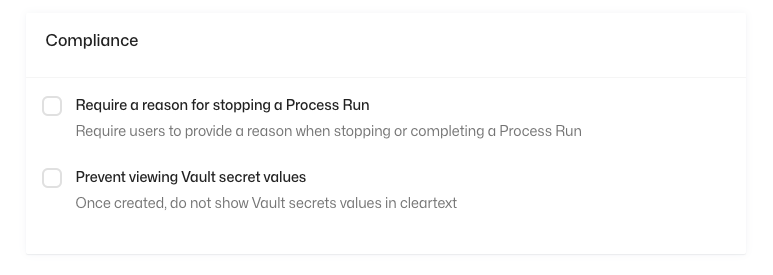
To enable the new features, we have added two new options under the "Privacy & Compliance" tab in the Organization settings. These settings can be accessed by the Organization Owners and Admins.
Vault Secret Visibility
By toggling the "Prevent viewing Vault secret values", vault secrets won't be visible to users after creation from the UI. This can prevent leaking of secure credentials by accident (by e.g. in a screen share) and can be a requirement in IT security policies.
Process Run Stop Reason
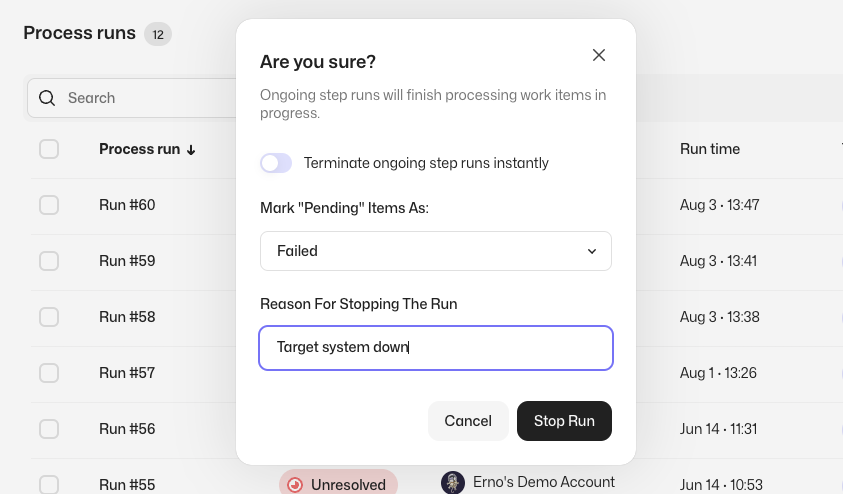
By toggling the "Require a reason for stopping a Process Run", users need to provide a reason when stopping process runs manually. This will add the reason to the audit log event regarding stopping the run and is useful for e.g. SOX compliance.
New Audit Log Events
We have added User login (with IP address) and SSO mapping change events to the audit log to cover common security policy and auditing needs.
As always, we at Robocorp would be most excited to hear your thoughts about the features! Feel free to contact us in Slack or other channels if you have any feedback in mind.