
Improved UX: Work Item handling flows
In our continuous effort to make the Control Room UX as good as possible, this round of UX improvements was aimed at the work item handling flows. The core view regarding these is the Work Data Explorer, where we implemented multiple improvements which reduce a lot of clicks and make work item handling flows and technical troubleshooting more streamlined.
-
New search, sort, and filtering
- Stay on top of what is happening with the improved search, sorting and filtering
-
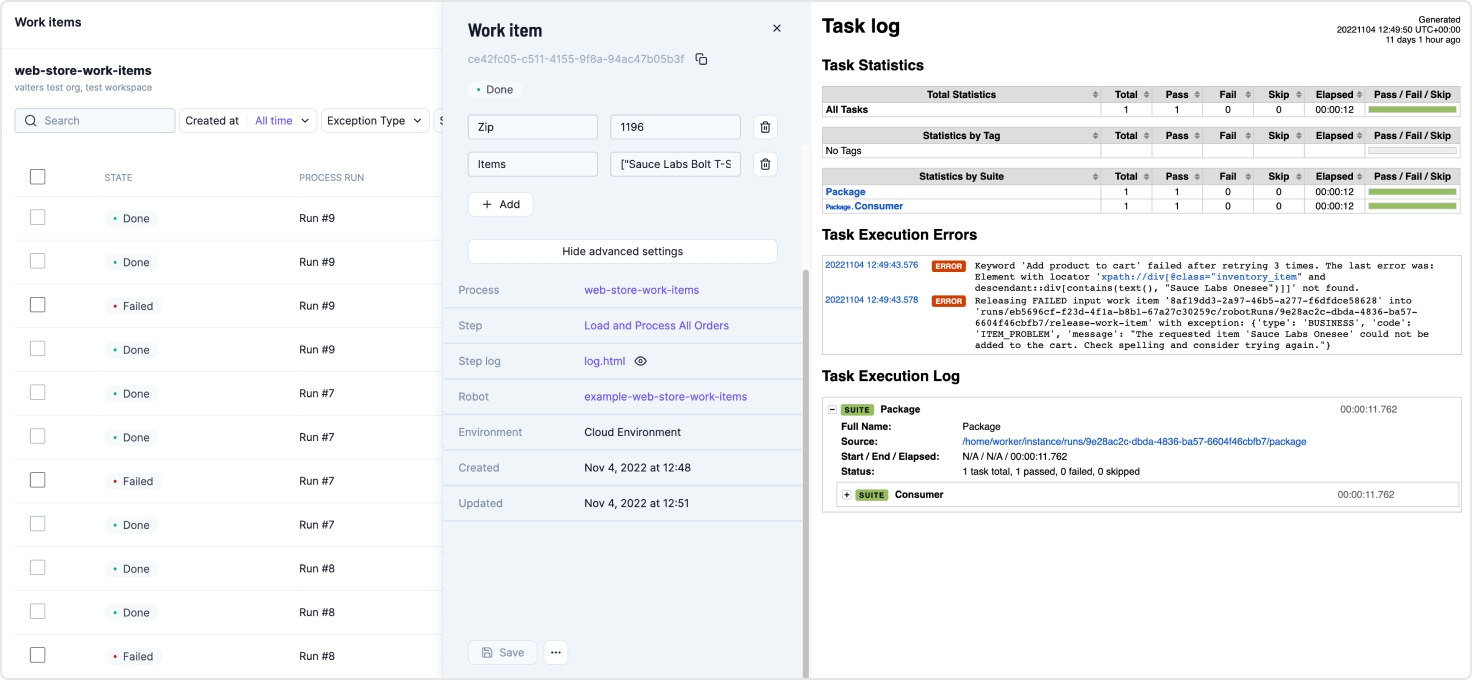
The work item side panel now stays open while browsing through work items
- Reduced amount of clicks and streamlined the flow when browsing through multiple work items
-
Work item actions added to the work item side panel
- Retry, Mark as Done, etc. are now available in the work item panel
-
Toggleable advanced settings for technical troubleshooting
-
You can toggle advanced settings to see more data about the work item at a glance
-
Quick access links to the Step, Step log file, Robot and Environment
-
You can click the eye icon next to the log file to automatically render it to the same view, making troubleshooting more straightforward
-
-
Improved single work item view and direct linking
- Get direct links to single work items, which will open in their own view
- Pass work items to your teammates to handle in a straightforward way