
Process webhooks and conditional step start
We're thrilled to add two new features to the unattended automation, helping you to integrate and control the execution flow of processes in new ways:
-
Process scoped webhooks
-
Conditional process step start
Process Scoped Webhooks
Previously all webhooks were on the Workspace level, leading to unwanted events and a need to filter them at the integration in some use cases. Solution: Process Scoped Webhooks! You can now receive webhook invocations for chosen process runs instead of polling the APIs for status updates and work item data. This feature is designed to be simple, efficient, and scalable to meet the integration needs with various systems like dashboards, other workflow automation tools and BPM tools.
API Key and Webhook management user interfaces got an overhaul in the process. These now have filtering and sorting and let you send test events to ensure the integrations are working properly.
Last but not least, we have added an event log for Webhooks, where you can see the invocations and results, including errors and error codes, to help troubleshoot any problems that might arise during use.
Please see our updated Webhooks documentation to learn more about the feature.
Conditional step start
This new feature lets you control the execution condition of process steps - a much-wanted functionality! Look at the Mark in the below picture; that's where the magic happens. He is like a gatekeeper between the steps, exactly what this feature introduces.
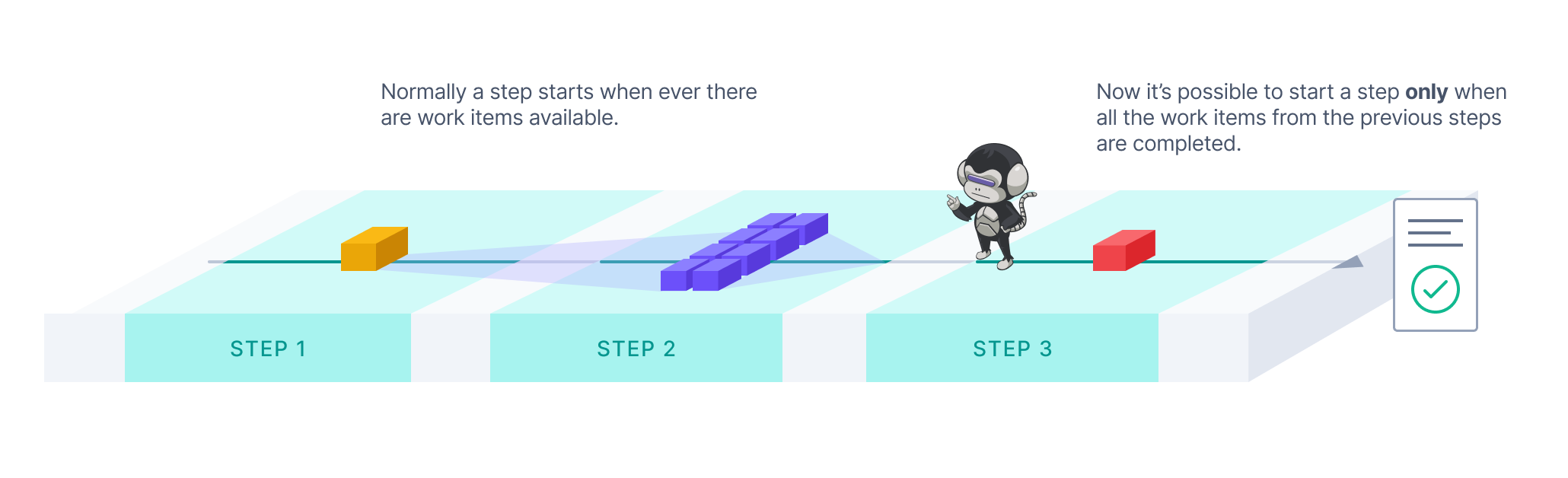
With the "Start Only After" feature switched on, you can choose a step execution to start only after all work items from the previous steps have been processed. This will allow you to synchronise workloads in the process steps. A typical case is when you are concurrently processing high volumes of work items in the early parts of the process but need a consolidated step at the end to, for example, generate a report of all the results of a process run. Take a look at our new Producer-Consumer-Reporter template for an example.
You can switch on the "Start Only After" in the Configuration under each step (except the first of any process). For more information about the feature, please see our updated documentation.
As always, we would love to hear your feedback about the new features, so please don't hesitate to contact us if you have anything in mind!