
Process run termination updates
We are excited to announce a few updates to the process run termination in the Control Room, which will give you more control over how process runs are stopped and what happens to the work items in them.
Previously, when "Terminate ongoing step runs instantly" was selected, it also marked all work items as "Done", which prevented retrying the items after the underlying issue was solved. This was inconvenient in many use cases, so we are now introducing new toggles which you can use to define the logic in a more granular level. Also, many users were not aware of the different ways we provide to end ongoing runs, so we have clarified the options in the UI.
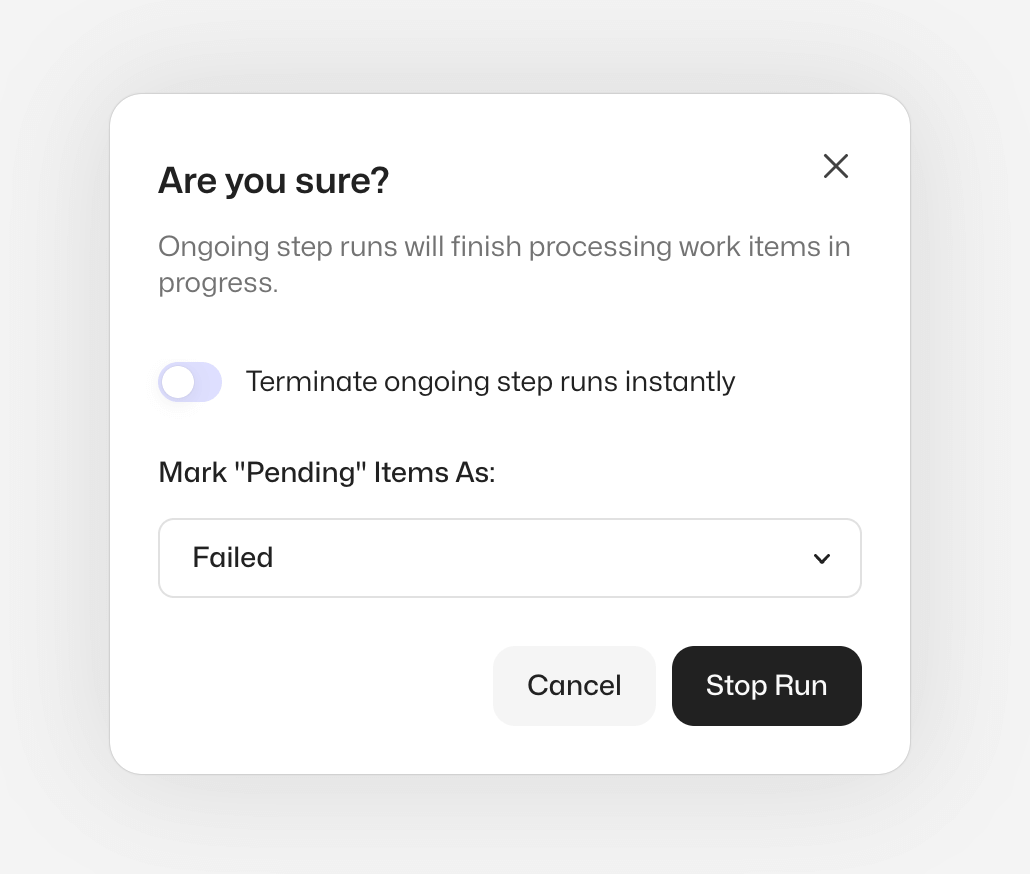
When you click "Stop Run" button in the process run table or inside the process run view, you will get a confirmation dialog with two options.
The first one lets you control the way the step runs are stopped:
- By selecting "Terminate ongoing step runs instantly," all the step runs are given a terminate signal which will instantly end all processing
- By not selecting, all the step runs will finish the work item they are processing and shut down gracefully afterward
The second one controls the behavior of the "Pending" work items which are still to be processed:
- By selecting "Failed" the work items are marked as "Failed" with an exception and can be retried, and the process run will be marked as "Unresolved"
- By selecting "Done" the work items are marked as "Done", and the process run will be marked as "Complete"
For more information about the feature, please see the updated documentation page.
As always, we are excited to hear what you think about the update, so please feel free to contact us in Slack if you have any feedback!