
Release Notes
🎉 RPA Framework 23.2.0
-
Library RPA.Browser.* (#974):
-
Selenium:
-
Fix bug with detecting the right web-driver version for download on systems having Chromium installed instead of Chrome. (#949)
-
Add support for operating on shadow DOMs within the
Get WebElementkeyword. (#941) -
Playwright:
-
Upgrade version and documentation to the latest robotframework-browser 16.2.0. (#942)
-
Automatic headless detection when running on systems without UI, including our Cloud Worker (Linux container). (#166)
Process webhooks and conditional step start
We're thrilled to add two new features to the unattended automation, helping you to integrate and control the execution flow of processes in new ways:
-
Process scoped webhooks
-
Conditional process step start
Process Scoped Webhooks
Previously all webhooks were on the Workspace level, leading to unwanted events and a need to filter them at the integration in some use cases. Solution: Process Scoped Webhooks! You can now receive webhook invocations for chosen process runs instead of polling the APIs for status updates and work item data. This feature is designed to be simple, efficient, and scalable to meet the integration needs with various systems like dashboards, other workflow automation tools and BPM tools.
API Key and Webhook management user interfaces got an overhaul in the process. These now have filtering and sorting and let you send test events to ensure the integrations are working properly.
Last but not least, we have added an event log for Webhooks, where you can see the invocations and results, including errors and error codes, to help troubleshoot any problems that might arise during use.
Please see our updated Webhooks documentation to learn more about the feature.
Conditional step start
This new feature lets you control the execution condition of process steps - a much-wanted functionality! Look at the Mark in the below picture; that's where the magic happens. He is like a gatekeeper between the steps, exactly what this feature introduces.
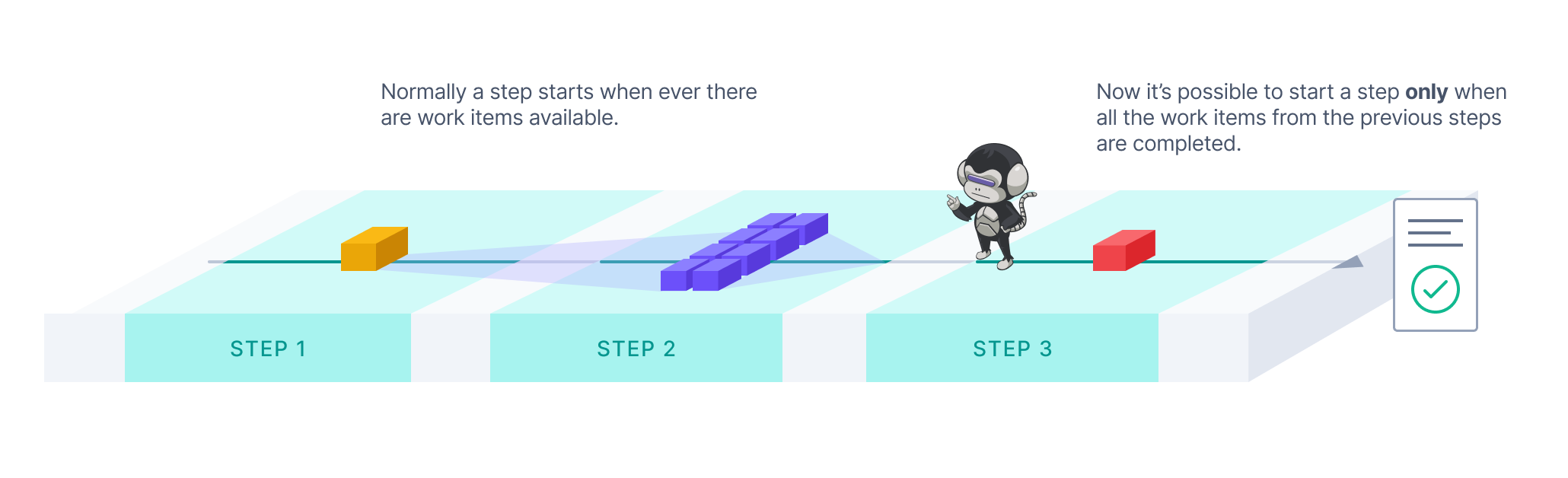
With the "Start Only After" feature switched on, you can choose a step execution to start only after all work items from the previous steps have been processed. This will allow you to synchronise workloads in the process steps. A typical case is when you are concurrently processing high volumes of work items in the early parts of the process but need a consolidated step at the end to, for example, generate a report of all the results of a process run. Take a look at our new Producer-Consumer-Reporter template for an example.
You can switch on the "Start Only After" in the Configuration under each step (except the first of any process). For more information about the feature, please see our updated documentation.
As always, we would love to hear your feedback about the new features, so please don't hesitate to contact us if you have anything in mind!
🎉 RPA Framework 23.1.0
- Library RPA.Browser.Selenium (#943):
- New keyword
Click Element When Clickablewhich tries to overcome errors like “Other element would receive the click”. (#884) - New keyword
Set Element Attributewhich sets an attribute value to an element retrievable withGet Element Attribute. (#762) - Setting a custom download directory is now supported by all Chromium-based browsers and Firefox. Use
Set Download Directorybefore opening any browser instance in order to set such a custom path. (this should be working now in both headful and headless modes; #882) - Custom user profiles (and common configuration) can be used with all Chromium-based browsers, like Chrome, Edge. (#865)
- Improved main library documentation, accepting both WebElement and str as locator types under our keywords as well. (#940, #939)
Pre-build robot environments 🏗️
👉 Need to control or scan every file your automations use in production?
👉 Want to save time / protect developers from environment building?
We now have a solution for setting up environment pre-building inside your company network so that all robot runs and developer tools can get environments much faster.
The setup enables you to build the environments on dedicated machines and, if needed, scan the results before passing them on to your users.
The client machines only download missing files to get the environment which means drastic speed improvements over time as the environments share many of the same files.

🚀 The documentation covers the feature and setup, but if there are any questions, do not hesitate to ping us.
Robot templates update 🤖
Robot Templates coming via RCC and VS Code are now "renamed" a bit, and we have a simple landing page for templates to explain a bit more and have links to their Portal pages.
The highlight item is the new template Producer-Consumer Extended, which extends the Producer-Consumer template by showcasing a third step for reporting, examples for starting your own Python library, more extensive exception handling, etc.
The template list from RCC looks like this:
👉 Reminder that Robocorp Portal is full of open-source robots that can work as a jumping off point, so check it out.
🎉 RPA Framework 23.0.0
-
Library RPA.Database (#944):
-
Improvements for keyword
Call Stored Procedure -
Fix keyword not returning results of the procedure
-
Add possibility of returning result as a
RPA.Tables.Tableby parameteras_table=True(default is True, ie. Table is returned) -
Add possibility of returning multiple resultsets from a
Call Stored Procedureby parametermultiple=True(default is False, ie. only one resultset is returned). Multiple results are then either a list of lists or a list of Tables. -
Remove specific support for Python 2.* in this keyword
-
Library RPA.Email.Exchange (#948):
-
Add new keyword
Send Reply Message -
Add parameter
items_onlyfor keywordList Messageswhich returns internal Email objects (mainly for advanced usage) -
Library RPA.Email.ImapSmtp:
-
Add keyword
Convert EML file into messagewhich reads EML message and returns headers, attachments and body (in text and HTML) format. (#948) -
Add parameters in_reply_to and return_path to keyword
Send Message. (#948) -
Make the recipients optional. It is still mandatory to give one of the following parameters recipients, cc or bcc. (#930)
-
Library RPA.FTP (#938): Add socket support for TLS connections.
-
Library RPA.JavaAccessBridge (#947):
-
Add new keyword
List Java Windows -
Add new keyword
Select Window By PID -
Add new keyword
Select Window By Title -
Keyword
Select Windowis deprecated in favor of the 2Select..keywords mentioned above. Direct replacement for this keyword isSelect Window By Title. This keyword will be removed during next major release involvingRPA.JavaAccessBridgelibrary. -
Update library documentation to contain information about autoexit init parameter
-
RPA.Excel.Application
-
RPA.Outlook.Application
-
Library RPA.Word.Application (#945): Add autoexit init parameter (on default True as it is for similar libraries). This is a breaking change.
Robocorp Assistant 2.0.11
Robocorp Assistant 2.0.11
This update contains:
- Now all the Error pages will show a "Submit issue" button; this will specially be helpful for users to submit an issue in case of linking errors
- RCC updated to version 14.6.0
Kind reminder that Assistant v1 will be deprecated end of June 2023, we will push the automatic update, at which point the end-users still using version 1 will get a prompt to upgrade.
🎉 RPA Framework 22.5.3
- Security update: Bumps
cryptographyto version 40. (fixes the limitation of not being able to use the latestrpaframework-pdfin some scenarios; #926)
Worker v6.28.1
Workforce Agent Core v6.28.1 / Workforce Agent UI v1.2.88.
Changes to the Workforce Agent Core:
- Upgrade RCC to v13.12.0
- Add support for streaming the desktop video to local path
- Improved desktop streamer logging and error handling
- Fix an issue where worker was not sending the run IDs in the state update message to Control Room
- Send worker configuration to Control Room when connection is established
- Update dependencies
A good thing to understand about Workforce Agent is that no matter which execution option you are using; you are always running the Workforce Agent Core behind the scenes, and you can find the detailed changelog for Workforce Agent Core here.
Introducing: Robocorp Setup Utility 🎉
Robocorp Setup Utility is a new application we have developed to simplify the setup process inside companies that are using SSO, have stricter network access, or want to avoid command-line setups 😉
What is the tool for?
-
Quickly create and test a profile configuration for your SSO organization
-
The tool also helps you through complex setups with network proxies etc.
-
Import and switch between profiles
-
Note: Our VS Code extension also supports profile imports and switching.
-
Setup and run the Local Worker for testing purposes
-
Setup Utility will replace the Workforce Agent UI application for the local testing use case
…and on the coming soon list are the Windows Desktop Worker Setups
Download the tool from: https://robocorp.com/download.
You can find guides and documentation on our docs site
Mandatory database update
We need to perform a mandatory database update on all of our production instances which can have minor impact on the system usage. This can show up as e.g. errors on UI or some API calls failing. This should not however impact any ongoing process runs which should automatically retry any failed orchestration operations etc. Runtime environments for robots runs are not directly impacted at all. Some robot operations like accessing the Vault can be interrupted.
We will be performing these operations on 3rd of May at 10:00-12:00 EEST. The actual update will be performed as a database failover which should be near instantaneous and we expect the impact of the operation to be extremely limited.
Robocorp Assistant 2.0.8
Robocorp Assistant 2.0.8
This update contains:
- RCC updated to version 13.12.0 now supports the ROBOCORP_HOME env variable to be a path that contains special characters like diacritics
- Security updates for multiple 3rd party dependencies
- Fixes that should support better the complex network proxy setups
We also released Robocorp Assistant 1.9.3 that contains important security updates as part of the maintenance for v1. This is a kind reminder that Assistant v1 is marked for deprecation.
We will publish security updates to Assistant v1 until the end of April 2023. End of June 2023, we will push the automatic update, at which point the end-users still using version 1 will get a prompt to upgrade.
🎉 RPA Framework 22.5.2
- Library RPA.Browser.Selenium (#916):
- Takes into use the latest Selenium (4.8.3 at the time of the release) and its logging fixes. (#883)
- Fixes scheme ensuring bug during not provided URLs. (#586)
- Fixes headless mode setting with newer browsers and enables more browser features when running in this mode. (#919)
- Ensures keyword
Screenshotworks and logs messages as expected. (logs aren’t polluted with raw image data on levels equal or greater than INFO and it returns the final output image path; #920) - Takes into use the latest webdriver-manager fixes given
rpaframework-core11.0.1.
New UX & Process Outputs
We are excited to announce our new user experience for the Control Room, which is designed to provide users with a more natural, consistent, and efficient experience. In addition to looking modern, it will help users to stay on top of what is happening in their automated processes, simplifying common usage patterns and speeding up the troubleshooting of exceptions.
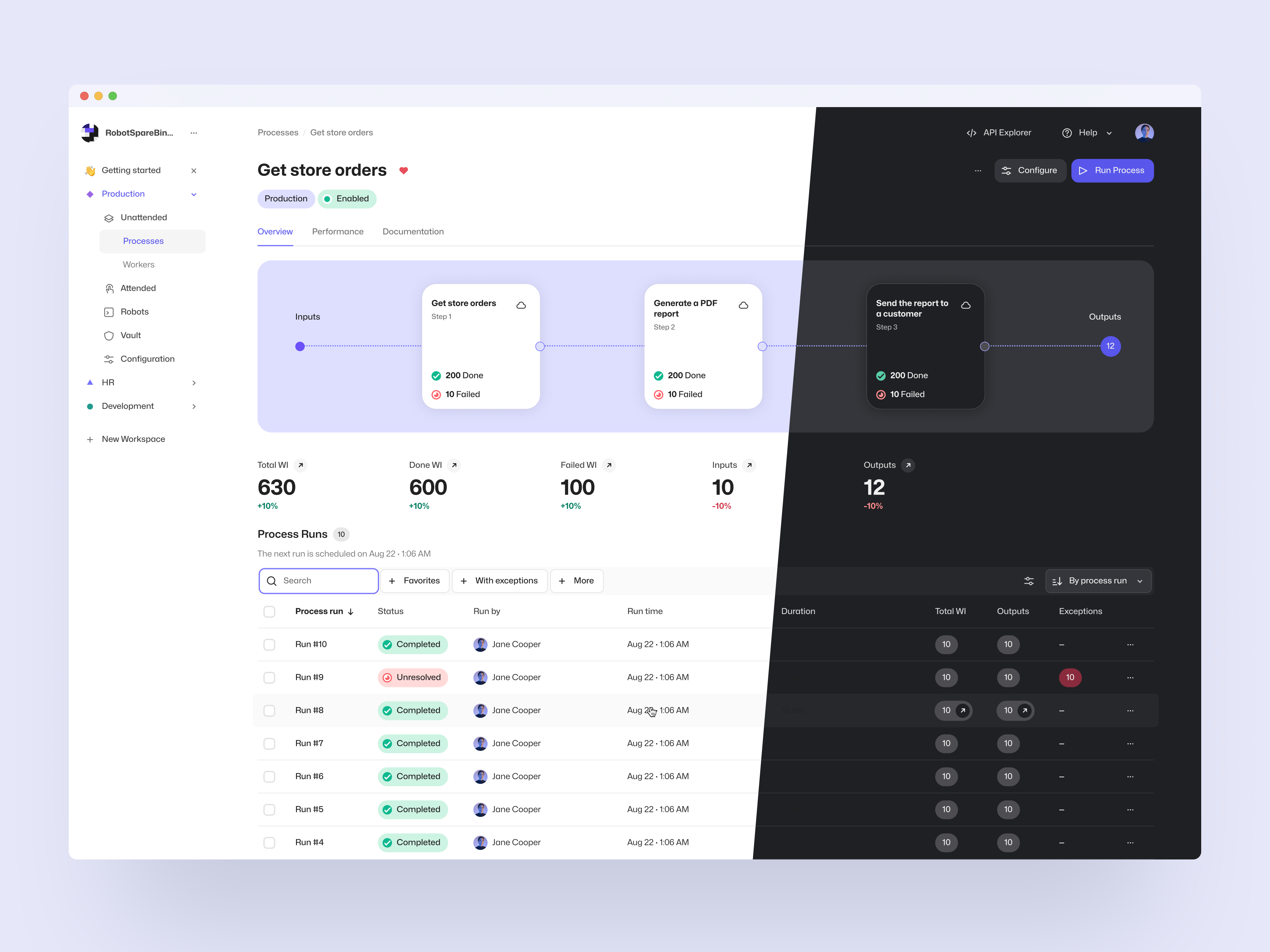
One of the main focus points of the redesign was the unattended automation views, which now visualize the processes giving users better visibility of the process structure and work items, including their processing status. With a few clicks, users are now able to get into the data they need and conveniently perform common actions like looking into the task log, terminating a process run, or retrying multiple failed work items.
Process Output Work Items
As a new feature, we have also introduced Process Outputs. These Output-state work items can be used to store data that is conceptually considered the output of the business process. To utilize them, all you need to do is to create work items from the robot in the last step of the process. They can be accessed via the UI and API in the same way as all other work items, and we will be adding more output-specific functionality in the future to help with e.g. integration use cases.
To go with the new user experience and added features, we have also updated our unattended automation documentation along with examples of how to conveniently use the system, which can be found on the documentation site.
As always, we at Robocorp would be excited to hear what you think of these changes, so feel free to contact us if you have anything in your mind!
🎉 RPA Framework 22.5.1
-
Library RPA.Windows (
rpaframework-windows7.3.2; #913): -
Keywords
[Double|Right|Middle ]Clickwill raise ActionNotPossible if the element is not visible during clicking. (thus clicking wouldn’t happen at all) -
Main library and various keywords documentation fixes.
-
Library RPA.PDF (
rpaframework-pdf7.1.5) (#914): Fix “TypeError: cannot pickle ‘dict_keys’ object” bug with theHTML To PDFkeyword.
Note
This rpaframework version requires at least the following library versions (if you have such dependencies already listed in your conda.yaml), although we recommend upgrading to the latest found in PyPI:
rpaframework-assistant2.2.1rpaframework-aws5.2.8rpaframework-dialogs4.0.4 (deprecated)rpaframework-google7.0.2rpaframework-pdf7.1.4rpaframework-recognition5.1.2rpaframework-windows7.3.0
🎉 RPA Framework 22.5.0
- Library RPA.Windows (
rpaframework-windows7.3.0; #912): - Our Windows elements recorder (windows-recorder) supports path: strategy display when run with verbosity on. (
-vflag) - Keyword
Print Treenow displays the path: strategy locator alongside printed controls and flattened-by-level returned elements. - Keyword
Set Valuesupports value validation customization through the validator parameter.
Check our visually detailed Portal example in order to learn more about element paths and how to use the recorder: this Portal example
RPA.Assistant 2.2.0
RPA.Assistant (rpaframework-assistant) 2.2.0:
New features:
- Add Text Input now supports Robot Framework validation keywords
- Add Text Input now supports minimum and maximum rows to enable multiline inputs
- Improve how validation errors are displayed. They display beside the input field now, instead of bottom of the dialog.
- Fix checkbox values being strings "true" and "false" instead of booleans.
Worker 6.26.12
Workforce Agent Core v6.26.12 / Workforce Agent UI v1.2.85.
Worker API call error handling was improved to validate all responses from Control Room to provide better error messages.
A good thing to understand about Workforce Agent is that no matter which execution option you are using; you are always running the Workforce Agent Core behind the scenes, and you can find the detailed changelog for Workforce Agent Core here.
🎉 rpaframework 22.4.0
-
Library RPA.Excel.Files
-
Made
require_open_xlsx_workbook, a method that was accidentally exposed publicly, private again. -
Library RPA.JavaAccessBridge (#908):
-
Fixes related to keyword
Select Window -
Update to the latest
java-access-bridge-wrapper0.9.7 -
Add additional system window verification before using
jab.switch_window_by_title -
Library RPA.Database (#899):
-
Add support for parameterised sql queries
-
Library RPA.PDF (
rpaframework-pdf7.1.3) (#909): Add documentation about PDF merge and split.
Worker 6.26.10
Workforce Agent Core v6.26.10 / Workforce Agent UI v1.2.83
This version added a fix for an issue where artifact upload failure raised an incorrect error message and updated worker dependencies.
A good thing to understand about Workforce Agent is that no matter which execution option you are using; you are always running the Workforce Agent Core behind the scenes, and you can find the detailed changelog for Workforce Agent Core here.