
Release Notes
Automation Studio 2.16.0
This update to Automation Studio is all about solving potential issues users might encounter. The system diagnostics dialogs have been re-designed, and should now better guide users through possible errors and their mitigations. This version also fixes various bugs reported by users who have been doing the first certification course.
Features
- Redesigned diagnostics dialogs with more clear UI, better documentation, and an option to automatically fix issues (where possible)
- Support for showing code comments (#) in visual mode
Updates
- Removed non-functional Safari option in browser preferences
- Selected workspace is now stored per project
Bugfixes
- Export project menu option would always fail
- Manually added code comments would sometimes be removed on project save
- Custom Python environment variables would sometimes prevent running Robots
- Inspector window sometimes out of bounds with multi-monitor setups
- User keywords would not update when return values were added
🎉 rpaframework 22.3.0
- New library RPA.Smartsheet (#880):
- Supports getting, creating and updating Smartsheet sheets, as well as downloading attachments.
- Read library documentation for a full list of keywords.
Video streaming for unattended processes
We have now added the capability to the Control Room to view a video feed for unattended process runs. This gives visibility to what is happening during the execution and will help troubleshoot or demonstrate what the robot is doing.
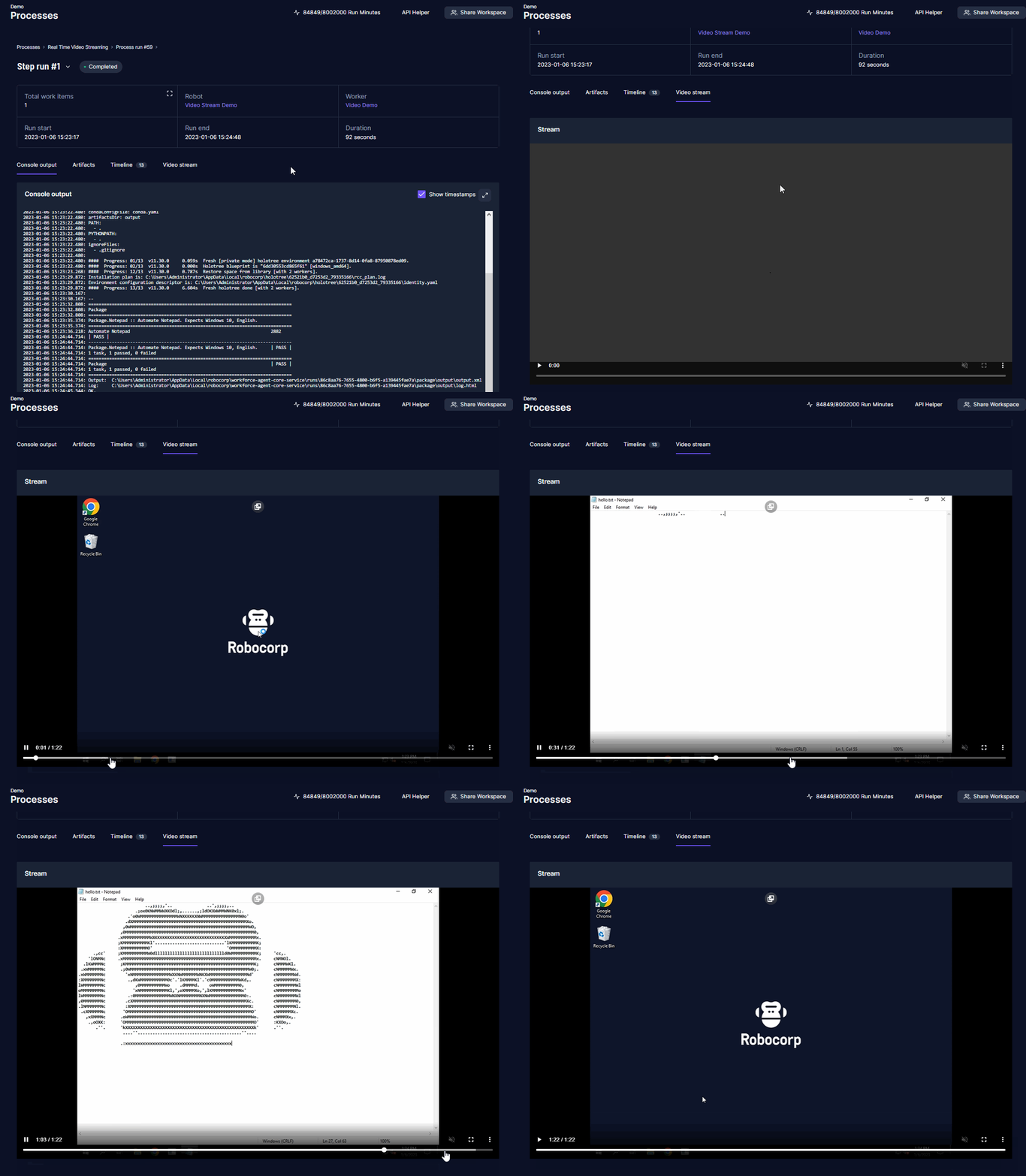
For security, video streaming has a few opt-in steps. Video streaming needs to be enabled per organization, and the feature must be enabled per worker on the local machines.
Once enabled, you can see the video stream under your process step run page. You can view the robot run as it happens or after it has finished. Depending on the network delay, there can be a delay in the streaming.
Video streaming is now available for the new Flex and Enterprise tiers, don't hesitate to get in touch with your Robocorp Customer Success contact to enable the feature.
Check out the documentation: Video stream for unattended runs
Worker 6.26.6
Workforce Agent Core v6.26.6 / Workforce Agent UI v1.2.80
Changes for the Workforce Agent Core:
- Fixes for http(s) calls when proxy is setup via the RCC profile
- Make sure the stream file upload is using RCC profile network options
- Upgrade RCC to v13.9.2
- Update dependencies
A good thing to understand about Workforce Agent is that no matter which execution option you are using; you are always running the Workforce Agent Core behind the scenes, and you can find the detailed changelog for Workforce Agent Core here.
Service Helper 1.8.1
New version of Robocorp Service Helper v1.8.1 available from here.
This version adds RCC profile network support for all downloads and fixes an issue where executable could fail on dependency issue.
🎉 rpaframework 22.2.3
- Library RPA.PDF (
rpaframework-pdf7.1.2): Light documentation fix and preserved default behaviour with the boxes_flow parameter in theSet Convert Settingskeyword. (defaults to 0.5)
RPA.Assistant v2.1.2
RPA.Assistant (rpaframework-assistant ) 2.1.2:
Bugfixes:
- Fix File picker sometimes causing AssertionError: Control must be added to the page first
- Fix Add Next Ui Button callback getting a normal dict instead of a DotDict.
🎉 rpaframework 22.2.2
- Library RPA.Browser.Selenium (#859):
- Fixes
Set Download Directorykeyword: functionality, docs, examples. - Improves Browser Locators functionality. (referenced by alias:)
🎉 rpaframework 22.2.1
-
New library RPA.Calendar (#694):
-
Supports holiday and business day related calculations.
-
Read library documentation for a full list of keywords.
-
Library RPA.Database:
-
Changes how psycopg2 module handles the
Call Stored Procedurekeyword. -
Sets the autocommit parameter when using the
Connect To Databasekeyword with the psycopg2 module. -
Removes INFO level logs from
Connect To Databasekeyword. (privacy) -
Library RPA.Outlook.Application (#878):
-
Adds possibility to set CC and BCC recipients with
Send EmailandSend Messagekeywords.
RPA.Assistant v2.1.0
RPA.Assistant (rpaframework-assistant ) 2.1.0:
New features:
-
Add
Set Titlekeyword. Can be used to set title of assistant when it is running. -
Add
Open RowandClose Rowkeywords. Used to layout elements into rows. -
Add
Open ColumnandClose Columnkeywords. Used to layout elements into columns. -
Add
Open NavbarandClose Navbarkeywords. Can be used to create an always visible top bar for a dialog. -
Add
Open StackandClose Stackkeywords. Can be used to position elements manually. -
Add
Open ContainerandClose Containerkeywords. Useful for styling or placing single elements. -
Add
Add Flet Iconthat enables adding any icons from Flet's large gallery of icons.- Compared to
Add Icon, it is more complicated to use but supports a much larger amount of icons.
- Compared to
Bugfixes:
- Fix regression, Assistant flet app not closing properly when run from CLI and when close button is pressed.
- The library no longer silently misses adding to the result when an input
nameduplicate name is used, instead raises a ValueError.
🎉 rpaframework 22.1.1
- Library RPA.Windows (
rpaframework-windows7.2.1; #869): Documentation fixes in keywords:Set Value,Print Tree,Set Mouse Movement.
🎉 rpaframework 22.1.0
- Library RPA.Windows (
rpaframework-windows7.2.0; #855): - Enhances keyword
Set Valuewith additional checks and a send_keys_fallback parameter as an alternate way of setting in the provided value. (if the main one fails; #483) - Improves keyword
Print Treewith clearer printed depths and children positions in the element tree. The returned element structure now encapsulates a usable path based locator in every element. (#796) - Adds new keyword:
Set Mouse Movementwhich enables/disables mouse movement simulation when interacting with elements. (e.g. clicking combo-boxes; #791) - Miscellaneous: better recording instructions, documentation updates, bugfixes. (#591, #797)
Robocorp Workforce Agent Update v6.26.1
Robocorp Workforce Agent UI v1.2.76 / Workforce Agent Core v6.26.1.
The Workforce Agent Core version was updated to fix an issue introduced in the v6.26.0 release. Large artifacts were not uploaded correctly to the Control Room at the end of the run.
A good thing to understand about Workforce Agent is that no matter which execution option you are using; you are always running the Workforce Agent Core behind the scenes, and you can find the detailed changelog for Workforce Agent Core here.
RPA.Assistant v2.0.0
RPA.Assistant v2.0.0
The new version of RPA.Assistant contains the following breaking changes:
-
Run Dialog and Ask User parameter
clearwas removed, clearing is now mandatory -
(affects Python side users only): Location enum that
run_dialogandask_useraccepts was changed from Location to WindowLocation to improve clarity. -
By default sliders now round to 1 decimal. Use
roundArgument to specify amount of decimals.
New features:
-
Added
locationargument to Add Button keyword -
Added
roundargument to Add Slider keyword.
Fixes:
-
Internal refactoring
-
Update underlying UI library to Flet 0.2.2 -> 0.4.2, granting various bugfixes and improvements
-
Now depends on
rpaframework-core10.4.1 due to Flet dependency incompatibilities with earlier versions
Automation Studio 2.15.1
The first certification course designed for Automation Studio is now available! This update brings in some missing keywords required for the course, and a bunch of small and medium-sized improvements to the developer experience, that should hopefully make finishing the course a breeze.
Features
- The first certification course for Automation Studio
- Libraries in sidebar for archives and PDFs
Updates
- Show all used RPA Framework libraries in palette, if import defined manually
- Show conditionals in tree as read-only, instead of editing raw conditional string
- Automatically open sidebar when adding new keywords or control structures
- Keyword argument inputs show default value and more user-friendly argument names
- Improved handling of non-boolean values in boolean arguments
- Automatically activate task if writing or copy-pasting code into empty file
- Links to Control Room and documentation follow profile, if defined
- Show artifact and log files if encountering an error during Robot run start
Bugfixes
- Editor would crash sometimes when items were deleted in visual mode
- Unable to write work item key that starts with previous key
- Show correct user keywords per suite, if project has multiple suites
- Reveal in file system button does nothing on Windows
- Empty icons for users with no profile image
- Double border for run view errors
Robocorp Worker Update v6.26.0
Robocorp Workforce Agent UI v1.2.75 / Workforce Agent Core v6.26.0
The Workforce Agent Core received bug fixes and updates:
- Artifact uploader to use RCC profile network settings
- Catch package download failure correctly and recover
- Set proxy authentication credentials correctly from embedded proxy URL
- Upgrade RCC to v13.6.3
Major upgrade was also added to the Control Room Robocontainer which will now include, by default, document handling packages:
- libreoffice
- wkhtmltopdf
- unoconv
A good thing to understand about Worker is that no matter which execution option you are using; you are always running the Workforce Agent Core behind the scenes, and you can find the detailed changelog for Workforce Agent Core here.
Robocorp Assistant 2.0.4
Robocorp Assistant 2.0.4
-
Fix for supporting proxies with passwords that contain special characters
-
Updates to internal dependencies for security updates
-
Fix for the documentation URL
Reminder: Assistant v2 update had some behavior changes that we do not want to force the automatically update to version 2. Update to v2 by downloading the application from the downloads page and installing it. The update will not break the link to Control Room. We will publish security updates to Assistant v1 until the end of April 2023. End of June 2023, we will push the automatic update, at which point the end-users still using version 1 will get a prompt to upgrade. Please contact us via Slack or Forum if you have any questions.
🎉 rpaframework 22.0.0
⚠️ Warning - Breaking change release. Example: Parse PDF Invoice
- The
rpaframework-dialogspackage is no longer part of therpaframeworkpackage. - Reason for this change is the deprecation of the RPA.Dialogs library as we are recommending the RPA.Assistant library for building attended Robots.
- This means that RPA.Dialogs library can be still used, but it needs to be separately added into the pip section of the conda.yaml (
rpaframework-dialogs==4.0.2). - The RPA.Assistant library also requires separate package installation of
rpaframework-assistant==1.2.1. - We see that unattended robots are a majority of the process run cases and thus it makes sense to move libraries meant for the attended robots into separate packages. Added benefit is that will reduce the package size for the
rpaframeworkpackage. - Please read the migration guide on how to move from RPA.Dialogs to RPA.Assistant.
Other changes included in the release:
-
Library RPA.Windows (
rpaframework-windows7.1.0; #840):- Add support for the path: strategy in locators. (index-based element tree search)
- Enhance
Print Treekeyword with better element tree logging and the ability to return such structure.
-
Library RPA.Tables (#821): Allow custom dialects in csv files.
-
Library RPA.Robocorp.Process (#845): Host of the Process API should use the host from an environment variable (RC_API_PROCESS_HOST) if that is available.
-
Script use-robocorp-vault maximum token validity time has been lowered to 20 hours.
🎉 rpaframework 21.1.1
- Security upgrade of
cryptographydependency to 39.0.1. (#833)
🎉 rpaframework 21.1.0
- Library RPA.DocumentAI.Base64AI (#803): Support for signature matching on image documents with the following newly added keywords:
Get Matching Signatures: Detects and returns signatures and their similarity.Filter Matching Signatures: Keeps relevant and alike signatures only.Get Signature Image: Saves signature’s image for manual inspection.- Portal example: https://github.com/robocorp/example-signature-match-assistant
- Global fix with retrieving the output directory path.