
Release Notes
Automation Studio 2.14.3
This update of Automation Studio is mostly about under the hood changes. Project environments handling has been refactored, and from now on custom environments are built locally on the machine. In the following releases we will be introducing ways for managing custom libraries and dependencies in projects.
Features
- Build project environments that have unsupported dependencies
- Automatically clean stale environments when starting application
Updates
- Updated default environment to use latest RPA Framework
- Reduced disk space usage for environments
- Improved errors when opening projects
- Tasks and User Keywords no longer automatically titlecased
- Undo and Redo hidden in Flow view, added tooltips
Bugfixes
- Resource and Variables imports sometimes changed to Library imports
- Wrong vertical alignment for certain Variable and Locator icons
RPA.Assistant -library for attended robots
RPA.Assistant -library for attended robots
- Switching from
RPA.Dialogsto RPA.Assistant enables you to build more complex UX flows directly from your Robot Framework code. - Behind the library is Flet, which is a lot lighter dependency and has more flexibility.
- Get started with the new stuff using the Assistant template.
Also check out the migration Guide if you have been using RPA.Dialogs -library

Robocorp Assistant 2.0.1
Robocorp Assistant 2.0.1
The new version of Robocorp Assistant simplifies the end-user experience.

The end-user no longer sees technical / developer options like 'Open Logs', 'Unlink', etc. as the technical features are now behind a Maintenance mode, which you can activate via user settings.
The bigger change in behavior is that the robot run output handling is now in complete control of the robot developer.
If your robot needs to store, for example, report files to the user's local folder, this needs to be done in the robot code, where Robot developers can choose the location or ask the user. Assistant application no longer copies robot outputs automatically to users local folders.
Files placed in the artifactsDir defined in robot.yaml work just like before and will be sent to the Control Room at the end of the run, so use these for debugging as you see fit.
Note: Due to the behavior change described above, the Assistant application will not automatically update to version 2.
Update to v2 by downloading the application from the downloads page and installing it. The update will not break the link to Control Room.
We will publish security updates to Assistant v1 until the end of April 2023. End of June 2023, we will push the automatic update, at which point the end-users still using version 1 will get a prompt to upgrade.
Please contact us via Slack or Forum if you have any questions.
Feature update: Scheduler, custom SMTP server, RBAC
Greetings everyone!
In this feature update, we are bringing additional utility to work items, and improving other areas around operations, especially in Enterprise setups. In the upcoming releases, expect to see more utility added to work items, process operation, and APIs. We are also working on rehauling the look & feel (see our new Portal) and UX of the core views in the Control Room, so stay tuned for interesting updates during the spring and summer!
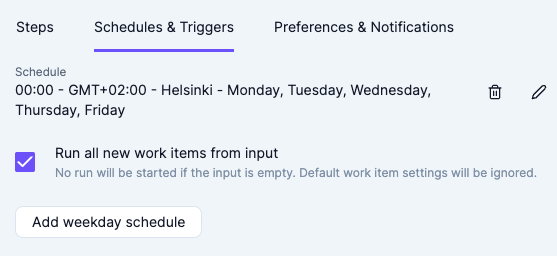
Scheduler - automatically run all new work items from the process input:
-
We have added a new option to run all work items in "New" state from the process input.
-
One powerful use-case for this option is to accumulate work to be processed by creating new work items using the API (or manually via Control Room UI) and defer the processing of said work items to a later time, on a schedule.
-
In case there are no new items in the input, no runs will be started, and hence no run minutes will be used.
-
Combined with a cron scheduler, the feature can be used to create e.g. queue pollers.
-
For further information, see the documentation.
Custom SMTP server configuration for notification e-mails:
-
By default, Control Room uses its own server to send outgoing e-mails, which may cause issues with some filters, e.g. in high-security Enterprise setups.
-
We have added an option (currently available for Enterprise customers) to configure a custom SMTP server, which will then be used instead of the default Robocorp e-mail service.
-
This will also enable sending of notification e-mails to non-workspace member addresses, which can be useful for e.g. integrating with e-mail-based systems.
-
In the future, we are also planning to include support for sending e-mails from the Robots via the custom SMTP server.
-
For further information, see the documentation.
Operator role UI update:
- We have removed the ability for the workspace role "Operator" to see the "Robots" page in the UI.
- The change was made to reflect the use case that "Operator" role is usually given to business persons to operate their automations, and the Robots page is usually obsolete for them.
- No back-end permissions have been changed, so "Operator" still has access to robots for e.g. running Assistants.
- With SSO RBAC, custom permission configurations are available for Enterprise customers.
- The permission matrix has been updated to reflect the UI change.
OpenAI comes to RPA Framework
OpenAI (#792) comes to RPA Framework! New library RPA.OpenAI adds four keywords covering GPT-3 text completions and DALL.E image creation.
-
Authorize To OpenAI: Authorize with OpenAI using your API key -
Completion Create: Keyword for creating text completions in GPT-3 API using your prompt and various arguments. -
Image Create: Create one or more images based on a text prompt. -
Image Create Variation: Creating one or more variations of an existing image.
Note!
The RPA.OpenAI is not included in the core rpaframework package, so please add rpaframework-openai==1.0.1 as a pip dependency in your conda.yaml.
VS Code extensions: LSP 1.9.0 / Robocorp Code 1.1.0 / Warning regarding VSCode 1.75.0
Note: VSCode 1.75.0 has a major issue related to handling keybindings. Please keep to VSCode 1.74.3 until VSCode 1.75.1 is available.
Robot Framework Language Server
New features
-
Code action: Surround with try..except.
-
Code action: Surround with try..except..finally.
-
Interactive Console: (Robot Framework 4 onwards): When a single keyword call is executed and it has a non-None return, its return value is printed.
-
Interactive Console: Typing a variable in the
Interactive Consoleshows that variable. #871 -
Improve
IF/WHILE/Run Keyword Ifsnippet completions to make it a bit clearer that python expressions are expected. -
Building the model of the flow explorer no longer times out and a progress dialog is shown while building it.
-
robot.libraries.blacklistcan be used to blacklist libraries which should never appear in code-completion. -
Deprecated libraries:
robot.libraries.deprecatedcan be used to mark libraries as deprecated.- Keywords from deprecated libraries will not appear in the auto-import code-completion (so, they'll only be available if the
Libraryis added to theSettings). - Libraries which start with
*DEPRECATED*in its doc are also considered deprecated. - Keywords from libraries marked as deprecated will be shown as deprecated.
-
Requesting completions right after
Librarieswithout any additional name will show completions for all known (pre-loaded) libraries. -
Completions for variables are shown without having to enter
$nor${.
Bugfixes
-
Properly report about undefined variable in
RETURN. #865 -
References to variables used in
Evaluatearguments are now properly collected. -
Don't show completion for the variable being currently defined in variable assign.
Robocorp Code
-
If the
TEMPfolder being used in the environment is removed the extension properly deals with it. -
Inspector upgrades:
- Browser Actions Recorder: Improvements in performance and other bug fixes.
- Browser Actions Recorder: Auto-scroll for the keyword list.
- Browser Actions Recorder: Code Editor no longer readonly (note: still indifferent to user changes as it will always update).
- Browser Locator: Fixed buttons not displaying if no matches available.
- Improved approach to close the browser and app window.
🎉 rpaframework 21.0.1
- Library RPA.Windows (
rpaframework-windows7.0.3): Fix Windows element(s) retrieval. (and dependent keywords)
Automation Studio 2.13.2
With this update to Automation Studio, we're bringing in changes to the editor layout. Both the left and right sidebars are now collapsible, with the latter automatically hiding when no elements are selected. Documentation fields for Tasks and User Keywords have been inlined, and rename/delete features moved to the left sidebar to improve consistency.
In the preferences menu, there is a new option to select a default browser for creating web locators and recording. Additionally, dozens of bugs reported by users or detected in internal testing have been fixed.
Features
- Improved editor layout with dynamic sidebars, inline documentation, and more consistent rename/delete features
- Allow selecting default browser for picking and recording
- Multiple new hotkeys and command palette items
Updates
- Tasks and User Keywords can be renamed and removed from the context menu in the left sidebar
- Use special variable syntax in conditionals by default
- Browser is not closed after picking or recording
- Further improvements in Web Recorder element detection
- Run view Back button disabled when run still in progress
- Improved naming and editing of Work Item sets
- Code editor automatically scrolls to active line
- Suite drop-down menu shown in Code view
- Web recording disabled when no Tasks are defined
- Upload Robot disabled when no Tasks are defined
Bugfixes
- Closing a project before opening finishes caused a critical error
- Removing a Suite could leave project in preparing state
- Upload Robot view sometimes incorrectly handled switching workspaces or users
- Unable to set Work Item values with partially duplicate keys
- Output Work Item sets not always updated after runs
- Variables inside strings in IF/WHILE conditionals parsed incorrectly
- Special variables in conditionals incorrectly reported as invalid syntax
- Could not drag Variable into FOR loop value
- Renaming a User Keyword argument would remove default value
- Default return value not always set when User Keyword dragged from sidebar
- Linking with Control Room did not work on macOS when application was closed
- Various small layout and styling issues
🎉 rpaframework 21.0.0
⚠️ Warning
Multiple breaking changes below!
-
Library RPA.Cloud.Azure (#635):
- robocloud_vault_name -> robocorp_vault_name
- use_robocloud_vault -> use_robocorp_vault
Set Robocloud Vault->Set Robocorp Vault
-
Library RPA.Cloud.Google (#794;
rpaframework-google7.0.0):RPA.Robocloud.Secrets->RPA.Robocorp.Vault
-
Library RPA.PDF (#785;
rpaframework-pdf7.0.1):- Keyword
Find Text: - Supports additional parameter ignore_case, which if set to True, will make the search case insensitive. (switch it on if you experience a different behaviour)
- Adds subtext: strategy in the passed locator which checks for a substring instead of the whole text to match.
- Keyword
-
New related Portal example for parsing PDF invoices: https://github.com/robocorp/example-parse-pdf-invoice
Portal got new looks and much more ✨
Our Portal has been growing fast in terms of content, now home to thousands of lines of robot code that jumpstarts your development. It was time to take it to the next level!
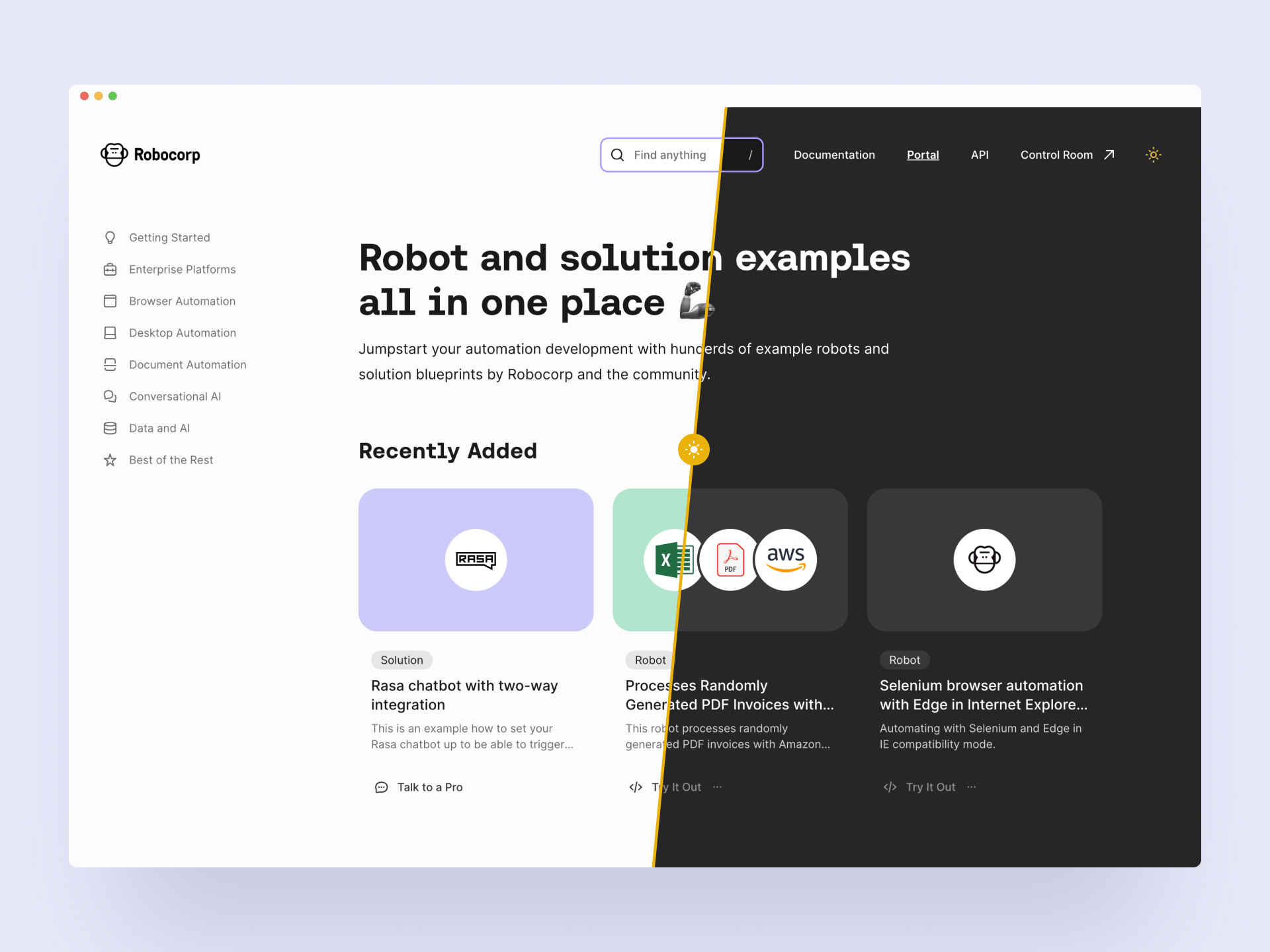
Design
Okay, let's get the most important updates out of the way: it now has a dark mode! 😎🕺 Joking aside, we've redesigned it from scratch with the users in mind. Hope you like it!
New content type: Solution
Portal still houses the robot code examples, but we've added a second content category called Solutions. These bigger pieces guide you through building your entire digital stack with Robocorp. Integrating third-party systems, reference architectures, extending the capabilities, using Control Room API and more. Robocorp + Rasa chatbots is an excellent example of a solution.
Content findability: Collections and library links
Another big update is the Collections you can see on the navigation (on the left in the big screens). This answers your call to have fast access to the content relevant to your style of automation. "Show me all you got on desktop automation now". Btw, the search is quite good, too. 🧙♀️
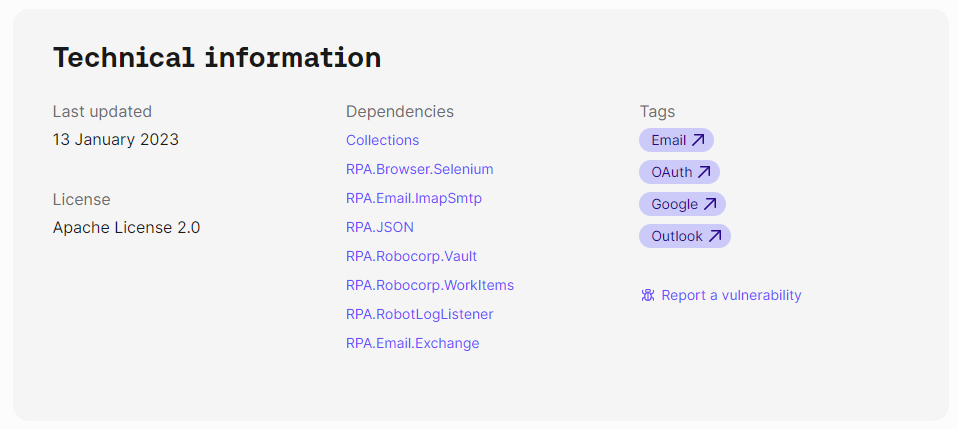
Each robot has a footer containing technical information that houses a new helpful feature: It shows the libraries that the robot uses. They are now linked to a page that contains all the other robots using the same library.
Add to Control Room
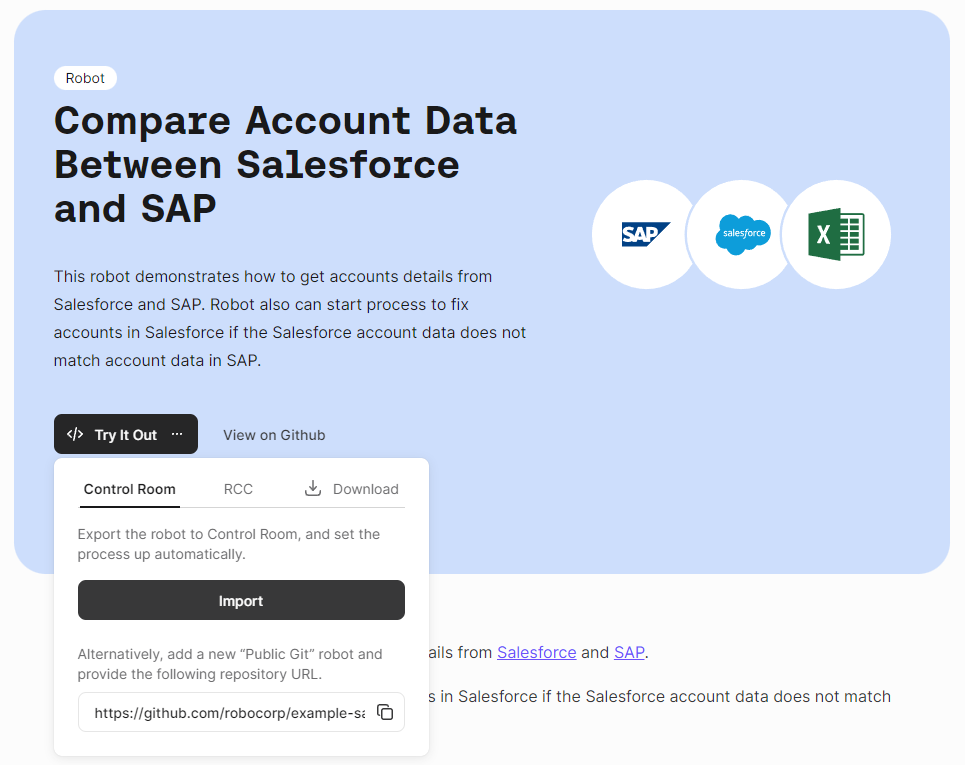
You can now add the robot directly to Control Room from the Portal. The Try It Out button's first option is "Import to Control Room", which takes you through the steps to add the robot and create a process. Handy!
We hope you enjoy the new Portal, and be sure to let us know what you think!
As a reminder, community submissions to the Portal are more than welcome, it's a great way to promote your work. We are planning to add a section to the front page that highlights the best of your bots soon! Submit your bot here.
🎉 rpaframework 20.1.2
- Library RPA.Browser.Selenium (#787): Improved browser order resolution given the set env var and running OS.
🎉 rpaframework 20.1.1
- Library RPA.Browser.Selenium (#781): Ability to change the default search order of browsers, when using the
Open Available Browserkeyword, through the RPA_SELENIUM_BROWSER_ORDER env var.
VS Code extensions: LSP 1.8.0 / Code 1.0.2
A big bunch of updates and new features have been released in the VS Code extensions at a rate that even the release notes have been lagging behind.
The biggest features released since November 2022:
-
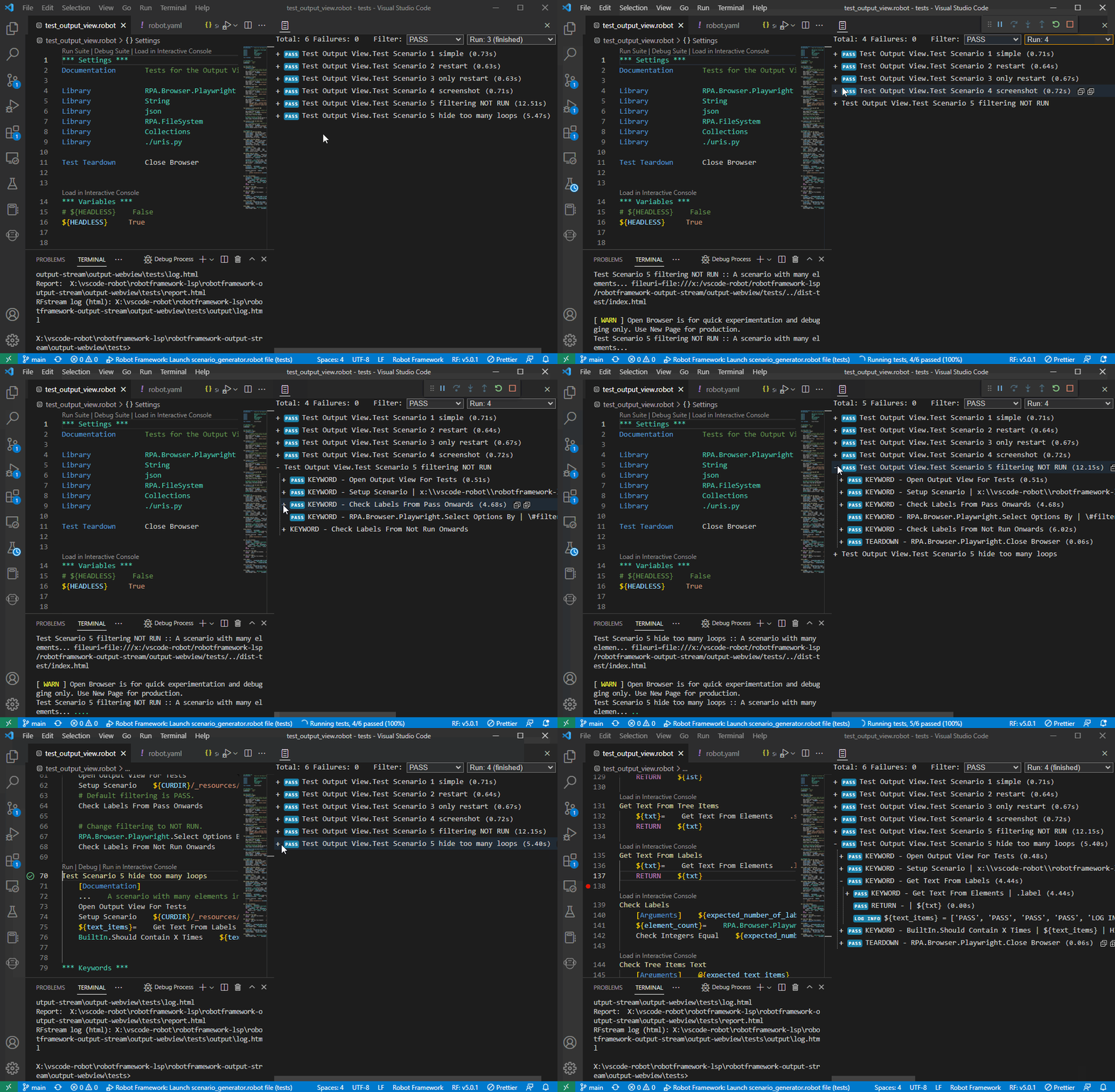
New robot output
-
See the Robot Framework output while running the robot.
-
Command palette > View: Toggle Robot Output
-
-
Flow Explorer now also in VS Code
- Select a .robot file > Command Palette > Robot Framework: Open Robot Flow Explorer
-
Documentation panel
-
See the keyword documentation in a static panel
-
Command palette > View: Toggle Robot Documentation
-
-
Inspector / locators features
-
UX from Studio now in VS Code
-
Windows Locator improvements
-
Web Recorder Beta
-
-
Conversion Accelerator
-
Improved UX to take in multiple robots at a time to enable analysis over source robots
-
Improvements to all conversions and support for AAv11
-
Still looking for more input robots to develop the tool further. Contact us.
-
-
Quick fixes and code refactoring

Install the extensions from VS Code extensions panel by typing Robocorp or from marketplace links available here.
🎉 rpaframework 20.1.0
- Library RPA.Browser.Selenium (#745): Ability to run Edge in IE compatibility mode. (robot example: https://github.com/robocorp/example-ie-mode-edge)
- Library RPA.SAP: Fix error in dependency import order in the underlying SapGuiLibrary.
Automation Studio 2.12.3
Added
- Allow using Vault from Control Room during development
- Library for reading Vault secrets in Robots
- Editor for creating, modifying, and deleting Suite variables
Changed
- Improved element detection and code generation for Web Recorder
- Invalid Variables hidden from auto-complete
- Errors in Visual editor highlighted more prominently
- Improved discoverability of Reveal in File System functionality
- Report Error renamed to Submit Issue to match other products
- Minor tweaks to Conditional builder
- Minor tweaks to Help menus
- Minor tweaks to Tasks sidebar
Fixed
- Unexpected error when running Robots with certain Windows configurations
- Flow view controls overlapping Run view
- Multi-line errors in in Run view not shown correctly
- Errors with multiple IF/ELSE IF branches not shown correctly
- Sidebar in Run view was not scrollable
Robocorp Workforce Agent v1.2.66
Robocorp Workforce Agent UI v1.2.66 / Workforce Agent Core v6.25.7
New in the Workforce Agent Core:
- Upgraded RCC to v13.0.0
- Use RCC to unwrap the downloaded bundle from Control Room
- File downloads use network settings from RCC profile
A good thing to understand about Workforce Agent is that no matter which execution option you are using; you are always running the Workforce Agent Core behind the scenes, and you can find the detailed changelog for Workforce Agent Core here.
🎉 rpaframework 20.0.2
- Security dependency fix given the bump of
cryptographypackage to version 38. (#773)
🎉 rpaframework 20.0.1
- Fix docs given the dropped support for extras under library dependencies. (#772)
🎉 rpaframework 20.0.0
- Global package & sub-library updates adding security and documentation fixes. (#767)
- Other affected sub-libraries:
rpaframework-aws5.2.5 (no API change, just dev & docs 3rd-party package upgrades)rpaframework-google6.1.5 (no API change, just dev & docs 3rd-party package upgrades)rpaframework-pdf6.0.1 (no API change, but behaviour may be different)rpaframework-windows7.0.2 (no API change, but locators recording may act differently)
⚠️ Warning
This is a breaking change!
-
We don’t support optional packages anymore. Migrate your conda.yaml if needed:
rpaframework[aws]->rpaframework-aws==5.2.4rpaframework[cv]->rpaframework-recognition==5.0.1rpaframework[playwright]->robotframework-browser==14.4.1- And of course, don’t forget about
rpaframework==20.0.0.
-
RPA.Desktop keywords related to mouse and keyboard may behave differently due to their
pynputdependency recent upgrade. -
Extra dependencies are pinned to the following minimum versions:
requests = "^2.28.1"oauthlib = "^3.2.2"requests-oauthlib = "^1.3.1"
-
Misleading keyword
On Token Refreshwas removed from the RPA.Email.Exchange library. (wasn’t meant to be a keyword at all)
Robocorp Workforce Agent Update
Robocorp Workforce Agent UI v1.2.62 / Workforce Agent Core v6.25.0
New in the Workforce Agent Core:
- Upgraded RCC to v11.33.2
- Send runtime log events to Control Room
- Drop the Microsoft RDP client as a backup, use the FreeRDP client only when connecting to a desktop session
A good thing to understand about Workforce Agent is that no matter which execution option you are using; you are always running the Workforce Agent Core behind the scenes, and you can find the detailed changelog for Workforce Agent Core here.