
Release Notes
Terminology, Assistant and Process updates
To better align with the widely used RPA terminology, we have made some changes to the naming in our product. The goal was to make the stack easier to understand especially when migrating from Gen1 products, and to avoid overloading the term "Environment".
Unattended automation naming has been simplified as follows:
-
The term "Workforce" has been dropped in favor of "Unattended"
-
The term "Environment" has been replaced with the term "Worker" and applied in all contexts such as Worker Groups and Cloud Worker
-
"Workforce Agent" application will be renamed as "Worker" application

To help with managing Assistants in especially large-scale deployments, two features have been added:
-
Assistant-only users
-
Added "Assistant-only" users who only need to run assistants, without Control Room registration
-
Workspace Admins are able to mass-create "Assistant-only" users via a CSV import
-
The feature is enabled upon request, get in touch with us if interested
-
-
Assistant failure notifications
-
Users are now able to set failure notifications for Assistant runs, in the same way as with Process runs
-
E-mail and Slack are supported as notification channels
-
The feature is available for all tiers
-
Process updates:
-
Cron scheduler now supports scheduling a process on the last day of the month via the L-notation
-
Step runs now have numbering in a Process run scope
-
Step run UI has been updated
🎉 rpaframework 19.4.2
- Library RPA.Hubspot (#740): Deprecate keyword
Auth With API Keyin favor ofAuth With Token. (read how to generate one with Private Apps)
🎉 rpaframework 19.4.1
- Library RPA.Email.Exchange (#736): Fix token auto-refresh for single-tenant Client apps.
🎉 rpaframework 19.4.0
- Added native OAuth2 support (#706) with the following keywords:
Generate OAuth URLGet OAuth TokenRefresh OAuth Token
Available in libraries:
- RPA.Email.Exchange (#604)
- RPA.Email.ImapSmtp (additional keyword
Generate OAuth String) - RPA.MFA (#658)
Check the updated OAuth2 E-mail sending Portal example on: https://robocorp.com/portal/robot/robocorp/example-oauth-email
🎉 rpaframework 19.3.1
- Library RPA.Browser.Selenium (#710): Fix bug with auto_close=${False} param when importing the library, which still had the browser closed at the end of the session. (now it’s left open if such parameter is set to False)
🎉 rpaframework 19.3.0
- Library RPA.Slack (#711): New keyword
Slack Raw Messageadds support forblocksmessage property by allowing user to set message dictionary. - Library RPA.Excel.Files (#712): Add new keywords for the library. List of new
RPA.Excel.Fileskeywords (supported only on .XLSX format):- Auto Size Columns (docs)
- Clear Cell Range (docs)
- Copy Cell Values (docs)
- Delete Columns (docs)
- Delete Rows (docs)
- Hide Columns (docs)
- Insert Columns After (docs)
- Insert Columns Before (docs)
- Insert Rows After (docs)
- Insert Rows Before (docs)
- Move Range (docs)
- Set Cell Formula (docs)
- Set Cell Values (docs)
- Set Styles (docs)
- Unhide Columns (docs)
Robocorp Workforce Agent Update
Robocorp Workforce Agent UI v1.2.58 / Workforce Agent Core v6.23.3
The Workforce Agent Core received few minor bug fixes.
A good thing to understand about Workforce Agent is that no matter which execution option you are using; you are always running the Workforce Agent Core behind the scenes, and you can find the detailed changelog for Workforce Agent Core here.
🎉 rpaframework 19.2.0
- Library RPA.Windows (#693):
- Keyword
Get Elementssupports now parameter siblings_only which filters for elements found on the same level with the first match. This is ON by default; set it to False for a global search, which retrieves all the found elements matching the criteria instead. - Keyword
Get Valuereturns None when there’s no value to retrieve at all. - Fix sibling element searching in keyword
Get Elementswhen there’s no comparison strategy identified.
- Keyword
Robocorp Workforce Agent Update
Robocorp Workforce Agent UI v1.2.57 / Workforce Agent Core v6.23.0
The Workforce Agent Core version also has multiple improvements and features around the Windows Desktop executions. As well as major performance improvements.
A good thing to understand about Workforce Agent is that no matter which execution option you are using; you are always running the Workforce Agent Core behind the scenes, and you can find the detailed changelog for Workforce Agent Core here.
Improved UX: Work Item handling flows
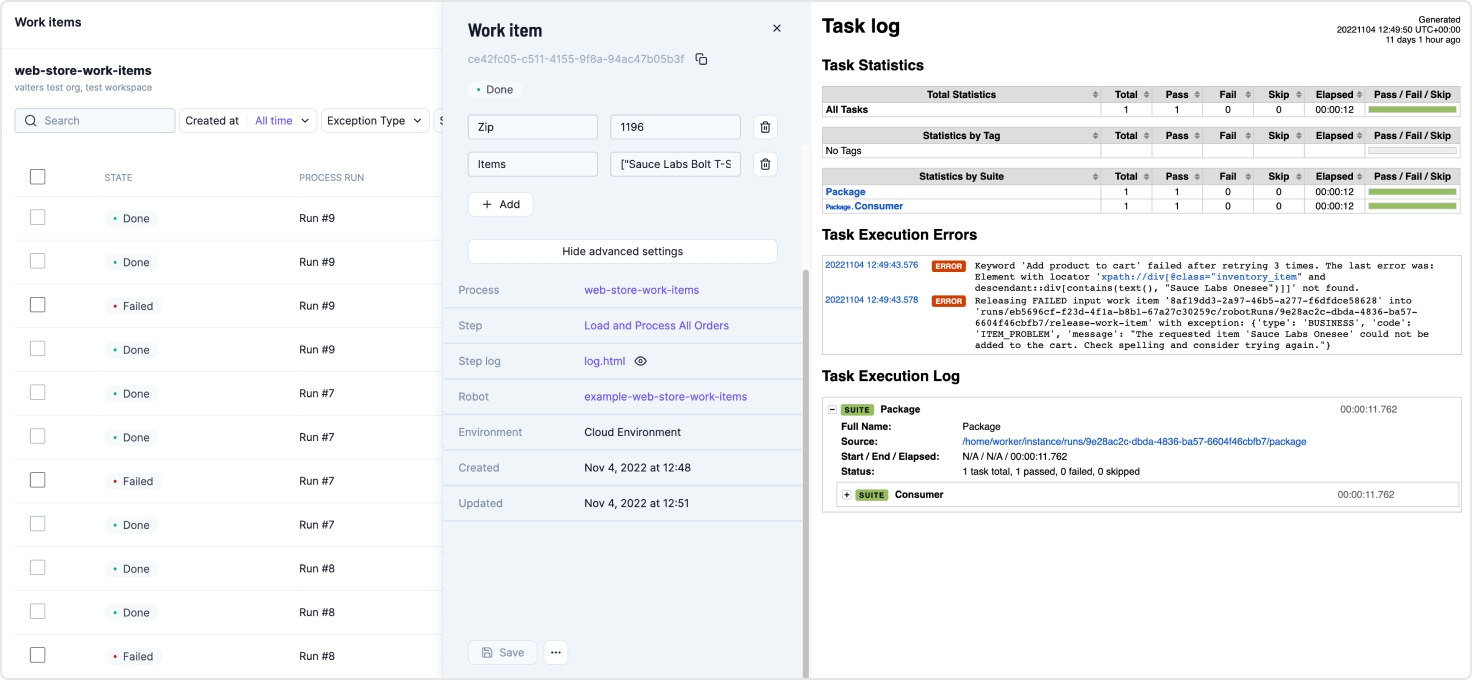
In our continuous effort to make the Control Room UX as good as possible, this round of UX improvements was aimed at the work item handling flows. The core view regarding these is the Work Data Explorer, where we implemented multiple improvements which reduce a lot of clicks and make work item handling flows and technical troubleshooting more streamlined.
-
New search, sort, and filtering
- Stay on top of what is happening with the improved search, sorting and filtering
-
The work item side panel now stays open while browsing through work items
- Reduced amount of clicks and streamlined the flow when browsing through multiple work items
-
Work item actions added to the work item side panel
- Retry, Mark as Done, etc. are now available in the work item panel
-
Toggleable advanced settings for technical troubleshooting
-
You can toggle advanced settings to see more data about the work item at a glance
-
Quick access links to the Step, Step log file, Robot and Environment
-
You can click the eye icon next to the log file to automatically render it to the same view, making troubleshooting more straightforward
-
-
Improved single work item view and direct linking
- Get direct links to single work items, which will open in their own view
- Pass work items to your teammates to handle in a straightforward way
Robocorp Assistant 1.8.5
Robocorp Assistant 1.8.5 released
Fixed the community Assistant install view as the UI elements there were broken
Get started with Assistant quick guide
Robocorp Assistant 1.8.4
Robocorp Assistant 1.8.4 released
Fixed the Assistant installation step to speed up the 1st run
Get started with Assistant quick guide
🎉 rpaframework 19.1.1
- Library RPA.Outlook.Application (#687): Fix
pywintypesXX.dllerrors.
🎉 rpaframework 19.1.0
-
Library RPA.Cloud.AWS (#683): Fix S3
List Filesempty list response. Released inrpaframework-awsversion5.2.1. -
Library RPA.HTTP (#685): Add keyword
Check Vulnerabilitieswhich will now just check forOpenSSLvulnerable versions. Related article: https://robocorp.com/docs/faq/openssl-cve-2022-11-01
The example output warning message when keyword Check Vulnerabilities from RPA.HTTP library is called.
As always see Github pull requests (links above) for more information on the changes.
Robocorp Workforce Agent update
Robocorp Workforce Agent UI v1.2.54 / Workforce Agent Core v6.20.9
Workforce Agent updated to using RCC v11.30.0 that provides warning around the OpenSSL vulnerability, so that execution logs show if the environment contains vulnerable versions. We will keep updating the guidance page as we get more details and actions.
The Workforce Agent Core version also has multiple improvements and features around the Windows Desktop executions.
A good thing to understand about Workforce Agent is that no matter which execution option you are using; you are always running the Workforce Agent Core behind the scenes, and you can find the detailed changelog for Workforce Agent Core here
Robocorp Assistant 1.8.3
Robocorp Assistant 1.8.3 released
Update RCC to v11.30.0. This update will print a warning in case a insecure openssl version is detected in the environment
UI changes in the results view to clear out some of the more developer focused things like logs.
🎉 rpaframework 19.0.0
- New Intelligent Document Processing library RPA.DocumentAI, which is a convenient wrapper over the existing libraries:
- RPA.Cloud.Google (needs
rpaframework-googleinstalled) - RPA.DocumentAI.Base64AI (moved from
RPA.Base64AI) - RPA.DocumentAI.Nanonets (moved from
RPA.Nanonets)
- RPA.Cloud.Google (needs
Provides the following generic keywords capable of working with all the engines above:
Init EngineSwitch EnginePredictGet Result
Portal example: GitHub | Portal
 Warning
This is a breaking change! Two DocumentAI related libraries have moved, thus the importing location is changed now:
RPA.Base64AI->RPA.DocumentAI.Base64AIRPA.Nanonets->RPA.DocumentAI.Nanonets
October feature update
We have released an update today with improvements to many features, including Workforce, Assistant, and the new Audit Log. The new additions should help with managing operations involving a number of self-hosted environments, and addressing needs around compliance and governance.
Environment management updates
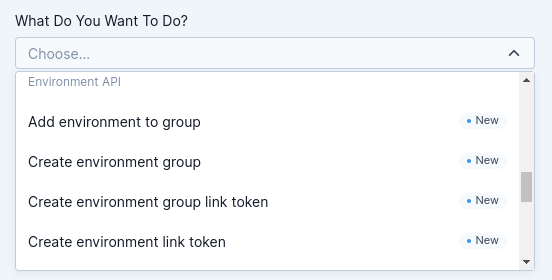
- Environment API is now available and can be accessed through the API helper in the Control Room
- Many new endpoints to manage environments and environment groups
- Opens up use cases around custom infrastructure configurations and monitoring
- Environment pages have been redesigned
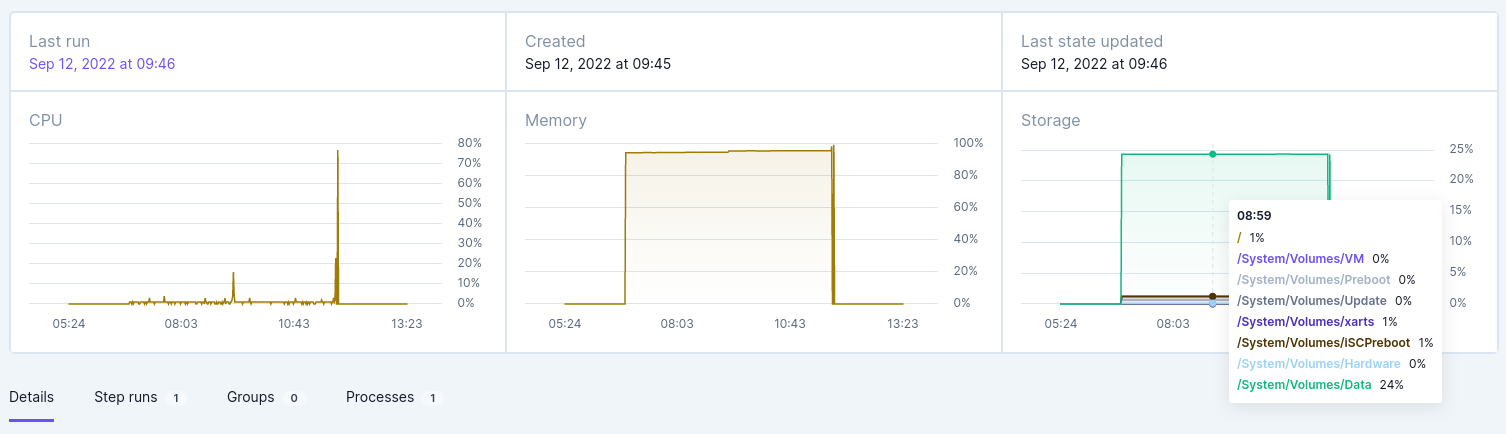
- Environment listing and environment views now include a lot more data
- Added CPU, Memory, and Storage usage statistics and graphs
- Added tabs about Step runs, Groups and Processes to give more visibility around where the environments are used
Assistant updates
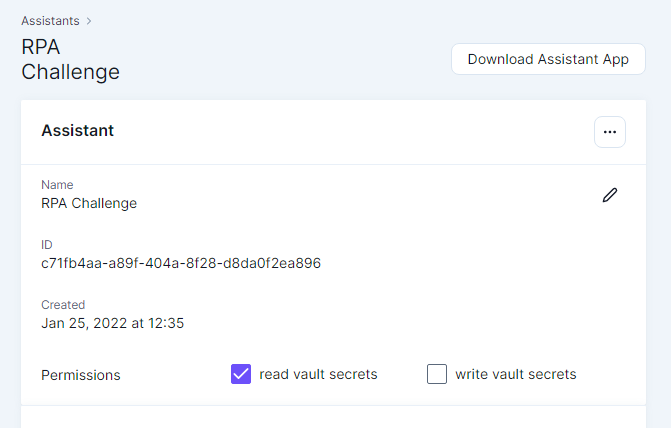
- Assistants now support configuring Vault access permissions
- The ability to control Assistant's access to read and/or write vault secrets has been added to the UI
Audit Log updates
- Export as CSV feature has been added to the Audit Log
- Administrators can now download Audit Log data as .CSV based on the selected filters
- The file will be generated in the background, and will be available for download afterward
Automation Studio 2.7.0
This update to Automation Studio fixes a critical bug that prevented running Robots on certain Windows machines, but also brings some quality of life improvements.
Features
- Variables returned from keywords and assigned in FOR loops can now be auto-completed
Updates
- Invalid environments for Robots are automatically removed and re-downloaded
- Reduced execution time for Robots within Automation Studio
Bugfixes
- Fatal errors when running are correctly shown instead of getting stuck in "Starting Robot" view
- Dragging multiple elements out of the tree correctly deletes all of them
Automation Studio 2.6.1
Features
- New user guide for Automation Studio in Robocorp Docs
- Release notes now shown when an update is available
- File and folder picker for keywords that expect paths
- Images in the run results can be shown as full-size
Updates
- Upload to Control Room shows more information when replacing robots
- Improved scroll bars on Windows, and various related layout fixes
- User keyword arguments are now validated in case of invalid values
- Variable blocks supported in conditionals
Bugfixes
- Double spaces in tasks and user keywords behaved unexpectedly
- Errors in conditionals not always shown in run results
- FOR loop values and variables were sometimes mixed up
- IF statements sometimes moved a keyword into the conditional
- String literals sometimes incorrectly shown as Variables
- Double context menus for variables
- Wrong path shown in New Robot dialog when project name already exists
- Literals with hash sign highlighted as comment in code editor