
Release Notes
🎉 rpaframework-google 7.1.1
Robocorp Assistant 2.1.0
Robocorp Assistant 2.1.0
This update contains:
-
Support for SSO Assistant-only Users
-
Security updates
-
Update to use RCC v14.15.4
ReMark💬 knowledge update
We've done major updates on ReMark💬 to serve the growing user base better now and in the future.
First and foremost, ReMark💬 now has a personality! We wanted it to be something familiar based on our much-loved Mark the Monkey. ReMark💬 is an alter ego of Mark, equipped with more tech and tapped into all data sources devs need when working on their Robocorp bots. Meet ReMark💬!

The main updates are in the data ingestion and in the responses ReMark💬 gives:
-
We added new data sources to be ingested into ReMark💬 database. The documentation now contains all the contents from Robocorp Docs, including new Python library documents. In addition, we've added the Portal examples.
-
The data ingestion is now implemented as a Robocorp bot (!) and runs daily. So, the knowledge will refresh continuously as we improve our documentation and examples.
-
We reduced the next-best questions to three in the answers, as the previous five took up too much space in the UI.
-
Also, in the answers, ReMark💬 might now point you to the most relevant Portal bots to learn more, not just docs articles.

Under the hood, we've done a complete rehaul of the architecture, gearing up towards integrating ReMark💬 into our other tools and services. For example, we switched the vector database for embeddings from Chroma to pgvector.
You might have noticed a few moments of "Something went wrong" in the past few days, but updates are now done, and things should run much smoother from now on!
🎉 RPA Framework 26.1.0
-
General update on all packages (#950):
-
All packages will be taking into use the latest
robotframeworkversion (6.1.1). -
The minimum Python version is set to 3.8.
-
All new package versions are listed below.
-
rpaframework-assistant3.0.0 (additional release note included below) -
rpaframework-aws5.3.0 -
rpaframework-google7.1.0 -
rpaframework-openai1.3.0 -
rpaframework-pdf7.2.0 -
rpaframework-recognition5.2.0 -
rpaframework-windows7.4.0 -
Library RPA.Assistant (#1068;
rpaframework-assistant3.0.0): -
Fix
Add Date Inputvalidation and return value as Date object instead of a string. -
Add Python examples for every keyword.
🎉 RPA Framework 26.0.3
26.0.3 - 24 Aug 2023
- Library RPA.Browser.Selenium: Properly show webdriver errors in case the initial default is not found in PATH.
26.0.2 - 24 Aug 2023
- Library RPA.Browser.Selenium (#1069): Use an already existing webdriver found in PATH if present. Only if such a default expected executable isn’t found, a newly cached one will be downloaded and used. (affects all supported browsers)
🎉 RPA Framework 26.0.1
- Library RPA.Browser.Selenium (#1059): Fix webdriver management and automation issues related to Edge in IE mode. Updated Portal example: https://robocorp.com/portal/robot/robocorp/example-ie-mode-edge
Robocorp Log 2.7.0
The following improvements are now available in Robocorp Log 2.7.0:
-
ifstatements now create a scope inlog.html(when the function is not a generator). -
If an exception has a cause or context the context/cause is now shown in the log (i.e.: when an exception is raised from another exception or is raised while handling another exception all exceptions are shown).
-
continueandbreakinside a loop are properly handled. -
continueandbreakare now shown in the logs. -
It's now possible to expand / collapse recursively in
log.html. -
log.html: When navigating using left arrow, if the element is already collapsed the parent is focused. -
Spec version changed from
0.0.3to0.0.4. -
re.Patternis now accepted atadd_sensitive_variable_name_pattern.
Robocorp Code 1.10.0 released
-
RCC upgraded from
v14.6.0tov14.15.4. -
Information from pypi is shown on hover for pypi packages in
conda.yaml. -
Warning if the versions for pypi in
conda.yamlhave updates. -
Warning if
pythonversion is not>= 3.8inconda.yaml -
Warning if
pipversion is not>= 22.0inconda.yaml -
ROBO TASKS OUTPUTupdated to latest version (now supportsrobocorp-log 2.7.0).
Worker v6.34.7
Worker release v6.34.7.
Fixes an issue where extracted RCC executable was sometimes locked for the first API call.
You can find the detailed changelog for Workforce Agent Core here.
🎉 RPA Framework 26.0.0
-
Library RPA.Browser.Selenium (#1058):
-
Fixed options passing with Firefox. (when a binary location is specified)
-
General improvements to RPA.*.Application libraries (#1055):
-
All: Better error handling (COM -> runtime), improved generic docs and troubleshooting guiding, fixed document closing (if was closed already) and app open/quit management, improved warnings and logging, file paths are tested for existence when operating on documents and raise errors in their absence.
-
Excel:
-
Removed deprecated parameter tabname from
Add New Sheet. (use sheetname) -
Save Excel Asraises when there’s no workbook open. (useOpen Workbookfirst) -
Outlook:
-
Removed deprecated keywords:
Send Message(useSend Email) andWait For Message(useWait For Email).
⚠️ Breaking changes in the Application libraries listed above.
Worker v6.34.6
Worker release v6.34.6.
Minor update that improves logging and updates the RCC to latest version (14.15.4).
You can find the detailed changelog for Workforce Agent Core here.
Updated Pricing Plans, Mass Work Item Actions
We are excited to announce some updates to the pricing plans and to the Work Item UX. The 3-minute step run time limit on the Developer plan has been removed, and the Consumption plan has 1500 free run minutes in addition. The plan updates have been rolled retroactively, so you can enjoy the benefits immediately. On the Work Items, mass actions have been updated for you to be able to process more items at once.
Pricing Plan Changes
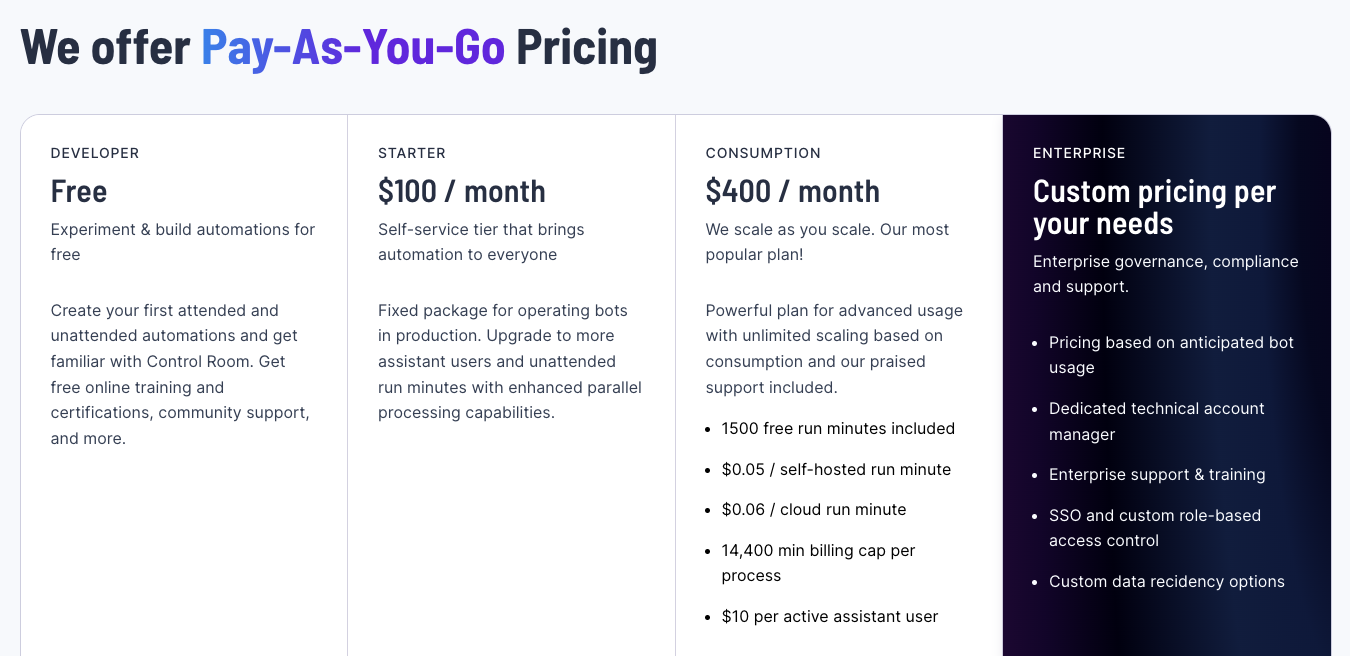
We felt that some limitations in the Developer plan were too inconvenient to properly try out the platform and that the Flex plan had some discrepancies in the upgrade path, so we decided to tune them a bit in a way that lets you get more bang for your buck.
On the free Developer plan, we have decided to remove the 3-minute time limit for step runs. The forced timeout caused many problems for users, in some cases even terminating the run before the environment was set up in the Worker. This change should allow you to run longer running automations, up to the fixed 240 minutes included in the plan.
The Flex plan has been renamed to Consumption plan to better reflect that it allows you to fully take advantage of the consumption-based pricing and scaling that our platform offers. It is the first plan that does not limit you to a fixed amount of run minutes per month (as in Developer and Starter plans).
In addition, we have decided to add 1500 free run minutes to the Consumption plan to be in line with the upgrade path, so you will also have a base capacity you can use without extra cost.
Work Item UX Improvements
The Work Item mass actions have been previously limited to the page size. Now you can select all filtered Work Items, and perform actions on them. This will reduce the amount of clicks needed in e.g. cases where you have had a lot of application exceptions and want to retry all Work Items at once.
🎉 Robocorp Setup Utility v1.0.1
- Setup Utility force creates necessary folders in order to operate properly
- Running diagnostics after network config add/remove
- RDP connection available only if worker is running
- Ensuring profile in common path - controlled by Admin account
- Forcefully removing unknown workers
- UI/UX improvements all across the board
- Main Page has now specific guidance for users
- RCC Speed Test implementation & integration
- All dependency vulnerabilities are fixed
- New version of embedded RCC at version
14.15.4 - Service Helper Embedded at version
1.13.2 - Internal Status page updated
Download from here and check our updated documentation here
Have a splendid day! 🎉
Worker v6.34.4
Workforce Agent Core v6.34.4
- Add more information to the artifact upload end event
- Bundle RCC into the Worker executable and extract it during runtime
- Upgrade RCC to v14.15.3
You can find the detailed changelog for Workforce Agent Core here.
🎉 RPA Framework 25.0.1
🎉 RPA Framework 25.0.0
Updated Worker Views and More
In this Control Room update, we are introducing brand new and improved Worker views for you to conveniently manage a large number of Workers, along with a few smaller UX improvements and bug fixes.
Improved Worker Views
.png)
The Worker views have been updated to enable more convenient management of Workers and troubleshooting of potential issues in your unattended automations, especially in cases where there are multiple self-hosted Workers or groups involved.
The new views have been structured to provide more information about how the Worker is used in different Processes, Steps, and Groups, in addition to sorting and filtering of data, which helps you to stay on top of operations. Also, the user experience of linking new Workers and managing groups has been improved.
Other improvements and bugfixes
- The parallel execution limit in steps is no more limited by the Worker group size
- Autoremove option has been added to the group link tokens, enabling better management of temporary execution environments
- The rare case of scheduler double triggering process runs has been fixed
- UX improvements to the Vault UI
- The bug where VSCode was unable to get secrets when "Prevent viewing Vault secret values" was enabled has been fixed
As always, we in Robocorp would be most interested to hear what you think about the update, so don't hesitate to contact us in the community Slack!
ReMark💬 got conversational
Have you tried ReMark💬, our generative AI assistant that helps developers deliver value (bots!) faster? One of the early users said, "Something that used to take me 1 hour to do now takes me 10-15 minutes". Don't miss out on this significant shift in developer productivity. ReMark💬 is available for free here.
The most recent update makes the use of ReMark💬 easier, especially when working on multiple things at the same time. We added conversations. The new left sidebar will keep your conversations in order. As ReMark💬 uses previous messages and responses to answer your questions, remember to hit the "New Chat" button to start fresh when you are changing topics.
Features
- Organise chats with ReMark💬 in conversations
- Rename and delete conversations
- Stop text generation button when ReMark💬 is answering
- Thumbs up and down buttons to give feedback on the quality of answers
Updates
- Better error messages in cases when OpenAI API returns an error
New features to address organizational policy needs
To address common security and compliance policy needs encountered often in different organizations, in this update, we are introducing a control to Vault secret visibility on the UI, the possibility to provide a reason for stopping Process Runs for auditing purposes, and new audit log events.
Organization Privacy & Compliance settings
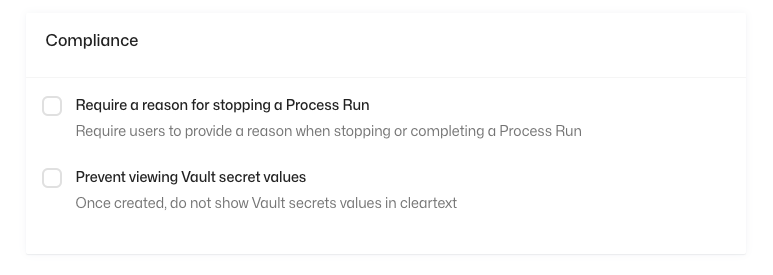
To enable the new features, we have added two new options under the "Privacy & Compliance" tab in the Organization settings. These settings can be accessed by the Organization Owners and Admins.
Vault Secret Visibility
By toggling the "Prevent viewing Vault secret values", vault secrets won't be visible to users after creation from the UI. This can prevent leaking of secure credentials by accident (by e.g. in a screen share) and can be a requirement in IT security policies.
Process Run Stop Reason
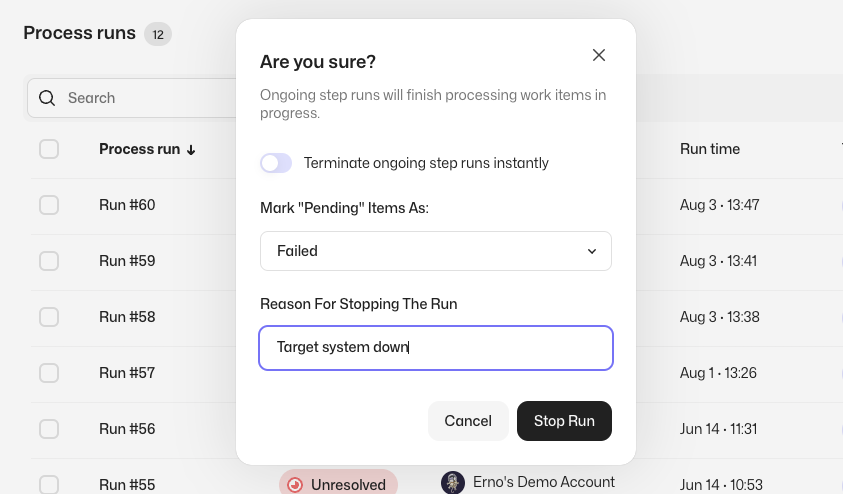
By toggling the "Require a reason for stopping a Process Run", users need to provide a reason when stopping process runs manually. This will add the reason to the audit log event regarding stopping the run and is useful for e.g. SOX compliance.
New Audit Log Events
We have added User login (with IP address) and SSO mapping change events to the audit log to cover common security policy and auditing needs.
As always, we at Robocorp would be most excited to hear your thoughts about the features! Feel free to contact us in Slack or other channels if you have any feedback in mind.