
Release Notes
🎉 rpaframework 22.2.2
- Library RPA.Browser.Selenium (#859):
- Fixes
Set Download Directorykeyword: functionality, docs, examples. - Improves Browser Locators functionality. (referenced by alias:)
🎉 rpaframework 22.2.1
-
New library RPA.Calendar (#694):
-
Supports holiday and business day related calculations.
-
Read library documentation for a full list of keywords.
-
Library RPA.Database:
-
Changes how psycopg2 module handles the
Call Stored Procedurekeyword. -
Sets the autocommit parameter when using the
Connect To Databasekeyword with the psycopg2 module. -
Removes INFO level logs from
Connect To Databasekeyword. (privacy) -
Library RPA.Outlook.Application (#878):
-
Adds possibility to set CC and BCC recipients with
Send EmailandSend Messagekeywords.
RPA.Assistant v2.1.0
RPA.Assistant (rpaframework-assistant ) 2.1.0:
New features:
-
Add
Set Titlekeyword. Can be used to set title of assistant when it is running. -
Add
Open RowandClose Rowkeywords. Used to layout elements into rows. -
Add
Open ColumnandClose Columnkeywords. Used to layout elements into columns. -
Add
Open NavbarandClose Navbarkeywords. Can be used to create an always visible top bar for a dialog. -
Add
Open StackandClose Stackkeywords. Can be used to position elements manually. -
Add
Open ContainerandClose Containerkeywords. Useful for styling or placing single elements. -
Add
Add Flet Iconthat enables adding any icons from Flet's large gallery of icons.- Compared to
Add Icon, it is more complicated to use but supports a much larger amount of icons.
- Compared to
Bugfixes:
- Fix regression, Assistant flet app not closing properly when run from CLI and when close button is pressed.
- The library no longer silently misses adding to the result when an input
nameduplicate name is used, instead raises a ValueError.
🎉 rpaframework 22.1.1
- Library RPA.Windows (
rpaframework-windows7.2.1; #869): Documentation fixes in keywords:Set Value,Print Tree,Set Mouse Movement.
🎉 rpaframework 22.1.0
- Library RPA.Windows (
rpaframework-windows7.2.0; #855): - Enhances keyword
Set Valuewith additional checks and a send_keys_fallback parameter as an alternate way of setting in the provided value. (if the main one fails; #483) - Improves keyword
Print Treewith clearer printed depths and children positions in the element tree. The returned element structure now encapsulates a usable path based locator in every element. (#796) - Adds new keyword:
Set Mouse Movementwhich enables/disables mouse movement simulation when interacting with elements. (e.g. clicking combo-boxes; #791) - Miscellaneous: better recording instructions, documentation updates, bugfixes. (#591, #797)
RPA.Assistant v2.0.0
RPA.Assistant v2.0.0
The new version of RPA.Assistant contains the following breaking changes:
-
Run Dialog and Ask User parameter
clearwas removed, clearing is now mandatory -
(affects Python side users only): Location enum that
run_dialogandask_useraccepts was changed from Location to WindowLocation to improve clarity. -
By default sliders now round to 1 decimal. Use
roundArgument to specify amount of decimals.
New features:
-
Added
locationargument to Add Button keyword -
Added
roundargument to Add Slider keyword.
Fixes:
-
Internal refactoring
-
Update underlying UI library to Flet 0.2.2 -> 0.4.2, granting various bugfixes and improvements
-
Now depends on
rpaframework-core10.4.1 due to Flet dependency incompatibilities with earlier versions
🎉 rpaframework 22.0.0
⚠️ Warning - Breaking change release. Example: Parse PDF Invoice
- The
rpaframework-dialogspackage is no longer part of therpaframeworkpackage. - Reason for this change is the deprecation of the RPA.Dialogs library as we are recommending the RPA.Assistant library for building attended Robots.
- This means that RPA.Dialogs library can be still used, but it needs to be separately added into the pip section of the conda.yaml (
rpaframework-dialogs==4.0.2). - The RPA.Assistant library also requires separate package installation of
rpaframework-assistant==1.2.1. - We see that unattended robots are a majority of the process run cases and thus it makes sense to move libraries meant for the attended robots into separate packages. Added benefit is that will reduce the package size for the
rpaframeworkpackage. - Please read the migration guide on how to move from RPA.Dialogs to RPA.Assistant.
Other changes included in the release:
-
Library RPA.Windows (
rpaframework-windows7.1.0; #840):- Add support for the path: strategy in locators. (index-based element tree search)
- Enhance
Print Treekeyword with better element tree logging and the ability to return such structure.
-
Library RPA.Tables (#821): Allow custom dialects in csv files.
-
Library RPA.Robocorp.Process (#845): Host of the Process API should use the host from an environment variable (RC_API_PROCESS_HOST) if that is available.
-
Script use-robocorp-vault maximum token validity time has been lowered to 20 hours.
🎉 rpaframework 21.1.1
- Security upgrade of
cryptographydependency to 39.0.1. (#833)
🎉 rpaframework 21.1.0
- Library RPA.DocumentAI.Base64AI (#803): Support for signature matching on image documents with the following newly added keywords:
Get Matching Signatures: Detects and returns signatures and their similarity.Filter Matching Signatures: Keeps relevant and alike signatures only.Get Signature Image: Saves signature’s image for manual inspection.- Portal example: https://github.com/robocorp/example-signature-match-assistant
- Global fix with retrieving the output directory path.
RPA.Assistant -library for attended robots
RPA.Assistant -library for attended robots
- Switching from
RPA.Dialogsto RPA.Assistant enables you to build more complex UX flows directly from your Robot Framework code. - Behind the library is Flet, which is a lot lighter dependency and has more flexibility.
- Get started with the new stuff using the Assistant template.
Also check out the migration Guide if you have been using RPA.Dialogs -library

OpenAI comes to RPA Framework
OpenAI (#792) comes to RPA Framework! New library RPA.OpenAI adds four keywords covering GPT-3 text completions and DALL.E image creation.
-
Authorize To OpenAI: Authorize with OpenAI using your API key -
Completion Create: Keyword for creating text completions in GPT-3 API using your prompt and various arguments. -
Image Create: Create one or more images based on a text prompt. -
Image Create Variation: Creating one or more variations of an existing image.
Note!
The RPA.OpenAI is not included in the core rpaframework package, so please add rpaframework-openai==1.0.1 as a pip dependency in your conda.yaml.
🎉 rpaframework 21.0.1
- Library RPA.Windows (
rpaframework-windows7.0.3): Fix Windows element(s) retrieval. (and dependent keywords)
🎉 rpaframework 21.0.0
⚠️ Warning
Multiple breaking changes below!
-
Library RPA.Cloud.Azure (#635):
- robocloud_vault_name -> robocorp_vault_name
- use_robocloud_vault -> use_robocorp_vault
Set Robocloud Vault->Set Robocorp Vault
-
Library RPA.Cloud.Google (#794;
rpaframework-google7.0.0):RPA.Robocloud.Secrets->RPA.Robocorp.Vault
-
Library RPA.PDF (#785;
rpaframework-pdf7.0.1):- Keyword
Find Text: - Supports additional parameter ignore_case, which if set to True, will make the search case insensitive. (switch it on if you experience a different behaviour)
- Adds subtext: strategy in the passed locator which checks for a substring instead of the whole text to match.
- Keyword
-
New related Portal example for parsing PDF invoices: https://github.com/robocorp/example-parse-pdf-invoice
Portal got new looks and much more ✨
Our Portal has been growing fast in terms of content, now home to thousands of lines of robot code that jumpstarts your development. It was time to take it to the next level!
Design
Okay, let's get the most important updates out of the way: it now has a dark mode! 😎🕺 Joking aside, we've redesigned it from scratch with the users in mind. Hope you like it!
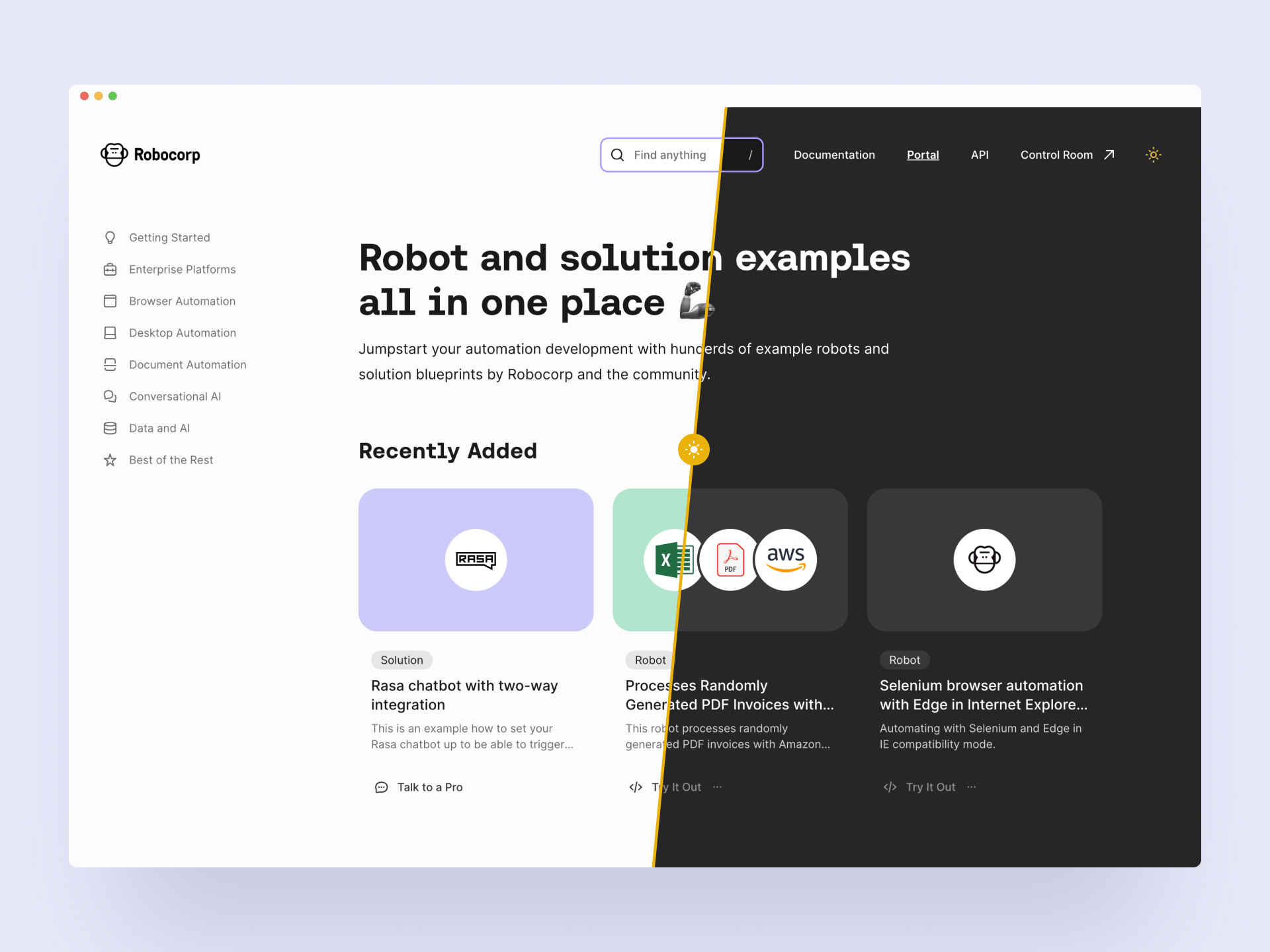
New content type: Solution
Portal still houses the robot code examples, but we've added a second content category called Solutions. These bigger pieces guide you through building your entire digital stack with Robocorp. Integrating third-party systems, reference architectures, extending the capabilities, using Control Room API and more. Robocorp + Rasa chatbots is an excellent example of a solution.
Content findability: Collections and library links
Another big update is the Collections you can see on the navigation (on the left in the big screens). This answers your call to have fast access to the content relevant to your style of automation. "Show me all you got on desktop automation now". Btw, the search is quite good, too. 🧙♀️
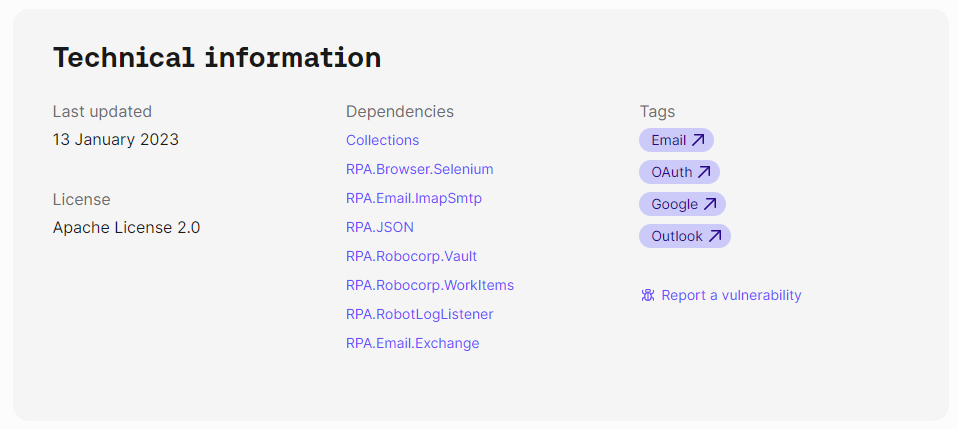
Each robot has a footer containing technical information that houses a new helpful feature: It shows the libraries that the robot uses. They are now linked to a page that contains all the other robots using the same library.
Add to Control Room
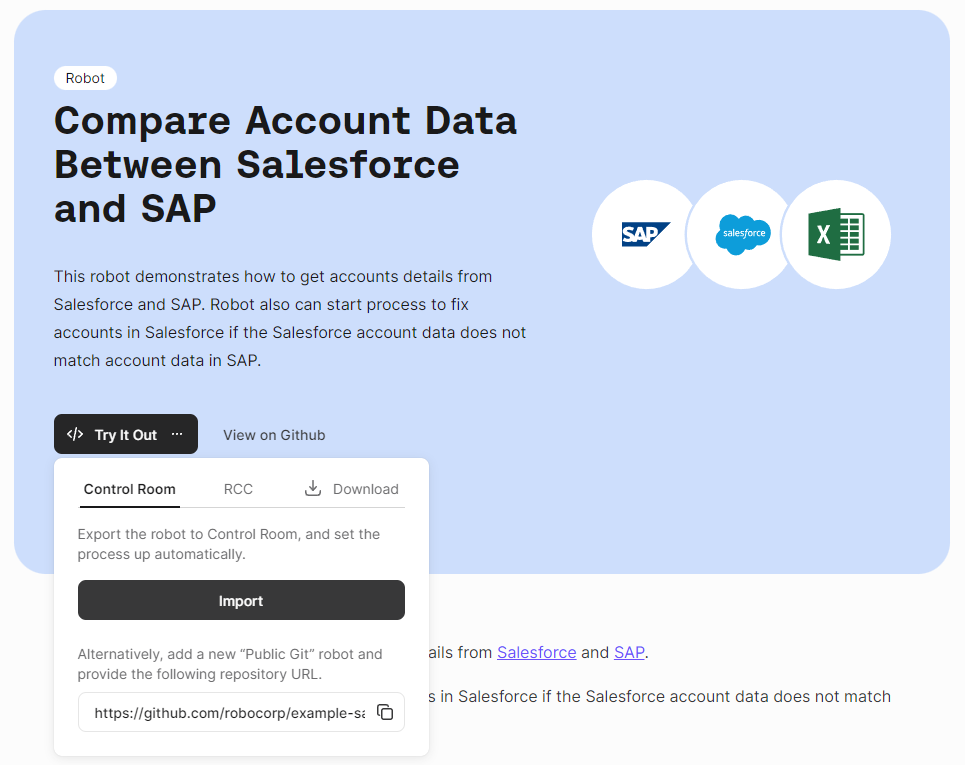
You can now add the robot directly to Control Room from the Portal. The Try It Out button's first option is "Import to Control Room", which takes you through the steps to add the robot and create a process. Handy!
We hope you enjoy the new Portal, and be sure to let us know what you think!
As a reminder, community submissions to the Portal are more than welcome, it's a great way to promote your work. We are planning to add a section to the front page that highlights the best of your bots soon! Submit your bot here.
🎉 rpaframework 20.1.2
- Library RPA.Browser.Selenium (#787): Improved browser order resolution given the set env var and running OS.
🎉 rpaframework 20.1.1
- Library RPA.Browser.Selenium (#781): Ability to change the default search order of browsers, when using the
Open Available Browserkeyword, through the RPA_SELENIUM_BROWSER_ORDER env var.
🎉 rpaframework 20.1.0
- Library RPA.Browser.Selenium (#745): Ability to run Edge in IE compatibility mode. (robot example: https://github.com/robocorp/example-ie-mode-edge)
- Library RPA.SAP: Fix error in dependency import order in the underlying SapGuiLibrary.
🎉 rpaframework 20.0.2
- Security dependency fix given the bump of
cryptographypackage to version 38. (#773)
🎉 rpaframework 20.0.1
- Fix docs given the dropped support for extras under library dependencies. (#772)
🎉 rpaframework 20.0.0
- Global package & sub-library updates adding security and documentation fixes. (#767)
- Other affected sub-libraries:
rpaframework-aws5.2.5 (no API change, just dev & docs 3rd-party package upgrades)rpaframework-google6.1.5 (no API change, just dev & docs 3rd-party package upgrades)rpaframework-pdf6.0.1 (no API change, but behaviour may be different)rpaframework-windows7.0.2 (no API change, but locators recording may act differently)
⚠️ Warning
This is a breaking change!
-
We don’t support optional packages anymore. Migrate your conda.yaml if needed:
rpaframework[aws]->rpaframework-aws==5.2.4rpaframework[cv]->rpaframework-recognition==5.0.1rpaframework[playwright]->robotframework-browser==14.4.1- And of course, don’t forget about
rpaframework==20.0.0.
-
RPA.Desktop keywords related to mouse and keyboard may behave differently due to their
pynputdependency recent upgrade. -
Extra dependencies are pinned to the following minimum versions:
requests = "^2.28.1"oauthlib = "^3.2.2"requests-oauthlib = "^1.3.1"
-
Misleading keyword
On Token Refreshwas removed from the RPA.Email.Exchange library. (wasn’t meant to be a keyword at all)