
Release Notes
🎉 RPA Framework 24.1.2
- Library RPA.Robocorp.Storage (
robocorp-storage0.3.2): Fix bug when retrieving assets containing spaces in their names.
🎉 RPA Framework 24.1.1
- Library RPA.Browser.Selenium (#1035;
rpaframework-core11.0.5): Fix chromedriver download issues with Chrome 115 and over.
🎉 RPA Framework 24.1.0
-
Library RPA.Browser.Selenium (#1021;
rpaframework-core11.0.4): -
Correctly handles and downloads a valid existing webdriver version when there’s a need for one.
-
Ability to provide a default browser binary location with the RPA_SELENIUM_BINARY_LOCATION environment variable. (useful when the webdriver isn’t able to automatically detect and start your system browser)
-
Portal example taking these into use: here
-
Library RPA.Browser.Playwright: Renders documentation for
robotframework-browser==17.1.0.
🎉 RPA Framework 24.0.0
- Library RPA.Robocorp.Storage: Takes into use
robocorp-storage0.3.1 and replaces the limited generic keywords with the ones below. (#1016) Set Bytes Asset&Get Bytes AssetSet Text Asset&Get Text AssetSet JSON Asset&Get JSON AssetSet File Asset&Get File Asset
⚠️ Breaking changes: Old Set Asset & Get Asset keywords are gone, please replace them with one of the pairs above.
24.0.0 - 18 Jul 2023
Other noticeable past releases
23.5.2 - 29 Jun 2023
- Library RPA.Robocorp.Storage: Add support for using Assets in VSCode
23.5.1 - 28 Jun 2023
- Library RPA.JavaAccessBridge:
- Update and pin
java-access-bridge-wrapperto version0.14.1
23.5.0 - 27 Jun 2023
- Library RPA.JavaAccessBridge:
- Update
java-access-bridge-wrapperto version0.13.0 - Add keyword
Print Locator Tree
23.4.0 - 22 Jun 2023
- Add new library RPA.Robocorp.Storage for managing assets within Asset Storage in Control Room. (#957)
🎉 RPA Framework 23.4.0
- Add new library RPA.Robocorp.Storage for managing assets within Asset Storage in Control Room. (#957)
Introducing Workspace Assets
Today we are releasing Asset Storage for your bots! It’s a highly convenient way to persistently store data and configurations you might need when setting up or operating your attended or unattended automations.
The Asset Storage stores data on a workspace scope and can be used either via UI, API, or with Keywords directly from the Robots, and supports different data types, e.g., Text, JSON, and Files.
There are endless use cases in which the feature can be helpful; your imagination is the limit! Here are some examples we have heard from our users:
-
Managing configuration data across automations in a centralized way instead of multiple environment variables in process steps (e.g. e-mail lists used by the robots)
-
Sharing common input data across multiple processes (e.g. Excel sheet that multiple robots process different parts from)
-
Storing user-facing reports that are updated by multiple processes (e.g. Excel sheet that is updated by multiple different processes)
-
Storing process operational data that the work items are not suitable for due to their transactional nature
-
Storing non-process items, like development guides, documentation, and company practices
-
Storing LLM prompt templates to be used by the robots with large language models, allowing the iteration of prompts without deploying the bot
The Asset Storage is designed for non-sensitive data that needs to persist beyond a single process or assistant run, and the Vault should be used to store sensitive data like credentials instead.
How to use
Control Room UI: Asset Storage is enabled by default, and you can access it from the navigation by selecting "Assets" in the menu. In the Assets view, you can create new assets or modify the content of old assets.
API: Assets can be used with the workspace API; please see the available actions from the API documentation under "Asset Storage".
Keywords: To utilize Assets from robots, we have created simple-to-use keywords for convenient workflows. Please see the library documentation.
For the full description of the feature, please see the documentation page. As always, we at Robocorp would be most excited to hear your thoughts and feedback about the features, and if you have interesting use cases in mind, please share them with us!
🎉 RPA Framework 23.3.0
Jun 2023
-
Library RPA.MSGraph (#980):
-
Lock
O365dependency to a version less than2.0.27for compatibility with Python 3.7 -
Security update: Bumps
cryptographyto version41.0.1. (#979) -
Library RPA.JavaAccessBridge:
-
Update
java-access-bridge-wrapperto version0.12.0
Supporting repository for RPA.JavaAccessBridge is upcoming on Monday.
RPA.OpenAI got an Azure support (1.2.0)
Microsoft offers Open AI service from Azure, and now it's easy to use them with Robocorp, too!
This is an appealing alternative, especially for enterprise customers. Using Azure OpenAI, customers get the security capabilities of Microsoft Azure while running the same models as OpenAI. Azure OpenAI offers private networking, regional availability, and responsible AI content filtering. Please note that you must request and set up the Azure Open AI Service yourself before using it from your bots.
The new capabilities are available in the rpaframework-openai package from version 1.2.0 onwards, and by including the RPA.OpenAI library.
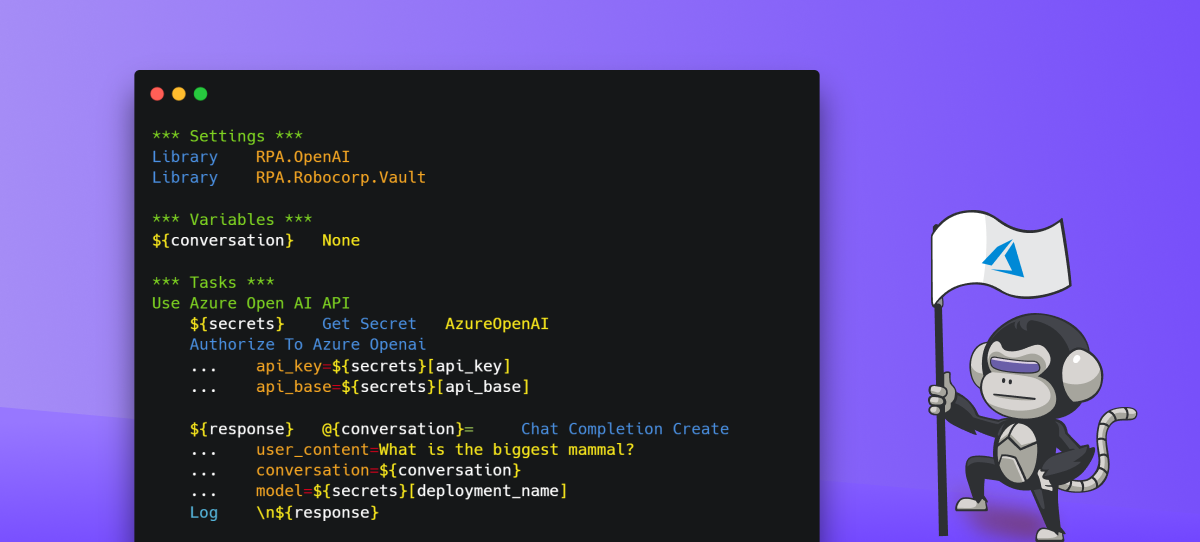
Usage is straightforward and follows the same pattern as previously with the Open AI API. Simply authenticate first:
Then off you go with the prompts, just like before.
Have fun LLMing!
🎉 RPA Framework 23.2.0
-
Library RPA.Browser.* (#974):
-
Selenium:
-
Fix bug with detecting the right web-driver version for download on systems having Chromium installed instead of Chrome. (#949)
-
Add support for operating on shadow DOMs within the
Get WebElementkeyword. (#941) -
Playwright:
-
Upgrade version and documentation to the latest robotframework-browser 16.2.0. (#942)
-
Automatic headless detection when running on systems without UI, including our Cloud Worker (Linux container). (#166)
🎉 RPA Framework 23.1.0
- Library RPA.Browser.Selenium (#943):
- New keyword
Click Element When Clickablewhich tries to overcome errors like “Other element would receive the click”. (#884) - New keyword
Set Element Attributewhich sets an attribute value to an element retrievable withGet Element Attribute. (#762) - Setting a custom download directory is now supported by all Chromium-based browsers and Firefox. Use
Set Download Directorybefore opening any browser instance in order to set such a custom path. (this should be working now in both headful and headless modes; #882) - Custom user profiles (and common configuration) can be used with all Chromium-based browsers, like Chrome, Edge. (#865)
- Improved main library documentation, accepting both WebElement and str as locator types under our keywords as well. (#940, #939)
🎉 RPA Framework 23.0.0
-
Library RPA.Database (#944):
-
Improvements for keyword
Call Stored Procedure -
Fix keyword not returning results of the procedure
-
Add possibility of returning result as a
RPA.Tables.Tableby parameteras_table=True(default is True, ie. Table is returned) -
Add possibility of returning multiple resultsets from a
Call Stored Procedureby parametermultiple=True(default is False, ie. only one resultset is returned). Multiple results are then either a list of lists or a list of Tables. -
Remove specific support for Python 2.* in this keyword
-
Library RPA.Email.Exchange (#948):
-
Add new keyword
Send Reply Message -
Add parameter
items_onlyfor keywordList Messageswhich returns internal Email objects (mainly for advanced usage) -
Library RPA.Email.ImapSmtp:
-
Add keyword
Convert EML file into messagewhich reads EML message and returns headers, attachments and body (in text and HTML) format. (#948) -
Add parameters in_reply_to and return_path to keyword
Send Message. (#948) -
Make the recipients optional. It is still mandatory to give one of the following parameters recipients, cc or bcc. (#930)
-
Library RPA.FTP (#938): Add socket support for TLS connections.
-
Library RPA.JavaAccessBridge (#947):
-
Add new keyword
List Java Windows -
Add new keyword
Select Window By PID -
Add new keyword
Select Window By Title -
Keyword
Select Windowis deprecated in favor of the 2Select..keywords mentioned above. Direct replacement for this keyword isSelect Window By Title. This keyword will be removed during next major release involvingRPA.JavaAccessBridgelibrary. -
Update library documentation to contain information about autoexit init parameter
-
RPA.Excel.Application
-
RPA.Outlook.Application
-
Library RPA.Word.Application (#945): Add autoexit init parameter (on default True as it is for similar libraries). This is a breaking change.
🎉 RPA Framework 22.5.3
- Security update: Bumps
cryptographyto version 40. (fixes the limitation of not being able to use the latestrpaframework-pdfin some scenarios; #926)
🎉 RPA Framework 22.5.2
- Library RPA.Browser.Selenium (#916):
- Takes into use the latest Selenium (4.8.3 at the time of the release) and its logging fixes. (#883)
- Fixes scheme ensuring bug during not provided URLs. (#586)
- Fixes headless mode setting with newer browsers and enables more browser features when running in this mode. (#919)
- Ensures keyword
Screenshotworks and logs messages as expected. (logs aren’t polluted with raw image data on levels equal or greater than INFO and it returns the final output image path; #920) - Takes into use the latest webdriver-manager fixes given
rpaframework-core11.0.1.
🎉 RPA Framework 22.5.1
-
Library RPA.Windows (
rpaframework-windows7.3.2; #913): -
Keywords
[Double|Right|Middle ]Clickwill raise ActionNotPossible if the element is not visible during clicking. (thus clicking wouldn’t happen at all) -
Main library and various keywords documentation fixes.
-
Library RPA.PDF (
rpaframework-pdf7.1.5) (#914): Fix “TypeError: cannot pickle ‘dict_keys’ object” bug with theHTML To PDFkeyword.
Note
This rpaframework version requires at least the following library versions (if you have such dependencies already listed in your conda.yaml), although we recommend upgrading to the latest found in PyPI:
rpaframework-assistant2.2.1rpaframework-aws5.2.8rpaframework-dialogs4.0.4 (deprecated)rpaframework-google7.0.2rpaframework-pdf7.1.4rpaframework-recognition5.1.2rpaframework-windows7.3.0
🎉 RPA Framework 22.5.0
- Library RPA.Windows (
rpaframework-windows7.3.0; #912): - Our Windows elements recorder (windows-recorder) supports path: strategy display when run with verbosity on. (
-vflag) - Keyword
Print Treenow displays the path: strategy locator alongside printed controls and flattened-by-level returned elements. - Keyword
Set Valuesupports value validation customization through the validator parameter.
Check our visually detailed Portal example in order to learn more about element paths and how to use the recorder: this Portal example
RPA.Assistant 2.2.0
RPA.Assistant (rpaframework-assistant) 2.2.0:
New features:
- Add Text Input now supports Robot Framework validation keywords
- Add Text Input now supports minimum and maximum rows to enable multiline inputs
- Improve how validation errors are displayed. They display beside the input field now, instead of bottom of the dialog.
- Fix checkbox values being strings "true" and "false" instead of booleans.
🎉 rpaframework 22.4.0
-
Library RPA.Excel.Files
-
Made
require_open_xlsx_workbook, a method that was accidentally exposed publicly, private again. -
Library RPA.JavaAccessBridge (#908):
-
Fixes related to keyword
Select Window -
Update to the latest
java-access-bridge-wrapper0.9.7 -
Add additional system window verification before using
jab.switch_window_by_title -
Library RPA.Database (#899):
-
Add support for parameterised sql queries
-
Library RPA.PDF (
rpaframework-pdf7.1.3) (#909): Add documentation about PDF merge and split.
🎉 rpaframework 22.3.0
- New library RPA.Smartsheet (#880):
- Supports getting, creating and updating Smartsheet sheets, as well as downloading attachments.
- Read library documentation for a full list of keywords.
🎉 rpaframework 22.2.3
- Library RPA.PDF (
rpaframework-pdf7.1.2): Light documentation fix and preserved default behaviour with the boxes_flow parameter in theSet Convert Settingskeyword. (defaults to 0.5)
RPA.Assistant v2.1.2
RPA.Assistant (rpaframework-assistant ) 2.1.2:
Bugfixes:
- Fix File picker sometimes causing AssertionError: Control must be added to the page first
- Fix Add Next Ui Button callback getting a normal dict instead of a DotDict.