
 Back to blog

Enterprise AI agents are no longer just sophisticated chatbots. They’re becoming autonomous workers that manage tickets, process documents, execute code, and orchestrate complex workflows across your entire tech stack.
What’s one technology that is driving this transformation? Remote Model Context Protocol (MCP) servers connect agents directly to your enterprise tools and data. With platforms like Sema4.ai \, you can now plug production-grade MCP servers into your agents in minutes—no custom integrations required.
Key takeaways:
Remote MCP servers give AI agents standardized, secure access to enterprise tools and data so they can take action across systems without one-off integrations. Key examples include Atlassian/Linear, Notion, browser automation, Box, and Stripe MCP servers.
What are remote MCP servers?
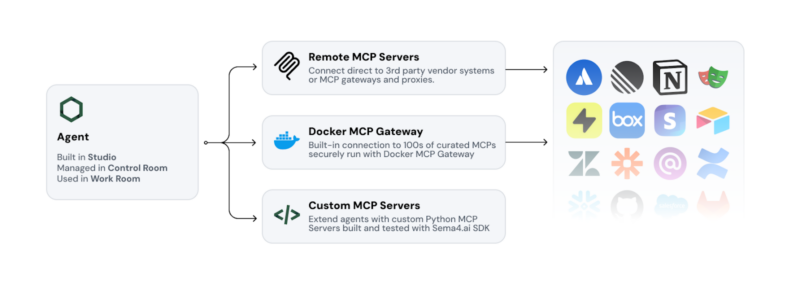
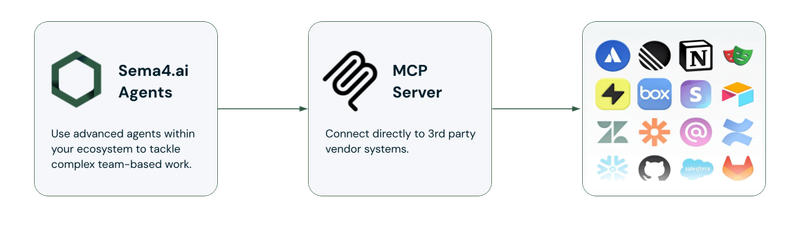
Think of remote MCP servers as universal translators between AI agents and your business tools. Instead of building custom integrations for every app your agents need to access, MCP provides a standardized protocol that makes tools instantly available to any compatible agent.
In practical terms, a remote MCP server is a separately hosted service that exposes tools, data, or actions to an AI agent through the Model Context Protocol, allowing the agent to use those capabilities over a network connection.
Remote MCP servers run independently from your agents, offering:
- Plug-and-play connectivity to enterprise applications
- Standardized interfaces that work across different AI platforms
- Scalable architecture that grows with your automation needs
- Enterprise-grade security with proper authentication and audit trails
Why enterprise agents need MCP servers
What makes AI agents interesting for enterprises is their ability to take action. They can not only analyze data and answer ad hoc questions, but agents can also update a support ticket, draft a project plan, and create tasks in your project management system.
MCP servers bridge this gap by giving agents the ability to:
- Access live enterprise data without complex data pipelines
- Execute actions across multiple business systems
- Maintain context between different tools and workflows
- Scale operations without exponential integration complexity
What is the difference between remote and local MCP servers?
Local MCP servers run on the same machine or environment as the agent client, while remote MCP servers are hosted separately and accessed over a network. For enterprise deployments, remote MCP servers can simplify centralized access, authentication, maintenance, and scaling across teams.
What are common remote MCP servers for AI agents?
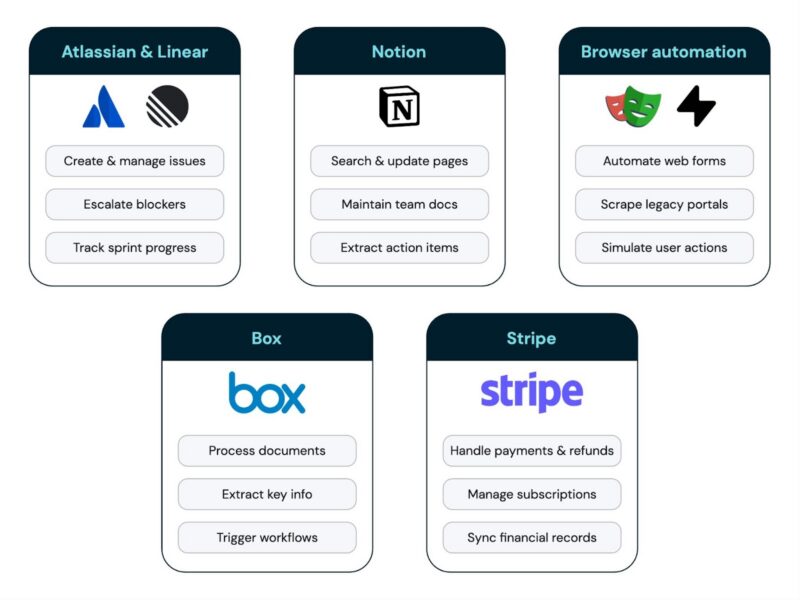
Five useful remote MCP server options for enterprise AI agents include Atlassian/Linear, Notion, browser automation tools such as Playwright or Hyperbrowser, Box, and Stripe.
Here are 5 highly useful remote MCP servers that are changing how enterprises deploy AI agents today:
- Atlassian & Linear MCP servers
Use case: project management, issue tracking, workflow automation
Your agents become project coordinators that can actually manage work, not just talk about it. These MCP servers enable agents to:
- Create, update, and assign tickets across Jira, Confluence, and Linear
- Track project progress and identify bottlenecks automatically
- Generate status reports with real-time data from multiple projects
- Escalate issues based on predefined business rules
Real-world example: “Create a high-priority ticket for the API timeout issue, assign it to the backend team, and schedule a follow-up review for Friday.”
Your agent creates the ticket, sets priority, and assigns team members—all in one workflow.
- Notion MCP server
Use case: knowledge management, documentation workflows, team collaboration
Transform your Notion workspace into an intelligent knowledge base that agents can both read from and contribute to. The Notion MCP server allows agents to:
- Search across all workspaces to find relevant documentation
- Create and update pages with structured information
- Extract action items and deadlines from meeting notes
- Maintain company wikis and process documentation automatically
Real-world example: “Update our onboarding checklist with the new security training requirements”
The agent finds the relevant Notion page and adds the new requirements.
- Browser Automation MCP servers (Playwright/Hyperbrowser)
Use case: web-based workflows, legacy system integration, data extraction
Many enterprise workflows still happen in web applications that don’t have APIs. Browser automation MCP servers give your agents the ability to:
- Navigate complex web applications like a human user
- Extract data from legacy systems and web portals
- Automate form submissions and multi-step web processes
- Integrate with SaaS tools that lack proper API access
Real-world example: “Check our vendor portal for new invoices and create corresponding entries in our accounting system.”
The agent connects to the vendor portal, reads invoice data, and populates your financial software—bridging systems that don’t talk to each other.
- Box MCP server
Use case: document workflows, file management, compliance processes
Document-heavy processes are perfect for AI automation, but agents need secure access to your file systems. The Box MCP server enables agents to:
- Search and retrieve documents across enterprise file structures
- Process contracts, invoices, and reports automatically
- Maintain version control and audit trails for document changes
- Trigger workflows based on document uploads or modifications
Real-world example: “When a new contract is uploaded to the Legal folder, extract key terms, create a summary, and route it for approval.”
Your agent monitors file uploads, processes documents intelligently, and initiates business workflows automatically.
- Stripe MCP server
Use case: payment processing, subscription management, billing automation
Give agents safe, governed access to your Stripe account for everyday billing work. The Stripe MCP server enables agents to:
- Process refunds, with Stripe’s built-in human approval on every refund
- Respond to customer disputes by gathering and submitting evidence
- Manage subscription lifecycles, upgrades, and cancellations
- Generate invoices, payment links, and track outstanding balances
- Create targeted coupons and promotional campaigns based on customer behavior
- Monitor payment failures and follow-ups for failed transactions
Real-world example: “When a customer asks for a refund through our support system, look up the charge, start the refund in Stripe for a person to approve, then update the refund status in our CRM and email the customer a confirmation.”
The agent looks up the payment, starts the refund and waits for a person to approve it in Stripe before any money moves. Your CRM and email connectors handle the rest. The result is a consistent customer experience, a human check on every refund and accurate financial records.
How to choose the right MCP server for your use case
When evaluating MCP servers for your enterprise agents, consider:
Security & compliance
- Does it support your authentication methods (OAuth, SSO)?
- Are audit trails and access controls built-in?
- Can it operate within your security boundaries?
Integration depth
- How well does it connect with your existing tech stack?
- Does it support the specific actions your workflows require?
- Can it handle your data volumes and performance needs?
Maintenance & support
- Is it actively maintained by the vendor or community?
- Are there enterprise support options available?
- How easy is it to troubleshoot and monitor?
Frequently asked questions about remote MCP servers
What is a remote MCP server?
A remote MCP server is a separately hosted service that exposes tools, data, or actions to an AI agent through the Model Context Protocol, allowing the agent to access those capabilities over a network connection.
Why do AI agents use MCP servers?
AI agents use MCP servers to access live data and take actions in external systems through a standardized interface, reducing the need to build and maintain separate custom integrations for every tool.
Are remote MCP servers suitable for enterprise use?
They can be, provided the implementation supports enterprise requirements such as authentication, access controls, auditability, monitoring, security boundaries, and reliable maintenance.
How will remote MCP servers shape the future of enterprise AI?
Remote MCP servers represent a fundamental shift in how we think about AI integration. Instead of building point-to-point connections between agents and tools, we’re creating a standardized ecosystem where any agent can work with any properly configured tool.
This standardization doesn’t limit flexibility—it enhances it. With MCP, you can:
- Mix and match different agents and tools without custom development
- Scale integrations across departments without exponential complexity
- Future-proof your AI investments as new tools and agents emerge
- Maintain security through consistent protocols and governance
At Sema4.ai, we’re embracing this future by supporting MCP servers to give our customers enterprise-grade security and control with the flexibility to integrate with the broader AI tooling landscape.
Ready to supercharge your enterprise AI agents with remote MCP servers? Explore how Sema4.ai’s native MCP support can transform your workflows while maintaining the security and governance your enterprise demands.


 Read more