 Back to blog

Key takeaways
A shared AP inbox does not have to be a bottleneck. With an agent monitoring the inbox, every incoming invoice, remittance, and vendor inquiry moves through a controlled, eight-step loop – classify, extract, validate, match, route, resolve, record, and improve—with human review reserved for genuine exceptions. The result is faster processing, fewer errors, and a complete audit trail for every transaction.
Why your AP inbox is already a workflow (but could be an agentic one)
Every shared AP inbox already follows a pattern. Emails arrive. Someone opens them, decides what work is required for each one, and forwards it to the right person or pastes data into a spreadsheet. Invoices get matched against purchase orders. Exceptions get flagged, sometimes in a tracker, or sometimes in someone’s memory. The workflow exists. It is just scattered across people, inboxes, desks, and disconnected tools.
The problem is not a lack of process. It is that the process depends on a person or persons initiating every step. Manual triage is slow, inconsistent, and impossible to scale when invoice volumes spike at month-end or quarter-close. Automated invoice processing has long promised relief, but most approaches fall short. Traditional tools might suggest a category or highlight a field, but a person still has to review, approve, and move the work forward.
That is the difference between assistive AI and agentic AI. Assistive AI organizes work and waits for a human to act. Agentic AI completes the work end-to-end, classifying, extracting, validating, matching, and routing. It only pauses when it encounters something that genuinely requires human judgment. Your inbox already holds the workflow. The question is whether a person has to drive every step or whether an agent can.
From shared inbox to controlled work queue: the 8-step agentic loop
When AI agents take over monitoring the AP inbox, every incoming message enters a structured, repeatable loop. Each step has a clear purpose, and every action is logged. Here is how the eight steps work in practice.
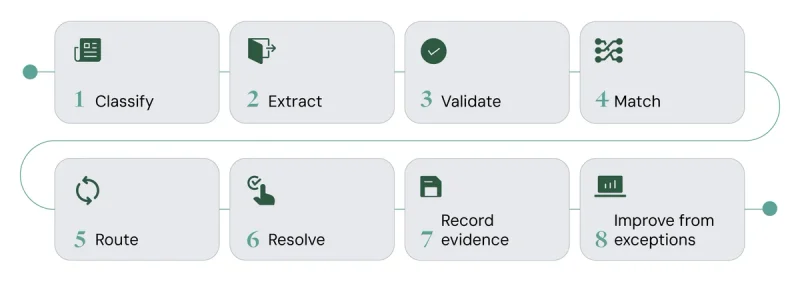
Classify
The agent reads each incoming email and attachments to determine what it is – a new invoice, a remittance advice, a vendor inquiry about payment status, or something unrelated entirely. Classification happens in seconds and ensures each item enters the correct processing path from the start, rather than sitting in a queue waiting for someone to sort it manually.
Extract
A document intelligence process pulls structured data out of unstructured invoices and attachments. Line items, totals, vendor details, PO references, tax amounts, and payment terms are all captured automatically, regardless of whether the invoice arrives as a PDF, a scanned image, or an embedded email attachment. The agent handles format variation without needing a template for every vendor. Learn more about AI data agents.
Validate
Before anything is matched or paid, policy and compliance checks run automatically. The agent flags duplicate invoices by comparing invoice numbers, amounts, and dates against recent history. It verifies that bank details on the invoice match the approved vendor master record – catching potential fraud from altered payment instructions. Tax calculations are checked against expected rates, and tolerances are applied per your organization’s policies.
Match
The agent performs invoice reconciliation by comparing extracted invoice data against purchase orders and goods receipt records. A two-way or three-way match confirms that what was ordered, what was received, and what was billed all align. Variances are calculated with mathematical precision using SQL-powered processing, not probabilistic estimates. Discrepancies that fall within approved tolerances pass through. Those that do not become exceptions.
Route
Exceptions and approval requests go to the right owner automatically. A price variance above a threshold routes to the buyer who placed the PO. A missing goods receipt routes to the warehouse team. An invoice without a PO routes to the budget holder for the relevant cost center. Routing follows your organization’s approval policies and escalation paths, not a static assignment table.
Resolve
Vendor and payment inquiries get resolved without a person touching every ticket. When a vendor emails asking about payment status, the agent matches the inquiry to the relevant invoice and case history, retrieves the current status from the ERP, and responds with accurate, specific information. For inquiries that require a decision, like a disputed charge or a credit request, the agent routes to the appropriate team member with full context attached and proposed resolution options, if applicable.
Record evidence
Every classification, extraction, validation check, match result, routing decision, and resolution is logged with a complete audit trail. This is what makes the workflow controlled, not just fast. When an auditor asks why an invoice was processed a particular way, the answer is already documented – which checks ran, what the agent found, and what action it took. No one has to reconstruct the decision after the fact.
Improve from exceptions
Exceptions are not just problems to fix. They are data and learning opportunities. When the same vendor consistently sends invoices with a formatting quirk that triggers extraction errors, the agent learns that pattern and adapts. When a specific cost center routinely requires manual approval for a particular invoice type, the workflow can be refined. Over time, the volume of exceptions decreases because the system absorbs the institutional knowledge that previously lived only in people’s heads.
What is document intelligence in an agentic AP workflow?
Document intelligence is the capability that turns invoices, remittances, and attachments into structured, validated data that agents can act on. It is the foundation that makes every subsequent step in the AP workflow possible.
In practice, intelligent document processing goes far beyond basic optical character recognition (OCR). A multi-pass parsing system first analyzes the visual layout of a document, identifying headers, line-item tables, totals, and footnotes; it then applies contextual understanding to interpret the meaning of each element. A “Total” field next to a currency symbol is not the same as a “Total units shipped” field, and the system recognizes the difference.
This matters because AP teams receive invoices in dozens of formats from hundreds of vendors. Document intelligence adapts to new formats automatically, processes documents in over 100 languages, and handles scanned pages, embedded images, and multi-page PDFs with the same accuracy. When extraction confidence is low on a specific field, the agent flags that field for human review rather than guessing, keeping the workflow accurate without requiring a person to check every page.
How automated invoice processing reduces manual work and vendor friction
The most immediate effect of automated invoice processing on the AP workflow is time recovered. When agents handle classification, extraction, matching, and routine inquiries autonomously, analysts stop spending their days on repetitive data entry and status lookups. That time shifts to work that actually requires expertise like resolving complex disputes, negotiating payment terms, and analyzing spend patterns.
Vendor relationships improve as well. When a supplier emails about an unpaid invoice, they get an accurate response in minutes instead of days. Payment inquiries no longer sit in a queue behind dozens of unrelated emails. Vendors who receive faster, more consistent communication are less likely to escalate issues or apply pressure through sales contacts. This reduces friction across the entire organization.
The AP workflow itself becomes more predictable. Instead of scrambling during month-end close, the team works from a managed queue of true exceptions. Processing times become measurable and consistent rather than dependent on who is available and how full the inbox is.
Triggers and policy compliance: keeping AP automation controlled and efficient
Speed without control is a liability in accounts payable. What separates an agentic AP workflow from simple automation is the policy and trigger logic that governs every decision.
Triggers determine when and how invoices move through the workflow. An email arriving in the AP inbox triggers classification. A completed extraction triggers validation checks. A successful three-way match triggers routing for payment approval. Each trigger is defined by your organization’s policies – not hardcoded into a rigid sequence that breaks when conditions change.
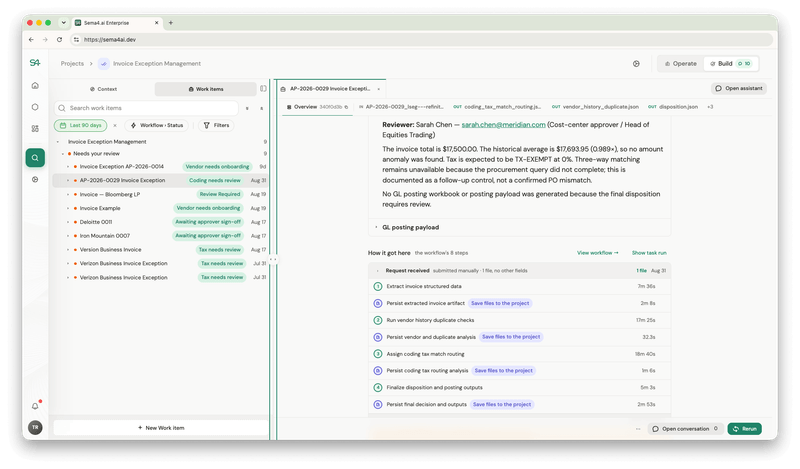
When an agent encounters a situation where it cannot make a confident decision – an invoice with an ambiguous PO reference, a vendor not found in the master record, an amount that falls in a gray zone between auto-approve and auto-reject – it defers to the person or team responsible. The escalation includes full context, including what the agent attempted, what it found, and why it could not proceed. The human reviewer picks it up with complete information rather than starting from scratch.
Safeguards are built into every step. Before sharing payment or account information in response to a vendor inquiry, the agent verifies the requester’s identity against known contacts. Sensitive data, such as bank details, is masked in logs and communications unless explicitly required. These are not optional add-ons. They are structural elements of how the workflow operates.
This is where agentic AI diverges from legacy approaches. Traditional OCR tools extract data but cannot validate, match, or route it. RPA sequences follow fixed scripts that break when a document format changes or a new exception type appears. Point-solution AP platforms handle parts of the process but leave gaps between steps that still require manual coordination. An agentic workflow connects every step, from inbox to ledger, with policy logic that adapts and evidence that accumulates.
What changes for your finance team
When an agentic workflow takes over the AP inbox, the daily reality for your finance team shifts in concrete ways.
Analysts who previously spent hours triaging emails and keying data now review a managed queue of exceptions, handling only the 5-10% of items that genuinely need human judgment. Routine invoices flow from inbox to ERP posting without a manual touch. Agents monitoring the AP inbox take immediate action day and night upon receipt, so cycle times compress from days to minutes for standard processing. In production deployments, organizations have seen response times on AP help desk inquiries drop from 24-48 hours to under 10 minutes, with human teams only touching approximately 10% of exception tickets.
Large manufacturer – AP help desk
- 150+ tickets per day processed by the agent
- 24–48 hour response time → reduced to ~10 minutes
- Human team only touches ~10% of exception tickets
- Agent pulls ticket metadata and attachments, parses documents, identifies invoice details, handles lookups and fuzzy matching, collects status, and responds.
The role of agents in enterprise AI growth is not about replacing finance professionals. It is about shifting their time from processing to judgment, from volume to value.
Recommended resources
AP workflows: understanding invoice reconciliation →
Get a demo & see agents in action →
Agentic AP workflow FAQs
What is an agentic AP workflow?
An agentic AP workflow turns a shared inbox into a continuously controlled work queue where AI agents classify, extract, validate, match, route, resolve, and log evidence for every incoming invoice and inquiry. Human review is reserved for genuine exceptions rather than every transaction, and every decision is recorded for audit.
How does AI automate invoice reconciliation?
Document intelligence extracts line-item data from invoices and matches it against purchase order and goods receipt records using SQL-powered calculations with mathematical precision. Variances are flagged through policy checks, and only discrepancies outside approved tolerances are escalated to a person.
What triggers move an invoice through an agentic AP workflow?
Policy and trigger logic – not a fixed, static sequence – determines how invoices are routed, when escalations happen, and how exceptions are handled. Each event in the workflow (classify?arrival, extraction completion, match result) triggers the next step based on your organization’s defined policies.
How do AI agents resolve vendor payment inquiries without human intervention?
Agents match inquiries to relevant invoices and case histories, retrieve the current payment status from the ERP, and respond with accurate details. When an inquiry requires a judgment call – such as a disputed charge – the agent routes it to the right team member with full context. Every exchange is recorded for audit.
What is document intelligence in an agentic AP workflow?
Document intelligence is the capability that turns invoices, remittances, and attachments into structured, validated data that agents can act on. It goes beyond basic OCR by using multi-pass parsing to understand document layout, context, and meaning – handling format variation, multiple languages, and complex table structures automatically.
Have more questions about agentic AP workflows? Contact us today and book a demo.


 Read more